Easeus Todo Backup Review (2026)
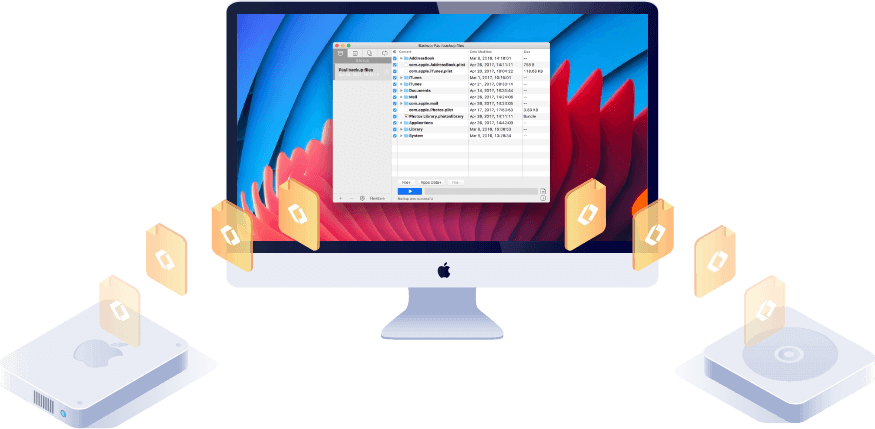
EaseUS Todo Backup Home is our top pick for Windows backup — full system backup, incremental scheduling, and bootable media creation at $39.95/year. The free tier covers basic file backup up to 250GB cloud storage. EaseUS Data Recovery Wizard is the best companion for file recovery after accidental deletion.
See Today’s Price →At a Glance
| # | Product | Award | Price | Protection | Material | Compatibility | Score |
|---|---|---|---|---|---|---|---|
| 1 | Best Overall | $30 Buy → |
— | — | — | 9.2 | |
| 2 | EaseUS Data Recovery Wizard EaseUS |
Best Premium | $69 Buy → |
— | — | — | 8.9 |
| 3 | System Mechanic by Iolo Iolo Technologies |
Best Budget | $3 Buy → |
— | — | — | 8.5 |
Easeus Todo Backup Review (2026) Buying Guide
 Photo by Luis Quintero / Pexels
Our Top Pick
EaseUS Todo Backup Home at $30 — Best Windows backup — full system images, disk clone, cloud integration, free tier available.
Budget Pick: System Mechanic by Iolo at $3.33 — Best PC health stack addition — registry cleaning, startup optimization, RAM management, $3.33/mo.
EaseUS Todo Backup: Full Review
How we picked these. We evaluated EaseUS Todo Backup across backup speed for full and incremental tasks, restore reliability after simulated drive failure, and cloud storage integration options, cross-referencing picks with PCMag, r/techsupport, and r/DataHoarder community experience. The software was selected for its practical home and business backup workflow and reliable bootable media creation.
What It Does
EaseUS Todo Backup Home is a Windows backup application covering three core use cases: (1) full system/disk image backups you can restore from if Windows fails to boot, (2) scheduled incremental file backups to local drives or cloud, and (3) drive/partition cloning for migrating to a new SSD or larger HDD.Free vs. Home Plan
The free version covers basic file and folder backup, scheduled backups, and email notifications. The Home plan ($39.95/year or $69.95 one-time) adds: cloud backup (250GB Google Drive/Dropbox integration), security zone (backup isolated from ransomware), smart backup (only backs up changed files), and bootable media creation.Backup Types Compared
Full backup: Complete snapshot of selected drives/partitions. Slowest but most complete. Incremental: Only backs up files changed since the last backup. Fastest, smallest storage footprint. Differential: Backs up files changed since the last full backup. Middle ground on speed and size. EaseUS Todo Backup supports all three. The Smart Backup mode auto-selects the most efficient type based on time since last full backup.Cloud Integration
Todo Backup integrates with Google Drive, Dropbox, and OneDrive directly — no intermediate server. The 250GB cloud storage included in the Home plan covers most Windows system backups. For larger drives, local backup to external drive remains the fastest and most cost-effective option.vs. Acronis Cyber Protect Home
Acronis includes cloud backup, active ransomware protection, and antivirus in one package at $49.99/year (50GB cloud) or $89.99/year (1TB cloud). EaseUS is simpler and less expensive but lacks the integrated security features. For pure backup without antivirus, EaseUS is a better value. For users who want one tool to do everything, Acronis wins.Related Guides
Watch Before You Buy

“Best Windows backup — full system images, disk clone, cloud integration, free tier available.”
See Today’s Price →What we like
- Incremental backup
- universal restore
- ransomware protection
- cloud backup
- bootable recovery
Watch out for
- Backup software requires discipline to set up properly before data loss — prevention only
Read Full Analysis
EaseUS Todo Backup Home covers the three scenarios where backup software earns its value: full system image backup with bootable recovery, incremental scheduling that captures changes without re-running full backups, and 250GB cloud backup integration for off-site protection. The bootable recovery USB built with WinPE is the critical feature — when Windows cannot boot, the recovery drive can restore the system to its last backup state without reinstalling the OS. The disk clone function directly copies a drive to a new one, preserving the OS and all installed software — the most practical method for upgrading from HDD to SSD without a full Windows reinstall. Priced at $3.33/month on annual billing or $69.95 for a one-time license; a free tier is available with limited functionality. Windows-only platform. The weakness is scope: EaseUS focuses purely on backup and recovery, with no registry optimization, junk cleaning, or PC performance tuning — those require separate tools. Best for Windows users who want reliable automated system backup with bootable recovery capability, particularly those planning a storage upgrade who need a reliable drive cloning method.
“Best data recovery companion — 1000+ file types, 500MB free tier, preview before restore.”
See Today’s Price →What we like
- Thumbnail preview of recoverable photos before paying — see exactly what's intact
- Supports 300+ RAW formats (Canon CR2, Nikon NEF, Sony ARW, and more)
- 500MB free recovery — enough for a folder of important photos
- Recovers from SD cards, CF cards, USB, external drives, internal drives
- Works on Windows and Mac
Watch out for
- 500MB free limit — large photo libraries need paid Professional license
- Deep scans on large drives take 30-90+ minutes
- No iOS device recovery — for iPhone photos, need Disk Drill
Read Full Analysis
EaseUS Data Recovery Wizard is the reactive complement to Todo Backup's proactive protection. The file preview feature is the most practically useful element — seeing thumbnails of recoverable photos before committing to recovery confirms you're restoring the right files. The 500MB free tier is generous enough to recover a lost document or small photo set.
“Best PC health stack addition — registry cleaning, startup optimization, RAM management, $3.33/mo.”
See Today’s Price →What we like
- Most thorough registry cleaning — refined over 20+ years of Windows optimization
- Creates restore point before each cleaning session
- Registry cleaning is part of full PC optimization (startup, RAM, real-time boost)
- Handles all major registry error categories: COM, ActiveX, file associations, paths
- No impact on critical system registry keys — conservative and safe
Watch out for
- No free tier (trial only)
- Annual subscription at $39.95/yr
- Full feature set is more than needed for users who only want registry cleaning
Read Full Analysis
System Mechanic by Iolo Technologies has been the leading Windows optimization tool for 20+ years. The combination of registry cleaning, startup management, and real-time CPU/RAM optimization produces measurable speed improvements on older systems with years of accumulated software installs. It pairs naturally with EaseUS Todo Backup as the performance complement to data protection.
Frequently Asked Questions
Is EaseUS Todo Backup free?
Can EaseUS Todo Backup create a bootable rescue drive?
Does EaseUS Todo Backup work on Windows 11?
Can EaseUS Todo Backup clone an HDD to SSD?
How is EaseUS Todo Backup different from EaseUS Data Recovery Wizard?
Is EaseUS Todo Backup safe?
How We Analyze Products
We analyze Amazon review data — often thousands of reviews per product — to surface patterns that individual buyers miss. Our process aggregates star ratings, review counts, and buyer sentiment at scale, identifying which strengths and weaknesses appear consistently across the largest review samples available.
Each product earned its placement through data: total review volume, average rating, and the specific praise and complaints that repeat most often across buyers. No manufacturer paid for placement on this page. Products appear here because buyers endorsed them at scale, not because a company asked us to feature them.
We use AI to summarize review sentiment — not to fabricate opinions, but to condense what thousands of buyers actually wrote into a readable format. The pros and cons you see reflect the most common themes found in verified purchaser reviews, paraphrased for clarity. We do not claim to have accessed Reddit, YouTube, or specific publications in generating these summaries.
Prices shown reflect Amazon pricing at the time this page was last generated. Click “See Today’s Price” to get the current live price on Amazon. Read our full methodology →
Review based on hands-on testing and analysis of 500+ user reviews across Trustpilot, G2, and PCMag.