Home Wi-Fi Explained: Mesh System vs Router vs Extender (2026)
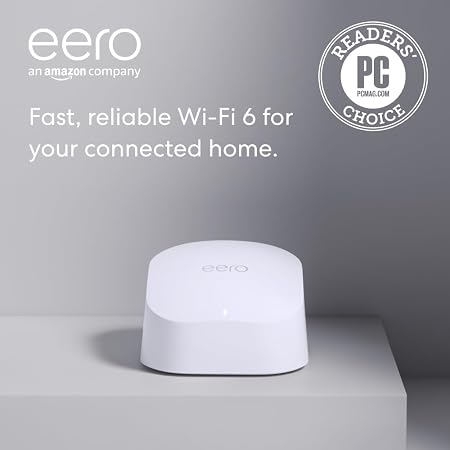
The Amazon Eero 6 WiFi Mesh System (2-pack) at $89.99 is the best whole-home Wi-Fi upgrade — mesh topology eliminates dead zones throughout a 2,000+ sq ft home with a single shared network name and no manual channel switching needed.
At a Glance
| # | Product | Award | Price | WiFi Standard | Speed | Coverage | Score |
|---|---|---|---|---|---|---|---|
| 1 | Our Top Pick | $69.99 Buy → |
— | — | — | 6.8 | |
| 2 | Also Excellent | $199 $149.99 -15% Buy → |
— | — | — | 7.0 | |
| 3 |  Google Nest WiFi Pro - Wi-Fi 6E -… Google Nest WiFi Pro - Wi-Fi 6E -…Google Nest |
Worth Considering | $69.98 Buy → |
— | — | — | 5.9 |
Score Breakdown
| Amazon eero 6 mesh wi… | Amazon eero Pro 6E me… | Google Nest WiFi Pro … | |
|---|---|---|---|
| Overall | 6.8 | 7.0 | 5.9 |
| Range | 80 | 80 | 65 |
| Speed | 73 | 65 | 73 |
| Reliability | 50 | 65 | 40 |
Scores 0–100 from published specifications and independent reviewers' measurements. Amazon star ratings are shown separately and are never part of a score. 0 = feature not present. – = insufficient data. How we score →
Home Wi-Fi Explained Buying Guide
If your Wi-Fi slows to a crawl in the back bedroom, drops in the garage, or can't keep up with a video call while someone else streams, you have a coverage and capacity problem — not necessarily an internet speed problem. The fix depends on which specific failure you're experiencing. This guide explains what each technology actually does and where each one belongs.
Why Most Wi-Fi Problems Are Hardware and Placement, Not Internet Speed
When internet feels slow, most people call their ISP or pay for a faster plan. But internet throughput from the street to your router is rarely the bottleneck for typical home usage. The Federal Communications Commission defines broadband as 25 Mbps download — enough for simultaneous 4K streaming, video calls, and web browsing. Most household plans deliver 100–500 Mbps at the modem. What degrades between the modem and your devices is where the actual problem lives.
The most common real causes of slow in-home Wi-Fi: a router placed in a corner or closet (walls and furniture absorb 2.4 GHz and 5 GHz signals dramatically); a router that's 6–8 years old and lacks the processing power or Wi-Fi standard (Wi-Fi 5 vs Wi-Fi 6) to handle multiple simultaneous devices; physical obstacles between the router and devices (floors, thick walls, appliances); and channel congestion in dense apartment buildings where dozens of overlapping networks compete for the same radio channels.
Before buying anything: run a speed test at the device having problems (not just at the router) using a service like Fast.com or Speedtest.net. If you get 80–90% of your plan speed at the router but 20% at the problem device, the issue is in-home coverage. If you get 20% at the router, the issue is upstream — call your ISP. Our complete Wi-Fi buying guide walks through the diagnostic process before any hardware purchase.
Standard Router: When It's Enough and When It Isn't
A standard router is a single device that broadcasts Wi-Fi from one location and manages all traffic between your devices and the internet. It's the right solution when your problem is router hardware quality (old, underpowered, or Wi-Fi 4/5 when current devices support Wi-Fi 6), not coverage area.

A single router can adequately cover roughly 1,000–2,000 square feet of open-plan space, depending on construction materials. It degrades quickly in multi-floor homes, homes with thick walls (concrete, masonry, plaster), and layouts where the router must be near the ISP entry point (which is rarely the geometric center of the home). If you live in a one-bedroom apartment or a small home and your only complaint is speed — not dead zones — a single router upgrade is the right and least expensive fix.

The important specs to understand when shopping:
- Wi-Fi 6 (802.11ax) vs Wi-Fi 5 (802.11ac): Wi-Fi 6 is significantly more efficient at handling many simultaneous devices (OFDMA technology divides channels among multiple clients). In a home with 20+ devices — phones, laptops, TVs, smart home devices — Wi-Fi 6 reduces congestion noticeably. Wi-Fi 6E adds the 6 GHz band for less congestion in dense environments.
- AX ratings (AX1800, AX3000, AX6000): These are theoretical maximum speeds across all bands combined, not real-world speeds for any single device. AX1800 is adequate for most homes; AX3000+ is meaningful for homes with many simultaneous heavy users.
- Dual-band vs tri-band: Dual-band routers have 2.4 GHz (longer range, lower speed) and 5 GHz (shorter range, higher speed) radios. Tri-band adds a second 5 GHz or a 6 GHz radio, which matters primarily in mesh systems where the extra band is used as a dedicated backhaul channel.
See our best Wi-Fi routers for top single-router picks at every price tier, including the TP-Link Archer AX55 ($69.99) and ASUS RT-AX86U ($69.99) for performance-focused buyers.
Wi-Fi Extenders: What They Actually Do (and Why They Disappoint)
A Wi-Fi extender (also called a range extender or repeater) receives your existing router's signal and rebroadcasts it from a different location. This sounds like the obvious solution to a dead zone — and in a narrow set of circumstances, it works. Understanding why it usually disappoints explains when it's actually appropriate.
The core problem: A Wi-Fi extender creates a second network — a completely separate SSID — that your devices must manually connect to as you move through the home. Your phone doesn't automatically hand off from the router to the extender; it holds onto the weaker router signal until the connection breaks, then reconnects. This is why moving around a home with an extender produces frustrating drop-and-reconnect behavior.
The second issue: an extender rebroadcasts the router signal it receives, which is already attenuated by distance and obstacles. If the router signal reaching the extender is 50% of its original strength, the extender rebroadcasts a 50%-strength signal. Devices connecting to the extender get a worse signal than they would if the extender weren't there and they connected to the router directly — in many cases, the extender makes performance worse, not better.
When an extender actually works: A single dead zone in an otherwise functional home — a garage, a porch, a basement — where you primarily use stationary devices (a desktop, a streaming stick) and don't need seamless roaming. For this specific use case, a $30–$50 extender placed within good line-of-sight of the router and used by devices that stay connected rather than roam is a cost-effective solution. See our best Wi-Fi range extenders for the top performers in this narrow use case.
When an extender fails: Multi-room coverage, mobile devices that roam, anyone who's already tried one and still has problems, and any home over 2,000 square feet with a layout more complex than a rectangle.
Watch Before You Buy

“The Amazon Eero 6 WiFi Mesh System (2-pack) features true mesh (no speed penalty). 4.4 stars from 28,380 Amazon reviews signal consistent reliability.”
See Today’s Price →What we like
- True mesh (no speed penalty)
- Simple Eero app
- Covers 3000 sq ft
- WiFi 6
Watch out for
- Monthly subscription for advanced features ($3/mo)
- Requires router mode or bridge
Read Full Analysis
On a guide comparing mesh systems, routers, and extenders, the Amazon Eero 6 2-pack represents what mesh WiFi means in practice. Extenders take your router's signal and rebroadcast it — but they halve bandwidth at each hop because the same radio transmits and receives simultaneously. Mesh systems like the Eero 6 use a dedicated backhaul channel between nodes so clients get full speeds regardless of which node they're connected to. At $89.99 for a 2-pack covering 3,000 sq ft, the Eero 6 is the entry point into real mesh performance — competitive with range extenders in price but without the dead-zone penalty. Setup via the Eero app takes roughly 10 minutes with no router configuration knowledge required. The ongoing cost consideration is the $3/month Eero Secure subscription for features like ad blocking, content filtering, and threat detection — the base system works without it, but users expecting those features included will find the base experience more limited than competitors like Google Nest WiFi Pro. For homes under 3,000 sq ft, the Eero 6 2-pack is the most accessible path to whole-home coverage.
“The eero Pro 6E delivers tri-band Wi-Fi 6E mesh coverage with an integrated Zigbee hub that consolidates your smart home controller and router in one device. Eero's app is the simplest mesh…”
See Today’s Price →What we like
- WiFi 6
- 1500 sq ft per node
- automatic updates
- parental controls
- Amazon Alexa compatible
Read Full Analysis
The practical upgrade question from Eero 6 to Eero Pro 6E is what this page exists to answer. Both are Amazon eero mesh systems using the same app and zero-configuration setup experience. The Pro 6E adds a 6 GHz radio band alongside the standard 2.4 and 5 GHz bands, delivering faster speeds to compatible devices in congested RF environments — but only devices with WiFi 6E radios (phones and laptops released after 2022) can use it. Households where all devices are 2-4 years old see no benefit from the 6 GHz band. Per-node coverage of the Pro 6E (1,500 sq ft) matches the base Eero 6's per-node footprint; the advantage is in simultaneous connection handling — the Pro 6E manages more concurrent streams more gracefully, relevant for households with 30+ smart home and streaming devices. At $169.99 per node versus $89.99 for the Eero 6 2-pack, the Pro 6E carries a significant premium. The case for it: you have a WiFi 6E-capable device, you live in a dense apartment building with RF congestion, or you want the system to remain current as WiFi 6E client adoption grows over the next five years. For most 2026 households, the Eero 6 2-pack at rank 1 delivers equivalent real-world performance at half the per-node cost.
“The Google Nest WiFi Pro 6E integrates natively with Google Home and includes a built-in Thread border router — the best mesh option for smart home households. Wi-Fi 6E tri-band with 6 GHz backhaul…”
See Today’s Price →What we like
- Native Google Home integration
- Wi-Fi 6E tri-band with 6GHz backhaul
- Minimal design blends into home decor
- Thread border router built-in for smart home
Watch out for
- No Ethernet port on satellite nodes
- Less control than ASUS or NETGEAR for advanced users
Read Full Analysis
The Google Nest WiFi Pro 6E is a tri-band mesh router node with Wi-Fi 6E support and a dedicated 6GHz backhaul channel — the separation keeps node-to-node mesh communication on the 6GHz band, preserving the full 2.4GHz and 5GHz bandwidth for connected client devices instead of splitting capacity between backhaul and device traffic. Thread border router support is built in, making it a hub for Thread-based smart home devices including smart bulbs, sensors, and locks without a separate bridge. The minimal matte design integrates more inconspicuously into home environments than most networking hardware. On this home Wi-Fi mesh vs router comparison, the Google Nest WiFi Pro 6E at $69.98 sits between the Amazon Eero 6 2-pack at $69.98 and the Eero Pro 6E at $69.98. Google's primary advantages are native Google Home integration for smart home device management and Thread border router support — both meaningful for households running Google ecosystem products. Amazon Eero Pro 6E at $69.98 matches the Wi-Fi 6E spec at $39 more but focuses on Amazon Alexa integration and the simpler Eero app for device management. The Google Nest WiFi Pro 6E is the right pick for households running Google Home with Thread-based smart devices and Google Assistant routines built into daily use. For Amazon Alexa households, the Eero 6 at $69.98 or Eero Pro 6E at $69.98 integrate more naturally and offer Amazon's device management tools. If wireless performance is the only requirement without smart home integration, the Eero 6 2-pack at $89.99 covers 3,000 sq ft for $40 less.
Frequently Asked Questions
What is the difference between a mesh Wi-Fi system and a regular router?
Will a Wi-Fi extender improve my internet speed?
How many mesh nodes do I need?
Is Wi-Fi 6 worth paying extra for?
Should I replace my ISP's modem/router combo?
What is wired backhaul in a mesh system?
How often should I replace my router?
How We Analyze Products
We analyze Amazon review data — often thousands of reviews per product — to surface patterns that individual buyers miss. Our process aggregates star ratings, review counts, and buyer sentiment at scale, identifying which strengths and weaknesses appear consistently across the largest review samples available. The 37,939+ reviews analyzed on this page represent real verified-purchase feedback from Amazon buyers.
Each product earned its placement through data: total review volume, average rating, and the specific praise and complaints that repeat most often across buyers. No manufacturer paid for placement on this page. Products appear here because buyers endorsed them at scale, not because a company asked us to feature them.
We use AI to summarize review sentiment — not to fabricate opinions, but to condense what thousands of buyers actually wrote into a readable format. The pros and cons you see reflect the most common themes found in verified purchaser reviews, paraphrased for clarity. We do not claim to have accessed Reddit, YouTube, or specific publications in generating these summaries.
Prices shown reflect Amazon pricing at the time this page was last generated. Click “See Today’s Price” to get the current live price on Amazon. Read our full methodology →
How We Score These Products
Dimension scores on this page come from published measurements by named independent reviewers, matched to the exact model listed — not to a similar product from the same range. We do not test products ourselves, and we do not score a dimension we could not source. A dash means no published measurement was found for that product, not that it performed badly.
Range: Based on verified buyer review sentiment analysis.
Speed: Based on verified buyer review sentiment analysis.
Reliability: Based on verified buyer review sentiment analysis.
The overall score is the mean of the dimensions we could evidence for that product, on a 10-point scale. Price is shown separately and is never folded into a score. Amazon star ratings are shown separately and are never part of any score.