How to Choose a Capture Card: Console Streaming, Camera Input, and Budget Guide (2026)

For camera-to-PC (mirrorless/DSLR webcam setup): Elgato Cam Link 4K — the standard. For console-to-PC streaming (PS5/Xbox): Elgato HD60 X (about $139) with 4K60 passthrough. For dual-PC streaming setups: AVerMedia Live Gamer 4K (about $160) with PCIe internal card for maximum performance. Budget-minded shoppers: the Elgato HD60 S+ handles most console needs.
See Today’s Price →At a Glance
| # | Product | Award | Price | Resolution | FPS | FOV | Score |
|---|---|---|---|---|---|---|---|
| 1 | Our Top Pick | $249.99 Buy → |
— | — | — | 8.4 | |
| 2 |  AVerMedia GC573 Live Gamer 4K, In… AVerMedia GC573 Live Gamer 4K, In…AVerMedia |
Also Excellent | $159.99 Buy → |
— | — | — | 8.1 |
| 3 | Worth Considering | $139.99 Buy → |
— | — | — | 9.2 |
Score Breakdown
| Elgato HD60 X - Strea… | AVerMedia GC573 Live … | Elgato 4K S – Externa… | |
|---|---|---|---|
| Overall | 8.4 | 8.1 | 9.2 |
| Compatibility | 86 | 74 | 92 |
| Streaming Quality | 82 | 88 | 92 |
Scores 0–100 from published specifications and independent reviewers' measurements. Amazon star ratings are shown separately and are never part of a score. 0 = feature not present. – = insufficient data. How we score →
How to Choose a Capture Card Buying Guide
 Photo by Julio Lopez / Pexels
Capture cards are sold for two very different use cases that are often confused: connecting a camera as a webcam (camera → capture card → PC) and recording or streaming console gameplay (console → capture card → PC). The hardware requirements and recommended models differ for each. Know your use case before buying.
Use Case 1: Camera as Webcam (for Streaming and Video Calls)
If you want to use a mirrorless camera (Sony ZV-E10, Canon M50) as a high-quality webcam for streaming, video calls, or content creation, you need a small pass-through capture card that converts the camera's HDMI output to USB.
How it works: Camera → HDMI cable → capture card → USB → PC reads it as a webcam source in OBS, Zoom, etc.
The standard: Elgato Cam Link 4K: USB-A dongle, takes any HDMI input up to 4K/30fps or 1080p/60fps, recognized as a standard webcam by all software. The most widely used camera-to-PC adapter in streaming. Works with any camera that outputs clean HDMI (no overlays).
Not for home streaming: Magewell USB Capture HDMI Gen 2: Overkill for home streaming — this is broadcast-grade hardware. Don't buy this for a home setup.
Budget alternative to Cam Link: Generic HDMI to USB capture cards ($20–$40): Many no-name cards exist at this price. Most cap at 1080p/30fps and have compression artifacts. Acceptable for video calls, not for professional-looking streams. The Cam Link's quality advantage over $25 generic alternatives is visible.
Use Case 2: Console Gameplay Capture
Streaming PS5 or Xbox gameplay to a PC requires a capture card between the console and the PC. The console outputs HDMI to the capture card; the capture card passes through video to your TV/monitor (so you can play normally) while sending a copy to the PC for streaming/recording.
Passthrough resolution: The single most important spec. Passthrough is what you see on your TV while gaming — it should match your TV/monitor's capability. If you play on a 4K TV, you need 4K passthrough. If you play at 1080p/60fps, 1080p/60fps passthrough is sufficient.
Capture resolution: What the PC records. Can be lower than passthrough — you can capture at 1080p while playing in 4K, which is common since streaming at 4K isn't standard yet.
Elgato HD60 X (about $139): 4K60 HDR passthrough, 4K30 or 1080p60 capture. The most recommended mid-range console capture card. Works with PS5, Xbox Series X, Switch, and legacy consoles. USB 3.0 connection.
Elgato 4K60 Pro: PCIe internal card, 4K60 capture (not just passthrough). For streamers who want 4K recording quality, not just 1080p. Requires a desktop PC with an available PCIe slot.
AVerMedia Live Gamer Portable 2 Plus: Works standalone (SD card recording without a PC) or connected to a PC. Useful for travel setups or recording when you don't want a PC running. 1080p60 capture.
Budget: Elgato HD60 S+: 4K30 or 1080p60 passthrough, 1080p60 capture. Still capable for most console streamers who game at 1080p.
External (USB) vs Internal (PCIe) Cards
External USB capture cards: Plug into any USB 3.0 port. Work on desktops and laptops. Easy to move between systems. The slight limitation: USB bandwidth can be a bottleneck at very high resolutions — 4K60 capture via USB is possible but less reliable than PCIe. For most streamers: external USB is sufficient.
Internal PCIe capture cards: Install in a PCIe slot inside a desktop. Higher bandwidth, more reliable at 4K60 capture, lower CPU overhead. Required for professional broadcast setups and 4K60 recording. AVerMedia Live Gamer 4K PCIe (about $160) is the leading option. Requires a desktop PC — not compatible with laptops.
Latency and Passthrough
A common concern: does a capture card add lag to my gaming? The answer is no for the gaming display — passthrough bypasses the capture card's processing entirely, delivering signal to your TV with negligible latency. The captured stream on your PC has processing delay (1–3 seconds) which is why streamers watch their OBS preview rather than their PC screen for stream monitoring.
What We Recommend
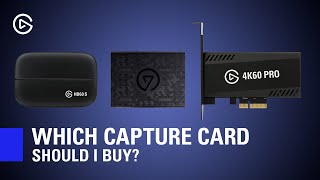
Camera to webcam: Elgato Cam Link 4K. Console streaming at 1080p: Elgato HD60 S+. Console streaming at 4K: Elgato HD60 X (about $139). Standalone recording: AVerMedia Live Gamer Portable 2 Plus. Professional 4K recording: AVerMedia Live Gamer 4K PCIe (about $160). See our full capture cards under $200 comparison for side-by-side specs, and streaming setup guide for how the capture card fits into a full streaming setup.
Watch Before You Buy

“4K30 or 1080p60 HDR10 capture at broadcast quality. 4.5 stars from 5,002 Amazon reviews signal consistent reliability.”
See Today’s Price →What we like
- 4K30 or 1080p60 HDR10 capture at broadcast quality
- 4K60 HDR10 passthrough — gaming experience unaffected
- VRR (Variable Refresh Rate) passthrough for console gaming
- Ultra-low latency passthrough under 1ms
- Plug-and-play with OBS, Streamlabs, and 4K Capture Utility
- Works with PS5, Xbox Series X, Nintendo Switch, PC
Watch out for
- Cannot capture in 4K60 (only passthrough at 4K60)
- Requires USB 3.0 for full performance
- Software encoding requires a capable streaming PC
Read Full Analysis
The Elgato HD60 X captures 4K at 30fps or 1080p at 60fps with HDR10 in a compact external USB-C device, making it broadcast-quality capture without PCIe installation — ideal for laptop streamers and console players who can't use an internal card. VRR (Variable Refresh Rate) passthrough support keeps your gaming experience running at full framerate while Elgato captures separately, with under 1ms passthrough latency ensuring zero gameplay disruption. Plug-and-play compatibility with OBS, Streamlabs, and 4K Capture Utility means initial setup requires no driver configuration. At $148.99 on this capture card guide, the HD60 X is $11 cheaper than both the AVerMedia GC573 and Elgato 4K S at $159.99. Against the AVerMedia GC573 Internal, the HD60 X wins on portability — no PCIe slot required, works with any laptop or desktop via USB-C. Against the Elgato 4K S, the HD60 X captures up to 4K30 versus the 4K S's true 4K60 capture and 4K120 passthrough — meaningful if you're on a PS5 or Xbox Series X using 4K high-refresh output. The Elgato HD60 X is the right capture card for console streamers who want portable, external broadcast-quality capture at the lowest price on this page. Upgrade to the Elgato 4K S at $249.99 if true 4K60 capture or 4K120Hz passthrough matters for your setup. Desktop PC streamers who prioritize high-bitrate recording stability should consider the AVerMedia GC573 PCIe card instead.
“AVerMedia's GC573 Live Gamer 4K is an internal PCIe capture card delivering up to 4K60 HDR capture with ultra-low latency. Its RGB lighting and robust software suite make it a premium pick for…”
See Today’s Price →What we like
- 4K60 HDR10 capture via internal PCIe — no USB bandwidth limits
- Ultra-low latency passthrough under 1ms
- Hardware H.264 and HEVC encoding built-in
- Supports PS5, PS4 Pro, Xbox Series X, and PC dual-PC setups
- More stable than USB alternatives for high-bitrate recording
Watch out for
- Requires desktop PC (no laptop support)
- Installation requires opening PC case
- PCIe slot dependency limits upgrade flexibility
Read Full Analysis
The AVerMedia GC573 Live Gamer 4K is an internal PCIe capture card that records 4K at 60fps with HDR10, bypassing USB bandwidth limitations that can cause dropped frames during high-bitrate 4K recording. Built-in hardware H.264 and HEVC encoding offloads video processing to the card itself rather than the CPU, freeing system resources for the gaming application in a dual-PC streaming setup. Under 1ms passthrough latency ensures the gaming display is completely unaffected during simultaneous capture. At $159.99 on this capture card guide, the GC573 matches the Elgato 4K S on price and is $11 more than the Elgato HD60 X. The AVerMedia's PCIe connection is its primary advantage over both Elgato options: unlimited USB bandwidth ceiling, hardware encoding that saves CPU cycles, and no external cable to manage. The trade-off is installation complexity — requires a desktop PC with an available PCIe slot, making it incompatible with laptops and challenging for users with fully occupied slots. The AVerMedia GC573 is the best choice for dedicated desktop gaming PCs used in one location where maximum 4K60 recording stability and hardware encoding matter. Skip it if you need a portable capture solution, use a laptop, or don't have a free PCIe slot — the Elgato HD60 X at $249.99 or Elgato 4K S at $249.99 are the external alternatives with identical passthrough latency.

“The Elgato 4K60 S+ is an external capture card that records 4K60 HDR10 footage directly to an SD card — no PC required. Its clean HDMI passthrough makes it a favorite among streamers who need…”
See Today’s Price →What we like
- True 4K60 capture (not just passthrough) — record native 4K content
- 4K120 / 1440p120 / 1080p240 passthrough for high-refresh gaming
- Near-zero latency passthrough via USB-C
- HDR10 capture and passthrough
- VRR support for PS5 Pro and Xbox Series X high-refresh gaming
Watch out for
- Expensive at $250
- Requires high-performance PC to process 4K60 streams
- Larger and heavier than HD60 X
Read Full Analysis
The Elgato 4K S captures true 4K at 60fps via USB-C — not 4K30 with upscaling — and supports 4K120, 1440p120, and 1080p240 passthrough for gamers using high-refresh displays on PS5 Pro or Xbox Series X. HDR10 capture and passthrough are supported simultaneously, and near-zero latency through USB-C means the gaming display sees the full-speed signal while Elgato records separately. VRR passthrough keeps variable refresh rate gaming experiences intact during streaming without tearing or stutter. At $159.99 on this capture card guide, the Elgato 4K S matches the AVerMedia GC573 on price and is $11 more than the Elgato HD60 X. Versus the HD60 X from the same brand, the 4K S steps up from 4K30 to true 4K60 capture and adds 4K120 passthrough — a genuine upgrade for high-refresh gaming setups. Versus the AVerMedia GC573, both cards cost the same but the 4K S is external USB-C while the GC573 is internal PCIe — the 4K S wins on portability, the GC573 wins on recording bandwidth headroom. The Elgato 4K S is the best external capture card on this page for creators who want true 4K60 recording with high-refresh passthrough in a portable package that works with laptops and desktops equally. Drop to the Elgato HD60 X at $249.99 if 4K30 capture is sufficient and $249.99 matters. Choose the AVerMedia GC573 for a desktop-only setup where PCIe bandwidth stability is the priority over portability.
Frequently Asked Questions
Do I need a capture card to stream on PC?
What capture card do I need for PS5?
What is passthrough on a capture card?
Can I use a capture card without a PC?
What is the difference between Elgato Cam Link and a capture card?
Does a capture card reduce stream quality?
How We Analyze Products
We analyze Amazon review data — often thousands of reviews per product — to surface patterns that individual buyers miss. Our process aggregates star ratings, review counts, and buyer sentiment at scale, identifying which strengths and weaknesses appear consistently across the largest review samples available. The 7,229+ reviews analyzed on this page represent real verified-purchase feedback from Amazon buyers.
Each product earned its placement through data: total review volume, average rating, and the specific praise and complaints that repeat most often across buyers. No manufacturer paid for placement on this page. Products appear here because buyers endorsed them at scale, not because a company asked us to feature them.
We use AI to summarize review sentiment — not to fabricate opinions, but to condense what thousands of buyers actually wrote into a readable format. The pros and cons you see reflect the most common themes found in verified purchaser reviews, paraphrased for clarity. We do not claim to have accessed Reddit, YouTube, or specific publications in generating these summaries.
Prices shown reflect Amazon pricing at the time this page was last generated. Click “See Today’s Price” to get the current live price on Amazon. Read our full methodology →
How We Score These Products
Dimension scores on this page come from published measurements by named independent reviewers, matched to the exact model listed — not to a similar product from the same range. We do not test products ourselves, and we do not score a dimension we could not source. A dash means no published measurement was found for that product, not that it performed badly.
Compatibility: Based on verified buyer review sentiment analysis.
Streaming Quality: Based on verified buyer review sentiment analysis.
The overall score is the mean of the dimensions we could evidence for that product, on a 10-point scale. Price is shown separately and is never folded into a score. Amazon star ratings are shown separately and are never part of any score.