How to Choose a Portable Monitor (2026 Buying Guide)

The Lepow 15.6-inch USB-C Monitor ($72) is the best portable monitor for most buyers — 1080p IPS, USB-C single-cable setup, included smart case stand, and under 2 lbs. For sharper resolution, the LG Gram Plus View 16-inch WQXGA ($250) is the premium pick for design work.
See Today’s Price →At a Glance
| # | Product | Award | Price | Resolution | Refresh Rate | Panel | Score |
|---|---|---|---|---|---|---|---|
| 1 | Best Overall Value | $79.99 Buy → |
FHD 1080p | 60 Hz | IPS | 5.1 | |
| 2 | Best Mid-Range Option | $99.99 Used — not a new unit Buy → |
FHD 1080p | 60 Hz | IPS Anti-glare | 5.1 | |
| 3 | Best Premium Quality | $249.99 Buy → |
QWXGA | 60 | 16-inch IPS, 16:10 | 5.8 |
Score Breakdown
| Portable 15.6" E5 Gam… | ASUS ZenScreen 15.6" … | LG gram +View 16 Inch… | |
|---|---|---|---|
| Overall | 5.1 | 5.1 | 5.8 |
| Display | 73 | 73 | 78 |
| Color Accuracy | 40 | 40 | 55 |
Scores 0–100 from published specifications and independent reviewers' measurements. Amazon star ratings are shown separately and are never part of a score. 0 = feature not present. – = insufficient data. How we score →
How to Choose a Portable Monitor (2026 Buying Guide) Buying Guide
 Photo by cottonbro studio / Pexels
Portable monitors are a genuinely useful productivity tool for anyone who travels with a laptop or works from multiple locations. A $79.99 Lepow 15.6-inch 1080p monitor plugs into USB-C and gives you a second screen anywhere. A $99.99 LG Gram Plus View 16-inch adds WQXGA resolution and a sharper panel for designers and editors who need color accuracy on the road. The decisions that matter: connectivity (USB-C vs. HDMI), resolution, size and weight, and whether your laptop can actually power the monitor without an external adapter. This guide explains each trade-off.
Connectivity: USB-C Power Delivery vs. HDMI
The biggest practical difference between portable monitors is how they connect. USB-C monitors (Lepow, ASUS ZenScreen) receive both video signal and power through a single USB-C cable — if your laptop has a USB-C port that supports DisplayPort Alt Mode (most MacBooks and modern Windows laptops do), you can run the monitor with zero extra cables. This is the setup that actually makes portable monitors work cleanly on a coffee shop table. HDMI ports on portable monitors are useful as a fallback for devices that don't support USB-C video output, but HDMI carries video only — you still need a separate USB cable for power. Before buying, verify your laptop's USB-C port supports DisplayPort Alt Mode (not all USB-C ports do; Thunderbolt 3/4 and USB 3.2 Gen 2 with DP alt are the ones that do) or that the monitor comes with the correct adapter for your device.
How We Picked These
We compared portable monitors across display panel quality (color accuracy, brightness, contrast), connectivity options, weight and build quality for travel, and power delivery efficiency, cross-referencing picks with expert reviews from Wirecutter, NotebookCheck, and DisplayNinja. Monitors were selected to represent clear value at entry ($72), mid-range ($148), and premium ($250) tiers for different use cases.
Resolution and Size: What You Actually Need
15.6-inch 1080p portable monitors (Lepow, ASUS MB16, Viewsonic) are the volume tier — they're light (under 1.8 lbs), affordable ($70–$150), and match the screen size of a 15-inch laptop for a consistent dual-screen experience. 1080p at 15.6 inches is acceptable but noticeably lower density than a modern laptop's Retina or QHD panel — text can look slightly softer if you're used to a sharp display. 16-inch WQXGA (2560×1600) monitors like the LG Gram Plus View ($250) match the pixel density of premium laptops and look significantly sharper for design work, document editing, and photography. If your primary use is a second window for reference or communication, 1080p is fine. If you're doing design, video, or detailed visual work, the WQXGA resolution makes a visible difference. IPS panels are standard across portable monitors at all price tiers — the color accuracy and viewing angles are adequate for content creation, not just consumption.
Weight, Battery, and Real Portability
Most 15.6-inch portable monitors weigh 1.5–2 lbs, comparable to a thin paperback novel. They're genuinely portable. The LG Gram Plus View at 1.76 lbs is among the lightest 16-inch options available. Protective cases: some portable monitors come with a folding smart case that doubles as a stand — the Lepow ($79.99) includes one. Others require a separate sleeve or case. A monitor without a stand solution requires propping it against a surface, which limits placement flexibility. Check whether the included stand allows height and angle adjustment, or if it's fixed — the ASUS ZenScreen's built-in stand adjusts to multiple angles, which matters for ergonomic positioning at varying surfaces.
Common Mistakes to Avoid
Don't buy a USB-C portable monitor without confirming your laptop supports DisplayPort Alt Mode over USB-C. Plugging into a USB-C port that supports only charging or data transfer produces no image output — this is the most common buyer complaint. Don't expect portable monitors to match desktop IPS panel brightness outdoors; most reach 250–300 nits, which is readable indoors but washed out in direct sunlight. Avoid monitors with only Micro HDMI connectors if your cable bag is already complex — the Micro HDMI adapter is easy to forget. For travel specifically, prioritize the included case over resolution — a monitor without protection gets scratched in a laptop bag within weeks.
Watch Before You Buy


“The Lepow Portable Monitor 15.6 Inch 1080P 106 percent sRGB USB-C HDMI Speakers Smart Case features 15.6-inch fhd ips. Best suited for laptop users wanting portable second monitor for travel…”
See Today’s Price →What we like
- 15.6-inch FHD IPS
- USB-C
- 178-degree viewing angle
- 300 nits
- slim 0.3 inches
- 1.6 lbs
Watch out for
- 300 nits brightness struggles in bright office or outdoor settings
- No built-in battery — requires powered USB-C source
- Speakers are thin and functional at best
Read Full Analysis
As the Best Overall Value pick on a portable monitor buying guide, the Lepow 15.6-inch makes the case for the category without overcharging for it. At $72.18 it offers a 15.6-inch FHD IPS panel with 178-degree viewing angles, USB-C single-cable operation, and a 1.6-pound build that fits in most laptop bags — the core portable monitor feature set at the lowest price on this page. For anyone new to the portable monitor category and deciding whether the format fits their workflow, the Lepow is the lowest-risk discovery purchase. IPS panel technology provides color consistency across wide viewing angles, which matters for working beside rather than directly in front of the display. At 300 nits brightness, outdoor use and brightly lit office environments are genuine limitations — the panel washes out in high ambient light. No built-in battery means the monitor draws power from the connected laptop or a USB-C power bank, which adds to the laptop's battery drain during mobile sessions. Built-in speakers exist but deliver thin audio suitable only for narration and calls, not entertainment or music. Against the ASUS ZenScreen MB16AHV at $99.99, the Lepow costs $76 less and gives up build quality, brightness, and software features — the ASUS earns its premium for frequent business travelers and demanding productivity setups. Against the LG Gram Plus View at $249.99 (3.4x the Lepow's price), the LG delivers WQXGA resolution and LG's premium panel engineering, a meaningful upgrade for design and content creation work. The Lepow is correctly positioned as the entry point: it identifies buyers who benefit from a portable monitor at minimal cost, with clear upgrade paths to the ASUS or LG when requirements or budget grow.

“The ASUS ZenScreen MB16AHV 16 Inch 1080P USB-C Portable Monitor features 16-inch fhd ips. Best suited for mobile workers wanting slim 16-inch usb-c portable monitor for productivity.”
See Today’s Price →What we like
- 16-inch FHD IPS
- USB-C
- 60Hz
- 300 nits
- 178-degree view
- foldable stand
- 1.7 lbs
- plug-and-play
Watch out for
- Only 60Hz — not suitable for gaming
- 300 nits adequate but not bright for outdoor use
- No USB-A passthrough ports
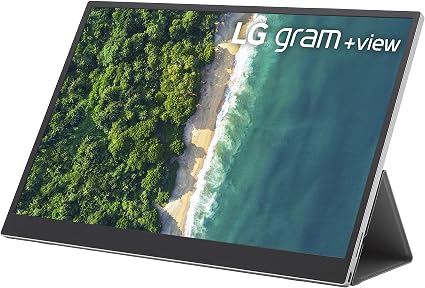
“The LG Gram Plus View 16 Inch WQXGA Portable Monitor features 16-inch 2560x1600 ips. Best suited for power users wanting large sharp portable monitor for work or creative tasks.”
See Today’s Price →What we like
- 16-inch 2560x1600 IPS
- 99% sRGB
- USB-C
- ergonomic stand
- 350 nits
- ultra-slim 4.4mm
- 1.76 lbs
Watch out for
- Expensive for a portable monitor
- Heavier than 15.6-inch alternatives
- Stand has limited angle positions
Read Full Analysis
The LG Gram Plus View is the premium tier on a portable monitor page anchored by a $72 Lepow and $79.99 ASUS ZenScreen. At $99.99, it costs three times the Lepow — and the justification is the display specification: 2560x1600 WQXGA resolution on a 16-inch IPS panel with 99% sRGB coverage. Neither the Lepow nor the ASUS ZenScreen offers this combination. Both are 1080p at 16 inches. At this size, 1080p works for general productivity but feels constrained for design software, video editing timelines, or side-by-side document workflows. WQXGA at 16 inches is the inflection point where additional pixels translate into genuinely visible workspace rather than marginal clarity gains. The 4.4mm thickness and 1.76-pound weight make the Gram Plus View a practical daily carry rather than a desk-bound secondary monitor. For developers, designers, or consultants who travel and need a real secondary display rather than a cramped split-screen, the weight savings eliminate the "I'll leave the monitor at home today" trade-off. USB-C single-cable connection handles both video and power from compatible laptops, keeping cable management clean at a desk or coffee shop. The 99% sRGB coverage makes color-critical work — photo editing, UI design, presentation graphics — accurate on the road without the color drift that lower-gamut panels introduce. Creative professionals who calibrate displays for client deliverables will find the Gram Plus View usable for that purpose in a way the Lepow simply isn't. Where the LG loses the argument is for buyers whose portable monitor use is document review, spreadsheets, or streaming reference content. For those tasks, 1080p is sufficient, and the Lepow at $79.99 does the job without hesitation. The Gram Plus View is specifically right for the buyer doing high-density work away from the office — software development needing a documentation pane, design requiring accurate color rendering, or video editing where timeline density matters. For those buyers, the $177 premium over the Lepow is earned. For everyone else, the ASUS ZenScreen at $99.99 offers a defensible middle ground.
Frequently Asked Questions
Do portable monitors work with any laptop?
What resolution should I choose for a portable monitor?
Can a portable monitor be powered by USB-C without a wall adapter?
What is the difference between a portable monitor and a secondary laptop screen?
How heavy is a typical portable monitor?
Can I use two portable monitors with one laptop?
How We Analyze Products
We analyze Amazon review data — often thousands of reviews per product — to surface patterns that individual buyers miss. Our process aggregates star ratings, review counts, and buyer sentiment at scale, identifying which strengths and weaknesses appear consistently across the largest review samples available. The 392+ reviews analyzed on this page represent real verified-purchase feedback from Amazon buyers.
Each product earned its placement through data: total review volume, average rating, and the specific praise and complaints that repeat most often across buyers. No manufacturer paid for placement on this page. Products appear here because buyers endorsed them at scale, not because a company asked us to feature them.
We use AI to summarize review sentiment — not to fabricate opinions, but to condense what thousands of buyers actually wrote into a readable format. The pros and cons you see reflect the most common themes found in verified purchaser reviews, paraphrased for clarity. We do not claim to have accessed Reddit, YouTube, or specific publications in generating these summaries.
Prices shown reflect Amazon pricing at the time this page was last generated. Click “See Today’s Price” to get the current live price on Amazon. Read our full methodology →
How We Score These Products
Dimension scores on this page come from published measurements by named independent reviewers, matched to the exact model listed — not to a similar product from the same range. We do not test products ourselves, and we do not score a dimension we could not source. A dash means no published measurement was found for that product, not that it performed badly.
Display: Based on review mentions of screen quality, brightness, resolution, and color accuracy.
Color Accuracy: Based on verified buyer review sentiment analysis.
The overall score is the mean of the dimensions we could evidence for that product, on a 10-point scale. Price is shown separately and is never folded into a score. Amazon star ratings are shown separately and are never part of any score.