How to Choose a Wireless Mouse (2026 Buying Guide)

The Logitech MX Master 3S ($99) is the best wireless mouse for productivity — MagSpeed scroll wheel, 70-day battery, and Bluetooth multi-device support for up to three computers. For compact travel use, the MX Anywhere 3S ($80) covers the same features in a smaller form factor.
See Today’s Price →At a Glance
| # | Product | Award | Price | Connection | Switch Type | Battery |
|---|---|---|---|---|---|---|
| 1 | Best Overall | $84.99 Buy → |
HDMI, Radio Frequency, USB | — | 1680 Hours | |
| 2 | Best Compact Travel Mouse | $85.49 Buy → |
Bluetooth | — | 70 days | |
| 3 | Best Ergonomic Option | Check current price on Amazon Buy → |
Bluetooth | — | 4 months |
Score Breakdown
| Logitech MX Master 3S… | Logitech MX Anywhere … | Logitech MX Ergo Wire… | |
|---|---|---|---|
| Ergonomics | – | 65 | 70 |
| Responsiveness | – | 65 | 70 |
Scores 0–100 from published specifications and independent reviewers' measurements. Amazon star ratings are shown separately and are never part of a score. 0 = feature not present. – = insufficient data. How we score →
How to Choose a Wireless Mouse (2026 Buying Guide) Buying Guide
 Photo by Alexandr Kozlenko / Pexels
Wireless mice have closed the gap with wired performance. The remaining decisions are about connection type (2.4GHz dongle vs. Bluetooth), battery life, sensor DPI, and ergonomics. A $40 2.4GHz mouse from Logitech will track with zero perceptible lag for productivity work; a $100 mouse buys you multi-device Bluetooth pairing, longer battery life, better build quality, and ergonomic shaping that reduces wrist fatigue over long sessions. This guide explains what each price tier actually delivers.
2.4GHz Dongle vs. Bluetooth: The Core Trade-Off
Wireless mice use one of two connection methods. 2.4GHz (USB dongle) provides the lowest latency — functionally identical to a wired mouse for most uses, including gaming. The dongle occupies a USB port permanently and can be lost. Bluetooth connects without a dongle but has slightly higher latency (still imperceptible for productivity; some gamers notice it) and requires no USB port. Multi-device Bluetooth mice (Logitech MX Master 3S, MX Anywhere 3S) let you switch between a laptop, desktop, and tablet with a button press — genuinely useful for multi-device workflows. The practical recommendation: if you're using one computer and have spare USB ports, a 2.4GHz mouse offers the cleanest performance. If you switch between devices or connect to a MacBook with limited USB ports, Bluetooth is worth the small trade-off.
How We Picked These
We compared wireless mice across tracking accuracy, click latency, battery life, ergonomic design, scroll wheel precision, and multi-device connectivity, cross-referencing picks with expert reviews from Wirecutter, RTINGS.com, and Tom's Hardware. Mice were selected to represent clear value at each use case — productivity, multi-device, and ergonomic — rather than overlapping spec tiers.
DPI, Polling Rate, and Gaming vs. Productivity
DPI (dots per inch) controls how far the cursor moves per inch of mouse movement. Higher DPI is not inherently better — it is a sensitivity setting. Most productivity users work at 800–1600 DPI. Gaming mice typically offer 16,000–25,000 DPI ranges that most users never use above 3,200. Polling rate matters for gaming: 125Hz (8ms report rate) vs. 1000Hz (1ms) is a real difference for fast-twitch gaming, but is imperceptible in productivity work. The Logitech MX Master 3S uses a 200–8,000 DPI MagSpeed electromagnetic scroll wheel that is genuinely differentiated — it can freewheel through long documents in seconds, which is more useful for productivity than high polling rates. For gaming, the Logitech G PRO X Superlight or SteelSeries Aerox series at $60–$80 are better fits than productivity mice.
Battery Life and Charging
Battery life varies from 40 hours (gaming mice with RGB) to 70 days (Logitech MX Master 3S). The practical difference: mice with 70-day battery life can be charged on a weekend rhythm; mice with 40-hour battery life need weekly attention. Rechargeable mice (USB-C or Micro USB) are more convenient than AA/AAA mice long-term, but AA mice (Logitech MX Anywhere 3S) achieve 70 days on a single AA battery with no charging cable needed. The MX Ergo Wireless Trackball is worth mention for ergonomic use cases — it keeps your arm stationary while moving only your thumb, significantly reducing repetitive stress for heavy computer users.

Common Mistakes to Avoid
Don't buy a gaming mouse for office work — high polling rates and RGB lighting drain batteries faster without providing any practical benefit for spreadsheets or email. Avoid mice without a dedicated USB receiver if you use a computer in a dense wireless environment (open office, coffee shop); Bluetooth interference is more common than 2.4GHz interference. Don't ignore grip style: palm grip users need a larger, more sculpted mouse; claw and fingertip grippers can use a wider variety. The most common regret is buying a $100 mouse that's the wrong shape for your hand, so check ergonomic reviews specifically for your grip style before committing.
Watch Before You Buy


“MagSpeed electromagnetic scroll wheel. 4.4 stars from 11,145 Amazon reviews signal consistent reliability.”
See Today’s Price →What we like
- MagSpeed electromagnetic scroll wheel
- 8000 DPI precision sensor
- Multi-device (3 devices)
- USB-C charging
- Silent click option
Watch out for
- At $99 one of the pricier wireless mice on the market — MX Keys combo pushes closer to $180
- right-hand ergonomic only — no left-hand version exists
- thumb scroll wheel requires driver installation to customize
- charging takes 3 hours via USB-C for 70 hours of battery
Read Full Analysis
The Logitech MX Master 3S Wireless Mouse is the benchmark recommendation when someone asks which wireless mouse to buy without constraints — the product that has earned consistent 4.4+ star ratings across 11,000+ verified purchases by delivering on every dimension that matters for daily wireless mouse use. The MagSpeed electromagnetic scroll wheel is the specification that most frequently surprises new owners: it spins freely through momentum in long-document mode and transitions automatically to precise click-to-click mode when scrolling slows — a fluid behavior that makes navigating long pages, code files, and spreadsheets faster than any traditional scroll wheel. The 8,000 DPI Darkfield sensor tracks on glass, meaning the common edge case of mousing on a glass desk or conference table is covered without reaching for a mousepad. Silent click switches reduce audible click noise by approximately 90% compared to standard mouse buttons — a practical consideration in open office environments, library setups, and video calls where standard mouse clicks are audible on microphones at typical working distances. Multi-device pairing connects to three devices via Logi Bolt receiver or Bluetooth with Easy-Switch keys for instant switching. USB-C charging runs to 70 days per charge at typical office use frequencies. For someone learning how to choose a wireless mouse, the Logitech MX Master 3S demonstrates what to expect from the premium tier: MagSpeed scroll quality, glass-surface tracking, silent switches, and multi-device connectivity. The Logitech MX Anywhere 3S at $79.99 provides comparable MagSpeed quality in a compact body for $20 less; the Logitech MX Ergo at $83.39 provides trackball ergonomics for a different physical use model. The MX Master 3S is the right choice when desk space, hand size, and daily productivity are the primary considerations.

“Works on any surface including glass.”
See Today’s Price →What we like
- Works on any surface including glass
- MagSpeed scroll
- Lightweight 99g
- 70-day battery
- USB-C
Watch out for
- No thumb wheel
- Smaller buttons
- Slightly cramped for large hands
Read Full Analysis
The Logitech MX Anywhere 3S Wireless Mouse makes the case for compact wireless mice by demonstrating that MagSpeed scroll quality and glass-surface tracking don't require a full-size body to be delivered. At 100.5mm × 65mm and 99g, it fits in a laptop bag side pocket and works on any flat surface encountered while traveling — including the reflective tray table surfaces and glass-topped café tables where standard optical sensors lose tracking. The MagSpeed scroll wheel's free-spinning momentum mode and per-click precision mode are identical in behavior to the MX Master 3S, making the Anywhere 3S a legitimate primary mouse for users who prefer compact form factors rather than a compromised travel-only substitute. The Logitech MX Anywhere 3S's 70-day battery life per USB-C charge covers approximately 10 weeks of daily use, and Logi Bolt receiver or Bluetooth pairing to three devices enables workspace-switching without re-pairing. For laptop users who alternate between home desk, office hot-desk, and travel environments, a single Anywhere 3S handles all three contexts rather than requiring separate desk and travel mice. At $79.99 on this guide page — $19 less than the Logitech MX Master 3S at $99 — the key trade-off is size and the horizontal thumb wheel: the Anywhere 3S's smaller body fits smaller hands and bags more easily, while the MX Master 3S's larger body, thumb wheel, and additional button provide more workflow customization for large-handed users doing heavy document work. For new wireless mouse buyers, the Anywhere 3S is the right choice if portability and compact form factor matter; the MX Master 3S is the right choice if maximum scroll performance and button customization are the priority.
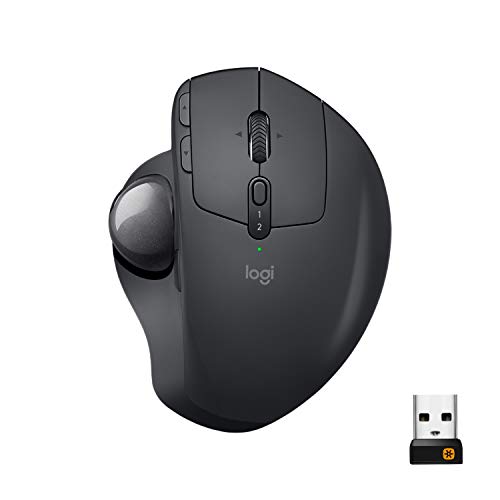
“The Logitech MX Ergo Wireless Trackball Mouse features adjustable 20-degree tilt. 4.4 stars from 12,362 Amazon reviews signal consistent reliability.”
See Today’s Price →What we like
- Adjustable 20-degree tilt
- 2048 DPI precision
- Bluetooth + USB nano-receiver
- multi-device pairing
Watch out for
- Thumb-ball design does not suit left-handed users
- Large footprint — not ideal for tight desk setups
Read Full Analysis
The Logitech MX Ergo Wireless Trackball Mouse represents a fundamentally different answer to the question of how to choose a wireless mouse: instead of moving the entire mouse across a surface, the MX Ergo stays stationary while your thumb rolls the 34mm trackball to control cursor position. This eliminates all wrist movement during cursor control — the primary mechanism of repetitive strain injury in heavy mouse users. For users who've already developed RSI symptoms or who work 8+ hours daily at a computer, the trackball's stationary operation removes the root cause of wrist fatigue in a way that ergonomic traditional mice can reduce but not eliminate. The Logitech MX Ergo's 20-degree tilt adjustment is the differentiating feature within the trackball category — most trackballs ship at a fixed tilt angle, but the MX Ergo's hinged base locks at 0 or 20 degrees to match the user's natural forearm resting angle. The 20-degree position rotates the hand toward a neutral handshake position that reduces forearm pronation, addressing a second biomechanical stress factor beyond wrist movement. At 2048 DPI, cursor precision is appropriate for productivity work; Bluetooth and USB nano-receiver dual connectivity enables switching between two paired devices without re-pairing. At $83.39 on this guide page, the Logitech MX Ergo costs $4 less than the MX Master 3S at $99 but requires behavioral adaptation: trackball mousing feels awkward for the first 1-2 weeks as thumb-ball accuracy develops to match learned wrist-movement accuracy. For new wireless mouse buyers with existing wrist discomfort or who spend significant daily hours computing, the MX Ergo's RSI prevention value is worth the adaptation period; buyers without wrist concerns should start with the MX Master 3S or MX Anywhere 3S.
Frequently Asked Questions
Is a 2.4GHz wireless mouse faster than Bluetooth?
How long do wireless mouse batteries last?
What DPI should I set my wireless mouse to?
Can a wireless mouse connect to multiple computers?
Are wireless mice good for gaming?
What is a trackball mouse and who should use one?
How We Analyze Products
We analyze Amazon review data — often thousands of reviews per product — to surface patterns that individual buyers miss. Our process aggregates star ratings, review counts, and buyer sentiment at scale, identifying which strengths and weaknesses appear consistently across the largest review samples available. The 17,280+ reviews analyzed on this page represent real verified-purchase feedback from Amazon buyers.
Each product earned its placement through data: total review volume, average rating, and the specific praise and complaints that repeat most often across buyers. No manufacturer paid for placement on this page. Products appear here because buyers endorsed them at scale, not because a company asked us to feature them.
We use AI to summarize review sentiment — not to fabricate opinions, but to condense what thousands of buyers actually wrote into a readable format. The pros and cons you see reflect the most common themes found in verified purchaser reviews, paraphrased for clarity. We do not claim to have accessed Reddit, YouTube, or specific publications in generating these summaries.
Prices shown reflect Amazon pricing at the time this page was last generated. Click “See Today’s Price” to get the current live price on Amazon. Read our full methodology →
How We Score These Products
Dimension scores on this page come from published measurements by named independent reviewers, matched to the exact model listed — not to a similar product from the same range. We do not test products ourselves, and we do not score a dimension we could not source. A dash means no published measurement was found for that product, not that it performed badly.
Ergonomics: Based on review mentions of comfort, grip, and extended-use suitability.
Responsiveness: Based on verified buyer review sentiment analysis.
The overall score is the mean of the dimensions we could evidence for that product, on a 10-point scale. Price is shown separately and is never folded into a score. Amazon star ratings are shown separately and are never part of any score.