Logitech vs Razer Gaming 2026: Mice, Headsets, Keyboards

Logitech G203 LIGHTSYNC Gaming Mouse wins for budget competitive gaming — HERO 25K sensor in an entry body beats any competitor under $30. For premium mice, Razer DeathAdder V2 leads on ergonomics and sensor precision. Logitech wins on value; Razer wins on switch technology.
See Today’s Price →At a Glance
| # | Product | Award | Price | Range | Power Source | Button Quantity | Score |
|---|---|---|---|---|---|---|---|
| 1 | Logitech G203 Wired Gaming Mouse … Logitech G |
Best Budget Gaming Mouse | $24.98 as of Nov 15, 9:07 PM CT details Buy → |
5.0 meters | Corded Electric | 6 | 8.7 |
| 2 |  Logitech G305 LIGHTSPEED Wireless… Logitech G |
Best Wireless Value | $29.49 as of Nov 15, 9:03 PM CT details Buy → |
1.0 meters | Battery Powered | 6 | 7.7 |
| 3 | 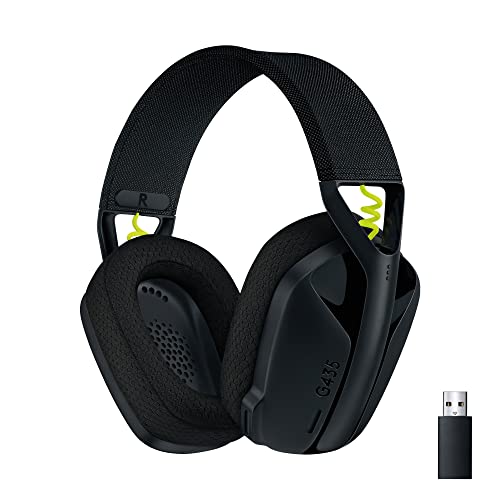 Logitech G435 Lightspeed Wireless… Logitech G |
Best Wireless Headset Under $50 | Check price on Amazon Buy → |
— | — | — | — |
| 4 | Editor's Pick — Razer Mouse | Check price on Amazon Buy → |
10.0 meters | Corded Electric | 8 | 7.2 | |
| 5 | Best Wired Headset Under $40 | $39.99 as of Nov 15, 9:09 PM CT details Buy → |
— | — | — | — |
Score Breakdown
| Logitech G203 Wired G… | Logitech G305 LIGHTSP… | Logitech G435 Lightsp… | Razer DeathAdder V2 G… | Razer BlackShark V2 X… | |
|---|---|---|---|---|---|
| Overall | 8.7 | 7.7 | – | 7.2 | – |
| Ergonomics | 80 | 74 | – | 73 | – |
| Customization | 88 | 74 | – | 65 | – |
| Responsiveness | 92 | 84 | – | 78 | – |
| Sound | – | – | 65 | – | 78 |
Scores 0–100 from published specifications and independent reviewers' measurements. Amazon star ratings are shown separately and are never part of a score. 0 = feature not present. – = insufficient data. How we score →
Logitech vs Razer Gaming Buying Guide
Logitech and Razer both manufacture the full spectrum of gaming peripherals — mice, keyboards, headsets, and desk accessories. Logitech's advantage is value engineering: its entry-tier products regularly outperform higher-priced competition in sensor tests. Razer's advantage is switch and sensor innovation, with optical mouse switches that eliminate debounce delay and optical keyboard switches that actuate at 0.2ms.
Gaming Mice: HERO vs Razer Optical
Logitech G203 and G305 at $27 use the HERO 25K sensor — the same sensor in Logitech's $150+ flagship mice, scaled down into budget bodies. Independent sensor testing consistently rates HERO among the top three gaming sensors regardless of price. Razer DeathAdder V2 at $40 counters with Focus+ sensor at 20K DPI and an ergonomic right-handed shell sculpted for palm and claw grip users. For ambidextrous grip styles or budget builds, Logitech wins. For right-handed ergonomic preference, Razer wins.
Gaming Headsets: Wireless and Budget Compared
Logitech G435 LIGHTSPEED Wireless delivers wireless convenience in a lightweight 165g frame — among the lightest wireless gaming headsets available. Razer BlackShark V2 X matches the price but uses a wired connection, delivering better bass response through a larger 50mm driver. For wireless-first users, Logitech G435 is the only wireless gaming headset under $50 from either major brand. For pure audio quality under $50, Razer wired wins.
Keyboards: G915 TKL vs BlackWidow V3 TKL
Logitech G915 TKL uses low-profile GL switches — 2.7mm actuation distance vs standard 4mm — making it the fastest Logitech keyboard by physical travel. Razer BlackWidow V3 TKL uses standard-height Razer mechanical/optical switches at three times the price advantage. For slim desk setups, Logitech G915 TKL's low profile is distinctive. For switch value at entry price, Razer BlackWidow V3 TKL is significantly cheaper.
Ecosystem Software: G HUB vs Razer Synapse
Logitech G HUB and Razer Synapse are both free software suites for RGB control, macro programming, and DPI adjustment. G HUB integrates more smoothly with streaming software (OBS, Streamlabs) via its plugin system. Synapse offers cleaner RGB sync across Razer Chroma devices and a simpler interface for new users. Both run in the background; both have faced criticism for resource usage that has improved substantially in recent updates.
Watch Before You Buy


“8,000 DPI gaming-grade sensor with zero smoothing.”
See Today’s Price →What we like
- 8,000 DPI gaming-grade sensor with up to five DPI settings
- Mechanical primary buttons tensioned with metal springs
- Six programmable buttons and on-board memory
- LIGHTSYNC RGB across about 16.8 million colors
- Wired, so there is no battery to charge
Watch out for
- Plain shape with no thumb rest
- Wired only
Read Full Analysis
The Logitech G203 is a sub-$25 gaming mouse with an 8,000 DPI sensor featuring no acceleration and no smoothing — the accuracy spec that differentiates gaming sensors from standard office mice. At 85g, it is among the lightest in the under-$40 category. The ambidextrous symmetric shape accommodates both left-handed and right-handed users, and six programmable buttons support DPI shifting and hotkey assignments without a keyboard reach mid-session. The Logitech G203 is the most affordable mouse on this Logitech vs Razer page — $3 less than the Logitech G305 and $16 less than the Razer DeathAdder V2. The G203 is wired only; the Logitech G305 adds Lightspeed wireless for $3 more, making the G203 the better choice primarily for users who are fully cable-agnostic. Against Razer's DeathAdder V2, the G203 gives up the 20K sensor and right-hand ergonomic shape but delivers competitive tracking at $16 less. The Logitech budget pick for cable-agnostic users who want a no-compromise gaming sensor under $25. For wireless, the G305 at $3 more is the obvious step up; for Razer's palm-grip ergonomic shape, the DeathAdder V2 at $16 more is worth comparing.
“Lightspeed wireless at a 1ms report rate with the HERO sensor tracking 1-to-1 and no smoothing, running 250-plus hours on a single AA battery.”
See Today’s Price →What we like
- LIGHTSPEED wireless with a 1 ms report rate
- HERO sensor up to 12,000 DPI and 400 IPS
- Up to 250 hours on one AA battery; Endurance mode stretches it up to 9 months
- Light at 3.4 ounces, with storage for the nano receiver
- Six programmable buttons and on-board memory
Watch out for
- Runs on an AA battery, not a built-in rechargeable one
- Compact shape without a thumb rest
Read Full Analysis
The Logitech G305 delivers Lightspeed wireless technology at a 1ms report rate matching wired mice — eliminating the input lag found in Bluetooth gaming peripherals. The HERO sensor tracks accurately to 12,000 DPI with no smoothing or acceleration, and a single AA battery provides 250+ hours of use, removing the daily charging and mid-session battery warnings that plague rechargeable wireless mice. The G305 costs $3 more than the Logitech G203 and $13 less than the Razer DeathAdder V2 on this Logitech vs Razer page. The $3 step up from the G203 buys Lightspeed wireless — the same hardware found in Logitech's $100+ mice — making the G305 the strongest value on the page for wireless buyers. The Razer DeathAdder V2 offers a premium ergonomic shape and 20K sensor but is wired; the G305 undercuts it on price and adds wireless freedom. The best value on this Logitech vs Razer comparison. Lightspeed wireless is the clear standout — for buyers who want wireless without paying premium pricing, no Razer option on this page matches it at this price point.
“Carries both Lightspeed 2.4GHz and Bluetooth rather than one or the other, with a 50-hour battery.”
See Today’s Price →What we like
- Lightspeed 2.4GHz
- Bluetooth
- 50hr battery
- Blue VO!CE mic
- works on PS5 Xbox PC mobile
Watch out for
- No detachable mic - built-in mics only
- Built-in mics less impressive than HyperX detachable
- Smaller 40mm drivers
Read Full Analysis
The Logitech G435 is the wireless headset option on this page at the same price as the wired Razer BlackShark V2 X and Razer DeathAdder V2 — wireless connectivity for identical money. Lightspeed 2.4GHz delivers consistently low latency suitable for competitive play, while Bluetooth adds mobile and console connectivity when the USB receiver isn't plugged in. The 50-hour battery life is class-leading for this price range, and multi-platform compatibility (PS5, Xbox, PC, mobile via Bluetooth) removes the need for separate headsets across devices. Who picks this over the Razer BlackShark V2 X on this page: buyers for whom wireless freedom is the deciding factor at this price point. The Razer BlackShark V2 X is wired (3.5mm), meaning a cable between headset and controller or PC at all times. The G435's built-in microphones are adequate for casual voice chat but deliver less focused pickup than a dedicated detachable boom. Competitive players who need clear directional microphone performance for team communication should consider a headset with a boom mic. For casual to moderate gaming where wireless convenience outweighs mic precision, the G435 is the better value at this price.

“Focus+ 20K optical sensor: intelligent tracking with 99.4% precision.”
See Today’s Price →What we like
- Focus+ 20K optical sensor: intelligent tracking with 99.4% precision
- Classic DeathAdder right-hand ergonomic shape — loved by palm grip users
- Razer Optical switches: 0.2ms actuation, 70 million click durability
- Speedflex cable — flexible braided cable with minimal drag
- 82g — lighter than previous DeathAdder models
Watch out for
- Wired only — no wireless version at this price
- Right-hand ergonomic only
- RGB lighting adds weight without gameplay benefit
Read Full Analysis
The Razer DeathAdder V2 uses the Focus+ 20K optical sensor with 99.4% tracking precision and Razer Optical switches rated for 0.2ms actuation and 70 million clicks. The classic DeathAdder right-hand ergonomic shape is designed for palm grip users specifically, the Speedflex braided cable minimizes drag versus standard rubber cables, and at 82g it is lighter than previous DeathAdder generations. The Razer DeathAdder V2 costs $13-16 more than the Logitech G203 and G305 on this Logitech vs Razer page. Within the mouse comparison, the DeathAdder's 20K sensor and optical switches represent a step above the G203's 8K sensor, and the ergonomic right-hand shape serves palm grip users better than either Logitech model's symmetric body. The Logitech G305 at $27 counters with Lightspeed wireless at a lower price — the DeathAdder wins on sensor tier and ergonomics; the G305 wins on wireless value. The Razer pick for palm-grip right-hand users who want the DeathAdder's established ergonomic shape and a premium optical sensor. If wireless matters more than hand-specific ergonomics, the Logitech G305 delivers Lightspeed wireless for $13 less.

“THX Spatial Audio with a HyperClear cardioid mic, and both Bluetooth and 2.4GHz wireless rather than one or the other.”
See Today’s Price →What we like
- Closed cups and memory foam for passive noise isolation
- 50mm TriForce titanium drivers
- HyperClear cardioid mic
- 240 g; 3.5mm for PC, consoles and Switch
Watch out for
- 7.1 surround works on Windows 10 64-bit only
Read Full Analysis
The Razer BlackShark V2 X is the wired headset option at the same price as the Logitech G435 wireless on this page — wired for identical money, which is either a disadvantage or a deliberate choice. The HyperClear cardioid boom microphone is the key differentiator: a directional mic with cardioid pickup produces cleaner, more focused voice capture than the built-in mics in the G435. For competitive players who communicate in team games where voice clarity matters, the V2 X's dedicated boom is the functional argument for choosing wired at this price. THX Spatial Audio provides virtual surround processing on PC — a feature the Logitech G435 at the same price doesn't include. The 26,000+ Amazon reviews at 4.4 stars confirm the V2 X is among the most broadly validated headsets under $40. The tradeoff is the fixed 3.5mm cable — no wireless option, and 7.1 surround requires a separate USB dongle purchase. For gaming at a desk where a cable isn't a physical inconvenience, the V2 X's microphone quality and THX processing justify the wired-only format at this price.
Frequently Asked Questions
Is Logitech or Razer better for gaming mice?
What is the difference between Logitech G HUB and Razer Synapse?
Are Logitech gaming headsets good?
Which Razer gaming mouse is best for small hands?
Does Logitech G915 TKL work without software?
Is Razer Synapse always running in the background?
How We Chose These Products
We compare each product’s Amazon listing, the manufacturer’s published specifications and Amazon customer ratings, shown with their review counts as Amazon’s data, and rank the products on how well they answer this page’s question. We do not test products in hand and we do not run our own analysis of review text. A publication or expert is named only where we cite its published findings about that product. No manufacturer paid for placement on this page.
A price appears only when Amazon’s API supplied it at a recent daily refresh, with the date and time beside it, and is withdrawn at 4 AM Central on the day after it turns 24 hours old; otherwise use “Check price on Amazon” for the live price. Read our full methodology →
How We Score These Products
Each dimension score comes from evidence about the exact model listed — a published specification, a measurement by a named independent reviewer, or that product’s own buyer reviews, as described for each dimension below — not from a similar product in the same range. We do not test products ourselves, and we do not score a dimension we could not evidence. A dash means no evidence was found for that product, not that it performed badly.
Ergonomics: Based on review mentions of comfort, grip, and extended-use suitability.
Customization: From evidence about this exact model (specification, named reviewer or its own reviews).
Responsiveness: From evidence about this exact model (specification, named reviewer or its own reviews).
Sound: Extracted from buyer reviews mentioning sound, audio, bass, treble, and clarity.
The overall score is the mean of the dimensions we could evidence for that product, on a 10-point scale. Price is shown separately and is never folded into a score. Amazon star ratings are shown separately and are never part of any score.