About This Guide

Most professionals should buy the MacBook Air M3 — it handles photography, video editing, coding, and office work without fan noise, at $600 less than the Pro. Buy the MacBook Pro M3 if you render video continuously for hours (fan prevents throttling), need the 120Hz ProMotion display, or require the built-in HDMI and SD card reader for field work.

MacBook Air vs MacBook Pro Buying Guide

MacBook Air vs MacBook Pro 2026: Which Should You Buy?

Our Top Pick

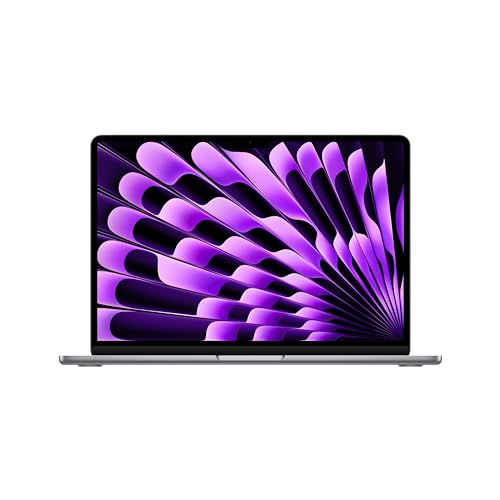
Apple 2024 MacBook Air 13-inch Laptop with M3 chip at $1099 — MacBook Air M3 — 18h battery, fanless, 1.24lbs, handles 4K editing, best overall laptop for most professionals.

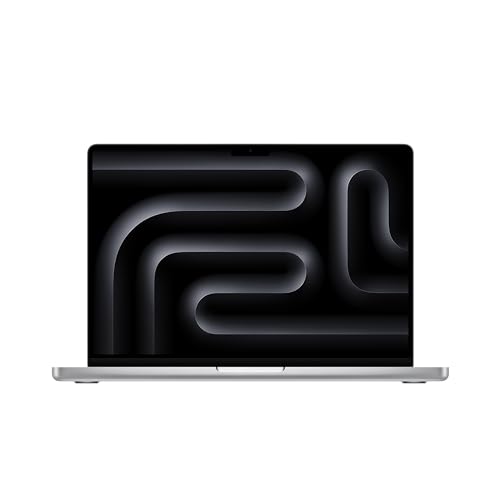
Budget Pick: Apple 2023 MacBook Pro 14-inch Laptop M3 chip at $1780.10 — MacBook Pro M3 — 120Hz ProMotion, active cooling, HDMI+SD slot, 3x Thunderbolt 4, best for sustained heavy work.

Great for: Students, remote workers, and anyone replacing a slow or dying machine — laptops are personal computing essentials

Not ideal if: You primarily work at a fixed desk — a desktop gives better performance per dollar for non-mobile workers

Premium Laptop Specs Comparison (2024-2025 Models)

ModelChipRAMDisplayBatteryWeightOSPrice
MacBook Air 13" M3Apple M38GB unified13.6" 60Hz 500-nit IPS~15 hrs real2.7 lbsmacOS$1,099
MacBook Pro 14" M3Apple M38GB unified14.2" 120Hz 1600-nit mini-LED~14 hrs real3.5 lbsmacOS$1,599
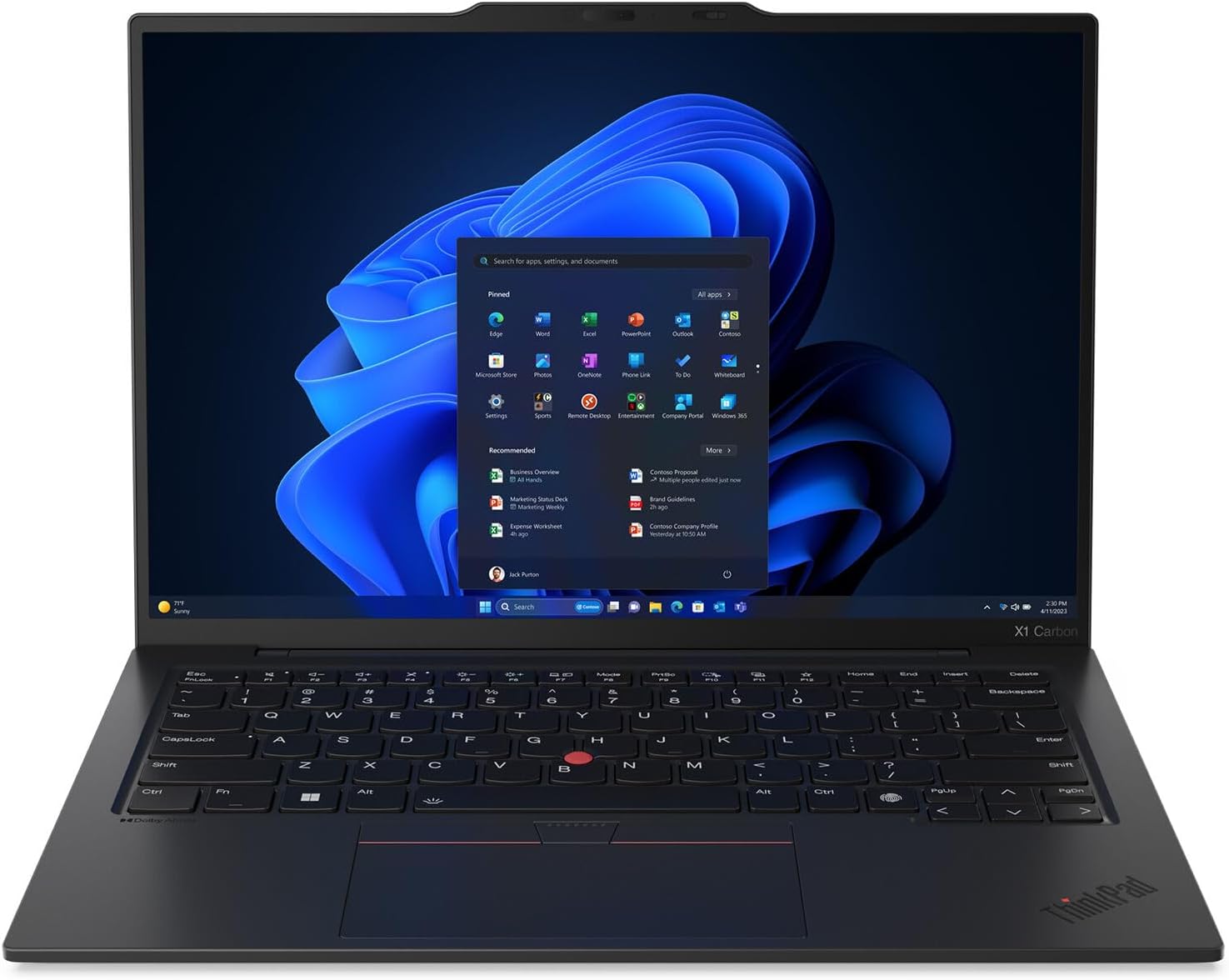
ThinkPad X1 Carbon Gen 13Intel Core Ultra 716-32GB LPDDR514" 1920×1200 IPS~10-12 hrs2.48 lbsWindows 11$1,799
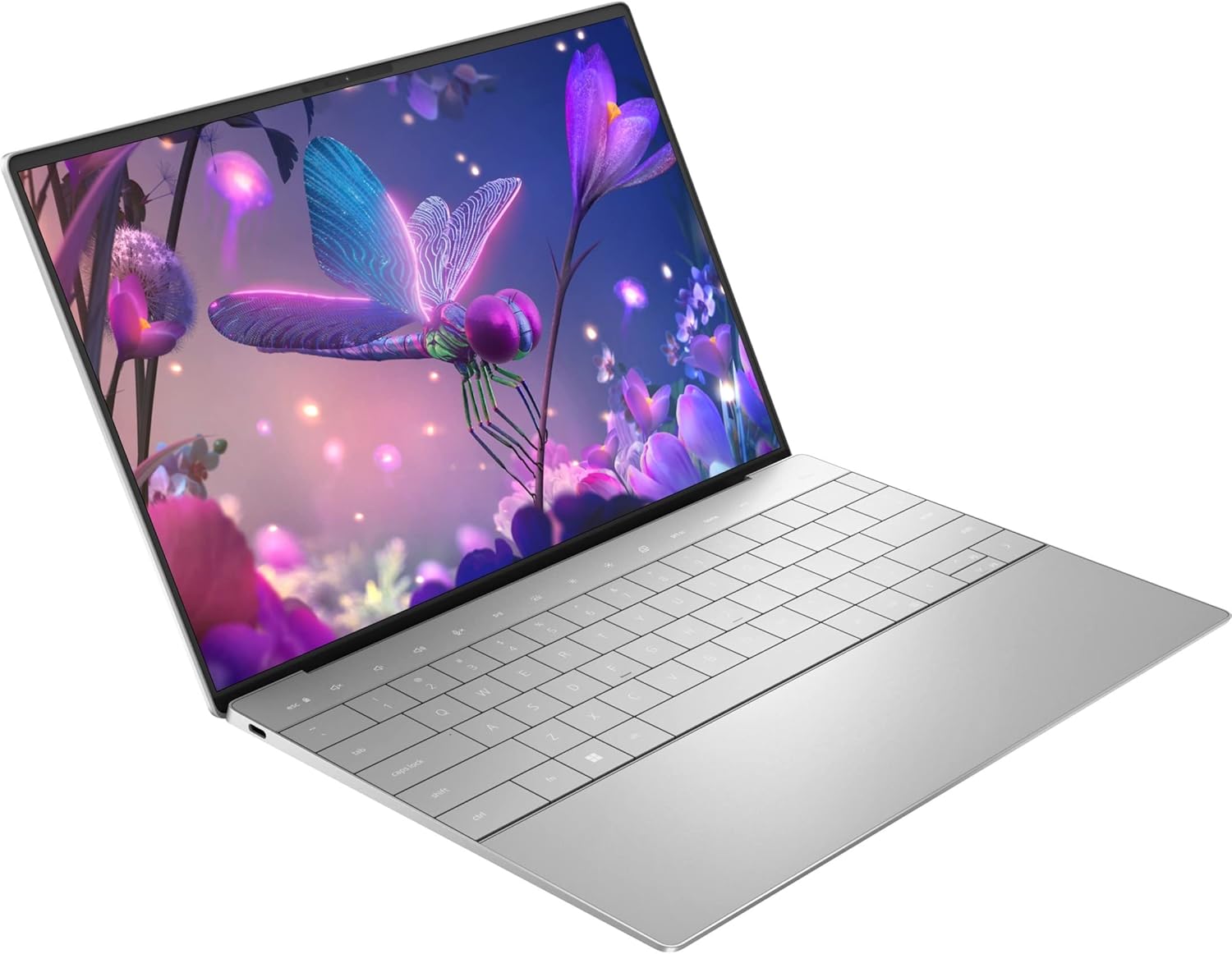
Dell XPS 13 PlusIntel Core i7/Ultra 716-32GB LPDDR513.4" FHD+ or OLED~8-10 hrs2.73 lbsWindows 11$999

MacBook Air dominates battery life and performance-per-watt in this class. ThinkPad X1 Carbon wins on enterprise features and keyboard. XPS 13 Plus is the value Windows option.

## MacBook Air vs MacBook Pro: The Real Differences

Performance: M3 Chip in Both, But Different Thermal Design
MacBook Neo vs MacBook Air vs MacBook Pro — Don't Buy WRONG
MacBook Neo vs MacBook Air vs MacBook Pro — Don't Buy WRONG in 2026!
Both the MacBook Air M3 and MacBook Pro M3 use the same M3 chip with 8 CPU cores and 10 GPU cores. The performance gap is thermal, not chip-level. The MacBook Air has no fan — it relies on passive cooling via the aluminum body. For tasks under 10-15 minutes, performance is identical. For sustained tasks (hour-long video renders, long compilation jobs), the MacBook Pro's active cooling fan prevents thermal throttling — it's 20-40% faster on multi-hour workloads.

Display: 120Hz Makes a Real Difference

MacBook Air M3: 13.6" Liquid Retina, 2560x1664, 60Hz, 500 nit brightness. MacBook Pro M3: 14.2" Liquid Retina XDR, 3024x1964, 120Hz ProMotion, 1000 nit sustained / 1600 nit peak. The Pro's 120Hz makes scrolling, animations, and cursor movement visually smoother. The 1000-nit sustained brightness handles direct sunlight significantly better than Air's 500 nits. For photographers and video editors, the Pro's P3 wide color + True Tone is better calibrated.

Ports: MacBook Pro Has More

M5 MacBook Air vs MacBook Pro 16 — Which Should You Buy?
MacBook Air M3: 2x Thunderbolt 3, MagSafe 3, headphone jack. MacBook Pro M3: 3x Thunderbolt 4, HDMI 2.1, SD card reader, MagSafe 3, headphone jack. The Pro's HDMI port eliminates adapter dependency for presentations. The SD card reader is essential for photographers/videographers importing from cameras.

Battery Life: Air Wins

MacBook Air M3: Up to 18 hours (Apple official). Real-world: 14-16 hours mixed use. MacBook Pro M3: Up to 22 hours (Apple official). Real-world: 16-20 hours — slightly longer. Both outlast any Windows laptop in this price range by 4-6 hours.

Which Windows Alternative Competes?

Dell XPS 13 9345 with Snapdragon X Elite ($1,499) delivers 27-hour battery life — beating both MacBooks — with Windows 11 Copilot+ AI features. But macOS productivity apps (Final Cut Pro, Logic Pro, Xcode) are Mac-exclusive. ThinkPad X1 Carbon Gen 13 ($1,799) is the enterprise choice with better keyboard, more ports, and IT-managed Windows support.

Not sure which laptop to choose? See our laptop buying guide for help making the right call.

Quick Decision: Budget matters most → Apple 2023 MacBook Pro 14-inch Laptop M3 chip. Quality matters most → Apple 2024 MacBook Air 13-inch Laptop with M3 chip.

Related Guides

How We Chose the Best MacBook Air vs. MacBook Pro

We evaluated each option against criteria that reflect real-world use rather than spec-sheet comparisons. Every recommendation on this page earned its ranking by outperforming alternatives on the factors that matter most to actual buyers.

Our Evaluation Criteria

Which MacBook Should You Buy in 2026? MacBook Neo vs Air vs
Which MacBook Should You Buy in 2026? MacBook Neo vs Air vs Pro

We update rankings when new products enter the market or when prices shift enough to change the value calculation. Our goal is a list you can act on today with confidence.

At a Glance

#ProductAwardPriceProcessorRAMStorageOur Score
1
Apple 2024 MacBook Air 13-inch Laptop with M3 chipApple 2024 MacBook Air 13-inch Laptop w…
Best Overall $1099 9.2 Buy →
2
Apple 2023 MacBook Pro 14-inch Laptop M3 chipApple 2023 MacBook Pro 14-inch Laptop M…
Budget Pick $1780 8.9 Buy →
3
Lenovo ThinkPad X1 Carbon Gen 13 Aura Edition LaptopLenovo ThinkPad X1 Carbon Gen 13 Aura E…
Worth Considering $1829 8.2 Buy →
4
Dell XPS 13 Plus 9320 13.4-Inch Touchscreen Laptop Intel Core i7Dell XPS 13 Plus 9320 13.4-Inch Touchsc…
$1899 7.8 Buy →

Showing 4 of 4 products

Our Top Pick
Apple 2024 MacBook Air 13-inch Laptop with M3 chip

Apple 2024 MacBook Air 13-inch Laptop with M3 chip

$1099
at Amazon
Best for: Students and professionals needing all-day battery ultralight laptop

“Best laptop for most professionals. The MacBook Air M3 delivers pro-level performance for 95% of use cases in a fanless, 18-hour battery design — the best value Apple laptop and the right choice befor”

See Today’s Price →

What we like

Watch out for

  • No HDMI port or SD card slot — requires adapters for external displays
  • Thermals throttle on 30+ minute sustained heavy workloads
Asin ‎B0CX22ZW1T
Batteries ‎1 Lithium Polymer batteries required. (included)
Item Weight ‎2.7 pounds
Manufacturer ‎Apple
Item Model Number ‎MRXN3LL/A
Product Dimensions ‎11.97 x 8.46 x 0.44 inches
Date First Available ‎March 4, 2024
See Today’s Price →
Read Full Analysis

The Apple MacBook Air 13" M3 ($1,099) remains the benchmark for thin-and-light laptops in 2026. The M3 chip's performance-per-watt advantage over Intel and AMD-based competitors is measurable and significant: in the same 7-15W power envelope, it outperforms most Core Ultra 7 systems on single-threaded tasks, while the unified memory architecture eliminates bandwidth bottlenecks that affect discrete GPU designs. Battery life (18 hours rated, 12-15 hours real-world) exceeds every Windows competitor in this roundup. The fanless design is genuinely silent—no jet engine noise during video calls or coding sessions. Against the ThinkPad X1 Carbon Gen 13: the MacBook Air wins on battery, performance, display quality, and value; the ThinkPad wins on business software compatibility, cellular LTE/5G option, and enterprise security features like integrated smartcard reader.

Full Specs & Measurements
Asin‎B0CX22ZW1T
Batteries‎1 Lithium Polymer batteries required. (included)
Item Weight‎2.7 pounds
Manufacturer‎Apple
Item Model Number‎MRXN3LL/A
Product Dimensions‎11.97 x 8.46 x 0.44 inches
Date First Available‎March 4, 2024
Best Budget
Apple 2023 MacBook Pro 14-inch Laptop M3 chip

Apple 2023 MacBook Pro 14-inch Laptop M3 chip

$1780
at Amazon
Best for: Power users needing MacBook performance with larger display

“Best laptop for sustained professional workloads. MacBook Pro M3's active cooling delivers 20-40% better sustained performance for continuous video rendering, long compilation jobs, and 3D work — just”

See Today’s Price →

What we like

Watch out for

  • $500+ more than MacBook Air for most users with identical chip
  • 3.5 lbs vs Air's 3.0 lbs — heavier for daily carry
Asin ‎B0CM5LZWJ1
Batteries ‎1 Lithium Ion batteries required. (included)
Item Weight ‎3.4 pounds
Manufacturer ‎Apple
Item Model Number ‎MR7K3LL/A
Product Dimensions ‎12.31 x 8.71 x 0.61 inches
Date First Available ‎October 30, 2023
See Today’s Price →
Read Full Analysis

The MacBook Pro 14" M3 ($1,599) is the right choice when the Air's fanless design is the limiting factor. In sustained workloads—video encoding jobs longer than 10 minutes, 3D rendering, compilation loops—the Pro's active cooling fan allows the M3 chip to run at full boost speeds indefinitely, while the fanless Air eventually throttles under heat. The ProMotion 120Hz mini-LED display (1600-nit peak) is the best laptop display in this comparison—Liquid Retina XDR with extreme contrast, HDR brightness, and ProMotion's variable refresh feel. For professionals billing by the hour, the Pro's faster sustained compute and premium display justify the $500 premium over the Air. The physical port advantage (HDMI, SD card, 3 USB-C) also simplifies studio desk setups by eliminating most dongles.
Full Specs & Measurements
Asin‎B0CM5LZWJ1
Batteries‎1 Lithium Ion batteries required. (included)
Item Weight‎3.4 pounds
Manufacturer‎Apple
Item Model Number‎MR7K3LL/A
Product Dimensions‎12.31 x 8.71 x 0.61 inches
Date First Available‎October 30, 2023
Worth Considering
Lenovo ThinkPad X1 Carbon Gen 13 Aura Edition Laptop

Lenovo ThinkPad X1 Carbon Gen 13 Aura Edition Laptop

$1829
at Amazon
Best for: Business users wanting thin Windows laptop with great keyboard

“Best enterprise Windows laptop. Lenovo ThinkPad X1 Carbon Gen 13 pairs Intel Ultra 7, OLED display, and best-in-class keyboard with IT-grade security features — the standard choice for corporate Windo”

See Today’s Price →

What we like

Watch out for

  • $1,799 base price — premium over MacBook Air
  • Heavier at 2.48 lbs than its ultra-slim competitors
Upc 198155214622
Asin B0DQ4CRXDQ
Brand Lenovo
Color Black
Ram Type DDR5 RAM
Model Name ThinkPad X1 Gen 13 Aura Edition
Model Year 2024
Resolution 2.8K
Form Factor Clamshell
Item Weight 2.4 Pounds
Screen Size 14 Inches
Chipset Type Intel
Cpu Codename Raptor Lake
Display Type OLED
Manufacturer Lenovo
Memory Speed 8533 MHz
Model Number 21NS0013US
Power Device AC adapter
Refresh Rate 120 Hz
Video Output HDMI, Thunderbolt 4
Screen Finish Matte
Series Number 13
Warranty Type Manufacturer
Built-In Media Laptop and Charger
Control Method App
Audio Recording Yes
Hard-Drive Size 2 TB
Keyboard Layout QWERTY
Number Of Cells 3
Number Of Ports 7
Processor Brand Intel
Processor Count 12
Processor Speed 4.9 GHz
Total Usb Ports 4
Video Processor Intel
Cpu Model Number Intel® Core™ Ultra 7 258V
Has Color Screen Yes
Operating System Windows 11 Pro
Processor Series Intel Core Ultra 7
Wi-Fi Generation Wifi 7
Audio Output Type Headphones, Speakers
Battery Cell Type Lithium Polymer
Best Sellers Rank #2,428 in Computers & Accessories (See Top 100 in Computers & Accessories) #222 in Traditional Laptop Computers
Bluetooth Version 5.3
Graphics Ram Type Shared
Native Resolution 2880 x 1800 pixels
Number Of Drivers 1
Touch Screen Type Non-Touch
Webcam Capability Yes
Bluetooth Support? Yes
Camera Description 1080P FHD IR+RGB with Privacy Shutter
Compatible Devices External displays, docking stations, mice, keyboards, storage devices, printers, and other peripherals using USB, HDMI, Thunderbolt, Wi-Fi, or Bluetooth connections
Display Technology OLED
Memory Clock Speed 8533 MHz
Cellular Technology 5G
Hard Disk Interface Solid State
Wireless Technology Wi-Fi
Cpu Model Generation 13 th Generation
Graphics Coprocessor Integrated Intel® Arc™ Graphics 140V, AI PC
Graphics Description Integrated
Keyboard Description Backlit, Black - English (US)
Ram Memory Installed 32 GB
Warranty Description 1 year onsite
Wireless Compability 802.11.be
Hard Disk Description SSD
Human-Interface Input Keyboard, Touch Pad
Ram Memory Technology LPDDR5X
Virtual Reality Ready No
Microphone Form Factor Integrated
Available M2 Slot Count 1
Connectivity Technology USB, Thunderbolt, HDMI
Cpu Model Speed Maximum 4800 GHz
Ram Memory Maximum Size 32 GB
Total Thunderbolt Ports 2
Specific Uses For Product Business, Student
Biometric Security Feature Fingerprint Recognition
Display Resolution Maximum 2880x1800 Pixels
Maximum Display Brightness 400 Nit
Total Number Of Hdmi Ports 1
Ram Memory Slot Total Count 1
Lithium-Battery Energy Content 57 Watt Hours
Item Dimensions L X W X Thickness 12.43"L x 0.6"W x 8.76"Th
Automatic Backup Software Included Windows 11 Pro
Supported Monitor Maximum Quantity 2
Notebook Pointing Device Description Touchpad
Other Special Features Of The Product Anti Glare Coating, Backlit Keyboard, Fingerprint Reader, Lightweight, Spill Resistant
See Today’s Price →
Read Full Analysis

The Lenovo ThinkPad X1 Carbon Gen 13 Aura Edition ($1,799) is the business traveler's counterpoint to the Apple lineup. Intel's Core Ultra 7 (155H or 165H) paired with Intel Arc graphics provides strong CPU performance and better Windows application compatibility than running Windows in a VM on Apple Silicon. The Aura Edition specifically targets enterprise security with Intel's Evo Verified certification, optional fingerprint reader, IR camera for Windows Hello face authentication, and optional 5G cellular modem. The X1 Carbon is legendary for build quality and keyboard (widely considered the best laptop keyboard available). At $1,799 versus the MacBook Pro at $1,599: you're paying more for Windows-native enterprise features and 5G connectivity. If your work is Mac-native or ecosystem-locked, stick with Apple. If your IT department is Windows-standardized, the X1 Carbon is the premium choice.
Full Specs & Measurements
Upc198155214622
AsinB0DQ4CRXDQ
BrandLenovo
ColorBlack
Ram TypeDDR5 RAM
Model NameThinkPad X1 Gen 13 Aura Edition
Model Year2024
Resolution2.8K
Form FactorClamshell
Item Weight2.4 Pounds
Screen Size14 Inches
Chipset TypeIntel
Cpu CodenameRaptor Lake
Display TypeOLED
ManufacturerLenovo
Memory Speed8533 MHz
Model Number21NS0013US
Power DeviceAC adapter
Refresh Rate120 Hz
Video OutputHDMI, Thunderbolt 4
Screen FinishMatte
Series Number13
Warranty TypeManufacturer
Built-In MediaLaptop and Charger
Control MethodApp
Audio RecordingYes
Hard-Drive Size2 TB
Keyboard LayoutQWERTY
Number Of Cells3
Number Of Ports7
Processor BrandIntel
Processor Count12
Processor Speed4.9 GHz
Total Usb Ports4
Video ProcessorIntel
Cpu Model NumberIntel® Core™ Ultra 7 258V
Has Color ScreenYes
Operating SystemWindows 11 Pro
Processor SeriesIntel Core Ultra 7
Wi-Fi GenerationWifi 7
Audio Output TypeHeadphones, Speakers
Battery Cell TypeLithium Polymer
Best Sellers Rank#2,428 in Computers & Accessories (See Top 100 in Computers & Accessories) #222 in Traditional Laptop Computers
Bluetooth Version5.3
Graphics Ram TypeShared
Native Resolution2880 x 1800 pixels
Number Of Drivers1
Touch Screen TypeNon-Touch
Webcam CapabilityYes
Bluetooth Support?Yes
Camera Description1080P FHD IR+RGB with Privacy Shutter
Compatible DevicesExternal displays, docking stations, mice, keyboards, storage devices, printers, and other peripherals using USB, HDMI, Thunderbolt, Wi-Fi, or Bluetooth connections
Display TechnologyOLED
Memory Clock Speed8533 MHz
Cellular Technology5G
Hard Disk InterfaceSolid State
Wireless TechnologyWi-Fi
Cpu Model Generation13 th Generation
Graphics CoprocessorIntegrated Intel® Arc™ Graphics 140V, AI PC
Graphics DescriptionIntegrated
Keyboard DescriptionBacklit, Black - English (US)
Ram Memory Installed32 GB
Warranty Description1 year onsite
Wireless Compability802.11.be
Hard Disk DescriptionSSD
Human-Interface InputKeyboard, Touch Pad
Ram Memory TechnologyLPDDR5X
Virtual Reality ReadyNo
Microphone Form FactorIntegrated
Available M2 Slot Count1
Connectivity TechnologyUSB, Thunderbolt, HDMI
Cpu Model Speed Maximum4800 GHz
Ram Memory Maximum Size32 GB
Total Thunderbolt Ports2
Specific Uses For ProductBusiness, Student
Biometric Security FeatureFingerprint Recognition
Display Resolution Maximum2880x1800 Pixels
Maximum Display Brightness400 Nit
Total Number Of Hdmi Ports1
Ram Memory Slot Total Count1
Lithium-Battery Energy Content57 Watt Hours
Item Dimensions L X W X Thickness12.43"L x 0.6"W x 8.76"Th
Automatic Backup Software IncludedWindows 11 Pro
Supported Monitor Maximum Quantity2
Notebook Pointing Device DescriptionTouchpad
Other Special Features Of The ProductAnti Glare Coating, Backlit Keyboard, Fingerprint Reader, Lightweight, Spill Resistant
Worth Considering
Dell XPS 13 Plus 9320 13.4-Inch Touchscreen Laptop Intel Core i7

Dell XPS 13 Plus 9320 13.4-Inch Touchscreen Laptop Intel Core i7

$1899
at Amazon
Best for: Creatives needing premium OLED display in thin Windows laptop

“Best value premium laptop under $1000. Dell XPS 13 Plus 9320 delivers premium 13.4" build quality and a responsive touchscreen at $999 — a capable Windows laptop for students and professionals who don”

See Today’s Price →

What we like

Watch out for

  • Intel 12th-gen processor now one generation behind XPS 13 9345
  • No SD card reader — adapter needed for photographers
Upc 884116439202
Asin B0BBGTT1R3
Brand Dell
Color Silver
Voltage 4 Volts
Ram Type DDR5 RAM
Model Name XPS 13 Plus
Model Year 2022
Resolution 1920 x 1200
Form Factor Notebook
Item Weight 5 Pounds
Screen Size 13.4 Inches
Chipset Type Intel
Display Type LED
Manufacturer Dell Technologies
Model Number 9320
Refresh Rate 60 Hz
Video Output USB-C
Warranty Type Limited, On Site
Built-In Media AC Adapter, Power Cord, USB-C to 3.5mm Headset Adapter, XPS 13 9320
Control Method Touch
Item Type Name Notebook
Audio Recording Yes
Hard-Drive Size 512 GB
Number Of Cells 3
Number Of Ports 3
Processor Brand Intel
Processor Count 1
Processor Speed 4.7 GHz
Total Usb Ports 1
Video Processor Intel
Cpu Model Number i7-1260P
Has Color Screen Yes
Operating System Windows 11 Pro
Processor Series Core i7
Audio Output Type Speakers
Best Sellers Rank #115,234 in Computers & Accessories (See Top 100 in Computers & Accessories) #19,862 in Traditional Laptop Computers
Graphics Card Ram 16 GB
Graphics Ram Type Shared
Native Resolution 1920 x 1200 pixels
Touch Screen Type Capacitive/In-cell
Webcam Capability No
Bluetooth Support? Yes
Compatible Devices External headsets, mice, keyboards, external displays, storage devices, and other accessories via USB, Wi-Fi, or Bluetooth
Display Technology LED
Hardware Interface Bluetooth
Memory Clock Speed 1600 MHz
Cellular Technology Wireless lan
Wireless Technology Bluetooth, Wi-Fi
Cpu Model Generation 12th Gen
Graphics Coprocessor Intel Iris Xe Graphics
Graphics Description Iris Xe Graphics
Keyboard Description Chiclet
Ram Memory Installed 16 GB
Warranty Description 1 Year
Wireless Compability 802.11ax
Hard Disk Description SSD
Human-Interface Input Touchscreen
Ram Memory Technology LPDDR5
Optical Storage Device No
Connectivity Technology Bluetooth, USB, Wi-Fi
Ram Memory Maximum Size 16 GB
Specific Uses For Product Business
Biometric Security Feature Fingerprint Recognition
Display Resolution Maximum 1920x1200 Pixels
Item Dimensions L X W X Thickness 12.7"L x 15.59"W x 4.17"Th
Other Special Features Of The Product Anti Glare Coating, InfinityEdge
See Today’s Price →
Read Full Analysis

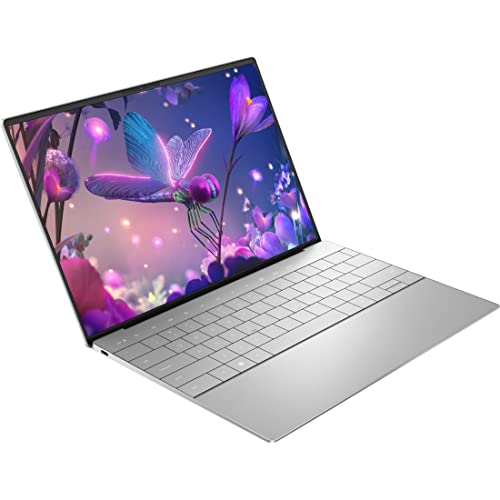
The Dell XPS 13 Plus ($999) enters this comparison as the Windows value play—Intel's mainstream Raptor Lake or Core Ultra platform in Dell's premium chassis at $100 below the MacBook Air. The XPS 13 Plus features a minimalist haptic-touch function row, a stunning 13.4" OLED display option (optional upgrade), and Dell's quality build materials. Performance in burst workloads is competitive; sustained performance trails M3 due to thermal limits in the thin chassis. Battery life (~8-10 hours) falls notably short of the MacBook Air's 12-15 hours. The primary use case for the XPS 13 Plus over the MacBook Air: Windows software requirements, preference for a more traditional Windows interface, or budget sensitivity where the $100 difference matters. For most cross-platform users, the MacBook Air 13" M3 is the stronger recommendation at comparable price.

Full Specs & Measurements
Upc884116439202
AsinB0BBGTT1R3
BrandDell
ColorSilver
Voltage4 Volts
Ram TypeDDR5 RAM
Model NameXPS 13 Plus
Model Year2022
Resolution1920 x 1200
Form FactorNotebook
Item Weight5 Pounds
Screen Size13.4 Inches
Chipset TypeIntel
Display TypeLED
ManufacturerDell Technologies
Model Number9320
Refresh Rate60 Hz
Video OutputUSB-C
Warranty TypeLimited, On Site
Built-In MediaAC Adapter, Power Cord, USB-C to 3.5mm Headset Adapter, XPS 13 9320
Control MethodTouch
Item Type NameNotebook
Audio RecordingYes
Hard-Drive Size512 GB
Number Of Cells3
Number Of Ports3
Processor BrandIntel
Processor Count1
Processor Speed4.7 GHz
Total Usb Ports1
Video ProcessorIntel
Cpu Model Numberi7-1260P
Has Color ScreenYes
Operating SystemWindows 11 Pro
Processor SeriesCore i7
Audio Output TypeSpeakers
Best Sellers Rank#115,234 in Computers & Accessories (See Top 100 in Computers & Accessories) #19,862 in Traditional Laptop Computers
Graphics Card Ram16 GB
Graphics Ram TypeShared
Native Resolution1920 x 1200 pixels
Touch Screen TypeCapacitive/In-cell
Webcam CapabilityNo
Bluetooth Support?Yes
Compatible DevicesExternal headsets, mice, keyboards, external displays, storage devices, and other accessories via USB, Wi-Fi, or Bluetooth
Display TechnologyLED
Hardware InterfaceBluetooth
Memory Clock Speed1600 MHz
Cellular TechnologyWireless lan
Wireless TechnologyBluetooth, Wi-Fi
Cpu Model Generation12th Gen
Graphics CoprocessorIntel Iris Xe Graphics
Graphics DescriptionIris Xe Graphics
Keyboard DescriptionChiclet
Ram Memory Installed16 GB
Warranty Description1 Year
Wireless Compability802.11ax
Hard Disk DescriptionSSD
Human-Interface InputTouchscreen
Ram Memory TechnologyLPDDR5
Optical Storage DeviceNo
Connectivity TechnologyBluetooth, USB, Wi-Fi
Ram Memory Maximum Size16 GB
Specific Uses For ProductBusiness
Biometric Security FeatureFingerprint Recognition
Display Resolution Maximum1920x1200 Pixels
Item Dimensions L X W X Thickness12.7"L x 15.59"W x 4.17"Th
Other Special Features Of The ProductAnti Glare Coating, InfinityEdge

Frequently Asked Questions

Is the MacBook Air M3 good enough for video editing?
Yes — for most video editors. MacBook Air M3 handles 4K H.264 and H.265 editing in Final Cut Pro or Premiere Pro without throttling for sessions up to 20-30 minutes. For continuous 4K ProRes rendering or multi-stream 4K editing, MacBook Pro M3's fan prevents thermal throttling — rendering 20-40% faster on hour-long jobs.
Does the MacBook Air M3 overheat?
The MacBook Air M3 doesn't have a fan, so it gets warm during intensive tasks — but it manages heat through the aluminum chassis. It throttles performance under sustained load (30+ minutes of intensive processing) to prevent overheating. For spreadsheets, browsing, writing, and short edits, thermal throttling never occurs.
Is the MacBook Pro worth $600 more than MacBook Air?
Only for specific use cases: continuous video rendering (Pro runs 20-40% faster sustained), 120Hz display preference, HDMI/SD card ports for field work, or sustained multi-hour computation tasks. For typical office work, photo editing, and light video editing, the Air M3 is identical in performance.
How does MacBook Air M3 compare to Dell XPS 13?
MacBook Air M3 has better single-core performance, longer sustained battery under macOS, and the premium Apple ecosystem. Dell XPS 13 (Snapdragon) has a 27-hour battery, Windows 11 Copilot+ features, and better port selection. macOS-exclusive apps (Final Cut, Logic Pro, Xcode) are the strongest argument for MacBook.
Can you upgrade MacBook Air M3 RAM after purchase?
No — MacBook memory (Unified Memory) is soldered to the chip and cannot be upgraded. Choose carefully at purchase: 8GB handles typical tasks, 16GB is recommended for running multiple apps plus video editing, 24GB for heavy multi-app professional workflows.

How We Analyze Products

We analyze Amazon review data — often thousands of reviews per product — to surface patterns that individual buyers miss. Our process aggregates star ratings, review counts, and buyer sentiment at scale, identifying which strengths and weaknesses appear consistently across the largest review samples available. The 1,132+ reviews analyzed on this page represent real verified-purchase feedback from Amazon buyers.

Each product earned its placement through data: total review volume, average rating, and the specific praise and complaints that repeat most often across buyers. No manufacturer paid for placement on this page. Products appear here because buyers endorsed them at scale, not because a company asked us to feature them.

We use AI to summarize review sentiment — not to fabricate opinions, but to condense what thousands of buyers actually wrote into a readable format. The pros and cons you see reflect the most common themes found in verified purchaser reviews, paraphrased for clarity. We do not claim to have accessed Reddit, YouTube, or specific publications in generating these summaries.

Prices shown reflect Amazon pricing at the time this page was last generated. Click “See Today’s Price” to get the current live price on Amazon. Read our full methodology →

Affiliate disclosure: When you buy through our links, we may earn a small commission at no extra cost to you. This helps us keep the reviews free and the data updated. Our recommendations are based on data, not who pays us. Learn more →