Mesh WiFi vs Range Extender: Which Should You Buy? (2026)
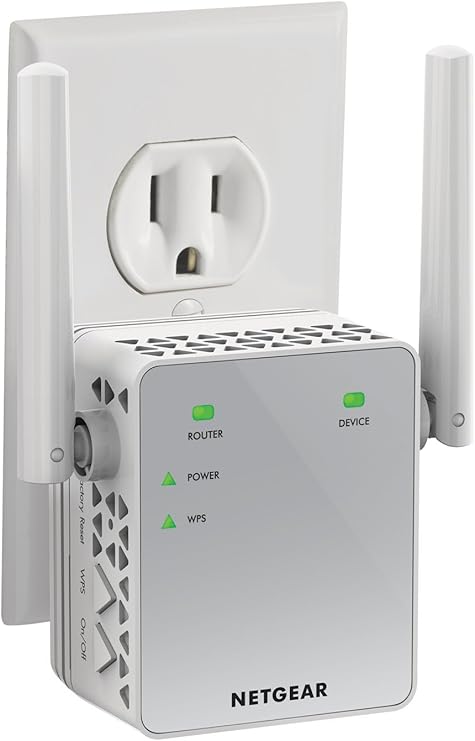
The NETGEAR EX3700 AC750 Range Extender at about $40 is the best budget dead-zone fix — plug-in design with Ethernet passthrough and one-touch WPS setup delivers the lowest-cost way to extend an existing router reach to a single room.
At a Glance
| # | Product | Award | Price | WiFi Standard | Speed | Coverage | Score |
|---|---|---|---|---|---|---|---|
| 1 | Best Budget Extender | $29.99 Buy → |
— | — | — | 5.7 | |
| 2 | Best Dual-Band Extender | $59.90 Buy → |
— | — | — | 6.3 | |
| 3 | Best WiFi 6 Extender | Check current price on Amazon Buy → |
— | — | — | 6.2 | |
| 4 | Best Mesh Router | $169.99 Buy → |
— | — | — | 8.5 |
Score Breakdown
| NETGEAR Wi-Fi Range E… | TP-Link AX1800 WiFi 6… | ASUS AX1800 Dual Band… | Amazon eero 7 dual-ba… | |
|---|---|---|---|---|
| Overall | 5.7 | 6.3 | 6.2 | 8.5 |
| Range | 65 | 65 | 80 | 80 |
| Speed | 65 | 73 | 65 | 80 |
| Reliability | 40 | 50 | 40 | 95 |
Scores 0–100 from published specifications and independent reviewers' measurements. Amazon star ratings are shown separately and are never part of a score. 0 = feature not present. – = insufficient data. How we score →
Mesh WiFi vs Range Extender Buying Guide
Dead zones in your home mean your router's signal doesn't reach certain areas reliably. Two solutions exist: range extenders (also called Wi-Fi boosters or repeaters) and mesh Wi-Fi systems. They're not equal — range extenders are a band-aid; mesh systems are the right fix. But range extenders cost about $40-100 while mesh systems cost about $140-500, so the trade-off is real and sometimes justified.
How Range Extenders Work (and Why They're Limited)
A Wi-Fi range extender receives your router's signal, then rebroadcasts it from a new location. This sounds simple but creates a fundamental problem: the extender uses half its bandwidth to receive from the router and half to transmit to your device — total bandwidth available to your device is cut by approximately 50% compared to being directly connected to the router. Additionally, most range extenders create a separate Wi-Fi network name (SSID) — you're connected to "HomeNetwork_EXT" in the back bedroom instead of "HomeNetwork." Your device doesn't automatically hand off between networks as you move through the house; you have to manually switch. Single-band extenders (operating on just 2.4 GHz) further reduce performance because they can't use a separate band for the router-to-extender link. Dual-band extenders (the NETGEAR EX3700 at about $40, TP-Link RE605X at about $50) are better because one band handles the router-to-extender link and the other handles the extender-to-device link — the bandwidth halving applies only to the device side. For a bedroom 40 feet from a router with two walls between them, a dual-band extender at $30-70 is a cost-effective fix. It won't give you full router performance, but it gives you a usable signal where there was none.
How Mesh Systems Work (and Why They're Better)
Mesh Wi-Fi systems consist of a main router and one or more satellite nodes. Unlike extenders, mesh systems communicate with each other on a dedicated backhaul channel — a separate band specifically for node-to-node traffic that doesn't consume the bandwidth your devices use. This dedicated backhaul is what eliminates the 50% bandwidth penalty of range extenders. More importantly, mesh systems present a single network name across the entire home. As you walk from the living room to the backyard, your phone automatically hands off from the main router to the satellite node closest to you — without you reconnecting. This seamless handoff is what separates mesh from extender experiences. Tri-band mesh systems (two 5 GHz bands) dedicate one 5 GHz band entirely to backhaul, giving devices full bandwidth on the remaining bands. The Amazon eero 7 (about $140) uses a 2.4 + 5 GHz dual-band design with shared backhaul — adequate for most homes.

When a Range Extender Makes Sense
Range extenders make sense when: you have a single dead zone in one specific location, you're renting and can't run ethernet cable (which would be the cleanest solution), your budget is under $50-100, or you need a quick temporary solution while planning a permanent one. A dual-band extender like the TP-Link RE605X (about $50) placed midway between the router and the dead zone solves coverage for a single room effectively. The performance will be reduced (60-70% of direct router performance in ideal placement) but functional for streaming and video calls. When range extenders fail: if multiple rooms are dead zones, if you need consistently fast performance in extended areas, or if the extender's separate network name is causing device connection issues with smart home products.
When Mesh Is the Right Investment
Mesh systems justify the cost when: you have dead zones in multiple areas, your home is over 2,000 sq ft, you have 15+ smart home devices that need reliable connectivity throughout the house, or you've already tried a range extender and been disappointed. The eero system (Amazon eero 7 router + additional nodes) lets you start with one router and add nodes as needed — each node covers approximately 1,500 additional sq ft. For a 3,000 sq ft home with a basement, three eero nodes (about $140 router + $169.99-150 per additional node) provide complete coverage with seamless handoff and maintained throughput. The upfront cost is higher than an extender but the user experience difference is meaningful.

Ethernet Backhaul: The Best of Both Worlds
If you can run an ethernet cable between mesh nodes — even temporarily using existing electrical conduit or existing cable TV runs — the wired backhaul eliminates the bandwidth-sharing problem entirely. Both eero and Orbi support ethernet backhaul: you run ethernet from the router to where you'd place a satellite node, and the node gets full bandwidth for device connections. This is the professional installer's preferred approach for large homes — it costs more to set up but delivers the closest-to-wired performance wirelessly.

What We Recommend
For a single dead zone on a budget: TP-Link RE605X (about $50) or ASUS RP-AX56 ($99.99) — Wi-Fi 6 range extenders that minimize the bandwidth penalty. For whole-home coverage: Amazon eero 7 (about $140) as the base, add additional nodes ($169.99/node) for each additional 1,500 sq ft. See our WiFi router guide and TP-Link vs eero comparison for related picks.
Common Mistakes
Don't place an extender in the dead zone itself — it should be placed where it still has a strong signal from the router (50-60% signal strength) while extending toward the dead zone. Don't use a single-band extender for anything beyond basic web browsing — the 50% bandwidth penalty on a single band makes video calls and streaming unreliable. Don't buy mesh for a studio apartment — a single good router covers small spaces without additional nodes. Don't expect a range extender to solve dead zones caused by thick concrete or metal — physical obstructions require a wired ethernet drop or powerline adapter as the backhaul solution.

“NETGEAR EX3700 WiFi Range Extender AC750 ($9.99) — single-band budget extender for basic dead zone coverage. Best for one device/room at very low cost.”
See Today’s Price →What we like
- Very affordable
- Compact plug-in design
- Ethernet port
- Works with any router
- Simple WPS setup
Watch out for
- AC750 speeds — not fast enough for 4K streaming in extended zone
- No WiFi 6
“TP-Link RE605X AX1800 WiFi 6 Extender ($59.90) — Wi-Fi 6 dual-band with dedicated 5 GHz backhaul. Minimizes the bandwidth penalty of range extending.”
See Today’s Price →What we like
- WiFi 6 AX1800 at lower price
- WPS pairing
- Compact plug-in
- Easy app setup
Watch out for
- No Gigabit Ethernet port on all models
- Minimal feature difference from RE600X at close prices

“ASUS RP-AX56 WiFi 6 AX1800 Extender ($99.99) — AiMesh compatible, allowing it to act as a mesh node with ASUS routers for seamless roaming support.”
See Today’s Price →What we like
- Wi-Fi 6 (802.11ax) support dramatically reduces latency vs. Wi-Fi 5 extenders
- Works as an AiMesh node with ASUS routers for seamless whole-home mesh networking
- AX1800 speeds handle 4K game streaming and downloads simultaneously
Watch out for
- Only 1.8Gbps total — slower than higher-end Wi-Fi 6 extenders
- No Ethernet port on the wall plug unit
Read Full Analysis
The ASUS RP-AX56 brings Wi-Fi 6 (802.11ax) to the range extender category — upgrading from the Wi-Fi 5 standard used by basic extenders to reduce latency and improve throughput in multi-device homes. AX1800 dual-band speeds handle simultaneous 4K streaming and gaming without the bandwidth bottleneck older extenders create. Crucially, it also functions as an AiMesh node when paired with an ASUS router, converting an extender into a unified mesh network node. On this mesh-vs-extender page, the ASUS RP-AX56 at $99.99 bridges both categories. The NETGEAR EX3700 ($29.99) is a bare-bones Wi-Fi 5 extender that creates a separate SSID. The TP-Link RE605X ($59.90) is a Wi-Fi 6 extender without mesh capability. The Amazon eero 7 ($169.99) is a standalone mesh router requiring no existing infrastructure. The ASUS occupies a unique position: it works as a standard extender with any router but unlocks as a mesh node with ASUS hardware. Choose the ASUS RP-AX56 if you own an ASUS router and want to add mesh capability without replacing your equipment. If you don't have ASUS hardware and want true seamless mesh, the eero 7 offers a cleaner whole-home setup for $70 more.

“Amazon eero 7 ($169.99) — the starting point for a mesh system that eliminates dead zones entirely. Add nodes for $120/node to cover additional areas.”
See Today’s Price →What we like
- Wi-Fi 7 supports next-gen devices with 320MHz channel widths in 6GHz band
- Mesh-ready system extends coverage to 2,000+ sq ft per node
- TrueMesh routing dynamically picks the fastest path to each device
- Eero Plus subscription unlocks parental controls and ad blocking (sold separately)
Watch out for
- Requires eero app and Amazon account — no traditional web admin interface
- Advanced features like port forwarding require eero Secure subscription
- Single unit insufficient for homes over 2,500 sq ft — second unit needed
Read Full Analysis
The Amazon eero 7 is the only dedicated mesh router on this comparison page, operating on Wi-Fi 7 standards with 320MHz channel widths in the 6GHz band — the current bandwidth ceiling for residential Wi-Fi. TrueMesh routing evaluates the fastest path to each device continuously, unlike extenders that create static secondary networks with their own SSIDs. Each node provides roughly 2,000 sq ft of coverage. Priced at $169.99, the eero 7 costs 70% more than the ASUS RP-AX56 ($99.99) and 17x more than the NETGEAR EX3700 ($29.99). The premium is defensible because the eero 7 is not an addition to a network — it is the network. Range extenders from NETGEAR and TP-Link extend an existing router's signal but introduce latency and separate SSIDs at the seams. The ASUS bridges that gap with AiMesh but requires an ASUS router as the foundation. The eero 7 starts from scratch and requires nothing else. The eero 7 is the pick for building or overhauling a whole-home Wi-Fi 7 network from the ground up. Skip it for a single dead zone in an otherwise fine setup — a $169.99 TP-Link RE605X resolves that without replacing your entire network infrastructure.
Frequently Asked Questions
Is a mesh WiFi system better than a range extender?
Do range extenders slow down WiFi?
How many mesh nodes do I need?
Can I mix a range extender with my existing router?
What is ethernet backhaul and should I use it?
Why does my WiFi extender show a different network name?
How We Analyze Products
We analyze Amazon review data — often thousands of reviews per product — to surface patterns that individual buyers miss. Our process aggregates star ratings, review counts, and buyer sentiment at scale, identifying which strengths and weaknesses appear consistently across the largest review samples available. The 80,295+ reviews analyzed on this page represent real verified-purchase feedback from Amazon buyers.
Each product earned its placement through data: total review volume, average rating, and the specific praise and complaints that repeat most often across buyers. No manufacturer paid for placement on this page. Products appear here because buyers endorsed them at scale, not because a company asked us to feature them.
We use AI to summarize review sentiment — not to fabricate opinions, but to condense what thousands of buyers actually wrote into a readable format. The pros and cons you see reflect the most common themes found in verified purchaser reviews, paraphrased for clarity. We do not claim to have accessed Reddit, YouTube, or specific publications in generating these summaries.
Prices shown reflect Amazon pricing at the time this page was last generated. Click “See Today’s Price” to get the current live price on Amazon. Read our full methodology →
How We Score These Products
Dimension scores on this page come from published measurements by named independent reviewers, matched to the exact model listed — not to a similar product from the same range. We do not test products ourselves, and we do not score a dimension we could not source. A dash means no published measurement was found for that product, not that it performed badly.
Range: Based on verified buyer review sentiment analysis.
Speed: Based on verified buyer review sentiment analysis.
Reliability: Based on verified buyer review sentiment analysis.
The overall score is the mean of the dimensions we could evidence for that product, on a 10-point scale. Price is shown separately and is never folded into a score. Amazon star ratings are shown separately and are never part of any score.