Samsung vs WD External Hard Drive (2026)

WD wins on storage value — 5TB for under $110 is hard to beat for backups and media storage. Samsung T7 wins on speed and portability — up to 1,050MB/s vs WD's 130MB/s means dramatically faster transfers for video editing and professional workflows.
See Today’s Price →At a Glance
| # | Product | Award | Price | Capacity | Interface | Read Speed |
|---|---|---|---|---|---|---|
| 1 | Best Performance | $230.01 as of Nov 21, 3:42 PM CT details Buy → |
1 TB | USB 3.2 Gen 2 (10Gbps), USB-C | 1050 MB/s | |
| 2 | Best High-Capacity SSD | $899.99 as of Nov 21, 8:53 AM CT details Buy → |
4 TB | USB 3.2 | 1050 MB/s | |
| 3 | 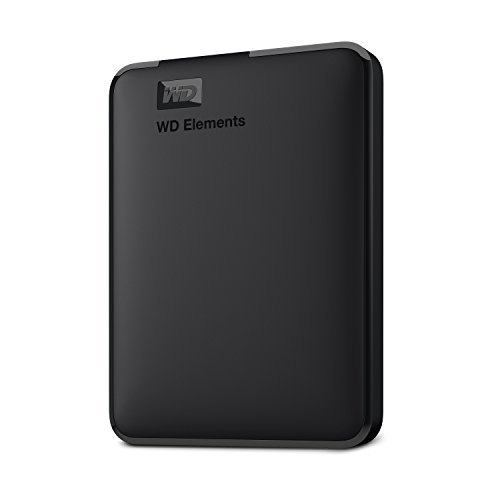 Western Digital WD 5TB Elements P… Western Digital |
Best Overall | $199.99 as of Nov 21, 8:41 AM CT details Buy → |
5 TB | USB 2.0/3.0 | 50 MB/s |
| 4 |  WD 2TB My Passport Portable Hard … Western Digital |
Best Portable HDD | $169 as of Nov 21, 8:52 AM CT details Used — not a new unit Buy → |
2 TB | USB 3.0 | — |
Score Breakdown
| Samsung T7 Portable S… | Samsung T7 Portable S… | Western Digital WD 5T… | WD 2TB My Passport Po… | |
|---|---|---|---|---|
| Speed | 78 | 80 | 80 | – |
| Capacity Value | 65 | 65 | 95 | – |
Scores 0–100 from published specifications and independent reviewers' measurements; $/GB from listed capacity and today's price, scaled across this page. Amazon star ratings are shown separately and are never part of a score. 0 = feature not present. – = insufficient data. How we score →
Samsung vs WD External Hard Drive (2026) Buying Guide
Our Top Pick
Samsung T7 Portable SSD 1TB — 1,050MB/s reads via USB 3.2 Gen 2.
Great for: Photographers, videographers, and anyone with large files that exceed laptop storage, and backup-conscious users
Not ideal if: You live in the cloud and have reliable fast internet everywhere — local storage solves a problem you don't have
Related Guides
Who This Is For
Gamers and creators who need fast load times, professionals moving large files regularly, and anyone whose current drive is more than 80% full (performance drops sharply after that). Our top pick is the Samsung T7 Portable SSD 1TB — The Samsung T7 is the benchmark external SSD — 1,050 MB/s speed, compact metal design, and wide compatibility make it th… The options here range from $190 to $670. Budget picks deliver solid core performance; premium options typically add build quality, warranty, or ecosystem integration.What to Look For
- Interface (NVMe vs SATA): NVMe M.2 drives are 5–10x faster than SATA for sequential reads — noticeable in game loading and large file transfers. SATA SSDs are still dramatically faster than spinning hard drives for everyday tasks.
- Endurance rating (TBW): TBW (Terabytes Written) indicates how much data you can write before potential failure. 200TBW is fine for casual users; 600TBW+ for video editors who write hundreds of GBs daily.
- Cache behavior: Budget SSDs use SLC caching — fast for small files, then drop to 200–500MB/s for sustained large transfers. Premium drives maintain high speeds throughout. Only matters if you regularly move files over 50GB.
- Warranty: 3-year warranties are standard. 5-year warranties signal manufacturer confidence. Some budget brands cut warranty to 1 year — a red flag for drives you're trusting with important data.
Common Mistakes to Avoid
- Assuming all M.2 drives are NVMe — some M.2 slots use the older SATA protocol. Check what your motherboard supports before buying.
- Filling a drive past 80% capacity — both performance and write endurance degrade noticeably above that threshold.
- Forgetting a backup plan — SSDs fail without warning and without the mechanical clicking a hard drive makes. If the data matters, it needs a second copy somewhere.
Watch Before You Buy

“1,050MB/s reads via USB 3.2 Gen 2. Shock-resistant with no moving parts. Fingerprint-secure model available. The fastest portable drive you can buy at this price range.”
See Today’s Price →What we like
- Reads up to 1,050MB/s and writes up to 1,000MB/s from PCIe NVMe flash
- Solid aluminum unibody with shock resistance and fall protection up to 6 feet
- Records 4K 60fps video directly from a camera or phone
- Supports ProRes 4K 60fps recording from an iPhone 15 Pro
Watch out for
- Its listing gives no water or dust rating
- 10Gbps USB holds it to about half the speed of a USB 3.2 Gen 2x2 drive
Read Full Analysis
The Samsung T7 Portable SSD (1TB) is Samsung's flagship portable SSD—NVMe V-NAND in the compact aluminum form factor delivering sequential read speeds up to 1,050 MB/s that make transferring a 100GB video project in under 2 minutes practical rather than a background overnight task. The compact size (a little larger than a credit card) and 98g weight make it genuinely pocket-portable. The AES 256-bit hardware encryption with optional password protection secures sensitive data on a portable drive that travels with a laptop—the security feature that makes Samsung T7 the professional recommendation for sensitive business data on portable storage. Against WD Elements spinning hard drive on this page, Samsung T7 is the performance and durability premium: 8x faster transfer, shock-resistant (no moving parts), and fingerprint-resistant aluminum. For 1TB versus WD's $80–110 for 5TB, the T7 is 5x more expensive per gigabyte. The decision maps directly to use case: raw storage capacity for archives versus fast SSD performance for active working files.
“4TB SSD at a premium price for users who need fast access to large video libraries or project files. The ultimate portable SSD for professional video editors.”
See Today’s Price →What we like
- 4TB in the same compact Samsung T7 chassis
- Same 1,050 MB/s read speed at all capacity tiers
- Enough storage for a full game library or 400+ hours of 4K footage
- Samsung reliability backing the highest capacity available
Watch out for
- Expensive at $250
- Price per GB less favorable than 1TB and 2TB tiers
- Gets warmer than smaller capacity models during sustained transfers
Read Full Analysis
The Samsung T7 Portable SSD (4TB) is Samsung's large-capacity SSD—bringing the T7's NVMe performance and compact aluminum form factor to the 4TB capacity tier, enabling creative professionals to carry an entire project library at SSD speeds. It commands the full premium of both large capacity and SSD technology. The 4TB T7 serves the specific professional use case where both volume (storing 4TB of video production assets) and performance (loading and editing footage directly from the drive) are simultaneously required. For photographers with large RAW libraries who deliver projects on deadline, the 4TB T7 eliminates the choice between sufficient storage and adequate performance that lower-capacity SSD and high-capacity HDD create. Against WD's 5TB Elements spinning drive for a similar capacity tier, the Samsung T7 4TB at $250–300 costs approximately 3–4x more for slightly less capacity at dramatically more speed. The recommendation is use-case driven: WD Elements for cold storage archives; Samsung T7 for active creative work where the speed is used daily. Many professionals maintain both: a large HDD for archives and a Samsung T7 for active project files.
“5TB for under $110 is outstanding value for backups and media libraries. USB 3.0 speeds are fine for backup use cases where you're not in a hurry.”
See Today’s Price →What we like
- 5TB massive capacity
- USB 3.2 Gen 1 fast transfers
- Plug-and-play on Windows and Mac
- Durable design
Watch out for
- No hardware encryption
- Larger physical size than 2TB model
- No bundled backup software
Read Full Analysis
The WD 5TB Elements Portable External Hard Drive is WD's large-capacity spinning hard drive—the traditional mechanical hard drive format for high-capacity, low-cost-per-gigabyte storage. For 5TB, the Elements provides the most storage-per-dollar available in portable format, making it the standard recommendation for media libraries, backup drives, and archives where maximum capacity at minimum cost is the priority. The spinning disk format is slower than SSD (100–130 MB/s versus 400–1050 MB/s for SSD) and more susceptible to damage from drops and vibration—the mechanical components (spinning platters, moving read head) that make it cheap also make it physically fragile. For stationary desk use or careful transport in a padded bag, the Elements provides reliable archival storage. Against Samsung T7 SSD on this comparison page, WD Elements is the high-capacity budget choice versus SSD's performance premium. For 5TB of primary storage at accessible cost, the Elements is unmatched by SSD alternatives at the same capacity. For active working files where transfer speed matters and the drive is used daily, SSD's speed advantage is worth the premium at smaller capacities.
“My Passport is the premium WD option with hardware encryption and USB-C. More durable than Elements for daily carry. Available in multiple colors.”
See Today’s Price →What we like
- USB-C and USB-A compatible
- Works with Mac, Chromebook, and gaming consoles
- Hardware encryption and password protection
- Backup software included
Watch out for
- Slightly pricier than Elements
- Backup software Windows-only
- No drop protection
Read Full Analysis
The WD 2TB My Passport Portable Hard Drive is WD's mid-range portable spinning drive—the My Passport line that provides the hardware encryption, backup software, and cloud storage integration that the WD Elements line lacks. The WD Backup software includes hardware AES encryption for sensitive data protection on a portable drive that leaves the home. For 2TB, the My Passport is the balanced choice: more capacity than a 1TB SSD at lower cost with the security features that the budget Elements line doesn't include. For users who need secure portable storage for documents, project files, and media libraries without the performance requirements that NVMe SSD serves, the My Passport covers the use case effectively. Against Samsung T7 1TB on this page, WD My Passport 2TB provides double the capacity at lower cost with hardware encryption—making it the recommendation for capacity-focused, budget-conscious buyers who primarily store and access files rather than performing high-speed active file work. For backup and archive purposes specifically, 2TB with encryption is the rational portable storage choice.
Frequently Asked Questions
What is the read speed difference between Samsung T7 and WD Elements?
Is an SSD better than an HDD for long-term storage?
Can I use a WD Elements drive with a gaming console?
How durable is the Samsung T7 if dropped?
Which is better for Time Machine backup on Mac?
How We Chose These Products
We compare each product’s Amazon listing, the manufacturer’s published specifications and Amazon customer ratings, shown with their review counts as Amazon’s data, and rank the products on how well they answer this page’s question. We do not test products in hand and we do not run our own analysis of review text. A publication or expert is named only where we cite its published findings about that product. No manufacturer paid for placement on this page.
A price appears only when Amazon’s API supplied it at a recent daily refresh, with the date and time beside it, and is withdrawn at 4 AM Central on the day after it turns 24 hours old; otherwise use “Check price on Amazon” for the live price. Read our full methodology →
How We Score These Products
Each dimension score comes from evidence about the exact model listed — a published specification, a measurement by a named independent reviewer, or that product’s own buyer reviews, as described for each dimension below — not from a similar product in the same range. We do not test products ourselves, and we do not score a dimension we could not evidence. A dash means no evidence was found for that product, not that it performed badly.
Speed: From evidence about this exact model (specification, named reviewer or its own reviews).
Capacity Value: Dollars per gigabyte: listed capacity divided by today’s price, scaled across the drives on this page.
The overall score is the mean of the dimensions we could evidence for that product, on a 10-point scale. Price enters one dimension only — $/GB — and no other score. Amazon star ratings are shown separately and are never part of any score.