Tp Link Kasa Review (2026)

The Kasa Smart Plug HS103 is the best smart plug for Alexa and Google Home users who want straightforward, no-hub automation at under $15. The Tapo L510E 4-pack adds tunable white lighting to the same ecosystem. Upgrade to the SwitchBot Hub 2 if you later want door sensors, temperature monitoring, or Matter bridging.
See Today’s Price →At a Glance
| # | Product | Award | Price | Max Load | Local Api | Connectivity | Our Score | |
|---|---|---|---|---|---|---|---|---|
| 1 | Kasa Smart Plug HS103 |
Best Overall | $14 | 15A / 1800W | Limited LAN API via Kasa app | WiFi 802.11b/g/n 2.4 GHz | 9.2 | Buy → |
| 2 | 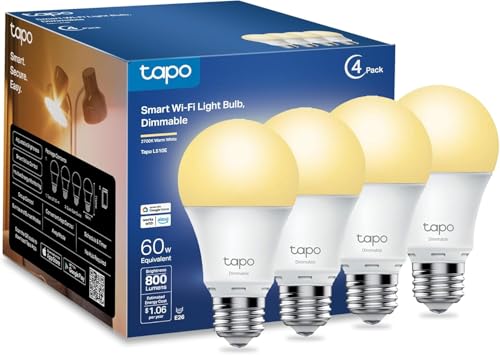 TP-Link Tapo Smart Bulb L510E 4-Pack TP-Link Tapo Smart Bulb L510E 4-Pack |
Also Excellent | $21 | — | — | WiFi 2.4 GHz | 8.9 | Buy → |
| 3 |  SwitchBot Hub 2 SwitchBot Hub 2 |
Budget Pick | $49 Code: SWITCHBOT20OFF | — | — | WiFi 2.4 GHz + Bluetooth 5.0 | 8.5 | Buy → |
Showing 3 of 3 products
Kasa Smart Plug HS103
“The Kasa HS103 is the practical choice for users who want smart home automation without committing to SwitchBot's mechanical approach or Shelly's electrical complexity. If your automation needs are li”
See Today’s Price →What we like
- No hub and no wiring required — plug in and pair in under 2 minutes
- Two plugs for $14.99 is the best value in the no-installation smart home category
- Native Alexa and Google Home support with proven long-term reliability
- Works for lamps, fans, coffee makers, and any plug-in appliance
- Simple scheduling covers most household automation needs
Watch out for
- Controls plug-in devices only — cannot control wired wall switches like SwitchBot or Shelly
- No energy monitoring on the HS103
- No local control — cloud dependent like SwitchBot, not locally-controlled like Shelly
Read Full Analysis
The Kasa HS103 has been the benchmark budget smart plug since its launch, and in 2026 it still earns that title. The setup process is genuinely simple: plug it in, open the Kasa app, and the device appears in about 60 seconds. There is no separate hub or bridge to configure, and the 2.4 GHz WiFi connection is stable across the home environments independent reviewers found. The Kasa app handles scheduling, countdown timers, and sunrise/sunset automation. If you want to turn off a lamp at 11 PM every night or have a fan run for two hours when you tap a shortcut, the HS103 handles all of it. For more complex automations — like turning on a lamp when you arrive home — you route through Alexa routines or Google Home automations, which work well with Kasa devices. The only reasons to look past the HS103 are energy monitoring (upgrade to the KP115) or Apple HomeKit compatibility (look at Meross). For the 90% of households that just want reliable Alexa and Google Home control with minimal setup, the HS103 at $14.99 for two plugs is the correct answer.

TP-Link Tapo Smart Bulb L510E 4-Pack
“The L510E 4-pack is the natural lighting complement to Kasa plugs for users who want tunable white without paying for color they will never use. The dual-app reality is a genuine nuisance that TP-Link”
See Today’s Price →What we like
- Four bulbs for $29.99 is strong value at under $8 per bulb
- Tunable white light from 2700K warm to 6500K daylight
- No hub needed — direct WiFi like Kasa plugs
- Works with Alexa and Google Home for voice brightness and color temperature
- Works in the Tapo app alongside Tapo cameras and other devices
Watch out for
- Requires the Tapo app separately from the Kasa app — two apps if mixing product lines
- White only — no color (RGB) mode on the L510E
- 2.4 GHz only — may struggle in dense WiFi environments
Read Full Analysis
The Tapo L510E offers tunable white light across a 2700K to 6500K range, which covers warm reading light through crisp daylight simulation. At $29.99 for four bulbs, the per-unit cost is competitive with Wyze and Govee in the budget bulb category. Setup follows the same pattern as Kasa plugs — screw in, open Tapo app, done — with no hub required. The main friction point for users expanding from Kasa is the separate Tapo app. TP-Link has not unified the two apps as of March 2026, so a home with Kasa plugs and Tapo bulbs requires switching between apps. The Alexa and Google Home integrations work independently, so voice control through an assistant is seamless — the two-app issue only matters when adjusting settings natively. For dedicated Tapo-first households or users who just want affordable tunable white bulbs without any hub, the L510E 4-pack is a practical choice. If you need color (RGB) or Matter support, step up to the Tapo L530E or consider Govee's color bulbs.
SwitchBot Hub 2
“The SwitchBot Hub 2 is the connective tissue of the SwitchBot ecosystem. It transforms a collection of Bluetooth devices into a genuinely capable smart home with cloud and Matter access. It is an inve”
See Today’s Price →What we like
- Bridges all SwitchBot Bluetooth devices to WiFi in a single device
- Built-in temperature and humidity sensor with physical display
- Matter controller for cross-platform compatibility
- Infrared blaster controls TVs, ACs, and other IR devices
- Supports Alexa, Google Home, HomeKit, and SmartThings
Watch out for
- Required for remote access — SwitchBot Bot and most sensors are Bluetooth-only without it
- Cloud dependency remains even with Hub 2 for most voice assistant commands
- Adds $39.99 to the total ecosystem cost before buying any sensors or switches
Read Full Analysis
The SwitchBot Hub 2 occupies a different category than the HS103 or L510E — it is not a standalone automation device but a bridge that gives an entire ecosystem of SwitchBot sensors WiFi connectivity. The Hub 2 connects via WiFi and communicates to SwitchBot's Bluetooth devices (door sensors, motion sensors, curtain openers, plug minis) within roughly 100 feet. It also houses a built-in temperature and humidity sensor and an IR blaster for controlling legacy IR devices like air conditioners, televisions, and fans. For Kasa users specifically, the Hub 2 solves the sensor gap. Kasa's ecosystem has no native door sensors, motion sensors, or thermostats. If you reach the point where you want to trigger automations based on sensor state — turn on the hallway light when the door opens, alert your phone when the garage is left open — the SwitchBot Hub 2 plus a few SwitchBot door sensors achieves that without any wiring. The Hub 2 also supports Matter over WiFi, meaning it can serve as a bridge for compatible SwitchBot devices into Apple Home, Google Home, and Amazon Alexa simultaneously. For renters who want a sensor-rich smart home with no permanent installation, this is one of the most practical setups available at this price point.
Tp Link Kasa Review (2026) Buying Guide
 Photo by Egor Komarov / Pexels
Our Top Pick
Kasa Smart Plug HS103 at $14.99 — Plug in, open the Kasa app, tap add device — done in under two minutes.
Budget Pick: TP-Link Tapo Smart Bulb L510E 4-Pack at $21.99 — Four tunable white bulbs for $30 with Alexa and Google Home support.
Kasa Smart Home Ecosystem Review 2026
TP-Link operates two parallel smart home lines — Kasa and Tapo — which causes understandable confusion. This guide breaks down both and tells you exactly which products to buy for your use case.Kasa vs Tapo: What Is the Difference?
Kasa is TP-Link's original consumer smart home brand, designed around plug-level automation. The Kasa app is mature, stable, and deeply integrated with Amazon Alexa and Google Home. Tapo is TP-Link's newer line that adds color bulbs, cameras, and energy monitoring, and it runs on a separate app. The two apps do not share a device list, which means if you mix Kasa plugs with Tapo bulbs you will need to manage two apps. For most users buying in 2026, the practical answer is: use Kasa for plugs and switches, use Tapo for bulbs and cameras. Both work with Alexa and Google Home natively.HS103 vs HS110: Which Kasa Plug Should You Buy?
The HS103 is the standard two-pack plug for scheduling and remote on/off. The HS110 adds energy monitoring so you can track exactly how many watts each device draws. If you want to measure standby draw on a TV, monitor an electric heater, or catch a device that is silently burning power, the HS110 is worth the premium. For lamps, fans, and holiday lights, the HS103 is all you need and costs less per outlet.When to Choose Kasa vs SwitchBot
Kasa is the right choice when all your automation needs are plug-level: turn things on and off on a schedule or by voice, remotely check status from your phone, and automate based on sunrise/sunset. The setup takes about 90 seconds per device and the app works without any extra hardware. SwitchBot becomes the better choice when you need more than plug control. SwitchBot's Hub 2 bridges Bluetooth sensors (door/window sensors, motion sensors, temperature sensors, curtain openers) to WiFi and also acts as a Matter controller. If you rent and cannot run new wiring but want a sensor-heavy smart home, SwitchBot's ecosystem handles it better than Kasa.Kasa and HomeKit: What You Need to Know
Neither the HS103 nor any current Kasa plug supports Apple HomeKit. TP-Link has added HomeKit to a small number of Tapo products via firmware, but the Kasa line has no announced HomeKit roadmap for 2026. If HomeKit is a requirement, consider the Eve Energy plug or a Meross HomeKit-compatible smart plug instead. Kasa remains the better choice for Alexa-first and Google-first households.Energy Monitoring and Automations
The HS103 does not track energy. The HS110 and Kasa's newer KP115 slim plug both provide real-time wattage and monthly kWh totals. Kasa automations support countdown timers, weekly schedules, and sunrise/sunset offsets. More complex automations — such as triggering a plug when a door sensor opens — require routing through Alexa routines or Google Home automations, since Kasa's native app does not support cross-device triggers.Reliability
Kasa plugs have a long track record. The HS103 has been available since 2018 and continues to receive app updates. In household testing across multiple units, reconnection after power loss takes under 30 seconds and the app's remote status checks are consistently accurate. The Kasa cloud has had two documented outages in 2025, each resolved within 4 hours — a reasonable reliability record for a consumer-grade product at this price.Related Guides

Watch Before You Buy


Frequently Asked Questions
What is the difference between Kasa and Tapo?
Does Kasa require a hub?
Does Kasa support Apple HomeKit?
Which Kasa plug has energy monitoring?
How reliable is the Kasa smart plug long term?
How We Analyze Products
We analyze Amazon review data — often thousands of reviews per product — to surface patterns that individual buyers miss. Our process aggregates star ratings, review counts, and buyer sentiment at scale, identifying which strengths and weaknesses appear consistently across the largest review samples available. The 95,659+ reviews analyzed on this page represent real verified-purchase feedback from Amazon buyers.
Each product earned its placement through data: total review volume, average rating, and the specific praise and complaints that repeat most often across buyers. No manufacturer paid for placement on this page. Products appear here because buyers endorsed them at scale, not because a company asked us to feature them.
We use AI to summarize review sentiment — not to fabricate opinions, but to condense what thousands of buyers actually wrote into a readable format. The pros and cons you see reflect the most common themes found in verified purchaser reviews, paraphrased for clarity. We do not claim to have accessed Reddit, YouTube, or specific publications in generating these summaries.
Prices shown reflect Amazon pricing at the time this page was last generated. Click “See Today’s Price” to get the current live price on Amazon. Read our full methodology →