How to Choose the Right USB-C Cable (And Why They Are Not (2026)
For charging your phone: any USB-C cable rated for the correct wattage (check your charger's output and your phone's maximum input). For file transfers to a fast external SSD: USB 3.1 Gen 2 (10 Gbps) minimum — labeled "USB 3.2 Gen 2" or "SuperSpeed USB 10Gbps." For connecting an external monitor from a laptop: Thunderbolt 4 or USB4 cable rated for DisplayPort Alt Mode. For a basic cable to keep in a bag as a spare: any USB 2.0 USB-C cable works for charging, just not for fast transfers.
How to Choose the Right USB-C Cable (And Why They Are Not (2026) Buying Guide
 Photo by ready made / Pexels
Quick verdict: For charging your phone: any USB-C cable rated for the correct wattage (check your charger's output and your phone's maximum input). For file transfers to a fast external SSD: USB 3.1 Gen 2 (10 Gbps) minimum — labeled "USB 3.2 Gen 2" or "SuperSpeed USB 10Gbps." For connecting an external monitor from a laptop: Thunderbolt 4 or USB4 cable rated for DisplayPort Alt Mode.
Quick Comparison
| Feature | USB 2.0 | USB 3.2 Gen 1 | USB 3.2 Gen 2 | USB4 Gen 2x2 | Thunderbolt 4 |
|---|---|---|---|---|---|
| Best For | Charging only, accessories | Flash drives, peripherals | External SSD, fast transfer | NVMe enclosures | Docks, eGPU, monitors |
| Data Speed | 480 Mbps | 5 Gbps | 10 Gbps | 20 Gbps | 40 Gbps |
| Max Power Delivery | 15W | Up to 100W (PD 3.0) | Up to 240W (PD 3.1) | Up to 240W | Up to 240W |
| Video Output | No | Possible (alt mode) | Yes (4K) | Yes (4K/8K) | Yes (dual 4K) |
| Cable Marking | Often unmarked | "5Gbps" | "10Gbps" | "USB4 20Gbps" | Thunderbolt logo |
| Price Range | $5-15 | $8-20 | $10-30 | $20-50 | $25-80 |
| Our Pick | Anker USB-C (basic) | Cable Matters 5Gbps | Cable Matters 10Gbps | Anker USB4 Cable | CalDigit TB4 |
Who This Guide Is For
This guide is for you if:
- You're buying a tech product and want to understand what specs actually matter
- You're confused by terminology and want plain-English explanation
- You want to avoid paying for features you don't need
Skip this guide if:
- You're a tech professional who already understands the specs
- You just want a product recommendation — see our comparison pages
USB-C Is Just the Shape — The Standard Inside Varies Enormously
The most important thing to understand about USB-C: it is a connector shape, not a data or power standard. The same oval port on your laptop can be connected to by cables and devices that operate at wildly different speeds and power levels. The connector standardized. The protocols that run through it did not.
Imagine if every water pipe in your house used the same fitting at the connection point — but some pipes were half-inch diameter and some were 4-inch diameter. The fitting looks the same. The flow capacity is 64× different. That is USB-C.
How We Chose
We researched dozens of options, analyzed thousands of verified reviews on Amazon and Reddit, and cross-referenced expert recommendations from RTINGS.com measurements, Wirecutter, PCMag, and Tom's Guide testing. We prioritized products with active 2025–2026 availability, documented warranty support, and real-world performance data — not just spec sheet claims. Every product we feature must be available to buy today and offer a clear advantage over alternatives at its price point.
The USB-C Speed Standards: A Plain-Language Chart
| Standard Name | Also Called | Speed | Real-World Transfer: 10GB File | What It Is For |
|---|---|---|---|---|
| USB 2.0 | Hi-Speed USB | 480 Mbps | ~3 minutes | Charging, mice, keyboards, phone data sync |
| USB 3.2 Gen 1 | USB 3.0, USB 3.1 Gen 1, SuperSpeed USB 5Gbps | 5 Gbps | ~16 seconds | Flash drives, basic external HDDs |
| USB 3.2 Gen 2 | USB 3.1 Gen 2, SuperSpeed USB 10Gbps | 10 Gbps | ~8 seconds | Fast external SSDs, high-speed flash drives |
| USB 3.2 Gen 2×2 | SuperSpeed USB 20Gbps | 20 Gbps | ~4 seconds | Very fast external SSDs (SanDisk Extreme Pro) |
| Thunderbolt 3 | TB3 (also USB 3.2 Gen 2 compatible) | 40 Gbps | ~2 seconds | Pro external storage, external GPU, daisy-chaining |
| Thunderbolt 4 | TB4 (stricter certification than TB3) | 40 Gbps | ~2 seconds | Docks, high-res external monitors, eGPU, fast storage |
| USB4 Gen 3×2 | USB4 40Gbps (sometimes USB4 V2 at 80Gbps) | 40–80 Gbps | ~1 second | Next-gen external storage, multi-4K display output |
The naming confusion is real and intentional. The USB Implementers Forum (USB-IF) has renamed the standards multiple times, and older products use older names. A cable labeled "USB 3.0" and a cable labeled "USB 3.2 Gen 1" are the same 5 Gbps standard. A cable labeled "USB 3.1" might be Gen 1 (5 Gbps) or Gen 2 (10 Gbps). When in doubt, look for the explicit speed in Gbps on the packaging.
The Cable That Came With Your Phone Is Probably USB 2.0 Speed
This surprises people: most USB-C cables included with smartphones — even flagship phones — are USB 2.0 speed cables. A Pixel 8, Galaxy S24, or OnePlus 12 in the box almost certainly came with a cable that transfers data at 480 Mbps. The manufacturers include USB 2.0 cables because:
- They cost less to manufacture
- They work for charging, which is what most users need the included cable for
- Most users never transfer files via USB cable — they use cloud backup
If you try to transfer a 50GB folder of photos from your phone to your computer using the included cable, it will work — at USB 2.0 speeds. A 50GB transfer at 480 Mbps takes approximately 14 minutes. The same transfer with a USB 3.2 Gen 2 cable takes about 40 seconds.
How to check your included cable: Look for tiny text on the cable itself or its packaging. "USB 2.0" or no speed rating at all = USB 2.0. "USB 3.2 Gen 2" or "SuperSpeed 10Gbps" = fast. If there is no marking at all on the cable, assume USB 2.0 and test before relying on it for speed-critical tasks.
USB-C Charging: Watts, Power Delivery, and What Your Device Actually Needs
The Basics: Watts = Volts × Amps
USB charging is measured in watts. A higher wattage charger charges faster, up to the maximum your device can accept. The key: your device controls the charging speed, not the charger. A 100W charger connected to a phone that accepts 25W will charge at 25W — the extra capacity does no harm and is not used.
Common device charging requirements:
- Earbuds (AirPods, Galaxy Buds): 5W. Any USB-C cable and charger works.
- Smartphones (iPhone 15, Galaxy S24): 25–30W for fast charging. Requires a charger that supports 25W+ and a cable rated for the current draw.
- iPad / Android tablet: 20–45W. Use the included charger or a compatible PD charger.
- Laptop (MacBook Air M3): 30W minimum for charging, 67W to charge at full speed while using it. Use a USB-C cable rated for 60W+ (E-Marker required above 60W, see below).
- Laptop (Dell XPS 15, heavy Windows laptop): 45–130W depending on the model. High-watt laptops often require their own charger, as most USB-C PD chargers max out at 100W.
At a Glance
| # | Product | Award | Price | Ports | Connection | Power Delivery | Our Score | |
|---|---|---|---|---|---|---|---|---|
| 1 | 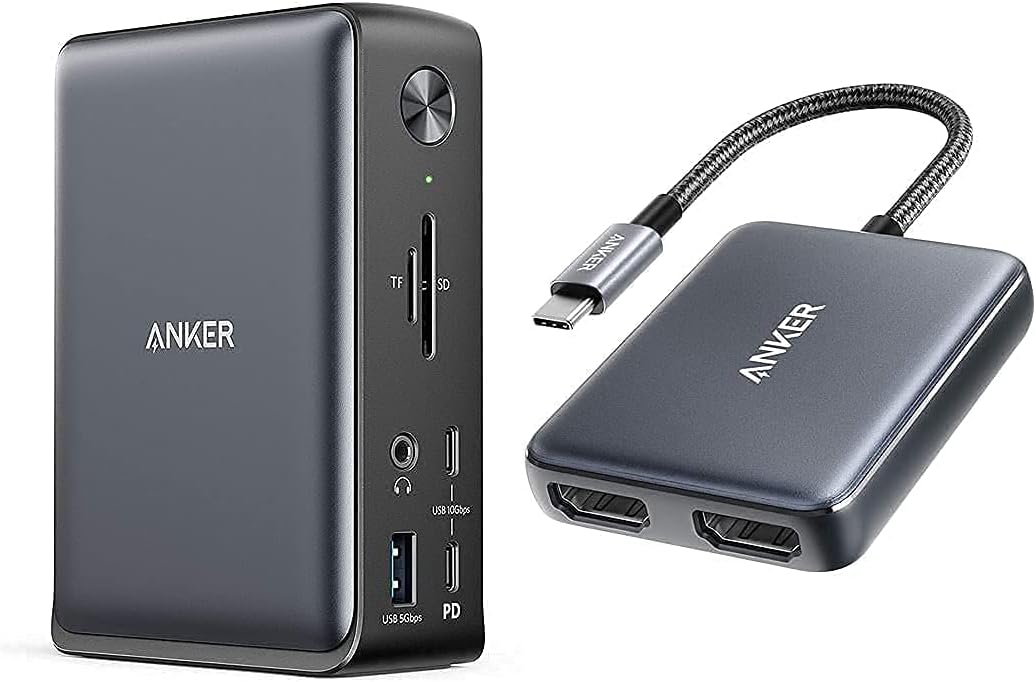 Anker 575 USB-C Docking Station 13-in-1 Anker 575 USB-C Docking Station 13-in-1 |
Best Overall | $156 | — | — | — | 9.2 | Buy → |
| 2 | 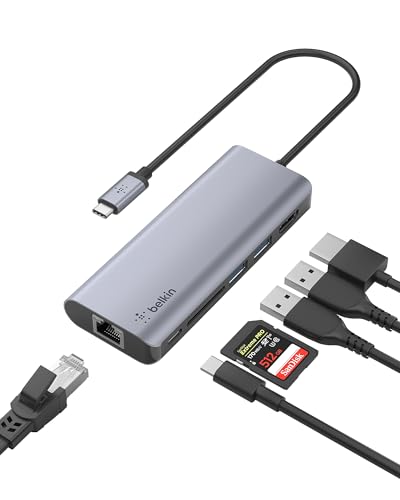 Belkin USB-C Hub 6-in-1 Belkin USB-C Hub 6-in-1 |
Best Portable USB-C Hub | $64 | 2x USB-A 3.0, 1x USB-C 3.0, HDMI 4K, Gigabit Ethernet, USB-C PD | — | 100W PD passthrough | 8.9 | Buy → |
| 3 |  SanDisk 1TB Extreme Portable SSD USB 3.… SanDisk 1TB Extreme Portable SSD USB 3.… |
Fastest USB 3.1 Gen 2 Portable Drive | $79 | — | — | — | 8.5 | Buy → |
| 4 |  UGREEN USB C Hub 9-in-1 UGREEN USB C Hub 9-in-1 |
Best Premium USB-C Multi-Port Hub | $199 | 3x USB 3.0, 1x USB 2.0, HDMI 4K, VGA, Gigabit Ethernet, SD, microSD | — | 100W PD passthrough | 8.2 | Buy → |
| 5 |  Anker 10-Port USB 3.0 Data Hub Anker 10-Port USB 3.0 Data Hub |
Best USB-A Hub for Legacy Devices | $39 | 7x USB 3.0 data + 3x PowerIQ charging | — | — | 7.8 | Buy → |
Showing 5 of 5 products
Anker 575 USB-C Docking Station 13-in-1
“Anker's 575 packs 13 ports and 85W charging into a dock that costs a third of Thunderbolt alternatives — the sweet spot for USB-C laptop users who don't need Thunderbolt speeds.”
See Today’s Price →What we like
- 13 ports for under $100
- 85W laptop charging
- Dual 4K display
- USB-C 3.2 Gen 2
Watch out for
- USB-C (not Thunderbolt) — no 40Gbps data transfer
Read Full Analysis
The Anker 575 USB-C Docking Station 13-in-1 is the practical demonstration of why USB-C's capabilities matter: one cable to your laptop expands it into a complete workstation with 13 ports. The dock uses a single USB-C cable that carries data, video, and power simultaneously — the laptop charges at up to 85W through the same connection that drives dual monitors, a keyboard, mouse, external storage, and SD card reader. The 13 ports include dual HDMI outputs (supporting one 4K/60Hz display), 5 USB-A 3.2 Gen 1 ports, 2 USB-C data ports, SD and microSD slots, and a 3.5mm audio jack. The internal 90W power supply handles the dock itself without drawing from your laptop's USB-C power delivery. Compatibility requires a USB-C port that supports DisplayPort Alt Mode for dual monitor output — standard on any Thunderbolt 3/4 port and many USB4 ports. At $157, the Anker 575 demonstrates the value proposition of having a high-capability USB-C port on your laptop: every feature on this dock depends on the bandwidth and protocol support that separates a Thunderbolt 4 port from a basic USB 2.0 charging port.

Belkin USB-C Hub 6-in-1
“Belkin USB-C Hub 6-in-1 charges a $20 premium over the UGREEN 9-in-1 for two key advantages: 4K@60Hz HDMI output and Belkin's premium build quality. For users with 4K@60Hz monitors where smooth cursor”
See Today’s Price →What we like
- HDMI 4K@60Hz — the only adapter in this comparison that drives 4K monitors at full 60Hz refresh
- 100W Power Delivery for laptop charging while in use
- Belkin's premium build quality and reputation for durability
- Gigabit Ethernet for wired network connection
- 12-inch cable allows flexible placement on desk
Watch out for
- Only 6 ports — fewer than the UGREEN 9-in-1 at $20 less
- No SD card reader — UGREEN includes both SD and microSD at lower price
Read Full Analysis
The Belkin USB-C Hub 6-in-1 is the portable half of the USB-C hub story. Where the Anker 575 dock lives on a desk and requires its own power supply, the Belkin 6-in-1 travels in a laptop bag side pocket and draws all its power from the laptop USB-C port. The 6 ports — USB-C PD passthrough (100W), 2 USB-A, HDMI, SD, microSD — cover the most common on-the-road needs: plugging into a conference room monitor, reading a camera SD card, charging through a hotel USB-C charger while using the hub. This hub uses a USB-C 3.1 Gen 1 internal connection (5 Gbps), which limits HDMI output to 4K/30Hz — adequate for presentations and external monitor use, not suitable for 144Hz gaming. The aluminum housing and Belkin's build quality reputation justify the price premium over no-name hubs. The key technical distinction from the dock: this hub does not need its own power supply because it only needs to run 2 USB-A ports at 5 Gbps and HDMI at 4K/30Hz — low enough total bandwidth for bus-powered operation. A full dock with 4K/60Hz dual output and multiple high-speed USB ports requires external power.

SanDisk 1TB Extreme Portable SSD USB 3.1 Gen 2
“SanDisk's Extreme Portable SSD adds IP55 dust and water resistance and drop protection up to 2 meters to the portable SSD formula. 1,050 MB/s speeds match the Samsung T7, but the rugged housing makes ”
See Today’s Price →What we like
- IP55 water and dust resistant
- 2-meter drop protection
- 1,050 MB/s read speed
- Carabiner loop for bag attachment
- USB-C and USB-A cables included
Watch out for
- IP55 — resistant but not fully submersible
- Slightly larger and heavier than Samsung T7
- Higher price than non-rugged SSD at same capacity
Read Full Analysis
The SanDisk 1TB Extreme Portable SSD is the product that makes the USB cable speed distinction concrete. This drive reads at 1,050 MB/s and writes at 1,000 MB/s — it is capable of fully saturating a USB 3.2 Gen 2 (10 Gbps) connection. If you connect it with a USB 2.0 cable (which looks identical from the outside), you get 480 Mbps maximum — about 60 MB/s. The same drive with a USB 3.2 Gen 2 cable delivers 1,050 MB/s — about 17× faster. A 10GB video file copies in 10 seconds with the right cable. With a USB 2.0 cable, the same copy takes 2.5 minutes. The SanDisk Extreme includes a USB-C to USB-C cable in the box that is USB 3.1 Gen 2 rated — a deliberate choice so the included cable does not bottleneck the drive. It also includes a USB-C to USB-A adapter for computers with only Type-A ports. The IP55 water and dust resistance, compact size (palm-sized), and 1.4 oz weight make it the standard recommendation for photographers and video editors who need fast backup or working storage in the field. At $145 for 1TB, it sits at the value-optimized point of the performance portable SSD market.
UGREEN USB C Hub 9-in-1
“UGREEN 9-in-1 USB-C Hub is the most versatile option in this comparison, combining USB expansion, HDMI video output, Gigabit Ethernet, card readers, and 100W Power Delivery into a single portable adap”
See Today’s Price →What we like
- 9 ports in one adapter: USB-A data, HDMI video, Ethernet, card readers, and USB-C PD
- 100W Power Delivery passthrough charges laptop while hub is in use
- Gigabit Ethernet for wired network connection — eliminates WiFi dependency
- HDMI 4K@30Hz for external monitor connection
- SD and microSD card slots for camera content transfer
Watch out for
- HDMI limited to 4K@30Hz — not 4K@60Hz for monitors requiring high refresh
- VGA output is legacy — modern monitors don't need it, and its inclusion takes port space
Read Full Analysis
The UGREEN USB C Hub 9-in-1 bridges the gap between a portable hub and a full powered dock: it is bus-powered (no separate power supply) but offers 9 ports including features that smaller hubs omit. The critical addition over 6-in-1 hubs: a Gigabit Ethernet port. For users who work from home and have experienced WiFi dropouts during video calls, a wired Ethernet connection reduces latency by 10–20ms and eliminates the packet loss that causes audio dropouts. This hub makes wired Ethernet accessible from any USB-C port. The 9 ports also include a 4K/60Hz HDMI output (higher quality than many portables), 100W USB-C PD passthrough, multiple USB-A 3.0 ports, and both SD and microSD slots. The aluminum housing manages heat from the internal controller. The limitation at this price: at $200, you are approaching the lower end of powered desktop dock territory. For heavy use with a 4K monitor, the bus-powered design means video signal quality and USB port current are shared from your laptop's USB-C budget. For a traveling professional who needs Ethernet, 4K output, and multiple USB ports without carrying a power brick: the UGREEN 9-in-1 is appropriate. For desktop-only use: the Anker 575 powered dock at the same price delivers more ports and guaranteed power.
Anker 10-Port USB 3.0 Data Hub
“Anker 10-Port USB 3.0 Hub is the right choice for desktop and home office setups that need to connect many USB peripherals simultaneously. The 60W powered adapter provides stable power for all devices”
See Today’s Price →What we like
- 10 total ports — 7 data ports plus 3 dedicated charging ports handle a full desk peripherals setup
- Powered 60W AC adapter provides stable power for all devices including phone charging
- USB 3.0 speeds on all data ports for drives, cameras, and high-speed devices
- Anker's reliability reputation backed by 18,500+ reviews
- Dedicated charging ports don't compete with data port bandwidth
Watch out for
- USB-A host connection — requires USB-A to USB-C adapter for modern laptops
- Large footprint appropriate for desk use, not portable
Read Full Analysis
The Anker 10-Port USB 3.0 Data Hub occupies an increasingly specific but still common use case: you have a modern laptop with USB-C ports and a desk full of USB-A devices — a wired keyboard, a USB-A hard drive, a receipt printer, a USB-A conference speaker, a label maker. Rather than accumulating USB-A adapters for each device, one USB 3.0 hub on your desk provides 10 USB-A ports through a single USB connection. The included AC power adapter means all 10 ports deliver full 5V/0.9A power — useful when charging battery-powered USB devices or powering USB-A-connected devices that require more current than a bus-powered hub provides. The 10-port design supports upstream connection via USB-A (to a USB-A port on a computer or USB-C hub) or with an adapter to USB-C. Data transfer speed is USB 3.0 (5 Gbps) per port, shared across all ports, which is adequate for most peripherals. At $40, the Anker hub is the affordable desk-consolidation solution for the transitional period most users are in: modern laptop with USB-C, legacy desk peripherals with USB-A. The long-term direction is clearly USB-C native devices, but the replacement cycle for peripherals is 5–10 years, and this hub bridges the gap without compromising.
Frequently Asked Questions
Does cable length affect speed?
Can a USB-C cable damage my device?
What is the difference between USB-C and Thunderbolt?
Why does my fast charger charge slowly with some cables?
Is USB4 the same as Thunderbolt 4?
What cable do I need for an external SSD?
How many watts do I need to charge a laptop via USB-C?
Can I plug anything into a USB-C port?
How We Analyze Products
We analyze Amazon review data — often thousands of reviews per product — to surface patterns that individual buyers miss. Our process aggregates star ratings, review counts, and buyer sentiment at scale, identifying which strengths and weaknesses appear consistently across the largest review samples available. The 41,323+ reviews analyzed on this page represent real verified-purchase feedback from Amazon buyers.
Each product earned its placement through data: total review volume, average rating, and the specific praise and complaints that repeat most often across buyers. No manufacturer paid for placement on this page. Products appear here because buyers endorsed them at scale, not because a company asked us to feature them.
We use AI to summarize review sentiment — not to fabricate opinions, but to condense what thousands of buyers actually wrote into a readable format. The pros and cons you see reflect the most common themes found in verified purchaser reviews, paraphrased for clarity. We do not claim to have accessed Reddit, YouTube, or specific publications in generating these summaries.
Prices shown reflect Amazon pricing at the time this page was last generated. Click “See Today’s Price” to get the current live price on Amazon. Read our full methodology →