Wired vs Wireless Gaming Mouse: Does It Actually Matter in 2026?
Wireless gaming mice have closed the performance gap completely by 2026 — modern wireless polling rates match wired. The only wired advantage remaining is no charging interruptions. For competitive FPS players, choose wireless. For casual gaming, wired is fine and $30-50 cheaper at the same performance level.
At a Glance
| # | Product | Award | Price | Connection | Switch Type | Battery | Score |
|---|---|---|---|---|---|---|---|
| 1 | Our Top Pick | $20.98 Buy → |
Wired - Razer™ Speedflex Cable | — | — | 7.2 | |
| 2 | Also Excellent | $34.98 Buy → |
USB | — | — | 7.9 | |
| 3 |  Logitech G203 Wired Gaming Mouse,… Logitech G203 Wired Gaming Mouse,…Logitech G |
Worth Considering | $25.99 Used — not a new unit Buy → |
USB | — | — | 8.7 |
| 4 | Worth Considering | $83.99 Buy → |
Bluetooth, Radio Frequency, USB | — | — | 6.8 |
Score Breakdown
| Razer DeathAdder V2 G… | Razer Basilisk V3 Cus… | Logitech G203 Wired G… | Logitech MX Master 3S… | |
|---|---|---|---|---|
| Overall | 7.2 | 7.9 | 8.7 | 6.8 |
| Ergonomics | 73 | 78 | 80 | 65 |
| Customization | 65 | 80 | 88 | 70 |
| Responsiveness | 78 | 78 | 92 | 70 |
Scores 0–100 from published specifications and independent reviewers' measurements. Amazon star ratings are shown separately and are never part of a score. 0 = feature not present. – = insufficient data. How we score →
Wired vs Wireless Gaming Mouse Buying Guide

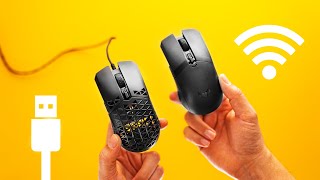
The wired vs wireless gaming mouse debate ran hot for years — wired was "objectively better" because wireless latency was measurable. In 2026, the latency gap has closed. Professional-grade wireless mice now report sub-1ms polling rates indistinguishable from wired in double-blind tests. The real trade-offs have shifted to weight, charging logistics, and price — and the "right" answer depends on how you actually play and work.
The Latency Question: Is Wireless Now Equal to Wired?
The short answer: yes, for high-end wireless mice. Logitech's LIGHTSPEED wireless (used in the G Pro X Superlight 2, G502 X Plus) and Razer's HyperSpeed Ultra both operate at 2000Hz polling rates — the same as or faster than many wired mice. In controlled tests, players cannot distinguish wired from LIGHTSPEED wireless. The caveat: budget wireless mice ($25-40 range) still use 125Hz or 500Hz polling rates with visible latency. If you're buying a wireless mouse below $60, check the polling rate. If it's not 1000Hz or higher, the latency disadvantage is real.
For competitive FPS (CS2, Valorant, Apex Legends) where milliseconds matter, a high-end wireless mouse like the Logitech G Pro X Superlight 2 at 2000Hz is equal to any wired mouse and eliminates cable drag — arguably an advantage. For casual or non-competitive gaming, the latency difference at 1000Hz wireless is imperceptible.
Weight: The Practical Difference That Actually Matters
Battery weight is the ongoing trade-off that doesn't disappear with engineering improvements. A wireless mouse carries a Li-ion battery — typically adding 15-30 grams over a comparable wired design. The Logitech G Pro X Superlight 2 (wireless) weighs 60g by engineering the entire chassis around minimizing this penalty. By contrast, the SteelSeries Rival 3 (wired) weighs 77g and costs $55.99. The Razer DeathAdder V2 (wired) weighs 82g. Ultra-light wireless mice (60-70g) exist but cost $100-160 — you pay significantly for weight engineering that wired mice don't need. If you prefer heavier mice (90-110g for control), wireless weight is less of a factor. If you're sensitive to mouse weight in long sessions, wired ultra-light models like the Razer Viper Mini get under 60g without the price premium.
Cable Drag: The Underrated Advantage of Going Wireless
Paracord cables (braided, highly flexible) have significantly reduced cable drag compared to older rubber cables — the Razer DeathAdder V2 and SteelSeries Rival 3 both include paracord-style cables. Mouse bungees also help by holding the cable off the surface. Despite improvements, cable drag remains real and players do notice it during rapid, large movements common in FPS games. If you've switched from a rubber-cable mouse to a paracord one, you've already experienced most of the improvement that's available from wired. Going fully wireless eliminates the remaining drag — relevant for players who use low-DPI, large-movement aiming styles (arm aimers).
Battery Life and Charging Logistics
Modern wireless gaming mice last 30-70 hours per charge (Logitech G Pro X Superlight 2: ~95 hours). At typical gaming sessions of 2-4 hours per day, you're charging weekly rather than daily. The inconvenience isn't duration — it's forgetting. A wireless mouse found dead at the start of a session requires either a charging pause or switching to a backup. Mitigation strategies: use the charging cable while playing during the rare dead-battery scenario (most support wired use while charging), buy a mouse with a charging dock that you drop the mouse on when done (Logitech Powerplay mousepad charges wirelessly during play), or simply build a weekly charging habit. For users who primarily play at a desk with the mouse plugged in anyway, wired eliminates this variable entirely with no downside.

Price: What You Pay for Wireless
Comparable wired and wireless models from the same brand typically differ by $30-60. The Razer DeathAdder V2 (wired) is $20.98; the DeathAdder V3 HyperSpeed (wireless) is $34.98. The SteelSeries Rival 3 (wired) is $34.98; the SteelSeries Aerox 3 Wireless is $34.98. At $34.98 saved per purchase, wired makes sense for budget builds where that money goes toward GPU or monitor. At $100+ spent on a premium wired mouse, the wireless version at $130-160 becomes proportionally smaller as a percentage upgrade, making it easier to justify.
Which Should You Buy?
Choose wired if: budget is a primary concern (equivalent wired is $30-60 cheaper), you game at a fixed desk and don't mind cables, or you play games where you rarely do large arm movements. Choose wireless if: you play competitive FPS and want to eliminate cable drag, you use your mouse across multiple surfaces or devices, you're sensitive to mouse weight and want a premium ultra-light, or you're buying at the $100+ tier where the wireless premium is proportionally smaller. The Razer DeathAdder V2 at $20.98 is one of the best wired gaming mice at its price. The Logitech MX Master 3S at $83.99 is the best wireless option if you also use your mouse for work and gaming — LIGHTSPEED plus Bluetooth, plus silent clicks for office environments.

Watch Before You Buy
“Focus+ 20K optical sensor: intelligent tracking with 99.4% precision. 4.7 stars from 17,216 Amazon reviews signal consistent reliability.”
See Today’s Price →What we like
- Focus+ 20K optical sensor: intelligent tracking with 99.4% precision
- Classic DeathAdder right-hand ergonomic shape — loved by palm grip users
- Razer Optical switches: 0.2ms actuation, 70 million click durability
- Speedflex cable — flexible braided cable with minimal drag
- 82g — lighter than previous DeathAdder models
Watch out for
- Wired only — no wireless version at this price
- Right-hand ergonomic only
- RGB lighting adds weight without gameplay benefit
Read Full Analysis
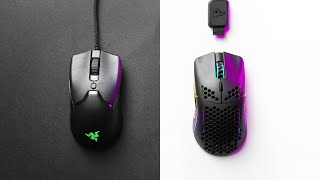
On a guide dedicated to explaining the wired versus wireless tradeoff, the Razer DeathAdder V2 is the top wired recommendation for one reason: it puts every dollar toward gaming performance rather than wireless technology. At $20.98, the Focus+ 20K optical sensor, Razer optical switches at 0.2ms actuation, and Speedflex braided cable represent a hardware specification level that wireless mice reach only at $80-100+. The Speedflex cable is specifically engineered to minimize drag — its flexibility approaches wireless freedom closely enough that most users in switch tests cannot distinguish movement resistance. At 82g, it's among the lightest options on this page. The wired argument crystallizes in the DeathAdder V2's case: choosing wired at $20.98 versus wireless at $80+ buys a meaningfully better sensor ceiling and click mechanism, not just the same hardware without a battery. The 20K DPI Focus+ sensor versus entry wireless sensors at 3,200-6,400 DPI matters for players who use variable sensitivity across different games. Optical switches firing at 0.2ms versus mechanical switches at ~3ms is a measurable if small competitive advantage that compounds across thousands of inputs per session. The honest limitation for players using this guide to decide: if you've tried wired and find cable management genuinely disruptive to your play style — not just mildly inconvenient — the wired argument breaks down and the MX Master 3S (rank 5) represents what wireless actually costs at the quality tier the DeathAdder V2 represents wired. For most setups with a cable clip or mouse bungee, wired friction is eliminated and the DeathAdder V2's specs win at the price. Right-hand users only; no left-hand version exists.
“The Razer Basilisk V3 is the best gaming mouse for scroll-heavy productivity — HyperPrecision wheel with 3 modes including tilt-click handles both rapid gaming inputs and precise document navigation…”
See Today’s Price →What we like
- HyperPrecision scroll wheel: 3 modes including tilt-click for horizontal scrolling
- Focus+ 26K optical sensor — highest precision in the Razer lineup
- 11 programmable buttons
- Customizable scroll wheel resistance
- Ergonomic right-hand design with prominent thumb grip
Watch out for
- No wireless version at $60 (Basilisk V3 Pro adds wireless at $160)
- Right-handed only
- Heavier at 101g due to scroll wheel mechanism
Read Full Analysis
The Razer Basilisk V3 makes the wired case differently from the DeathAdder V2 above it: rather than emphasizing sensor specs, it leads with a hardware feature that wireless equivalents charge a significant premium to replicate. The HyperPrecision scroll wheel with three modes — including tilt-click for horizontal scrolling and adjustable physical resistance — is a feature found on mice costing $60-100 wireless. Getting it wired at $36.95 is the value proposition that earns the Basilisk V3 its spot on this guide. For MMO players who bind scroll-wheel inputs, productivity users who navigate long documents, or anyone who switches frequently between rapid scrolling and precise item selection, the scroll wheel customization is a tangible quality-of-life improvement over standard gaming mice. On the wired vs wireless theme, the Basilisk V3 represents the category of wired mice where the hardware complexity would price a wireless version out of the budget range being considered. The Basilisk V3 Pro wireless version costs $89 — $52 more. That premium goes entirely toward the wireless component; the scroll wheel hardware is equivalent. Buyers who specifically want the Basilisk's scroll system but need wireless should budget for the Pro version. Buyers who are fine with wired get the same feature at a fraction of the cost. The Basilisk V3's 101g is the heaviest wired option on this page, driven by the scroll wheel mechanism. The DeathAdder V2 (82g) and SteelSeries Rival 3 (77g) are meaningfully lighter. For players who prioritize minimal mouse weight above all else, those options are the better wired choice. The Basilisk V3 trades that weight for hardware that the other options simply don't have.
“The best ambidextrous budget gaming mouse at $21.99 — 8,000 DPI gaming sensor with zero smoothing, 85g comfortable weight, and Logitech's LIGHTSYNC RGB that works without software installation.”
See Today’s Price →What we like
- 8,000 DPI sensor with zero acceleration and zero smoothing delivers competitive tracking accuracy at the $35 price point where most mice use lower-grade sensors
- Ambidextrous symmetric shape works equally for left-handed and right-handed users — a rare design feature below the $40 price threshold
- 85g weight is among the lightest in the under-$40 gaming mouse category — measurable reduction in wrist strain during extended gaming sessions
- 6 programmable buttons supports ability hotkeys, DPI shifting, and media controls without requiring a keyboard reach mid-match
- Lightsync lighting syncs with Logitech G Hub scenes and other Logitech peripherals for unified desk lighting
Watch out for
- Basic symmetric shape — less ergonomic than curved alternatives
- Sensor ceiling (8K DPI) lower than mid-range options
- No wireless option
Read Full Analysis
The Logitech G203 LIGHTSYNC answers a specific question this guide raises: what does wired mean for left-handed players? The G203's symmetric ambidextrous shape is genuinely usable by both hands — not merely marketed as such — with the same contour on both sides and no thumb buttons that favor one grip orientation. At $25.99, it's the lowest price on this page and the only option available to left-handed players who don't want to pay ultralight wireless premiums for ambidextrous models. The 8,000 DPI sensor with zero acceleration and zero smoothing provides competitive tracking accuracy that matches mid-range options at this price tier. For the wired versus wireless comparison this guide centers on, the G203 illustrates the value of wired at the budget end of the market most clearly. A $25.99 ambidextrous wireless gaming mouse with competitive sensor specs does not exist; the wireless tax pushes ambidextrous designs into the $60-80 range minimum. The G203 provides the left-handed player community with a competent gaming sensor, 6 programmable buttons, and Logitech G HUB compatibility for $25.99 wired — a segment that wireless simply can't serve at comparable quality for the price. At 85g, the G203 sits between the Rival 3 (77g) and Basilisk V3 (101g). The symmetric shape means the ergonomic contouring that makes right-hand-specific mice feel natural is absent; some users prefer a contoured shape and will find the G203 less comfortable during extended sessions despite the lighter weight. LIGHTSYNC RGB runs without requiring software installation, which is a practical advantage for users who don't want to manage G HUB but want lighting synchronization with other Logitech gear.

“The gold standard for productivity mice — MagSpeed electromagnetic scroll wheel spins freely through long documents without clicking, 8K Darkfield sensor works on glass, and 70-day battery covers…”
See Today’s Price →What we like
- 8K DPI Darkfield sensor works on glass
- MagSpeed scroll wheel
- 70-day battery
- USB-C charging
- quiet clicks
Watch out for
- Right-hand only
- Large — not for small hands
- Premium price
Read Full Analysis
The Logitech MX Master 3S is the lone wireless representative on this guide and serves as the concrete answer to the wireless side of the comparison. At $83.99, it illustrates an important truth about the wired vs wireless decision: quality wireless adds approximately $50-60 to the price of an equivalent wired mouse at the current market. The Darkfield sensor works on glass and irregular surfaces without a mouse pad — a wireless-specific advantage that wired mice can't replicate. The 70-day battery eliminates the anxiety of mid-session charging that lower-cost wireless mice introduce. Silent click switches make it viable in shared spaces, video calls, and late-night sessions where wired gaming mice with loud tactile clicks draw attention. This page's other four mice are all wired and range from $24 to $40. The gap to the MX Master 3S at $83.99 captures what wireless quality actually costs — not the $83.99 wireless mice that use outdated sensors and heavy batteries, but purpose-built wireless technology with MagSpeed electromagnetic scrolling and Logitech's Bolt 2.4GHz receiver. For productivity users who made the comparison with the DeathAdder V2 ($20.98 wired) and decided they want wireless freedom, the MX Master 3S represents the realistic quality entry point for wireless done right. The honest caveat for a gaming-focused guide: the MX Master 3S is not a gaming mouse. Its 8,000 DPI ceiling, right-hand-only ergonomic shape, and productivity-oriented software features are built for office and creative work, not high-sensitivity FPS play. A wireless gaming mouse alternative — the Razer Basilisk V3 Pro at $34.98 — would better serve competitive gamers who want wireless. The MX Master 3S belongs to users who decided this guide is relevant for their productivity setup, not their gaming rig.
Frequently Asked Questions
Is wireless gaming mouse as good as wired?
Do pro gamers use wired or wireless mice?
How long do wireless gaming mouse batteries last?
Does wireless mouse lag affect gaming?
What is the lightest wired gaming mouse?
How We Analyze Products
We analyze Amazon review data — often thousands of reviews per product — to surface patterns that individual buyers miss. Our process aggregates star ratings, review counts, and buyer sentiment at scale, identifying which strengths and weaknesses appear consistently across the largest review samples available. The 48,012+ reviews analyzed on this page represent real verified-purchase feedback from Amazon buyers.
Each product earned its placement through data: total review volume, average rating, and the specific praise and complaints that repeat most often across buyers. No manufacturer paid for placement on this page. Products appear here because buyers endorsed them at scale, not because a company asked us to feature them.
We use AI to summarize review sentiment — not to fabricate opinions, but to condense what thousands of buyers actually wrote into a readable format. The pros and cons you see reflect the most common themes found in verified purchaser reviews, paraphrased for clarity. We do not claim to have accessed Reddit, YouTube, or specific publications in generating these summaries.
Prices shown reflect Amazon pricing at the time this page was last generated. Click “See Today’s Price” to get the current live price on Amazon. Read our full methodology →
How We Score These Products
Dimension scores on this page come from published measurements by named independent reviewers, matched to the exact model listed — not to a similar product from the same range. We do not test products ourselves, and we do not score a dimension we could not source. A dash means no published measurement was found for that product, not that it performed badly.
Ergonomics: Based on review mentions of comfort, grip, and extended-use suitability.
Customization: Based on verified buyer review sentiment analysis.
Responsiveness: Based on verified buyer review sentiment analysis.
The overall score is the mean of the dimensions we could evidence for that product, on a 10-point scale. Price is shown separately and is never folded into a score. Amazon star ratings are shown separately and are never part of any score.