Best Soldering Iron 2026: Weller WE1010NA and PINECIL

The Weller WE1010NA ($115.00) is our top soldering station: a 70W digital station with temperature stability of plus or minus 4°F and a temperature lock that protects tips. For portable work, the PINE64 PINECIL ($39.99) runs from a USB-C or DC barrel power supply. For a second bench option, the Hakko FX888DX runs on Hakko's long-standing FX-888 tip platform.
See Today’s Price →At a Glance
Soldering Iron Buying Guide
 Photo by www.kaboompics.com / Pexels
The Weller WE1010NA at $115.00 is a 70W digital bench station with temperature stability rated at plus or minus 4°F and a temperature lock, the kind of iron that makes repeatable joints on through-hole boards, wire splices and larger pads. The PINE64 PINECIL at $39.99 is a pocket-size smart iron that runs from a USB-C or DC barrel supply and reaches working temperature in about 12 seconds by its maker's figure, which makes it the better choice for field repairs and small projects. This guide covers how to pick between a station and a portable iron, and how to get clean joints from either.
How we picked these. We compared the irons on this page by heater power, temperature control and power source, using each maker's own specifications, and we checked each listing on Amazon before publishing. Three irons we previously listed were out of stock with no featured offer when we checked, so they are no longer on this page; the Hakko FX888DX, Hakko's current bench station, was in stock new and has been added.
| Iron | Type | Power | Temperature control | Price |
|---|---|---|---|---|
| Weller WE1010NA | Bench station | 70W, 120V mains | Digital, plus or minus 4°F, temperature lock | $115.00 |
| Hakko FX888DX | Bench station | 120V mains | Digital, set by rotary encoder | Check current price |
| PINECIL | Portable smart iron | USB-C PD / QC 3.0 or DC5525 (supply not included) | Digital, about 12 s to operating temperature | $39.99 |
Temperature Selection for Common Soldering Tasks
300–320°C (572–608°F): Standard leaded solder (63/37 Sn/Pb) — the ideal range. 340–370°C (644–698°F): Lead-free solder (SAC305) — lead-free requires higher temperature. 350–400°C (662–752°F): Large pads, ground planes, and through-hole work that sinks heat quickly. Below 300°C: Rework on heat-sensitive components (FETs, LEDs). Above 400°C: Usually unnecessary and risks tip oxidation — the sign of too-high temp is solder that doesn't flow smoothly and tips that turn black quickly.
Why Your Cheap Iron Makes Bad Joints
$8–15 irons from hardware stores have three problems: no temperature feedback (the tip gets as hot as it gets, regardless of what's needed), no thermal recovery (a large pad sucks heat out faster than the heater replaces it, causing cold joints), and poor tip metallurgy (tips oxidize within hours and stop soldering). A digital station with a quality tip maintains target temperature dynamically and keeps the tip tinned and usable for months.
Tip Care: The Most Important Maintenance Task
A clean, tinned tip conducts heat to the joint; an oxidized black tip does not. After every joint: wipe the tip on a brass wire tip cleaner (not a wet sponge — thermal shock). Before and after every session: apply fresh solder to the tip, then wipe — this is "tinning." When done for the day: cool the iron with a heavy tin of solder on the tip (storage tinning prevents oxidation overnight). A well-maintained tip lasts months; a neglected tip turns black and useless within hours.
Flux: The Soldering Secret Most Beginners Miss
Flux chemically removes oxide from metal surfaces and allows solder to flow and wet properly. All solder wire contains flux in the core (rosin core, no-clean, water-soluble) — but additional flux in a syringe dramatically improves results, especially on old PCBs and SMD work. Apply a tiny amount to the joint, then touch with tinned iron and solder. The flux sizzles and the solder flows smoothly. Clean rosin flux with isopropyl alcohol after soldering; use water for water-soluble flux.

Quick Decision: If you solder at a desk most weeks, choose the Weller WE1010NA; if you need an iron you can carry, or you solder a few times a year, choose the PINECIL.
Watch Before You Buy
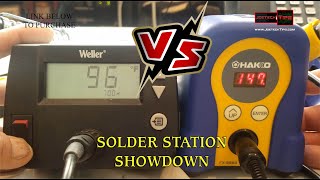
“70W digital station with temperature stability of plus or minus 4°F and a temperature lock that protects tips and components; standby and auto setback save the tip between joints.”
See Today’s Price →What we like
- 70W heater for excellent thermal recovery
- Digital temperature control
- ESD-safe design
- Large tip selection available
Watch out for
- Larger footprint than a pen-style portable iron
- Replacement tips cost extra
Read Full Analysis
The Weller WE1010NA is the bench station to buy if you solder regularly. Its 70W iron is, by Weller's own figure, 40% more powerful than the two models it replaced, which shows on large through-hole pads and ground planes that pull heat out of the tip. Temperature stability is rated at plus or minus 4°F (2°C), and a temperature lock with password protection keeps a shared bench from drifting off its settings. Standby mode and auto setback drop the temperature when the iron is resting, which extends tip life. The box includes the station, the WEP70 iron, a tip retainer and a safety rest, so it is ready to use. Against the PINECIL on this page, the Weller is the better tool for long sessions at a desk; the PINECIL is the one to carry.

“Hakko's current FX-888 bench station, set by rotary encoder, on the same platform and tip range most electronics benches already use.”
See Today’s Price →What we like
- Digital station with a rotary encoder for setting temperature
- Hakko FX-888 platform with its wide tip range
- Blue/yellow housing and handpiece
Watch out for
- Sold by a third-party seller at the time we checked
- Replacement tips cost extra
Read Full Analysis
The FX888DX is the current version of Hakko's FX-888 bench station, the platform many electronics hobbyists and repair benches standardise on because its tips are easy to find in many shapes. Temperature is set with a rotary encoder on a digital display. Against the Weller WE1010NA on this page, the choice is mostly about platform: if your bench already has Hakko tips, stay with Hakko; if you are starting fresh, the Weller's stated temperature stability and lock are the stronger spec on paper. For soldering away from a bench, the PINECIL is the one to carry.

“Pocket-size smart iron powered from USB-C (PD or QC 3.0) or a DC5525 barrel supply; reaches operating temperature in about 12 seconds by the maker's figure. Power supply not included.”
See Today’s Price →What we like
- Powers from USB-C (PD or QC 3.0) or a DC5525 barrel supply
- Reaches operating temperature in about 12 seconds (maker figure)
- TS100-style tip compatible
- Portable and travel-friendly
Watch out for
- Requires 65W USB-C PD charger
- Small grip diameter
- No built-in stand
Read Full Analysis
The PINECIL is the iron for makers who solder away from a bench. It takes power from a USB-C supply that speaks PD or QC 3.0, or from a DC5525 barrel jack, and PINE64 rates it to reach operating temperature in about 12 seconds, with an on-demand boost. The slim body is easy to pack, and it uses TS100-style tips. The trade-offs: no power supply comes in the box, so budget for a capable USB-C charger, and there is no stand. For all-day bench work the Weller WE1010NA on this page is steadier; for field repairs and small projects, the PINECIL costs about a third as much.
Frequently Asked Questions
What solder should I use for electronics?
Why do I keep making cold solder joints?
Can I use the same iron for jewelry and electronics?
What's the difference between a soldering iron and a soldering station?
How do I remove solder to fix a mistake?
How We Analyze Products
We analyze Amazon review data — often thousands of reviews per product — to surface patterns that individual buyers miss. Our process aggregates star ratings, review counts, and buyer sentiment at scale, identifying which strengths and weaknesses appear consistently across the largest review samples available. The 7,584+ reviews analyzed on this page represent real verified-purchase feedback from Amazon buyers.
Each product earned its placement through data: total review volume, average rating, and the specific praise and complaints that repeat most often across buyers. No manufacturer paid for placement on this page. Products appear here because buyers endorsed them at scale, not because a company asked us to feature them.
We use AI to summarize review sentiment — not to fabricate opinions, but to condense what thousands of buyers actually wrote into a readable format. The pros and cons you see reflect the most common themes found in verified purchaser reviews, paraphrased for clarity. We do not claim to have accessed Reddit, YouTube, or specific publications in generating these summaries.
Prices shown reflect Amazon pricing at the time this page was last generated. Click “See Today’s Price” to get the current live price on Amazon. Read our full methodology →