Best Soldering Iron for Beginners 2026
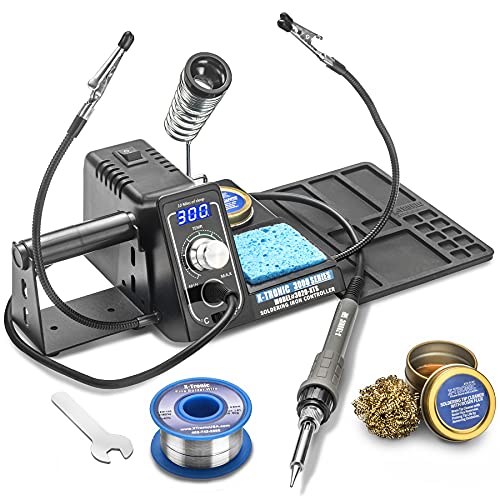
The X-Tronic 3020-XTS is our pick for beginners: its digital station holds the tip temperature with PID control and shows it on an LED readout, and the box adds helping hands, solder and tip cleaners, where PINE64's PINECIL ships with no power supply or stand. Choose the PINECIL if you want a slim iron that runs from a USB-C charger.
See Today’s Price →Holiday shopping

At a Glance
Related guides we’ve checked
 Best Multimeter for Beginners 2026: Auto-Ranging, Manual and True RMSTop pick: KAIWEETS HT118A Digital Multimeter
 Best Garage Shelving Units 2026: Heavy-Duty Steel, Wire and Folding RacksTop pick: REIBII 2400LBS Garage Shelving
 Best Adhesive Cabinet Bumpers Under $10 (2026)Top pick: Amazon Basics Cabinet Door Bumpers
Gift shopping? Holiday Gift Guide 2026: checked picks for everyone on your list.
Soldering Iron for Beginners Buying Guide
 Photo by www.kaboompics.com / Pexels
A first soldering iron has two jobs: hold a steady, adjustable temperature, and come with what you need to make a first joint safely, which means a stand, a way to clean the tip and some solder. The X-Tronic 3020-XTS leads this page because it does both in one box: a digital station with PID temperature control, plus helping hands, solder and tip cleaners. The ANBES kit is the cheapest complete start, and the PINECIL is a slim USB-C iron for small jobs and travel.
Temperature control matters most
Too cool and the solder will not flow; too hot and you lift pads and damage parts, so every iron here lets you set the temperature. The X-Tronic shows it on an LED readout and holds it with PID control across 200 to 480 degrees C. The ANBES adjusts from 200 to 450 degrees C with a dial but has no readout. The PINECIL reaches operating temperature in about 12 seconds, per Pine64, though its listing gives no temperature range. Start in the middle of the range and adjust until the solder flows within a second or two of touching the joint.
What should come in the box
A stand is not optional: a hot iron rolling across a bench is how burns happen. The X-Tronic comes with a spring-style holder, a brass tip cleaner with flux, a wet sponge, two helping hands to hold a board and a 50g roll of lead-free solder. The ANBES comes with a dual-spring stand with a sponge, five tips, a metal desoldering pump, tweezers, a wire stripper, solder and a storage bag. The PINECIL ships as the iron and one B2 tip, with no power supply, stand or solder, so add a USB-C charger and a holder.

Power: a wall station, a plug-in pen or USB-C
The X-Tronic is a 75W station that plugs into the wall, with a 40-inch iron cord and a 55-inch power cord, and it sleeps after 10 minutes idle. The ANBES is a 60W pen-style iron that plugs straight into the wall. The PINECIL runs from a USB-C charger that supports PD or QC 3.0, or a DC5525 barrel supply, and drops into standby when idle, which makes it the one to carry to a makerspace or a repair away from the bench.
Safety for a first project
Work in a ventilated room and keep flux fumes away from your face. Put the iron back in its stand every time you let go of it, and switch it off when you walk away; the X-Tronic's sleep timer and the PINECIL's auto standby help when you forget. Wear eye protection when you clip component leads, and wash your hands after handling solder.

How we picked: we compared each product's own listing - what it is, what comes in the box, the specifications its maker states and the warranty - and ranked them on how well they answer this page's question. We have not tested these products in hand.
Watch Before You Buy
“X-Tronic's 3020-XTS: a 75W digital soldering station with PID temperature control and an LED readout, two helping hands, a roll of lead-free solder, tip cleaners and a 3-year warranty.”
See Today’s Price →What we like
- 75W station with PID temperature control and a blue LED readout
- Two helping hands and a 50g roll of lead-free solder included
- Brass sponge tip cleaner with flux, plus a wet sponge
- ESD safe, 10-minute sleep timer and a °C/°F switch
Watch out for
- Only one brass-sponge flux tin comes in the box, though the main photo shows two
Read Full Analysis
The X-Tronic 3020-XTS puts a first electronics bench in one box, built around a station that holds its temperature. The 75W unit heats from 200 to 480 degrees C (392 to 896 degrees F) in under 30 seconds, shows the temperature on a blue LED readout with a Celsius/Fahrenheit switch, and uses PID control so the tip stays at the temperature you set. Two helping hands prop up a small circuit board in front of the station, and the box adds a 50g roll of lead-free solder on a side-mounted holder, a spring-style iron holder, a brass tip cleaner with cleaning flux and a wet sponge. It is ESD safe, sleeps after 10 minutes idle, and X-Tronic, a US brand based in Lincoln, Nebraska, backs it with a 3-year warranty.
Skip this if: You need to solder away from a bench and a wall outlet

“PINE64's PINECIL: a slim smart soldering iron that runs from a USB-C (PD or QC 3.0) charger or a DC barrel supply and reaches working temperature in about 12 seconds.”
See Today’s Price →What we like
- Runs from USB-C (PD or QC 3.0) or a DC5525 barrel supply
- Reaches operating temperature in about 12 seconds, per Pine64
- On-demand rapid boost
- Auto standby when it is not in use
- Slim stainless-steel core in a polycarbonate shell, about 6 inches long
Watch out for
- No power supply or stand in the box
- Comes with a single B2 tip
Read Full Analysis
The PINECIL is the iron for a small desk or a toolbag. It is about 6 inches long, with a stainless-steel core in a polycarbonate shell, and it runs from a USB-C charger that supports PD or QC 3.0, or from a DC5525 barrel-jack supply. Pine64 says it reaches operating temperature in 12 seconds, offers an on-demand rapid boost, and drops into standby when you put it down, which is a useful safety habit for a beginner to rely on. The catch is what is not in the box: you get the iron and a B2 tip, but no power supply, no stand and no solder, so budget for a USB-C charger and a holder before your first project.
Skip this if: You want a stand and power supply in the box
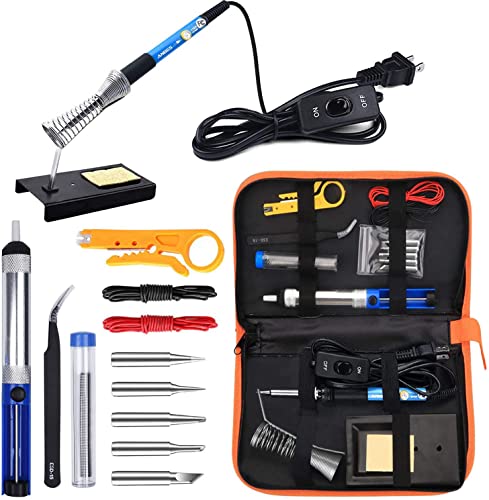
“ANBES's 14-in-1 kit: a 60W pen-style iron adjustable from 200 to 450 degrees C with five tips, a metal desoldering pump, a stand with a sponge, tweezers, a wire stripper and a storage bag.”
See Today’s Price →What we like
- Adjustable temperature from 200°C to 450°C
- Five interchangeable tips
- Metal desoldering pump, tweezers and a wire stripper in the kit
- Dual-spring stand with sponge and a storage bag
Watch out for
- Its listing quotes no temperature readout or stability figure
Read Full Analysis
The ANBES kit is the cheapest complete way to find out whether you enjoy soldering. The 60W pen-style iron adjusts from 200 to 450 degrees C with a dial, comes with five interchangeable tips, and holds its tip in a heat- and impact-resistant screw thread. Around it you get a dual-spring stand with a cleaning sponge, a metal desoldering pump for clearing through-hole joints, tweezers, a wire stripper and cutter, a tube of solder wire, two electronic wires and a bag to keep it all together. There is no digital readout, so you set the heat by the dial's markings rather than a number on a screen; if you stick with the hobby, a station such as the X-Tronic is the step up.
Skip this if: You want a digital temperature readout
Frequently Asked Questions
What should a beginner look for in a soldering iron?
Is a soldering station better than a soldering pen for beginners?
What do I need to power a PINECIL?
What tip should a beginner use?
What safety precautions should a beginner take when soldering?
How We Chose These Products
Ranked from each maker's listing on what a beginner needs: adjustable, steady temperature, a stand and tip cleaning in the box, how it is powered, and safety features such as sleep and standby.
We compare each product’s Amazon listing, the manufacturer’s published specifications and Amazon customer ratings, shown with their review counts as Amazon’s data, and rank the products on how well they answer this page’s question. We do not test products in hand and we do not run our own analysis of review text. A publication or expert is named only where we cite its published findings about that product. No manufacturer paid for placement on this page.
A price appears only when Amazon’s API supplied it at a recent daily refresh, with the date and time beside it, and is withdrawn at 4 AM Central on the day after it turns 24 hours old; otherwise use “Check price on Amazon” for the live price. Read our full methodology →