Best Desk Lamp for Studying (2026)
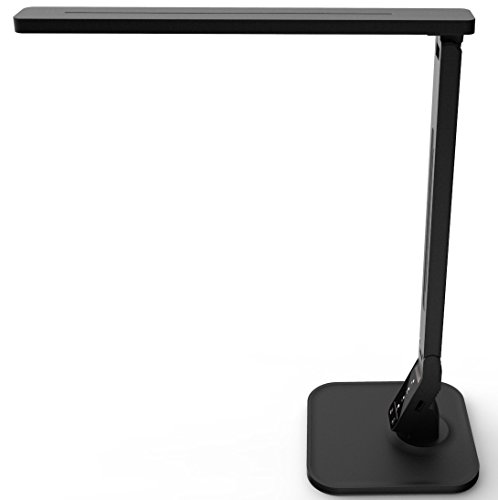
For studying, prioritize lamps with flicker-free LED output, adjustable color temperature (2700K warm for evenings, 5000K cool for focus), and brightness levels for late-night sessions. A USB charging port on the base is a practical bonus. Entry-level Lampat and LEPOWER models cover the basics; BenQ adds precision lighting geometry for extended academic work.
See Today’s Price →At a Glance
| # | Product | Award | Price |
|---|---|---|---|
| 1 | Best Budget | $16.99 as of Nov 21, 3:41 PM CT details Buy → |
|
| 2 | Best Classic Style | $18.98 as of Nov 21, 8:37 AM CT details Buy → |
|
| 3 | Best Clamp Lamp | Check price on Amazon Buy → |
|
| 4 | Best Adjustable | Check price on Amazon Buy → |
|
| 5 | Best for Long Sessions | $211.65 as of Nov 21, 3:41 PM CT details Buy → |
Desk Lamp for Studying (2026) Buying Guide
 Photo by Tima Miroshnichenko / Pexels
Prolonged studying under poor lighting causes eye fatigue, headaches, and reduced reading accuracy — all of which reduce productivity and increase error rates. Lamp quality for studying is measured in features that basic desk lamps don't prioritize: flicker frequency, color rendering index, and adjustable color temperature.
Flicker-Free Output
Cheap LED lamps often flicker at frequencies just above human conscious perception (100–120 Hz) but within the range that causes subconscious eye strain over hours of exposure. Flicker-free (or very low flicker) lamps run at much higher frequencies or use DC current — your eyes perceive a steady light rather than rapid pulsing. Look for lamps labeled "flicker-free" or "eye-care LED." This is particularly important for reading and handwriting work where your eyes are tracking a page continuously.
Color Temperature: Warm vs. Cool
Color temperature is measured in Kelvin. Warm white (2700–3000K) mimics incandescent light and is easier on the eyes in the evening but can feel sleepy for focus work. Neutral white (3500–4000K) is balanced and works well for daytime studying. Cool white/daylight (5000–6500K) is the most alert-promoting and best for focused study but can be harsh in a dark room at night. Lamps with multiple color temperature settings (or tunable between 2700K and 6500K) give you control to match the light to your needs and time of day.

Coverage Area and Position
A study lamp needs to illuminate your full work area — typically 18–24 inches of desk — without casting shadows from your hand or creating a harsh spot of bright light in the center. Wider reflectors, LED panels (versus single-point LED), and adjustable heads improve coverage. Architect-style lamps with fully adjustable arms let you position the light exactly where needed and avoid casting shadows over your writing hand.
USB Charging Integration
Many study lamps now include USB-A or USB-C ports in the base for charging phones and tablets without occupying an outlet. This is genuinely useful at a desk where outlet access is limited. Check whether the port supports fast-charging protocols if that matters for your devices — most desk lamp USB ports are basic 5W unless specified otherwise.

Related guides: Best Desk Lamps, Best Monitor Stands, Best Desk Organizers, Best Ergonomic Mouse, Best Chair Cushions.
Our Picks and Why
The Lampat Dimmable LED Desk Lamp with USB Charging earns the top spot for adjustable brightness and color temperature on a flexible arm. The Lepower Metal Desk Lamp is the step-up choice — a clamp mount or built-in USB charging for a busy desk. And the TROND LED Desk Lamp with Clamp USB-C and USB-A Ports ($17.99) rounds out the top three with a small, cheap lamp that still kills glare on a textbook.
Watch Before You Buy
“The Lampat dimmable desk lamp covers the study essentials: multiple light modes, touch control, and a USB charging port for keeping a phone or device topped up while working. The USB…”
See Today’s Price →What we like
- 4 lighting modes: Reading, Studying, Relaxation and Bedtime
- 5-level dimmer on a touch-sensitive panel
- 1-hour auto-off timer
- 5V/1A USB port charges a phone from the lamp
Watch out for
- USB port output is limited to 5V/1A
Read Full Analysis
The Lampat is the entry point on a page that spans to $211.65 for the BenQ e-Reading lamp. The core study functions are covered: multiple light modes shift between warm and cool-white for reading versus screen work, touch controls eliminate fumbling for a switch mid-session, and the USB port keeps a phone or tablet charged at the desk. The USB output is a standard 1A — enough for overnight charging but too slow for modern fast-charge speeds during an active study session. Plastic construction reflects the budget tier; it is functional, not built to last years of daily repositioning the way the LEPOWER Metal at $19.99 or the TROND clamp lamp are. For students who need a dedicated study light on a tight budget and can live with slow USB charging, the Lampat covers the essentials. Spend the $3 more to LEPOWER if build quality is a concern, or step to TROND if a clamp mount is needed.

“The Lepower Metal Desk Lamp is the most affordable quality option in this roundup, pairing a classic metal gooseneck design with compatibility for standard E26 bulbs so you control the…”
See Today’s Price →What we like
- Metal shade and base
- Flexible swing arm for angling the light
- Standard E26 socket for your choice of bulb
- On/off switch on the base
Watch out for
- No dimmer, USB port or lighting modes
Read Full Analysis
LEPOWER's Metal Desk Lamp is the style-first option on this study lamp page — the classic gooseneck metal design that pairs with traditional, minimalist, and industrial desk aesthetics where plastic study lamps look out of place. The compatibility with standard E26 bulbs is the defining functional feature: rather than locking you into a proprietary LED array, LEPOWER lets you choose the color temperature, brightness, and bulb type that fits your study environment. The infinitely positionable gooseneck arm is the other practical advantage. Unlike fixed-arm or pivot-joint lamps, a gooseneck bends and holds position anywhere along its arc — directly over a notebook, angled toward a monitor, positioned for desk illumination or task lighting for specific work areas. The honest trade-off against other options higher on this page: LEPOWER has no built-in dimming control, no color temperature switching, and no USB charging port. The Lampat and TROND options on this page deliver those features at comparable or higher prices. If study sessions require adjustable color temperature for eye comfort across different times of day, or if USB charging access matters at the desk, those options are more capable. For buyers who want a clean metal look, infinite positioning, and the freedom to choose their own bulb without a $50+ lamp budget, LEPOWER delivers the essential form and function.

“The TROND clamp lamp adds USB-C and USB-A charging ports to dimmable LED light on a flexible neck — two useful functions in one desk footprint. USB-C wattage is limited for fast-charging…”
See Today’s Price →What we like
- USB-C and USB-A ports
- Clamp mount
- Dimmable LED
- Flexible neck
Watch out for
- expensive for a desk lamp
- USB-C charging limited in wattage for phones
- combined product sometimes trades off quality of each function
Read Full Analysis
The TROND LED Desk Lamp consolidates two functions students consistently need at a study desk: task lighting and device charging in a single clamp-mount unit that frees the power strip socket a separate charger would otherwise occupy. The clamp attaches to desk edges, headboards, and shelves without requiring a base footprint, which matters in dorm rooms and small shared study spaces where desk surface area is a fixed constraint. USB-C and USB-A charging ports built into the lamp body allow a phone or tablet to charge while the lamp operates — eliminating the cable tangle of a separate charger competing for desk space. The flexible neck allows precise directional aiming so light reaches the study material and notebook rather than the screen, which reduces glare-induced eye strain over extended reading or writing sessions. Dimmable LED output spans multiple brightness levels to match ambient conditions, and color temperature is adjustable between warm and cool modes on most configurations. On this page, the TROND sits above the Lampat and LEPOWER in both price and capability — those options provide basic fixed-output lighting without USB ports or clamp mounting. The $50 Quntis LED clamp is the closest format alternative at a similar price. The TROND's trade-offs are consistent with combined-function products: it is priced as a premium desk lamp for buyers who value the charging integration, less so for those who only need light. The USB-C wattage is sufficient for overnight charging but too low for meaningful fast-charging during an active session. Combined devices also tend to perform each function adequately rather than at the level of a dedicated single-function product.

“The Quntis 31.5-inch wide light bar covers an entire study desk surface in one unit, with auto-dimming, a 2-hour timer, 5 color temperatures, and 10 brightness levels for eye-care study…”
See Today’s Price →Read Full Analysis
The Quntis LED Desk Lamp brings a wide-bar design that most compact task lights cannot match — the 31.5-inch light bar spreads illumination across an entire desk surface rather than pooling it in a single spot. That broad coverage is genuinely useful for students who spread textbooks, notes, and a laptop simultaneously. Quntis pairs the wide bar with 5 color temperatures and 10 brightness levels, plus a 2-hour auto-shutoff timer that remembers your last brightness setting — practical for late study sessions. The auto-dimming feature adjusts to ambient room light, reducing the jarring contrast between screen and desk. Against the BenQ, Quntis gives up the high-end e-reading mode and more precise hinge adjustments, but closes most of the gap for a quarter of the price. The clamp-only mounting means no freestanding option, and the arm articulation is less flexible than a true architect-style lamp — once clamped, the horizontal bar position is mostly fixed. For students who need wide, even, multi-temperature illumination at sub-$50, Quntis is the logical step up from the bare-minimum Lampat and LEPOWER options on this page.

“The BenQ e-Reading Lamp is the premium outlier in this roundup — e-Reading certified for zero flicker, no glare, adjustable color temperature modes, and an auto-dimming sensor designed…”
See Today’s Price →What we like
- Lights a 35.4 x 26.7-inch area at 500 lux or more
- Ambient light sensor adjusts brightness; Screen and Paper modes
- 13 color temperatures (2700K-5700K) and 23 brightness levels by knob
- Flicker-free certified to IEEE 1789 and rated RG0 for blue light
- Color rendering index above 95; ball-joint swing arm
Watch out for
- No charging port is listed
Read Full Analysis
BenQ e-Reading LED lamp delivers zero-flicker, no-glare illumination certified for extended reading and screen-adjacent desk work. The e-Reading certification distinguishes this from standard LED lamps that produce stable-looking but technically flickering light — the BenQ maintains consistent photon output that prevents the cumulative visual fatigue that builds during long sessions. The auto-dimming sensor adapts to changing ambient conditions, eliminating the need to manually adjust brightness as daylight shifts throughout the workday. Multiple color temperature modes add flexibility for different task types. The BenQ e-Reading is the premium outlier on this page, significantly above the TROND LED, LEPOWER Metal and Lampat. The $165 gap over the TROND represents a specific value proposition: the lower-priced lamps all provide adequate light; the BenQ provides light engineered to minimize eye strain for users doing 6+ hour desk sessions daily. Choose the BenQ e-Reading if you work long daily sessions at a desk and prioritize eye health — the zero-flicker certification and auto-dimming sensor justify the premium for heavy users. Skip it if your desk sessions are under 3 hours daily or if you experience no eye fatigue from standard lamps — the TROND LED provides solid adjustable illumination at less than a quarter of the BenQ price.
Frequently Asked Questions
What color temperature is best for studying?
How bright should a study lamp be?
Is LED or natural light better for studying?
What is the best lamp for studying in a dark room?
Does blue light from desk lamps affect sleep?
How We Chose These Products
We compare each product’s Amazon listing, the manufacturer’s published specifications and Amazon customer ratings, shown with their review counts as Amazon’s data, and rank the products on how well they answer this page’s question. We do not test products in hand and we do not run our own analysis of review text. A publication or expert is named only where we cite its published findings about that product. No manufacturer paid for placement on this page.
A price appears only when Amazon’s API supplied it at a recent daily refresh, with the date and time beside it, and is withdrawn at 4 AM Central on the day after it turns 24 hours old; otherwise use “Check price on Amazon” for the live price. Read our full methodology →