Best Home Office Setup 2026: Desk, Chair & Monitor

The SIHOO M57 ergonomic chair is where to start, because you sit in it all day: its lumbar support adjusts in height and depth, the headrest tilts and lifts, and SIHOO rates it for 330 lbs with BIFMA-certified key parts. Choose the FLEXISPOT EN1 standing desk first if your chair already works for you; it rises from 28.1 to 45.7 inches with 4 memory presets.
See Today’s Price →At a Glance
| # | Product | Award | Price |
|---|---|---|---|
| 1 | Our Top Pick | $179.99 as of Nov 21, 3:42 PM CT details Buy → |
|
| 2 |  FLEXISPOT EN1 One-Piece Standing … FLEXISPOT |
Best Standing Desk | $161.45 as of Nov 21, 8:39 AM CT details Buy → |
| 3 | Best Monitor | $299.99 as of Nov 21, 8:55 AM CT details Buy → |
|
| 4 | Best Dual Monitor Arm | $55.09 as of Nov 21, 8:41 AM CT details Buy → |
|
| 5 | Best Desk Mat | $15.99 as of Nov 21, 8:50 AM CT details Buy → |
Home Office Setup Buying Guide
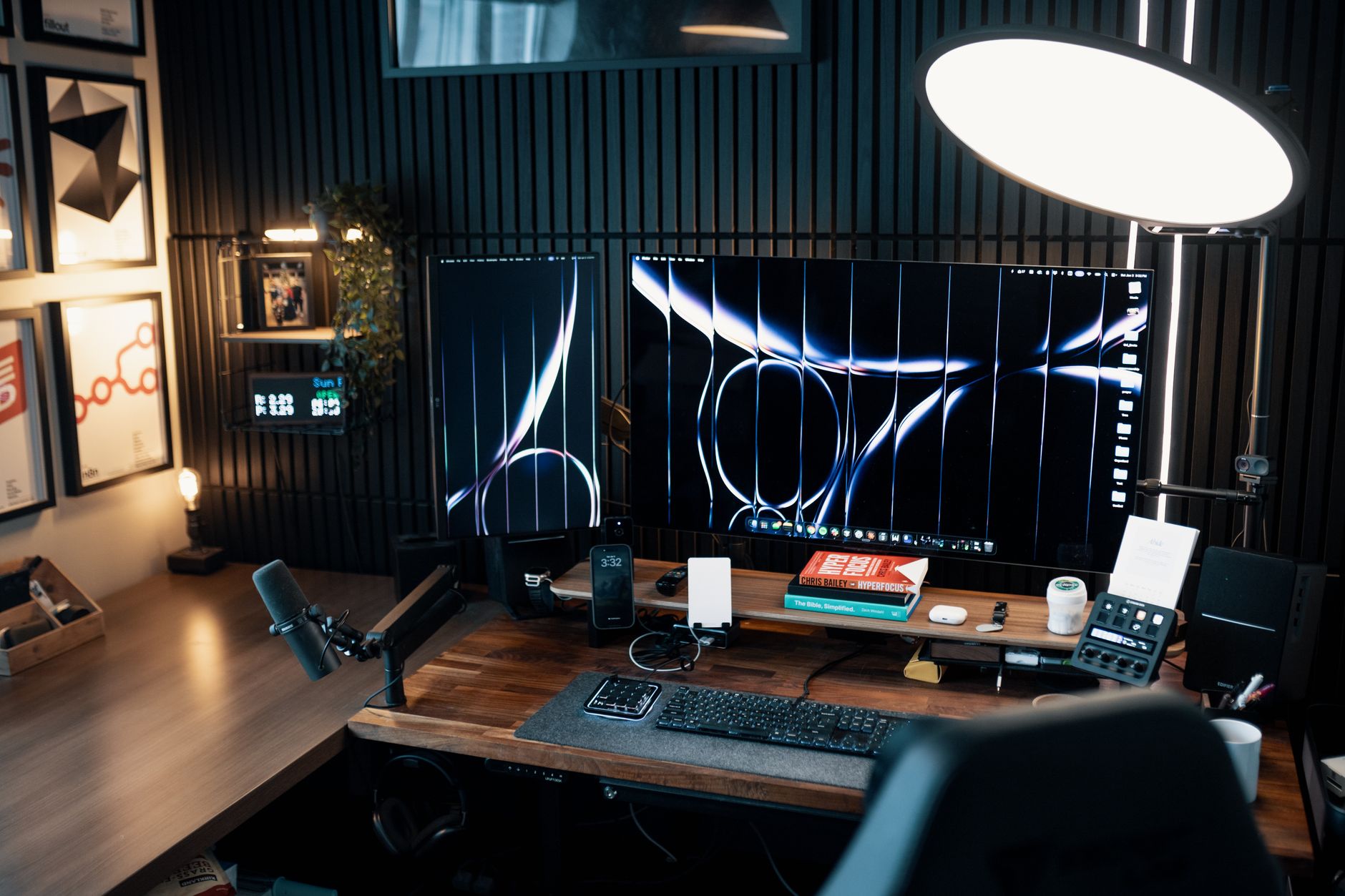 Photo by Josh Sorenson / Pexels
A home office setup comes down to three things you use every working minute - the chair, the desk and the screen - and the pieces that put them at the right height. Our pick to start with is the SIHOO M57 ergonomic chair. The FLEXISPOT EN1 standing desk, the Dell S3225QS 32-inch 4K monitor, the HUANUO dual monitor arm and the AFIING desk mat complete the setup.
The chair: adjustment you will use
Buy the chair first if your back or neck complains at the end of the day. The settings that matter are lumbar support that meets your lower back, armrests that let your shoulders drop, and a seat height that puts your feet flat with your knees level with your hips. The SIHOO M57's lumbar support moves in height and in depth, its headrest tilts and lifts, its armrests adjust three ways and its back reclines from 90 to 126 degrees. SIHOO rates it for 330 lbs, says its key parts are BIFMA and SGS certified, and gives it a 3-year warranty. Its listing does not mention seat-depth adjustment, so check the seat dimensions if you are much taller or shorter than average.
The desk: sit, stand and keep the height you chose
Set the desk so your elbows rest near 90 degrees with your shoulders relaxed, sitting or standing. An electric standing desk lets you change that height during the day instead of committing to one posture. The FLEXISPOT EN1 moves from 28.1 to 45.7 inches and stores 4 heights in memory presets, so switching takes one press. Its one-piece 48 x 30-inch top is 1 inch thick and 30 inches deep, which leaves room for a large monitor at a comfortable distance with the keyboard in front of it, and it is rated for 176 lbs.
The monitor and where it sits
Place the screen about an arm's length away, with its top edge at or slightly below eye level. The Dell S3225QS is a 31.5-inch 4K monitor, enough to keep two documents open side by side at a readable size; its ComfortView Plus keeps blue light emissions at or below 35%, it runs at up to 120Hz and it has built-in speakers for calls. To raise screens to eye level or add a second one, the HUANUO FlowLift dual arm holds two 13 to 32-inch monitors of 4.4 to 19.8 lbs each with VESA 75 or 100 holes, lifts them up to 15.75 inches and rotates them to portrait. HUANUO recommends a wooden desk 0.59 to 3.54 inches thick with nothing under the clamp; confirm your monitor's VESA holes and weight before you pair it with any arm.
The finishing touch: a desk mat
A desk mat protects the top, gives your mouse a consistent surface and softens the edge under your wrists. The AFIING mat covers 47 x 17 inches in vegan PU leather with a natural cork side; its surface is waterproof and oil-proof, so spills wipe off, and a non-slip backing keeps it from sliding. Add a cable tray or a few cable ties once everything is in place, and you have a setup that is comfortable for a full working day.

How we picked: we compared each product's own listing - what it is, what comes in the box, the specifications its maker states and the warranty - and ranked them on how well they answer this page's question. We have not tested these products in hand.
Watch Before You Buy

“SIHOO's M57 ergonomic mesh chair: lumbar support that moves in height and depth, a headrest that tilts and lifts, 3D armrests and a 90 to 126-degree recline, BIFMA and SGS certified for 330 lbs.”
See Today’s Price →What we like
- Lumbar support adjusts in height and depth
- 3D armrests and a headrest that tilts and lifts
- Reclines from 90 to 126 degrees
- Reinforced aluminum base and dual-frame backrest rated for 330 lbs
- 3-year warranty with free replacement parts
Watch out for
- Its listing states no seat-depth adjustment or tilt-tension control
Read Full Analysis
The SIHOO M57 is the first thing to get right in a home office, because you sit in it for every hour of work. Its lumbar support moves in height and in depth to fit the curve of your lower back, the headrest tilts and lifts for your neck, the armrests adjust in three directions, and the back reclines from 90 to 126 degrees so you can change posture through the day. The seat has a waterfall front edge that eases pressure behind the thighs, and the split mesh backrest cushions the spine. SIHOO builds it on a reinforced aluminum base with a dual-frame backrest, rates it for 330 lbs, and says its key parts are certified by BIFMA and SGS; it comes with a 3-year warranty and free replacement parts. Its listing does not mention seat-depth adjustment, so very tall or very short sitters should check the seat dimensions.
Skip this if: You need seat-depth adjustment, which its listing does not state
“An electric standing desk with a one-piece 48 x 30-inch top, 1 inch thick, that rises from 28.1 to 45.7 inches with 4 memory presets and holds 176 lbs.”
See Today’s Price →What we like
- One-piece seamless desktop, 48 x 30 inches and 1 inch thick
- Electric height adjustment from 28.1 to 45.7 inches
- 4 memory presets for sitting and standing heights
- Rated for 176 lbs
- 30-inch depth leaves room for a monitor, keyboard and notes
Watch out for
- A 48 x 30-inch footprint needs a good-sized wall or corner
Read Full Analysis
The FLEXISPOT EN1 turns the desk into an adjustable part of the setup. An electric motor moves the one-piece top from 28.1 to 45.7 inches, and 4 memory presets store your sitting and standing heights so you can switch with one press instead of guessing. The top is a single seamless 48 x 30-inch slab, 1 inch thick, with no split line down the middle, and the 30-inch depth leaves room for a large monitor at a comfortable distance with a keyboard and notes in front of it. FLEXISPOT rates it for 176 lbs and describes a simplified assembly. Before you buy, measure the wall or corner: a 48 x 30-inch footprint is generous, and if you plan to clamp a monitor arm to it, check that nothing under the top blocks the clamp.
Skip this if: Your room only fits a shallow desk

“Dell's 31.5-inch 4K monitor: 3840 x 2160 on a VA panel with a 120Hz refresh rate, ComfortView Plus low blue light and built-in speakers.”
See Today’s Price →What we like
- 31.5-inch 4K UHD (3840 x 2160) VA panel
- Refresh rate up to 120Hz with AMD FreeSync Premium
- ComfortView Plus keeps blue light emissions at or below 35%
- 99% sRGB and 95% DCI-P3 color coverage
- Built-in speakers
Watch out for
- A 32-inch screen needs a deep desk and a little distance to view comfortably
Read Full Analysis
The Dell S3225QS gives a home office one large, sharp screen instead of a laptop display. It is a 31.5-inch 4K UHD panel (3840 x 2160), so two documents fit side by side at a readable size, and spreadsheets show more rows. Dell's ComfortView Plus keeps blue light emissions at or below 35% without sacrificing color accuracy, Dell says, the VA panel covers 99% of sRGB and 95% of DCI-P3, and the refresh rate runs up to 120Hz with AMD FreeSync Premium for smooth scrolling and the odd game after hours. It has built-in speakers for calls and an ash white finish with thin bezels. A 32-inch screen wants a deep desk and some distance - sit about an arm's length away - and if you plan to mount it on an arm, confirm its VESA holes and weight in Dell's specifications first, because the listing does not state them.
Skip this if: Your desk is too shallow to sit an arm's length from a 32-inch screen

“A dual monitor arm for two 13 to 32-inch screens of 4.4 to 19.8 lbs each, with VESA 75 or 100 mounting, full-motion tilt, swivel and rotation, and a C-clamp or grommet base.”
See Today’s Price →What we like
- Holds two screens from 13 to 32 inches, 4.4 to 19.8 lbs each
- VESA 75 x 75 and 100 x 100 mounting
- Tilts +85/-50 degrees, swivels 90 degrees each way and rotates 360 degrees
- Raises screens up to 15.75 inches
- C-clamp or grommet mounting, with cable management along the arms
Watch out for
- Its maker recommends wooden desks 0.59 to 3.54 inches thick with no cross beams under the clamp
Read Full Analysis
The HUANUO FlowLift lifts two monitors off the desk and puts them where your eyes are. Each arm takes a 13 to 32-inch screen weighing 4.4 to 19.8 lbs with VESA 75 x 75 or 100 x 100 mounting holes, tilts from +85 to -50 degrees, swivels 90 degrees each way and rotates a full 360 degrees for a portrait screen, and raises the screens up to 15.75 inches. The base clamps to the desk edge with a dual C-clamp or mounts through a grommet hole, and cables run along the arms. Check the fit before you order: HUANUO asks for a wooden desk 0.59 to 3.54 inches thick with no cross beam or panel under the clamp, and monitors that meet all three screen conditions. With a single monitor today, the second arm is ready for another screen later.
Skip this if: Your desk is glass or plastic, or your monitors lack VESA holes

“A 47 x 17-inch desk mat in vegan PU leather with a natural cork side, a waterproof, oil-proof surface and a non-slip backing.”
See Today’s Price →What we like
- Large 47 x 17-inch surface for keyboard, mouse and writing
- Vegan PU leather with a natural cork side
- Waterproof and oil-proof surface wipes clean
- Non-slip backing keeps it in place
- Rolls up for travel
Watch out for
- At 17 inches deep it covers the front of a desk, not the whole top
Read Full Analysis
The AFIING desk mat is the inexpensive finishing piece: a 47 x 17-inch pad that covers the front of the desk where the keyboard, mouse and notebook live. One side is vegan PU leather and the other natural cork, and the surface is waterproof and oil-proof, so a spilled coffee wipes off with a cloth instead of soaking into the desktop. It works as a large mouse pad, gives the wrists and forearms a softer surface than a bare desk, and its non-slip backing keeps it from creeping. It is light enough to roll up and take with you. At 17 inches deep it covers the working strip of the desk, not the whole top; AFIING sells other sizes if you want more coverage.
Skip this if: You want a mat that covers the whole desktop
Frequently Asked Questions
What are the essentials for a home office setup?
How high should my monitor be in a home office?
Do surge protectors really protect equipment?
How should I manage cables in a home office?
Is a desk mat worth it?
How We Chose These Products
Ranked from each maker's listing on adjustability, stated load rating and certification, screen size and resolution, and how each piece fits the rest of the setup.
We compare each product’s Amazon listing, the manufacturer’s published specifications and Amazon customer ratings, shown with their review counts as Amazon’s data, and rank the products on how well they answer this page’s question. We do not test products in hand and we do not run our own analysis of review text. A publication or expert is named only where we cite its published findings about that product. No manufacturer paid for placement on this page.
A price appears only when Amazon’s API supplied it at a recent daily refresh, with the date and time beside it, and is withdrawn at 4 AM Central on the day after it turns 24 hours old; otherwise use “Check price on Amazon” for the live price. Read our full methodology →