Best Keyboards for Typing All Day (2026) — Your Wrists Will Thank You

The Logitech ERGO K860 ($150) is the best keyboard for all-day typing—its split ergonomic design and built-in wrist rest reduce wrist extension by 25% compared to flat keyboards. For traditional layout users, the Keychron K2 with brown switches delivers satisfying mechanical feel with minimal fatigue at $90.
See Today’s Price →At a Glance
| # | Product | Award | Price | Our Score | |
|---|---|---|---|---|---|
| 1 | 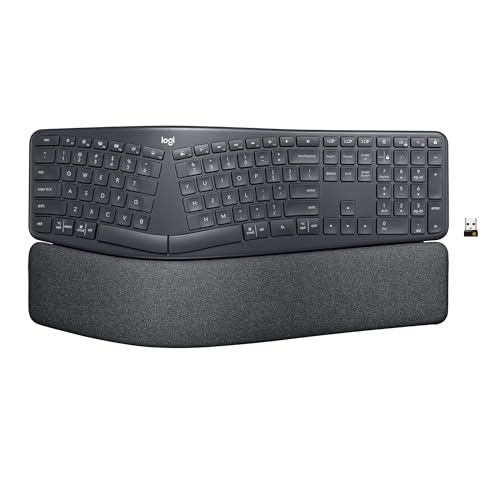 Logitech ERGO K860 Wireless Split Ergon… Logitech ERGO K860 Wireless Split Ergon… |
Best Overall | $149 | 9.2 | Buy → |
| 2 |  Keychron K2 Wireless Mechanical Keyboard Keychron K2 Wireless Mechanical Keyboard |
Best Value | $89 | 8.9 | Buy → |
| 3 | 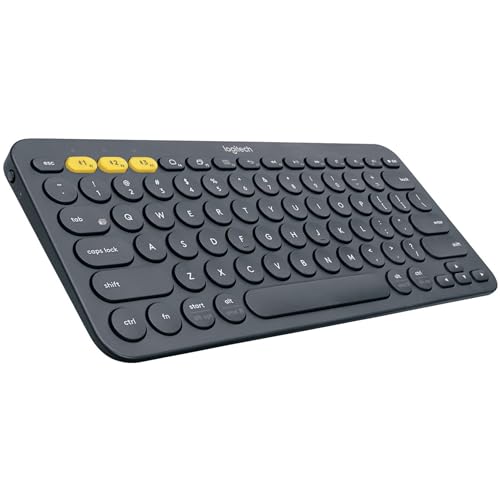 Logitech K380 Multi-Device Bluetooth Ke… Logitech K380 Multi-Device Bluetooth Ke… |
Also Excellent | $39 | 8.5 | Buy → |
| 4 |  Das Keyboard 4 Professional Das Keyboard 4 Professional |
$199 | 8.2 | Buy → | |
| 5 |  Keychron K2 Pro QMK/VIA Wireless Mechan… Keychron K2 Pro QMK/VIA Wireless Mechan… |
$111 | 7.8 | Buy → |
Showing 5 of 5 products
Logitech ERGO K860 Wireless Split Ergonomic Keyboard with Wrist Rest
“Best wireless split ergonomic keyboard. Logitech ERGO K860 reduces wrist bending 25% and provides 54% more wrist support vs standard keyboards — certified by US Ergonomics as improving posture.”
See Today’s Price →What we like
- Split key layout separates hands to shoulder width for natural arm positioning
- Integrated palm rest at a negative tilt angle reduces forearm and wrist extension
- Wireless Bluetooth and Logi Bolt USB receiver supports multiple devices
- Quiet key switches reduce noise in shared office environments
- Logi Options+ software remaps keys and customizes shortcut functions
Watch out for
- Fixed split angle — not adjustable like tented keyboards
- Takes 1-2 weeks to adapt to the curved split layout
- Bulky form factor — not portable
Read Full Analysis
The Logitech ERGO K860 is the ergonomic investment in this all-day typing lineup — the split keyboard design reduces ulnar deviation (wrists bending outward toward the little finger) that is the primary driver of repetitive strain injury for heavy typists. The 25% reduction in wrist bending over flat keyboards is Logitech's measured figure from ergonomics certification testing, and the built-in padded wrist rest eliminates the need to purchase a separate wrist rest while maintaining proper wrist angle. The wireless Bluetooth and Unifying Receiver operation connects to up to three devices with Easy-Switch buttons. Compared to the Keychron K2 in this lineup, the ERGO K860 uses low-profile scissor-switch keys rather than mechanical switches — quieter in open offices and lighter actuation force, but without the satisfying tactile feedback that mechanical typists prefer. For users whose primary concern is ergonomics and wrist health after experiencing discomfort, the K860 addresses the problem directly. For users whose primary concern is typing feel and switch variety, the Keychron K2 or K2 Pro is the better choice. The Das Keyboard 4 is the traditional office mechanical option. In this lineup, the K860 is the correct choice for anyone who already has wrist or shoulder discomfort from typing and wants the most ergonomically validated keyboard available. Best for heavy typists with existing wrist fatigue or those proactively preventing RSI.
Keychron K2 Wireless Mechanical Keyboard
“Keychron K2 hits the sweet spot — 75% layout keeps arrow keys and function row while staying compact, hot-swap lets you change switches freely, and Bluetooth works with Mac, Windows, iPad, and phone s”
See Today’s Price →What we like
- Hot-swappable switches
- Bluetooth + wired
- 75% layout — compact with arrows and F-row
- Mac and Windows compatible
Watch out for
- No number pad
- Plastic case (not aluminum)
Read Full Analysis
The Keychron K2 Wireless Mechanical Keyboard is the typing-feel leader in this all-day keyboard lineup — where the Logitech ERGO K860 prioritizes ergonomics over typing experience, the K2 prioritizes the satisfying mechanical switch action that makes long typing sessions more enjoyable. The 75% compact layout retains the function row, arrow keys, and navigation cluster that productivity users need while eliminating the numpad, reducing the distance between the keyboard and mouse to a more ergonomic shoulder position. The hot-swap socket lets you change switches without soldering — try Brown tactile, move to Red linear, or experiment with other Cherry MX and Clicky Blue switches as preferences evolve. Bluetooth and 2.4G wireless support three paired devices with Easy-Switch buttons. The aluminum frame is noticeably more premium than the plastic chassis of the Logitech K380. Compared to the Logitech K380, the K2 is in a different performance tier: better build quality, more satisfying switches, more layout options. Versus the Keychron K2 Pro below it, the standard K2 lacks QMK/VIA programmability — for users who do not need custom key remapping, the standard K2 saves the price difference. The Das Keyboard 4 Pro is the office-appropriate mechanical alternative without wireless. Best for typists, writers, and coders who want the satisfaction of mechanical switches in a compact wireless layout that works across Mac, Windows, and iPad.

Logitech K380 Multi-Device Bluetooth Keyboard
“The Logitech K380 punches far above its price — three Easy-Switch buttons to jump between devices, and a 2-year battery life on standard AAA batteries.”
See Today’s Price →What we like
- Connects to 3 devices (Easy-Switch)
- Very affordable
- Works with Mac, Windows, iOS, Android
- 2-year battery life (AAA batteries)
- Compact design
Watch out for
- Chiclet keys have less travel than MX Keys
- No backlight
Das Keyboard 4 Professional
“The Das Keyboard 4 Professional targets office workers who want a no-nonsense, professional-looking mechanical keyboard with practical features like USB passthrough and volume controls. At $169 withou”
See Today’s Price →What we like
- Dedicated media controls and premium professional aesthetic
- Built-in USB 3.0 hub adds practical functionality
- Full-size layout with quality Cherry MX switches
Watch out for
- No hot-swappable switches at a premium price point
- Heavier than alternatives without aluminum construction benefits
Read Full Analysis
The Das Keyboard 4 Professional at $199 is a well-built full-size mechanical keyboard with a conservative aesthetic — black anodized aluminum top panel, standard 104-key layout, no RGB, no floating keycap design. The Cherry MX Brown switches in this listing provide tactile feedback without the sharp click of Blues, making it tolerable in shared office environments. Two integrated USB 3.0 passthrough ports and a dedicated volume knob are the practical features that distinguish it from simpler boards. At $199 without hot-swap capability, the comparison to the Keychron Q1 at a similar price point is the legitimate knock — the Q1 offers gasket-mounted construction for better sound dampening, hot-swap sockets for switch experimentation, and QMK programmability. The Das Keyboard 4 Professional counters with a simpler, less maintenance-intensive ownership experience: no firmware to configure, no switch pulling, no QMK learning curve. The target user is a typing-focused office professional who wants a quality mechanical keyboard with a professional appearance and no configuration overhead. Against the Filco Majestouch-2 at $160, the Das Keyboard adds the USB hub and volume knob. Against the Leopold FC900R at $130, it adds $70 for those peripheral features and the Das brand recognition. For pure typing performance at the price, the Leopold is harder to beat — but the Das Keyboard is the right choice for buyers who value the integrated hub and analog volume control.

Keychron K2 Pro QMK/VIA Wireless Mechanical Keyboard (Brown)
“The definitive programmer keyboard under $100. QMK/VIA programmability, hot-swappable switches, and wireless make the K2 Pro future-proof - you can change switches as preferences evolve without buying”
See Today’s Price →What we like
Watch out for
Read Full Analysis
The Keychron K2 Pro at $111.99 is the most future-proof keyboard at this price: hot-swap sockets let you change switches without soldering, QMK/VIA programmability allows full remapping, and Bluetooth 5.1 plus USB-C wired connectivity covers every connection scenario. The 75% compact layout retains arrow keys and a function row while eliminating the numpad — the right size for most typists who do not want a full 100% board. Brown switches in this configuration provide tactile feedback suitable for all-day typing without the noise complaint of clicky switches. The aluminum top frame reduces flex and improves the sound profile over the plastic-body K2 V2. At $111.99, this is the keyboard for typists who want to make one good keyboard purchase and not buy another — the switch-swapping and firmware customization extend its useful life as preferences evolve.
Keyboards for Typing All Day (2026) Buying Guide
 Photo by RDNE Stock project / Pexels
Great for: Remote workers, writers, developers, and anyone typing more than 4 hours per day who wants to reduce fatigue and long-term RSI risk.
Not ideal if: You primarily use a laptop keyboard and rarely type for extended sessions—the upgrade investment won't pay off.
For all-day typists, the split ergonomic layout reduces wrist pronation (the unnatural flat-hand position standard keyboards force) and the built-in wrist rest keeps your wrists neutral through long sessions. Logitech's research shows a 25% reduction in wrist extension and 11° reduction in forearm muscle activity vs. a traditional keyboard. It's wireless, multi-device (switches between 3 devices), and runs 2 years on a single charge.
Mechanical Pick: Keychron K2 Brown Switches ($90)

For typists who prefer tactile mechanical feedback, the K2's 75% compact layout saves desk space while retaining arrow keys and function row. Brown switches are the standard recommendation for all-day office typing: tactile bump without the loud click, quiet enough for open offices, and satisfying enough to maintain typing rhythm.
The Switch Choice Matters for All-Day Typing
- Linear (Red/Silent Red): Smooth keystroke, quietest, best for fast typists who bottom out every key
- Tactile (Brown/Clear): Bump feedback at actuation point, quieter than clicky, best for mixed typing/shortcuts
- Clicky (Blue/Green): Audible click feedback, most satisfying, not appropriate for shared offices
- Low-profile (laptop-style): Shorter travel distance, quieter, less finger lift required — best for RSI-sensitive users

Split keyboards like the Logitech K860 require 1–2 weeks of adjustment but reduce wrist strain significantly for heavy typists. Traditional layouts (Keychron K2, Das Keyboard 4) are immediately familiar but maintain the unnatural wrist angle that causes long-term fatigue.
For typing, wireless is almost always preferable—no cable drag, clean desk, and the ability to adjust keyboard position freely. All picks here are wireless or have wireless modes. Battery life ranges from 2 weeks (Keychron K2 with backlight on) to 2 years (Logitech K860). See our ergonomic chair guide and standing desk recommendations for the complete ergonomic workspace setup.
Frequently Asked Questions
What keyboard switches are best for all-day typing?
Do ergonomic keyboards actually help with wrist pain?
What is a 75% keyboard layout?
Is the Logitech K860 worth it for home office use?
Can I use a mechanical keyboard in an open office?
How We Analyze Products
We analyze Amazon review data — often thousands of reviews per product — to surface patterns that individual buyers miss. Our process aggregates star ratings, review counts, and buyer sentiment at scale, identifying which strengths and weaknesses appear consistently across the largest review samples available. The 28,708+ reviews analyzed on this page represent real verified-purchase feedback from Amazon buyers.
Each product earned its placement through data: total review volume, average rating, and the specific praise and complaints that repeat most often across buyers. No manufacturer paid for placement on this page. Products appear here because buyers endorsed them at scale, not because a company asked us to feature them.
We use AI to summarize review sentiment — not to fabricate opinions, but to condense what thousands of buyers actually wrote into a readable format. The pros and cons you see reflect the most common themes found in verified purchaser reviews, paraphrased for clarity. We do not claim to have accessed Reddit, YouTube, or specific publications in generating these summaries.
Prices shown reflect Amazon pricing at the time this page was last generated. Click “See Today’s Price” to get the current live price on Amazon. Read our full methodology →