Desk Cable Management: How to Organize Cables Under Your Desk (2026)
Mount a cable tray under your desk ($20-40) to hold your power strip and keep cables off the floor. Use adhesive cable clips along desk edges to route cables cleanly. Bundle cables running the same direction with velcro ties (not zip ties — velcro is reusable and gentler on cables). The entire setup costs $30-60 and takes 2 hours.
At a Glance
| # | Product | Award | Price |
|---|
Desk Cable Management Buying Guide
 Photo by Josh Sorenson / Pexels
Most home office cable setups fail for a predictable reason: they were never planned — devices were added one at a time, each time taking the path of least resistance. The result is a spaghetti nest that takes 15 minutes to trace whenever something needs unplugging. A systematic approach takes 2-3 hours once and keeps the setup clean indefinitely.
Step 1: The Power Strip — Get It Off the Floor
The power strip is the anchor of any cable management system. If it's on the floor, every cable drops to the floor and creates a tripping hazard. The solution: a under-desk power strip mount or cable management tray. Options: Under-desk cable tray: Mounts to the underside of the desk with screws or clamps, holds a power strip and corrals cables in a channel. Cable Management Box ($20-30 from J Channel, Bluelounge, or IKEA SIGNUM) is the most popular. Fits power strips up to 12 inches and 6-outlet. Desk grommet power strip: Fits through the grommet hole in desks that have them. Uplift, Flexispot, and most standing desks include grommets. Adhesive cable box: For desks where drilling isn't allowed (rental furniture). 3M Command strips support up to 5 lbs for the mount itself; the power strip sits inside. Less stable but non-destructive.
Step 2: Route Cables Along Desk Structure
Once the power strip is mounted, run cables along the desk frame rather than hanging them loose. Tools: Cable clips (adhesive): Stick to desk edges, legs, and walls. Hold individual cables in a line. Best brands: Cable Matters, VELCRO brand clips, Monoprice. Use the appropriate size for cable diameter — many come in multi-size packs. Cable raceways: Plastic channels that stick or screw to walls and desk surfaces, concealing multiple cables in one clean line. Essential for runs along walls (monitor cables, ethernet). D-Line and Wiremold are the most durable raceways. Cable sleeves: Neoprene or nylon sleeves that bundle multiple cables into a single visible cord. Good for the visible section between desk and floor. Velcro ties (reusable): Bundle cables running in the same direction into organized groups. Never use zip ties on cables — the ratchet mechanism creates pressure points. Velcro cable ties ($8 for 100) can be repositioned indefinitely.

Step 3: Label Everything
A label maker pays off immediately. When everything behind a desk is labeled, a problem (flickering monitor, dropped network connection) takes 2 minutes to trace instead of 15. Label options: Permanent labels: Use a label maker (Brother P-Touch is the standard, $25) for power bricks and fixed devices. Cable identification tags: Wrap-around tags that stay with the cable. Amazon Basic cable labels ($8 for 40) are reusable and write-on/wipe-off. Color-coding approach: use electrical tape color markers at the plug end — green for peripherals, black for monitors, yellow for audio.
Cable Management by Desk Type
Standing/sit-stand desks: The cable management challenge is the height transition — cables need slack to accommodate the desk moving up and down without pulling devices off the surface. Use a cable chain (like an Igus energy chain) to manage the bundle that moves with the desk. Many standing desk manufacturers sell proprietary cable kits. Minimum: 3 feet of extra slack in every cable connected to the desk.
Corner desks: The corner creates a natural cable routing channel behind the monitor. Route cables through the corner and bundle them together using a large cable sleeve before running to the power strip. Corner management: a 24-inch cable raceway along the desk back edge cleans up 80% of visible cable clutter.
Glass desks: No underside mounting possible. Use a free-standing cable management box on the floor, positioned near one desk leg. Route all cables down one leg using cable clips (large, for 3-5 cables) and into the floor box.
Wall-mounted desks (floating): Most elegant cable management opportunity — no legs means cables can run directly down the wall into a floor box. A cable raceway from desk surface to floor outlet handles everything.
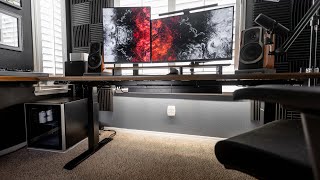
Monitor Arms and Cable Integration
Monitor arms (VESA mount) typically include integrated cable channels that run cables from monitor to desk surface inside the arm. This eliminates the most visible cable — the monitor video and power cable dangling from the display. Ergotron, Amazon Basics, and Huanuo monitor arms all include cable routing channels. If your current monitor stand doesn't route cables, a monitor arm ($25-100) solves both ergonomics and cable management simultaneously.
What We Recommend
Complete desk cable management kit for most setups: J Channel cable tray ($25) under the desk, D-Line cable raceway ($18) along any wall runs, VELCRO cable ties ($8) for bundling, and adhesive cable clips ($10 for 30) for routing. Total: ~$60 for a complete transformation. For premium setups, the IKEA SIGNUM under-desk cable rail ($10) paired with a cable management box ($20) is the most-photographed clean setup solution. See our full best cable management picks and best desk accessories for specific product recommendations.

How We Analyze Products
We analyze Amazon review data — often thousands of reviews per product — to surface patterns that individual buyers miss. Our process aggregates star ratings, review counts, and buyer sentiment at scale, identifying which strengths and weaknesses appear consistently across the largest review samples available.
Each product earned its placement through data: total review volume, average rating, and the specific praise and complaints that repeat most often across buyers. No manufacturer paid for placement on this page. Products appear here because buyers endorsed them at scale, not because a company asked us to feature them.
We use AI to summarize review sentiment — not to fabricate opinions, but to condense what thousands of buyers actually wrote into a readable format. The pros and cons you see reflect the most common themes found in verified purchaser reviews, paraphrased for clarity. We do not claim to have accessed Reddit, YouTube, or specific publications in generating these summaries.
Prices shown reflect Amazon pricing at the time this page was last generated. Click “See Today’s Price” to get the current live price on Amazon. Read our full methodology →