Home Office Lighting Guide: How to Reduce Eye Strain and Look Better on Video Calls (2026)
For video calls, place a light source in front of you at eye level — a ring light ($25-40) or a desk lamp aimed at your face. For working comfort, use 4000-5000K (cool white) lighting at 500+ lux on your desk surface. Never work facing a window — backlight makes your face dark on camera and causes squinting. Bias lighting behind your monitor reduces eye strain significantly.
At a Glance
| # | Product | Award | Price |
|---|
Home Office Lighting Guide Buying Guide
 Photo by Alpha En / Pexels
Most home offices were designed as bedrooms, dining rooms, or living rooms — not workspaces. The lighting reflects that: warm overhead fixtures that feel cozy but cause squinting at screens, windows positioned behind monitors that create extreme backlight, and no face-level light for video calls. Three targeted changes fix all of these problems for under $100 total.
Understanding Color Temperature
Color temperature is measured in Kelvin (K) and determines whether light appears warm (orange-yellow) or cool (blue-white):
2700-3000K: Warm white. The standard for homes — bedrooms, living rooms. Creates a relaxing atmosphere. Problem: too warm for focused work and makes you look slightly orange on video calls.
3500-4000K: Neutral white. The transitional zone. Good for home office use where you want some warmth without sacrificing alertness.
4000-5000K: Cool white. The sweet spot for home offices — mimics midday daylight, reduces eye strain, improves alertness and focus. Most office buildings use 4100-4500K.
5000-6500K: Daylight/blue-white. High alertness, sometimes harsh for extended use. Better for tasks requiring color accuracy (graphic design, photo editing).
The practical recommendation: use adjustable-color-temperature (tunable white) desk lamps that let you shift between 2700-6500K. BenQ's ScreenBar and Elgato's Key Light both offer this. For fixed temperature: 4000-4500K is the universal home office recommendation.
Positioning: The Most Overlooked Factor
Overhead lighting only (no desk lamp): Creates top-down shadows on your face, making you look tired or harsh on video. Glare on monitor surfaces reduces screen contrast. Overhead is ambient fill — it's not the primary working light. Window position: The single biggest home office lighting mistake is sitting with a window behind you. This creates backlight — your camera auto-exposes for the bright window, making your face dark. Solution: move your desk so the window is to the side (side lighting, which is flattering) or in front of you (creates soft front-fill light). If desk position can't change: close blinds and use a front-facing artificial light source. Monitor glare: Light sources that reflect in your monitor (overhead lights, windows to the side) reduce perceived contrast and cause eye strain. Position your monitor perpendicular to window light, not parallel to it. Face lighting for video calls: Ideal placement is in front of you, at eye level, slightly above your monitor. This creates the even, flattering light that makes video calls look professional. Ring lights ($25-40) and key lights (Elgato, Logitech Litra) accomplish this specifically.

Eye Strain: The Science and the Solutions
Digital eye strain (also called Computer Vision Syndrome) affects 50-90% of people who work at computers for extended periods. Symptoms: dry eyes, headaches, blurred vision, neck pain from adjusting viewing angle. Causes that lighting addresses: Contrast ratio between screen and surroundings — working in a dark room with a bright monitor forces eyes to constantly adapt between brightness levels. Solution: ambient lighting that keeps the room at 30-50% of monitor brightness. Flicker: Low-quality LEDs with high PWM (pulse-width modulation) at 50-100Hz cause subtle flicker invisible to conscious perception but fatiguing over hours. Look for "flicker-free" LED desk lamps (BenQ ScreenBar, Philips Hue, IKEA TRÅDFRI). Glare: Covered above — position lighting to eliminate monitor reflections. Bias lighting: LED strip lights mounted behind a monitor, emitting a soft glow on the wall. This reduces the contrast between the bright monitor and the dark wall behind it, measurably reducing eye fatigue. Govee, Philips Hue Play, and Corsair iCUE all offer bias lighting strips. Color: 6500K white or warm white bias light is most effective; colored bias lighting is primarily aesthetic.
Video Call Lighting on a Budget
A $25 ring light resolves 90% of video call lighting problems. Position it at eye level in front of your camera, slightly above monitor height. Modern ring lights include adjustable color temperature (warm to cool) and brightness controls. The $30-40 version from Neewer, Lume Cube, or UBeesize provides soft, flattering front lighting that makes even a cheap webcam look significantly better. For professional setups: a key light (Elgato Key Light at $200, or the budget Neewer LED panel at $50) provides more uniform, controllable face lighting without the circular reflection visible in people's eyes from ring lights (the "ring eye" that's become a video call aesthetic marker).
What We Recommend
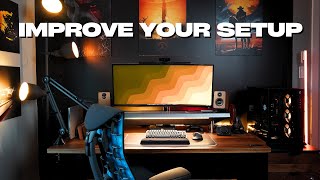
Complete home office lighting setup ($60-80 total): BenQ ScreenBar Halo ($109) as the desk lamp — it illuminates your desk without glare on the monitor screen (specifically designed for this). Budget alternative: IKEA FORSA lamp ($20) pointed at the desk surface (not the monitor). For video calls: Neewer 10" Ring Light ($30) at eye level. For eye strain reduction: Govee bias lighting strip ($20) behind the monitor. See our best chairs for working from home, cable management guide, and best budget office chairs for a complete home office setup.

How We Analyze Products
We analyze Amazon review data — often thousands of reviews per product — to surface patterns that individual buyers miss. Our process aggregates star ratings, review counts, and buyer sentiment at scale, identifying which strengths and weaknesses appear consistently across the largest review samples available.
Each product earned its placement through data: total review volume, average rating, and the specific praise and complaints that repeat most often across buyers. No manufacturer paid for placement on this page. Products appear here because buyers endorsed them at scale, not because a company asked us to feature them.
We use AI to summarize review sentiment — not to fabricate opinions, but to condense what thousands of buyers actually wrote into a readable format. The pros and cons you see reflect the most common themes found in verified purchaser reviews, paraphrased for clarity. We do not claim to have accessed Reddit, YouTube, or specific publications in generating these summaries.
Prices shown reflect Amazon pricing at the time this page was last generated. Click “See Today’s Price” to get the current live price on Amazon. Read our full methodology →