How to Set Up a Home Office: Complete Guide (2026)
Spend more on the chair than the desk. Add a $30 monitor arm before any other upgrade. Layer ambient + task + bias lighting. The 3 fixes — chair, monitor height, lighting — solve 80% of home-office complaints.
At a Glance
| # | Product | Award | Price | |
|---|---|---|---|---|
| 1 | Best Overall | $35 | Buy → | |
| 2 | Also Excellent | Check Price | Buy → | |
| 3 | Worth Considering | Check Price | Buy → | |
| 4 | Best Value | Check Price | Buy → |


How to Set Up a Home Office Buying Guide
A proper home office is not about Pinterest aesthetics — it is about supporting 8-hour workdays without back pain, eye strain, or productivity loss from a poorly-designed setup. Most home offices fail in three predictable ways: chair too cheap, monitor too low, lighting all wrong. Fix those three and you have solved 80% of remote-work ergonomic complaints. Here is the order to buy in, the budget breakpoints that actually matter, and the specific dimensions that protect your spine, neck, and eyes for the next decade.
The chair is non-negotiable (and worth more than the desk)
If your budget forces a tradeoff, spend more on the chair than the desk. A bad chair costs you 2-3 hours of productive work per day from fatigue and discomfort. A bad desk just makes the room less pretty. The Herman Miller Aeron and Steelcase Leap are the gold standards at $1,000-1,800 (refurbished from authorized resellers like Crandall Office Furniture cuts that to $400-600 with the same warranty). Below $300 new, almost every "ergonomic" chair has the wrong seat depth, fixed lumbar that does not adjust to your spine, or armrests that lock at the wrong angle.
The dimensions that matter: seat depth should let your back touch the lumbar support while leaving 2-3 inches behind your knees; seat height should put your feet flat on the floor with thighs parallel to ground; armrests should support elbows at 90-100 degrees with shoulders relaxed (not raised); lumbar curve should match your lower back. See our Best Chair for Home Office 2026 picks across budgets and Best Budget Office Chairs Under $200 for entry-level options that still hit the dimension requirements. For chronic back issues, Best Chair for Lower Back Pain 2026 goes deeper.

Monitor positioning beats monitor quality
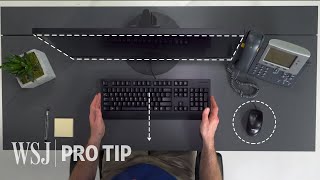
The single most common home office mistake is a monitor on a desk surface, with the top of the screen 4-8 inches below eye level. This forces you to tilt your head down all day, which causes the "tech neck" pain epidemic. The fix costs $30: a monitor arm. The top of your monitor should sit at eye level when you are sitting up straight, with the screen tilted slightly back (about 10 degrees). Distance from your face: roughly an arm's length, 25-30 inches.
For dual-monitor setups, the gap between monitors should be minimal (under 0.5 inches) if you use both screens equally; if one is primary, angle the secondary 30 degrees toward you. A 27-inch primary at 1440p resolution is the sweet spot for most desk work — larger means more head turning, smaller means cramped windows.
Desk depth and width — match your monitors
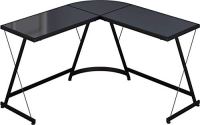
For a single 27-inch monitor, 48 inches wide and 24 inches deep is the absolute minimum; 60x30 is comfortable. For dual monitors, 60 inches wide minimum, 30 inches deep mandatory. Less depth and you cannot push monitors back to the proper viewing distance — which causes the eye strain and forward-leaning posture that defeats good chair positioning.
A standing desk option is worth considering if your work has long stretches of focused typing. See Best Standing Desks for Home Office for picks. The 20-min stand / 40-min sit alternation is what produces the back-pain reduction; standing all day is worse than sitting all day.
Lighting — the most underrated upgrade
Two failure modes dominate: (1) overhead-only lighting that creates monitor glare and washes out screens; (2) under-lit rooms where you are squinting and pupils dilating-contracting all day, which causes headaches by 3pm. The fix is a 3-light setup: ambient overhead, task lamp on the desk, and either a bias light behind the monitor or a window behind your desk providing natural ambient.
A desk lamp with adjustable color temperature (3000K-5000K) and brightness lets you match the lamp to time of day — warmer in evening reduces blue-light exposure before sleep, brighter cooler temperature midday improves focus. The BenQ ScreenBar ($99) clips on top of the monitor and lights the desk surface without monitor glare. See Best Desk Lamp for Eye Strain 2026 and Best LED Desk Lamps.
The accessories that quietly matter
Desk mat: a 36x16 inch desk mat creates a smooth mouse surface for the entire desk and reduces wrist fatigue. See Best Desk Mats 2026. Footrest: if your feet do not touch the floor when seated correctly, a footrest is mandatory — without it, you compensate by slouching. Best Footrests for Office Chairs covers options. Cable management: a cable tray under the desk and Velcro straps consolidate the snake pit. Desk organizer: a vertical document/laptop stand keeps the desk surface clear — see Best Desk Organizers for Home Office.
Common mistakes
Buying the desk before the chair. The chair drives most ergonomic outcomes; the desk just provides surface area. Reverse the typical purchase order.

Ignoring monitor height. A $30 monitor arm is the highest-ROI ergonomic purchase in any home office. Skip it and the $1,500 chair cannot save you.
Lighting only from overhead. Single-source overhead lighting causes monitor glare and harsh shadows. Layer ambient + task + bias lighting.
Buying a "gaming chair" for office work. Bucket seats with high backs and racing-style cushions look cool but have the wrong seat depth and the lumbar position is fixed. Real ergonomic office chairs adjust to your spine. See Best Chairs for Working From Home for proper office chairs.
Open-plan desk with no privacy from family. If you take video calls and live with others, a corner placement or door-closeable space matters more than the desk itself. Plan the room before the equipment.
Watch Before You Buy

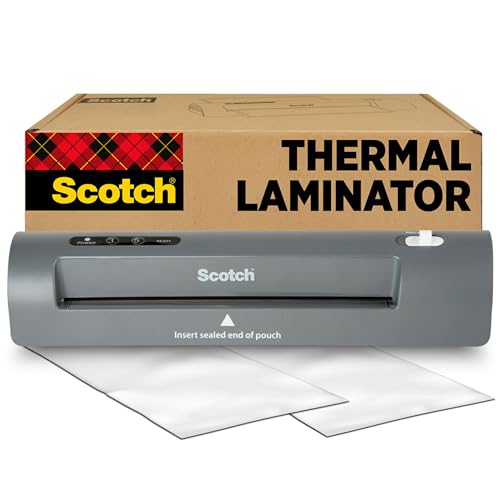
“Scotch's home laminator strikes the right balance of capacity and simplicity. The 2-roller system handles up to 5-mil pouches reliably — enough for menus, ID cards, and home reference sheets.”
See Today’s Price →What we like
- 2-roller system
- Hot and cold modes
- Standard home size
- Scotch quality
Watch out for
- Warm-up time longer than professional laminators
- Pouches not included — extra purchase
- Jamming possible with thick pouches
How We Analyze Products
We analyze Amazon review data — often thousands of reviews per product — to surface patterns that individual buyers miss. Our process aggregates star ratings, review counts, and buyer sentiment at scale, identifying which strengths and weaknesses appear consistently across the largest review samples available.
Each product earned its placement through data: total review volume, average rating, and the specific praise and complaints that repeat most often across buyers. No manufacturer paid for placement on this page. Products appear here because buyers endorsed them at scale, not because a company asked us to feature them.
We use AI to summarize review sentiment — not to fabricate opinions, but to condense what thousands of buyers actually wrote into a readable format. The pros and cons you see reflect the most common themes found in verified purchaser reviews, paraphrased for clarity. We do not claim to have accessed Reddit, YouTube, or specific publications in generating these summaries.
Prices shown reflect Amazon pricing at the time this page was last generated. Click “See Today’s Price” to get the current live price on Amazon. Read our full methodology →