Home › Tech › Best Budget Wireless Keyboards (2026)
Best Budget Wireless Keyboards (2026)
By MyAwesomeBuy Research Team · Updated April 8, 2026 · Our Methodology
4 models compared54,676+ reviews analyzed
No manufacturer paid for placement. Rankings based on verified buyer review data.
Quick Answer
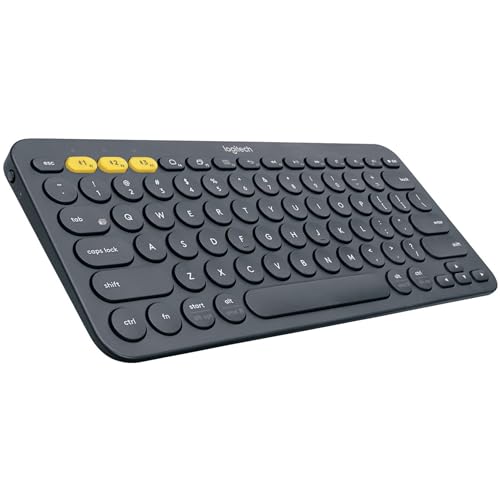
The Logitech K380 is the best budget wireless keyboard. At $33.99 it pairs to three devices — switch between your laptop, tablet, and phone with a single button press. The compact layout fits any desk setup, and Logitech's wireless reliability is class-leading. Battery life runs 2+ years on 2 AAA batteries. The best keyboard you can buy without spending $60+.
Best for: Budget users wanting multi-device connectivity
“The Logitech K380 punches far above its price — three Easy-Switch buttons to jump between devices, and a 2-year battery life on standard AAA batteries.”
The Logitech K380 pairs to up to three Bluetooth devices and switches between them with a dedicated button press, making it the standout multi-device keyboard at this price. At $33.99 with a 4.6-star rating, it's compact enough for a desk or bag, and the 2-year battery life on 2 AAA cells means months between changes. The round keycap design is slightly unusual but comfortable after an hour of use. Best for users who regularly switch between a laptop, tablet, and phone during the same work session.
Full Specs & Measurements
Upc
097855117618
Asin
B0148NPH9I
Brand
Logitech
Color
Dark Grey
Battery
2 years AAA
Language
Turkish
Platforms
Mac/Win/iOS/Android
Model Name
K380 Multi-Device Bluetooth Keyboard
Style Name
K380 Pebble
Unit Count
1.0 Count
Item Weight
0.9 Pounds
Connectivity
Bluetooth (3 devices)
Manufacturer
Logitech
Model Number
920-007596
Multi Device
True
Power Source
Battery Powered
Built-In Media
Keyboard - wireless
Item Type Name
Logitech Multi-Device K380 - Keyboard - Black
Number Of Keys
80
Button Quantity
80
Keyboard Layout
QWERTY
Antenna Location
Everyday Use, Office
Hand Orientation
Ambidextrous
Best Sellers Rank
#1,052 in Computer Keyboards
Compatible Devices
PC, Mac, Android, Apple iOS
Enclosure Material
Unspecified
Number Of Sections
1
Additional Features
Hotkeys and Media Keys
Keyboard Description
Multi Functional
Connectivity Technology
Bluetooth
Item Dimensions L X W X H
10.9"L x 4.9"W x 0.6"H
Number Of Batteries Required
2
Also Excellent
Arteck 2.4G Wireless Stainless Steel Full Size Keyboard Rechargeable
$37
at Amazon
Best for: Budget typists wanting full-size wireless keyboard for couch or desk use
“Best for TV couch users and budget home office workers who want a full-size wireless keyboard with a premium stainless look at an accessible price.”
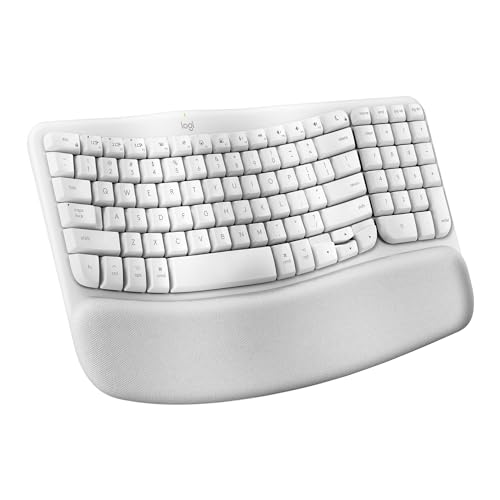
Keyboard DescriptionThis is an ergonomic wave-designed Bluetooth keyboard with a cushioned palm rest, quiet keys, and Mac-specific keys. It is made with 46% recycled plastic and is carbon neutral.
Warranty Description1 Year Limited Hardware Warranty
This is an ergonomic wave-designed Bluetooth keyboard with a cushioned palm rest, quiet keys, and Mac-specific keys. It is made with 46% recycled plastic and is carbon neutral.
Warranty Description
1 Year Limited Hardware Warranty
Connectivity Technology
Bluetooth
Number Of Batteries Required
4
Mechanical Keyboard Switch Model
Linear
Global Trade Identification Number
00097855191380
Best Premium
Logitech MX Keys S Wireless Keyboard
$119
at Amazon
Best for: Office workers needing quiet wireless keyboard for long typing sessions
“Best keyboard for programmers who prefer quiet typing and cross-device productivity. MX Keys S is whisper-quiet, premium, and the Logi Options+ app provides smart macro capabilities without full QMK c”
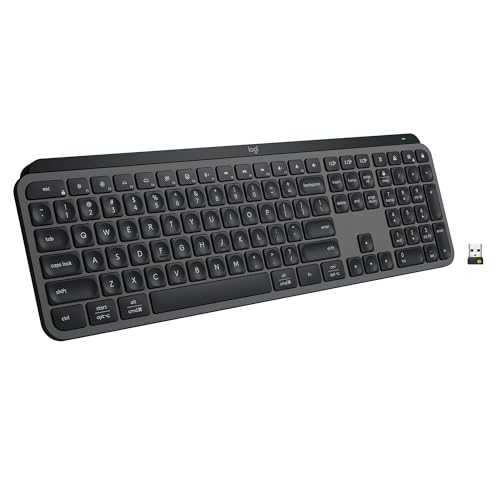
The Logitech MX Keys S at $119.99 is the premium wireless keyboard for programmers who want cross-device productivity and quiet operation. The spherical key tops create concave wells matching fingertip shape, reducing lateral finger movement and improving accuracy during extended coding sessions. Logi Options+ provides smart macros that fire different actions depending on which application is in focus — contextual remapping without full QMK complexity. Backlight adapts to ambient light via proximity sensor, activating when hands approach. Easy-Switch button changes between three paired devices without navigating Bluetooth settings menus. The MX Keys S updates the original MX Keys chassis with slightly refined switches and improved Options+ integration. For programmers who move between desktop, laptop, and tablet throughout the day, the three-device switching and premium typing feel make the MX Keys S the correct wireless choice.
Manufacturer’s warranty can be requested from customer service. Click here to make a request to customer service.
Water Resistance Level
Not Water Resistant
Connectivity Technology
Bluetooth
Item Dimensions L X W X H
18"L x 6"W x 1.5"H
Mechanical Keyboard Switch Model
Linear
Keyboard Backlighting Color Support
Single Color
Budget Wireless Keyboards (2026) Buying Guide
Photo by Avinash Kumar / Pexels
Our Top Pick
Logitech K380 Multi-Device Bluetooth Keyboard at $25.98 — Logitech K380 pairs to 3 devices with a single button toggle — the killer feature no competitor matches at this price.
Budget Pick: Arteck 2.4G Wireless Stainless Steel Full Size Keybo... at $37.99 — Arteck 2.4G at $37.99 gives you a full keyboard with numeric keypad in a stainless-steel ultra-slim package.
Great for: Writers and coders who type for hours and want tactile feedback, gamers who want fast actuation, and enthusiasts
Not ideal if: You work in a shared office — mechanical keyboards are loud and disruptive to coworkers in quiet environments
Budget wireless keyboards ($30–$60) cover 90% of everyday typing needs. Key considerations: connection type (Bluetooth vs USB dongle — Bluetooth works without a receiver but has more latency; USB dongles are more reliable for gaming), multi-device pairing (Logitech's Easy-Switch lets one keyboard control 3 devices), battery type (rechargeable USB-C is more convenient than AA/AAA, but AAA batteries last years vs months for a rechargeable), and key travel. For ergonomic needs, spend up — entry-level keyboards have standard flat layouts that cause wrist strain over long sessions. At $120+, models like MX Keys offer wrist-shaped concave key caps and a wrist rest.
Quick Decision: Budget matters most → Arteck 2.4G Wireless Stainless Steel Full Size Keybo.... Quality matters most → Logitech K380 Multi-Device Bluetooth Keyboard.
7 Tips for Buying Your FIRST Mechanical Keyboard // an Easy Beginner G
Typists who spend hours at a keyboard daily, gamers who want tactile or clicky feedback, and office workers looking to reduce finger fatigue. Linear switches suit gaming; tactile or clicky suits typing.
Our top pick is the Logitech K380 Multi-Device Bluetooth Keyboard (around $26) — The Logitech K380 punches far above its price — three Easy-Switch buttons to jump between devices, and a 2-year battery ….
The options here range from $26 to $120. Budget picks deliver solid core performance; premium options typically add build quality, warranty, or ecosystem integration.
What to Look For
Switch type: Linear switches (Red, Yellow) are smooth and quiet — preferred for gaming. Tactile switches (Brown, Clear) give a feedback bump without a click — good for typing in shared spaces. Clicky switches (Blue, Green) are the loudest and most satisfying but disruptive in offices.
Form factor: Full-size includes a numpad. Tenkeyless (TKL) removes it, freeing desk space. 75% and 65% layouts go smaller but sacrifice function row or arrow keys. Know what you'll miss before downsizing.
Hot-swap support: Hot-swap sockets let you change switches without soldering. It's a premium feature worth having if you're experimenting with switch types or expect to upgrade over time.
Wireless stability: 2.4GHz wireless dongles are as fast as wired for gaming. Bluetooth is convenient but adds 5–20ms latency — fine for typing, not ideal for competitive gaming.
What is the difference between Bluetooth and USB dongle wireless?
USB dongle (2.4GHz) has lower latency and more reliable connection — better for gaming. Bluetooth doesn't require a free USB port and connects to more devices including tablets and phones.
How long do wireless keyboard batteries last?
AA/AAA batteries in low-power keyboards last 1–3 years with moderate use. Rechargeable keyboards need charging every 4–8 weeks. If you hate charging, go AA.
Can a wireless keyboard work with both Windows and Mac?
Most modern wireless keyboards work with both — key labels differ (Windows key vs Command) but all major shortcut functions work once paired.
What is multi-device pairing on a keyboard?
Multi-device keyboards store 2–3 Bluetooth connections and let you switch between them with a button or key combo. Essential if you type on more than one device regularly.
Is a budget keyboard good for long writing sessions?
Budget keyboards can cause hand fatigue with flat, scissor-switch keys over long sessions. For 4+ hours of daily typing, an ergonomic keyboard with wrist rest is worth the $80–$130 investment.
We analyze Amazon review data — often thousands of reviews per product — to surface patterns
that individual buyers miss. Our process aggregates star ratings, review counts, and buyer
sentiment at scale, identifying which strengths and weaknesses appear consistently across
the largest review samples available. The 54,676+ reviews analyzed on this page represent real verified-purchase feedback from Amazon buyers.
Each product earned its placement through data: total review volume, average rating, and the
specific praise and complaints that repeat most often across buyers. No manufacturer paid for
placement on this page. Products appear here because buyers endorsed them at scale, not
because a company asked us to feature them.
We use AI to summarize review sentiment — not to fabricate opinions, but to condense what
thousands of buyers actually wrote into a readable format. The pros and cons you see reflect
the most common themes found in verified purchaser reviews, paraphrased for clarity. We do not
claim to have accessed Reddit, YouTube, or specific publications in generating these summaries.
Prices shown reflect Amazon pricing at the time this page was last generated. Click
“See Today’s Price” to get the current live price on Amazon.
Read our full methodology →
Affiliate disclosure: When you buy through our links, we may earn
a small commission at no extra cost to you. This helps us keep the reviews free and
the data updated. Our recommendations are based on data, not who pays us.
Learn more →

 Logitech K380 Multi-Device Bluetooth Ke…
 Arteck 2.4G Wireless Stainless Steel Fu…
 Logitech Wave Keys for Mac Wireless Erg…
 Logitech MX Keys S Wireless Keyboard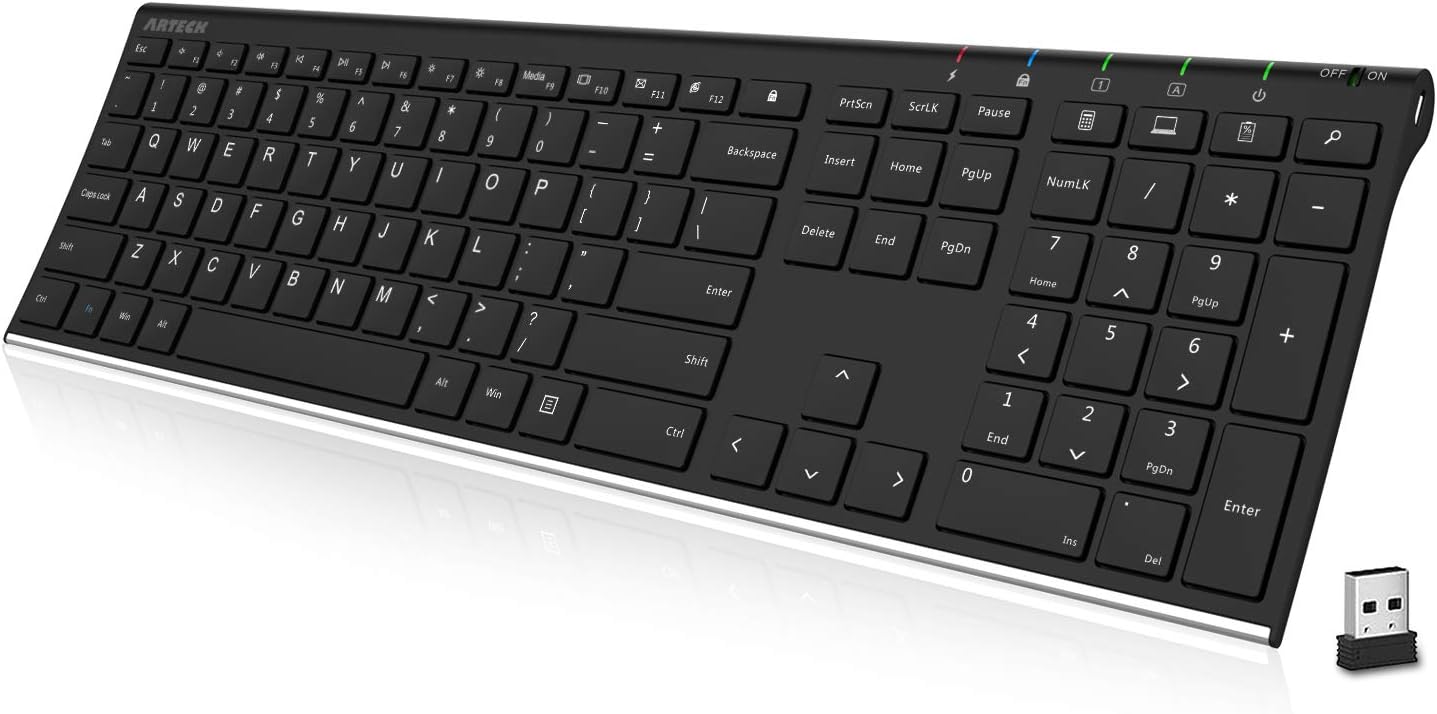


 Photo by Avinash Kumar / Pexels