Home › Tech › Best Keyboard for Writers 2026: Typing Comfort for Long Writing Sessions
Best Keyboard for Writers 2026: Typing Comfort for Long Writing Sessions
By MyAwesomeBuy Research Team · Updated April 8, 2026 · Our Methodology
5 models compared34,097+ reviews analyzed
No manufacturer paid for placement. Rankings based on verified buyer review data.
Quick Answer
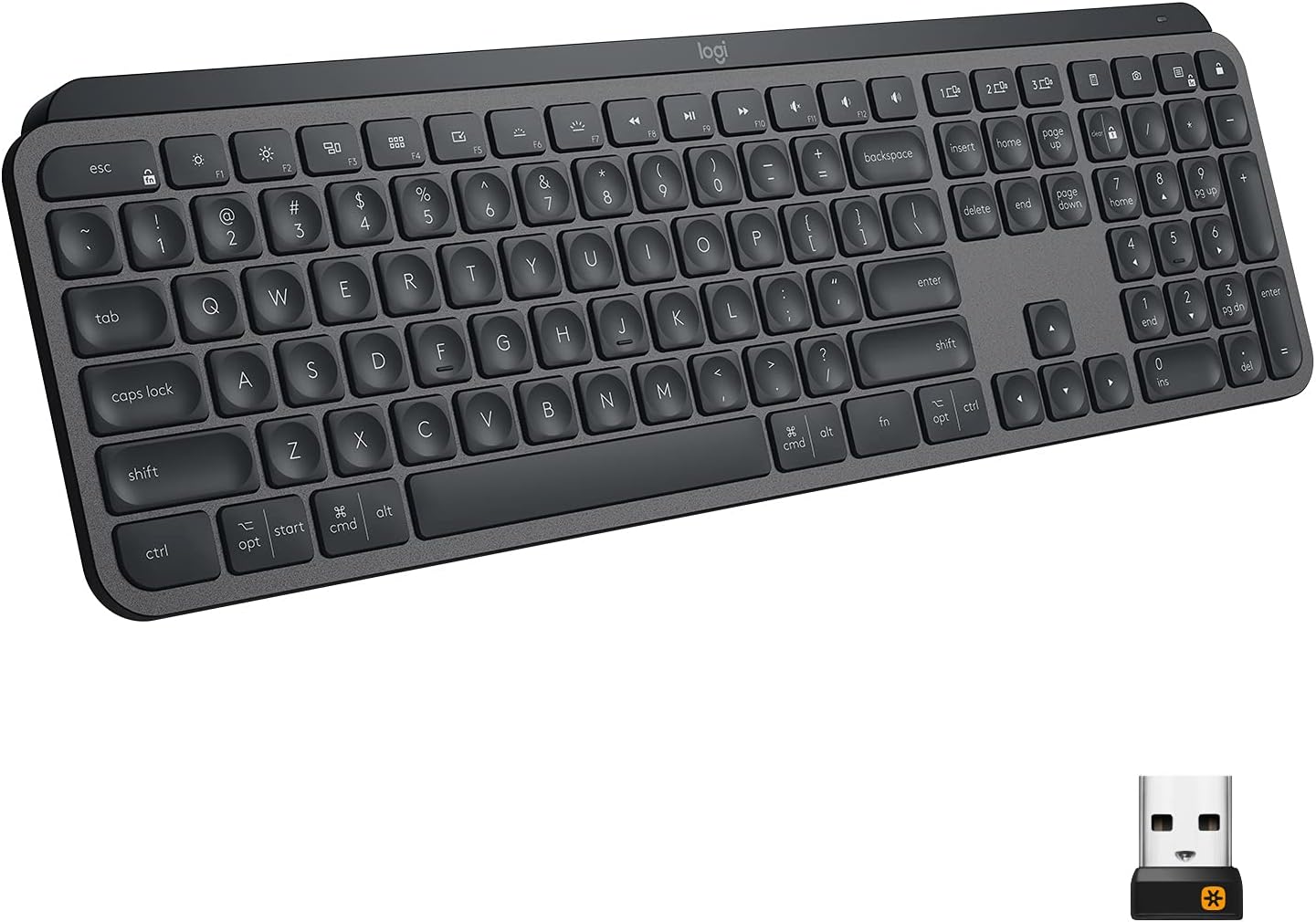
Best keyboard for writers: Logitech MX Keys Advanced at $120 -- quiet spherical keycaps, multi-device Bluetooth, and USB-C charging make it the most practical wireless keyboard for writers working across multiple devices.
Best for: Productivity typists and multi-device users
“The Logitech MX Keys is the best typing keyboard for most people — the spherical key tops and optimal travel distance make long typing sessions genuinely comfortable.”
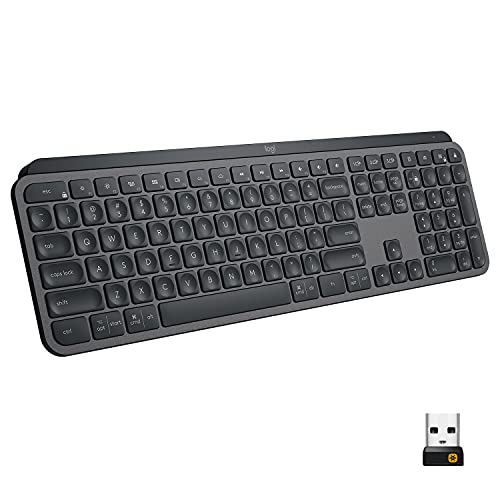
Logitech designed the MX Keys for productivity, not gaming. The spherical keycap design cups fingertips for more accurate typing with less lateral movement between keys. Smart backlighting activates only when hands approach the keyboard, extending battery life. Three-device Bluetooth switching with a single button enables seamless work across laptop, desktop, and tablet. USB-C charging provides a full recharge in 3 hours with 10-day battery life on a charge. The quiet, low-profile scissor switches are professional-environment appropriate. The benchmark wireless keyboard for serious writers.
Full Specs & Measurements
Upc
097855152893
Asin
B07S92QBCJ
Brand
Logitech
Color
Graphite
Theme
Elegant
Battery
10 days (with backlight)
Backlight
Smart per-key
Model Name
MX Keys
Style Name
MX Keys
Unit Count
1.0 Count
Item Weight
30.37 Ounces
Switch Type
Tactile
Connectivity
Bluetooth + 2.4GHz Bolt
Manufacturer
Logitech
Model Number
920-009294
Multi Device
3 devices
Power Source
Rechargeable Battery
Series Number
920
Built-In Media
Cable
Number Of Keys
104
Button Quantity
78
Keyboard Layout
QWERTY
Antenna Location
Office
Hand Orientation
Ambidextrous
Best Sellers Rank
#2,999 in Computer Keyboards
Compatible Devices
PC
Enclosure Material
Metal
Number Of Sections
1
Additional Features
Backlit
Keyboard Description
Wireless
Warranty Description
Manufacturer’s warranty can be requested from customer service.
Connectivity Technology
Bluetooth, USB
Item Dimensions L X W X H
16.9"L x 0.8"W x 5.1"H
Global Trade Identification Number
00097855152893
Keyboard Backlighting Color Support
Single Color
Best Premium
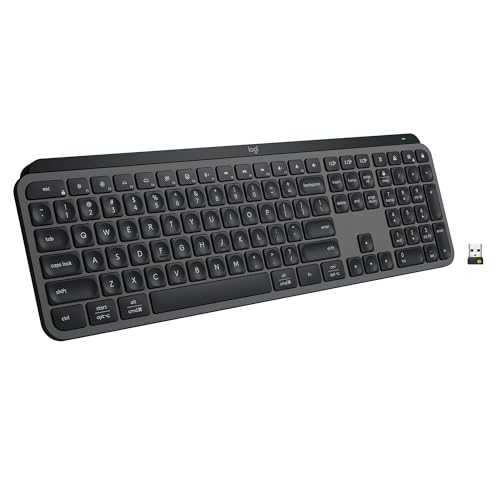
Logitech MX Keys S Wireless Keyboard
$119
at Amazon
Best for: Office workers needing quiet wireless keyboard for long typing sessions
“Best keyboard for programmers who prefer quiet typing and cross-device productivity. MX Keys S is whisper-quiet, premium, and the Logi Options+ app provides smart macro capabilities without full QMK c”
The MX Keys S is the updated successor to the MX Keys, with faster key response and improved battery life (15 days vs. 10 days). Smart Actions app integration enables keyboard shortcuts for workflow automation -- useful for writers who use custom keyboard shortcuts for their writing software. The keycap design and switch feel are essentially identical to the original MX Keys, which is a compliment to how well-designed the original was. If choosing between the S and original MX Keys, the S is the better purchase for new buyers at the same price point.
Manufacturer’s warranty can be requested from customer service. Click here to make a request to customer service.
Water Resistance Level
Not Water Resistant
Connectivity Technology
Bluetooth
Item Dimensions L X W X H
18"L x 6"W x 1.5"H
Mechanical Keyboard Switch Model
Linear
Keyboard Backlighting Color Support
Single Color
Worth Considering
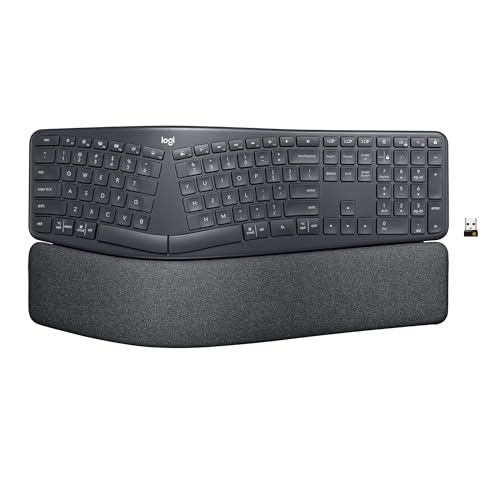
Logitech ERGO K860 Wireless Split Ergonomic Keyboard with Wrist Rest
$149
at Amazon
Best for: Heavy typists who want a split ergonomic keyboard with a built-in wrist rest
“Best wireless split ergonomic keyboard. Logitech ERGO K860 reduces wrist bending 25% and provides 54% more wrist support vs standard keyboards — certified by US Ergonomics as improving posture.”
The ERGO K860 addresses the fundamental ergonomic limitation of traditional flat keyboards: the internal shoulder rotation and ulnar wrist deviation required by standard keyboard geometry. The 10-degree curved key bed and split layout position hands in their natural resting position. The integrated wrist rest holds wrists in a neutral position during both typing and pausing. For writers who type 2,000+ words daily and have experienced wrist or shoulder fatigue, the K860 is the ergonomic intervention most likely to make a measurable difference. The learning curve is 1-2 weeks.
Full Specs & Measurements
Upc
097855151667
Asin
B07ZWK2TQT
Brand
Logitech
Color
Graphite
Model Name
Logitech K860
Style Name
Keyboard Only
Unit Count
1.0 Count
Is Electric
No
Item Weight
40.92 Ounces
Manufacturer
Logitech
Model Number
920-009166
Power Source
Battery Powered
Built-In Media
2 x AAA Alkaline Batteries, K860 Ergonomic Keyboard
Item Type Name
Ergonomic Split Keyboard
Number Of Keys
105
Button Quantity
78
Keyboard Layout
QWERTY
Antenna Location
Everyday Use
Hand Orientation
Ambidextrous
Best Sellers Rank
#8 in Computer Keyboards
Compatible Devices
Compatible on Windows, macOS, Linux and Chrome OS
Enclosure Material
Paper, Plastic
Additional Features
Customizable Display Keys
Keyboard Description
Ergonomic, QWERTY
Warranty Description
Manufacturer’s warranty can be requested from customer service.
Water Resistance Level
Waterproof
Connectivity Technology
Bluetooth, USB
Item Dimensions L X W X H
17.95"L x 9.17"W x 1.89"H
Number Of Batteries Required
2
Global Trade Identification Number
00097855151667
Keyboard Backlighting Color Support
Single Color
Worth Considering
Keychron K2 Pro QMK/VIA Wireless Mechanical Keyboard (Brown)
$111
at Amazon
Best for: Typists and coders wanting premium wireless mechanical keyboard
“The definitive programmer keyboard under $100. QMK/VIA programmability, hot-swappable switches, and wireless make the K2 Pro future-proof - you can change switches as preferences evolve without buying”
Keychron builds keyboards specifically for writers and productivity users who want mechanical feel. The K2 Pro uses a 75% compact layout (retains function row and navigation cluster, removes numpad) that keeps everything a writer needs while fitting a smaller footprint. QMK/VIA programmability lets you remap keys to your exact workflow. Brown switches provide tactile bump with each keypress without the loud click of blue switches. Wireless or USB-C wired. For writers who want the mechanical keyboard experience with genuine portability, the K2 Pro is the best package at this price.
Full Specs & Measurements
Asin
B09MQ257Q5
Brand
Keychron
Color
K Pro Red Switch
Theme
Keyboards
Generation
2nd Generation
Model Name
Keychron K2 Pro
Style Name
Contemporary
Unit Count
1 Count
Switch Type
Gateron G Pro Mechanical (plausible, but not confirmed)
Manufacturer
Keychron
Model Number
Keychron K2P-J1
Power Source
Battery Powered
Built-In Media
Keycaps for Windows and macOS, Hot-swappable sockets for MX style mechanical switches
Number Of Keys
84
Button Quantity
84
Keyboard Layout
QWERTY
Antenna Location
Everyday Use
Hand Orientation
Ambidextrous
Best Sellers Rank
#36,630 in Video Games (See Top 100 in Video Games) #1,824 in PC Gaming Keyboards
Compatible Devices
Laptop, Tablet
Enclosure Material
Polybutylene Terephthalate
Number Of Sections
3
Additional Features
Compatible with macOS, Windows, and Linux, Hot-Swappable, Pre-lubed Keychron K Pro Switch, Program with QMK & VIA
Keyboard Description
USB
Warranty Description
1 Year
Connectivity Technology
Bluetooth and Type-C cable
Number Of Batteries Required
1
Mechanical Keyboard Switch Model
Gateron G Pro
Keyboard Backlighting Color Support
RGB
Best Premium
Das Keyboard 4 Professional
$199
at Amazon
Best for: Office professionals wanting discrete mechanical keys and integrated media controls
“The Das Keyboard 4 Professional targets office workers who want a no-nonsense, professional-looking mechanical keyboard with practical features like USB passthrough and volume controls. At $169 withou”
Das Keyboard 4 Professional targets writers and professionals who want a keyboard built to last a decade of daily use. The full aluminum top panel eliminates the flex and rattle of plastic construction. Cherry MX Brown switches provide the tactile feedback that many writers prefer for long sessions. Dedicated media controls and a volume knob replace keyboard shortcuts for media management. Full-size layout ensures every key is present and in its expected position. At $199, the Das Keyboard 4 is a deliberate investment in a tool that a dedicated writer will use every single day.
Full Specs & Measurements
Upc
855800001494 855800001432
Asin
B00JG01QTY
Brand
Das Keyboard
Color
Soft Tactile - Cherry MX Brown Switches
Theme
Technology, Gaming, Programming
Layout
full size
Weight
3.1 lbs
Hot Swap
no
Generation
1st Generation
Model Name
4 Professional Cherry MX Brown
Style Name
Professional w/ USB 3 Hub
Unit Count
1.0 Count
Item Weight
2.87 Pounds
Switch Type
Tactile
Connectivity
wired
Manufacturer
Das Keyboard
Model Number
DASK4MKPROSIL
Power Source
USB powered
Series Number
4
Built-In Media
USB Cable
Item Type Name
Das Keyboard 4 Professional Soft Tactile MX Brown Mechanical Keyboard (DASK4MKPROSIL)
Number Of Keys
104
Button Quantity
104
Keyboard Layout
QWERTY
Antenna Location
Gaming, Programming
Hand Orientation
Ambidextrous
Best Sellers Rank
#963 in Computer Keyboards
Compatible Devices
Laptop, PC
Enclosure Material
Aluminum
Number Of Sections
3
Additional Features
USB Hub
Total Usb 2.0 Ports
2
Keyboard Description
Mechanical, QWERTY
Warranty Description
1 year limited manufacturer warranty
Connectivity Technology
USB, USB 2.0, USB 3.0
Item Dimensions L X W X H
18"L x 6.8"W x 1.3"H
Mechanical Keyboard Switch Model
Cherry MX Brown
Global Trade Identification Number
00855800001432
Keyboard Backlighting Color Support
Single Color
Keyboard for Writers Buying Guide
Photo by MART PRODUCTION / Pexels
Our Top Pick
Logitech MX Keys Advanced Wireless Keyboard at $118.19 — Logitech MX Keys Advanced Wireless at $120 combines quiet spherical keycaps, three-device Bluetooth, and USB-C in the....
Budget Pick: Keychron K2 Pro QMK/VIA Wireless Mechanical Keyboard at $111.99 — Keychron K2 Pro QMK/VIA Wireless Mechanical at $230 brings true mechanical typing feel to a wireless compact layout -....
Great for: Writers and coders who type for hours and want tactile feedback, gamers who want fast actuation, and enthusiasts
Not ideal if: You work in a shared office — mechanical keyboards are loud and disruptive to coworkers in quiet environments
How to Choose the Best Keyboard for Writers
Mechanical vs. membrane vs. scissor switch. Mechanical keyboards provide tactile feedback with each keypress -- many writers find this helps maintain rhythm and reduces finger fatigue. Linear mechanical switches (red) are smooth and quiet; tactile switches (brown) have a bump that confirms each actuation without audible click. Membrane keyboards are quiet and inexpensive but feel mushy. Scissor switches (found on low-profile keyboards like the Logitech MX Keys) are a middle ground -- low travel, firm feel, consistent actuation.
Switch sound level. Writers often work in libraries, offices, or shared spaces. Loud clicky switches (blue) are satisfying but disruptive. Brown tactile switches are audible but quiet enough for most environments. Red linear and low-profile scissor switches are nearly silent -- the best choice for shared workspaces.
Key travel distance. Standard keyboards have 3-4mm key travel. Low-profile keyboards have 1.5-2mm travel. Writers divide on preference: longer travel feels more deliberate and satisfying for extended typing; shorter travel is faster and feels more like a laptop keyboard. Try both if possible.
Wireless vs. wired. Wireless keyboards provide desk freedom and work with multiple devices simultaneously. Wired keyboards have zero latency, never need charging, and cost less. For writers who use multiple devices (laptop, desktop, tablet), multi-device Bluetooth is a meaningful convenience feature.
Ergonomic split design. Split keyboards position each hand at shoulder width, reducing the internal rotation stress that causes repetitive strain in writers who type for hours daily. The learning curve is real (1-2 weeks) but the long-term comfort benefit is significant for high-volume writers.
Quick Decision: Budget matters most → Keychron K2 Pro QMK/VIA Wireless Mechanical Keyboard. Quality matters most → Logitech MX Keys Advanced Wireless Keyboard.
Many experienced writers prefer mechanical keyboards for tactile feedback and key feel consistency. The audible click of each confirmed keypress creates a satisfying rhythm that some find reduces errors and fatigue. However, membrane and scissor switch keyboards work well for writers who are accustomed to laptop keyboards -- the best keyboard is the one you are most comfortable and accurate on. If you have no strong preference, try a tactile brown switch mechanical keyboard before committing to a different style.
What switch type is best for writers?
For quiet environments: Logitech Tactile low-profile switches or MX mechanical brown switches provide tactile feel with minimal noise. For home offices where noise is less restricted: Keychron brown switches provide traditional tactile mechanical feel. For maximum silence: red linear switches (Cherry MX Red, Keychron Red) are virtually silent. Avoid blue clicky switches in shared spaces -- they are loud enough to be disruptive in most office and library settings.
Does keyboard layout matter for writing?
Full-size keyboards (with numpad) provide all keys but take more desk space and push the mouse further right. Tenkeyless (TKL) removes the numpad, reducing width and bringing the mouse closer. 75% and 65% layouts remove additional keys for the most compact footprint. For writers, the function row and navigation cluster (Home, End, Page Up/Down) are useful enough to keep -- 75% or TKL is usually the best balance. The numpad is rarely needed for pure writing tasks.
What is the benefit of backlighting for writers?
Backlighting enables typing in dim environments (coffee shops at night, bedroom writing after lights out) without eyestrain from misidentifying keys. For touch typists who never look at the keyboard, backlighting is irrelevant. For writers who occasionally glance down, backlighting is a genuine convenience. Battery life is a consideration for wireless keyboards -- RGB backlighting can cut battery life significantly.
How do I reduce typing fatigue during long writing sessions?
Key factors: keyboard at a height where elbows are at 90 degrees; wrist rest to support wrists in a neutral position when not actively typing (not during typing -- wrists should float above the keyboard while typing); regular breaks of 5 minutes every hour; and a key switch weight that does not require excessive force per keypress. Many repetitive strain injuries in writers result from sustained muscle activation rather than any single ergonomic failure.
We analyze Amazon review data — often thousands of reviews per product — to surface patterns
that individual buyers miss. Our process aggregates star ratings, review counts, and buyer
sentiment at scale, identifying which strengths and weaknesses appear consistently across
the largest review samples available. The 34,097+ reviews analyzed on this page represent real verified-purchase feedback from Amazon buyers.
Each product earned its placement through data: total review volume, average rating, and the
specific praise and complaints that repeat most often across buyers. No manufacturer paid for
placement on this page. Products appear here because buyers endorsed them at scale, not
because a company asked us to feature them.
We use AI to summarize review sentiment — not to fabricate opinions, but to condense what
thousands of buyers actually wrote into a readable format. The pros and cons you see reflect
the most common themes found in verified purchaser reviews, paraphrased for clarity. We do not
claim to have accessed Reddit, YouTube, or specific publications in generating these summaries.
Prices shown reflect Amazon pricing at the time this page was last generated. Click
“See Today’s Price” to get the current live price on Amazon.
Read our full methodology →
Affiliate disclosure: When you buy through our links, we may earn
a small commission at no extra cost to you. This helps us keep the reviews free and
the data updated. Our recommendations are based on data, not who pays us.
Learn more →
 Logitech MX Keys Advanced Wireless Keyb…
 Logitech MX Keys S Wireless Keyboard
 Logitech ERGO K860 Wireless Split Ergon…
 Keychron K2 Pro QMK/VIA Wireless Mechan…
 Das Keyboard 4 Professional


 Photo by MART PRODUCTION / Pexels