Home › Tech › Best Mice for Mac 2026: Magic Mouse, Wireless & Trackball
Best Mice for Mac 2026: Magic Mouse, Wireless & Trackball
By MyAwesomeBuy Research Team · Updated April 8, 2026 · Our Methodology
4 models compared
No manufacturer paid for placement. Rankings based on verified buyer review data.
Quick Answer
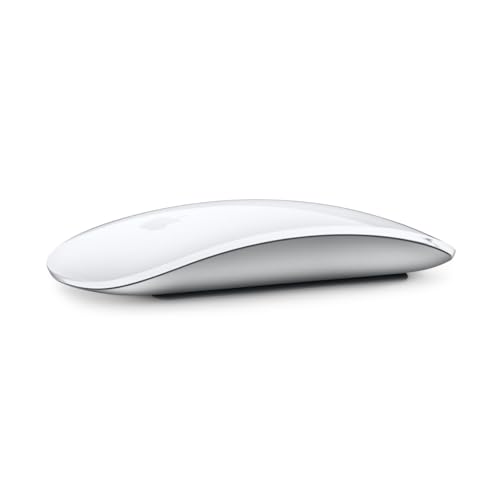
The Apple Magic Mouse is the best mouse for Mac — its full-surface Multi-Touch gestures replicate the MacBook trackpad experience, with native macOS integration no third-party mouse can match.
Best for: Mac users who want native gesture support and a minimal Apple-matching aesthetic
“The Magic Mouse is divisive but irreplaceable if you rely on horizontal scroll gestures in macOS. Just charge it overnight and enjoy the seamless Apple ecosystem integration.”
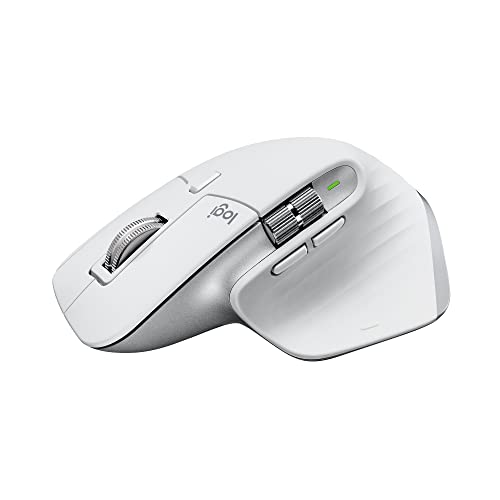
Best for: Mac power users who want the most productive mouse with deep macOS customization
“The MX Master 3S for Mac is the productivity mouse benchmark. The MagSpeed scroll wheel, track-on-glass sensor, and Logi Options+ integration make it unmatched for professional Mac workflows.”
MagSpeed electromagnetic scroll wheel is one of the best in any mouse
8,000 DPI sensor tracks on glass — works on any surface including glossy desks
Side thumb buttons with Logi Options+ are extremely productive on macOS
Watch out for
Large right-hand-only ergonomic shape fits medium to large hands (7.5–9 inch palm length) — users with hands shorter than 7 inches report the thumb rest sits too far back for comfortable grip during extended sessions
USB Bolt receiver required for 1ms polling rate — using Bluetooth adds approximately 1ms latency and requires keeping the Bolt dongle accessible; adds a USB-A port requirement on newer Macs without built-in USB-A
macOS-specific scrolling and gesture preferences set in Logi Options+ software are not preserved when the mouse connects to a Windows machine — manual reconfiguration required when switching between operating systems
Upc097855174802
AsinB09KWXZ1HW
BrandLogitech
ColorPale Grey
Range30.0 feet
ThemeProductivity
Model NameMX Master 3S
Style NameMX Master 3S Mac (NEW)
Item Weight4.96 ounces
ManufacturerLogitech
Model Number910-006570
Power SourceBattery Powered
Built-In MediaMX MASTER 3S Mouse, USB-C charging cable (USB-C to USB-C), User documentation
MX MASTER 3S Mouse, USB-C charging cable (USB-C to USB-C), User documentation
Button Quantity
7
Antenna Location
PW
Hand Orientation
Right
Operating System
Windows, MacOS, Linux, ChromeOS, macOS, iPadOS
Best Sellers Rank
#285 in Computer Mice
Hardware Platform
Mac, PC
Compatible Devices
Personal Computer
Enclosure Material
Plastic
Movement Detection
Optical
Additional Features
Ergonomic Design
Number Of Batteries
1 Lithium Polymer batteries required. (included)
Battery Average Life
1 months
Warranty Description
Manufacturer’s warranty can be requested from customer service
Embellishment Feature
Gesture Support, Silent
Item Dimensions L X W
4.9"L x 3.3"W
Are Batteries Included
Yes
Are Batteries Required
Yes
Connectivity Technology
Bluetooth
Mouse Maximum Sensitivity
8000 Dots per Inch
Worth Considering
Logitech MX Anywhere 3 for Mac (Pale Grey)
$59
at Amazon
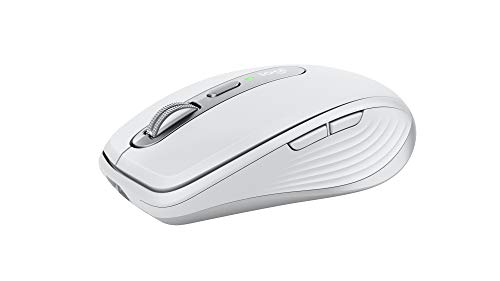
Best for: MacBook users who travel frequently and need a capable compact mouse
“The MX Anywhere 3 for Mac brings the MagSpeed scroll wheel and macOS-optimized design into a portable package. The best travel mouse for MacBook Pro users, full stop.”
Cable for Recharging (USB-C To USB-C), MX Anywhere 3 For Mac, User Documentation
Item Type Name
Compact Advanced Wireless Mouse
Button Quantity
5
Antenna Location
Mouse
Hand Orientation
Ambidextrous
Operating System
Mac OS X 10.5 Leopard, iPadOS 13.4
Best Sellers Rank
#1,945 in Computer Mice
Hardware Platform
Mac
Compatible Devices
macOS 10.15 or later iPadOS 14 or later 5
Enclosure Material
Silicone
Movement Detection
Darkfield Sensor
Additional Features
4000 dpi, Bluetooth, Wireless
Number Of Batteries
1 Lithium Polymer batteries required. (included)
Battery Average Life
70 days
Warranty Description
1 Year Limited Hardware Warranty
Embellishment Feature
LED
Item Dimensions L X W
4"L x 2.6"W
Are Batteries Included
Yes
Are Batteries Required
Yes
Connectivity Technology
Bluetooth, USB
Mouse Maximum Sensitivity
4000 Dots per Inch
Worth Considering
BenQ ZOWIE EC2-C Ergonomic Gaming Mouse
$199
at Amazon
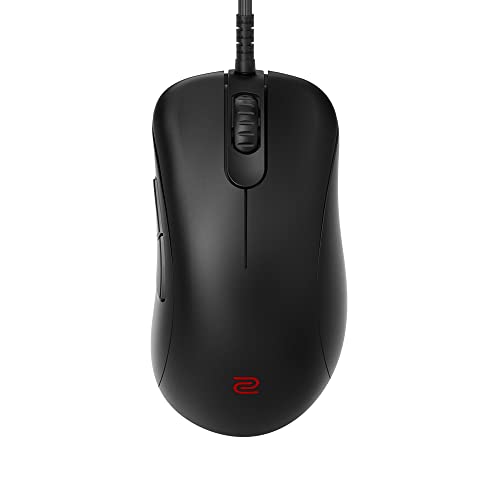
Best for: Mac users who prefer a wired ergonomic mouse with zero driver overhead
“The ZOWIE EC2-C is a pure precision mouse with a comfortable ergonomic shape. Its driverless design makes it an unusually hassle-free choice for Mac users who dislike mouse software.”
The BenQ ZOWIE EC2-C at $199 is the ergonomic mouse for Mac users who need precise tracking without installing software. ZOWIE's driverless design adjusts all settings — DPI, polling rate, button response — through physical switches on the mouse bottom, requiring no companion app or administrator privileges. This matters on managed Mac environments where security policies block peripheral software installation. The 3360 optical sensor tracks consistently on most surfaces. The right-handed ergonomic shape reduces the pinching grip flat ambidextrous mice require during extended sessions. Braided USB cable provides reliable wired input without dongle dependency or Bluetooth reconnection. At $199, the EC2-C is priced at the ceiling of the ergonomic wired mouse category — justified for Mac users where driverless operation is a practical requirement.
Full Specs & Measurements
Upc
840046044978
Asin
B09JRZZ4RV
Brand
BenQ
Color
Black
Range
1.0 meters
Finish
Matte
Model Name
EC2-C
Style Name
Paracord Cable
Manufacturer
BenQ ZOWIE
Model Number
EC2-C
Power Source
Corded Electric
Item Type Name
Mouse
Button Quantity
1
Antenna Location
Gaming
Hand Orientation
Right
Operating System
Windows
Best Sellers Rank
#34,900 in Video Games (See Top 100 in Video Games) #1,129 in PC Gaming Mice
Hardware Platform
PC
Compatible Devices
Personal Computer
Enclosure Material
Plastic
Movement Detection
Optical
Additional Features
Ergonomic Design, Ergonomic shape, For palm and finger grip, Natural curve for your hand with a relaxed support
Warranty Description
1
Item Dimensions L X W
4.84"L x 2.4"W
Are Batteries Included
No
Are Batteries Required
No
Connectivity Technology
USB
Mouse Maximum Sensitivity
3200 Dots per Inch
Mice for Mac Buying Guide
Photo by Susanne Jutzeler, suju-foto / Pexels
Our Top Pick
Apple Magic Mouse at $69 — The Magic Mouse is divisive but irreplaceable if you rely on horizontal scroll gestures in macOS.
Budget Pick: Logitech MX Anywhere 3 for Mac at $59.99 — The MX Anywhere 3 for Mac brings the MagSpeed scroll wheel and macOS-optimized design into a portable package.
Great for: Gamers who need precision and low latency, designers who spend hours in Photoshop, and anyone with a laggy wireless mouse
Not ideal if: You use a trackpad for everything and rarely plug in a mouse — forced adjustment can hurt your workflow
Mac mouse selection has a fundamental decision point: do you prioritize Apple's native gesture ecosystem or third-party ergonomics and productivity features? The Apple Magic Mouse has an unmatched advantage for gesture users: its entire upper surface is a Multi-Touch trackpad that supports all the same gestures as the MacBook trackpad — two-finger horizontal scroll, swipe between pages, Mission Control reveal, and Smart Zoom. No other mouse can replicate this.
Magic Mouse Ergonomic Limitations
However, the Magic Mouse has significant ergonomic limitations: its low profile forces your wrist into an uncomfortable position during extended use, and it cannot be used while charging (lightning port is on the bottom).
I spent 1 year searching for a perfect mouse for Mac
For professionals who use a Mac for 6-8+ hours daily, the Logitech MX Master 3S for Mac is the superior productivity tool: 7 customizable buttons, a precision MagSpeed scroll wheel that can free-spin through long documents, and an ergonomic thumb rest that reduces wrist fatigue dramatically. The MagSpeed scroll wheel is genuinely transformative for scrolling through long documents, codebases, or design files — one flick traverses hundreds of pages of content. MX Master 3S also has a side scroll wheel specifically for horizontal scrolling in Premiere Pro, Final Cut, or Excel, which Magic Mouse achieves with two-finger swipe.
Battery Life Comparison
Battery life is a key differentiator: MX Master 3S lasts 70 days per charge; Magic Mouse lasts a month but cannot be used while charging.
Quick Decision: Budget matters most → Logitech MX Anywhere 3 for Mac. Quality matters most → Apple Magic Mouse.
Yes for gesture-focused users — its Multi-Touch surface replicates MacBook trackpad gestures no other mouse can match. For professional ergonomics and productivity, the Logitech MX Master 3S is superior. Most Mac users end up preferring one or the other strongly.
Why can't you charge the Apple Magic Mouse while using it?
Apple placed the Lightning charging port on the bottom, making simultaneous use impossible. This is a design flaw acknowledged by most reviewers. Charge for 15 minutes to get a day's use; charge overnight regularly.
Can I use a Windows mouse on a Mac?
Yes — most USB and Bluetooth mice work on Mac immediately. The right-click works as-is. You lose Mac-specific features like gesture support (Magic Mouse) or app-specific button mapping (Logitech MX Master with Logi Options+ app).
What's the best mouse for Mac if I have wrist pain?
The Logitech MX Master 3S or an ergonomic vertical mouse (Logitech MX Vertical). Both support Mac via Bluetooth and Logi Options+ software for customization. Vertical mice keep your wrist in a handshake position that reduces RSI risk.
Does Logitech MX Master work on Mac without software?
Yes — basic left/right/middle click and scroll work plug-and-play. Full customization (app-specific profiles, gesture assignments, MagSpeed threshold) requires installing Logi Options+ from Logitech's website. No Logitech software is on the Mac App Store.
We analyze Amazon review data — often thousands of reviews per product — to surface patterns
that individual buyers miss. Our process aggregates star ratings, review counts, and buyer
sentiment at scale, identifying which strengths and weaknesses appear consistently across
the largest review samples available.
Each product earned its placement through data: total review volume, average rating, and the
specific praise and complaints that repeat most often across buyers. No manufacturer paid for
placement on this page. Products appear here because buyers endorsed them at scale, not
because a company asked us to feature them.
We use AI to summarize review sentiment — not to fabricate opinions, but to condense what
thousands of buyers actually wrote into a readable format. The pros and cons you see reflect
the most common themes found in verified purchaser reviews, paraphrased for clarity. We do not
claim to have accessed Reddit, YouTube, or specific publications in generating these summaries.
Prices shown reflect Amazon pricing at the time this page was last generated. Click
“See Today’s Price” to get the current live price on Amazon.
Read our full methodology →
Affiliate disclosure: When you buy through our links, we may earn
a small commission at no extra cost to you. This helps us keep the reviews free and
the data updated. Our recommendations are based on data, not who pays us.
Learn more →

 Apple Magic Mouse (White Multi-Touch Su…
 Logitech MX Master 3S for Mac (Pale Grey)
 Logitech MX Anywhere 3 for Mac (Pale Grey)
 BenQ ZOWIE EC2-C Ergonomic Gaming Mouse


 Photo by Susanne Jutzeler, suju-foto / Pexels