Best Mouse Pads 2026 — Desk Mats & Gaming
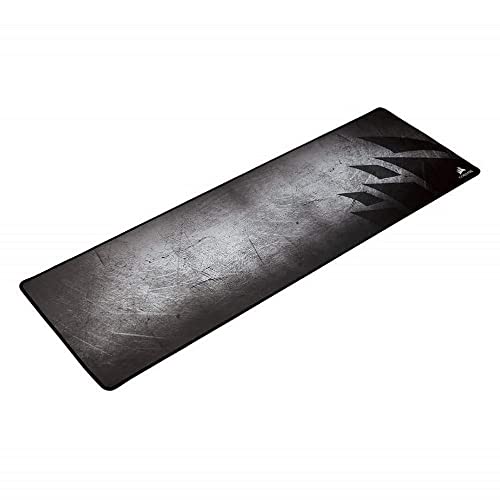
The Corsair MM300 Extended is the mouse pad to get: a 36.6 x 11.8 inch cloth mat with stitched anti-fray edges and an anti-skid rubber base, long enough for keyboard and mouse together. Choose the SteelSeries QcK XXL if your desk is deep enough for a 35 x 16 inch pad and you like an extra-thick, cushioned base.
See Today’s Price →Holiday shopping


At a Glance
| # | Product | Award | Price | Score |
|---|---|---|---|---|
| 1 | Our Top Pick | $12.99 as of Nov 21, 3:41 PM CT details Buy → |
8.1 | |
| 2 |  SteelSeries QcK Gaming Mouse Pad … SteelSeries |
Best Thick XXL Pad | $29.99 as of Nov 21, 3:41 PM CT details Buy → |
8.6 |
| 3 |  Logitech G840 XL Cloth Gaming Mou… Logitech G |
Best Thin Desk Mat | $37.99 as of Nov 21, 3:42 PM CT details Buy → |
8.5 |
| 4 | Best Standard-Size Pad | $9.99 as of Nov 21, 3:42 PM CT details Buy → |
— | |
| 5 | Best Hard Surface | $49.99 as of Nov 21, 3:41 PM CT details Buy → |
— |
Score Breakdown
| Corsair MM300 Extende… | SteelSeries QcK Gamin… | Logitech G840 XL Clot… | Razer Gigantus V2 Clo… | Razer Firefly Hard V2… | |
|---|---|---|---|---|---|
| Overall | 8.1 | 8.6 | 8.5 | – | – |
| Control | 80 | 87 | 82 | – | – |
| Glide Speed | 85 | 80 | 84 | – | – |
| Surface Size | 78 | 92 | 90 | – | – |
Scores 0–100 from published specifications and independent reviewers' measurements. Amazon star ratings are shown separately and are never part of a score. 0 = feature not present. – = insufficient data. How we score →
Related guides we’ve checked
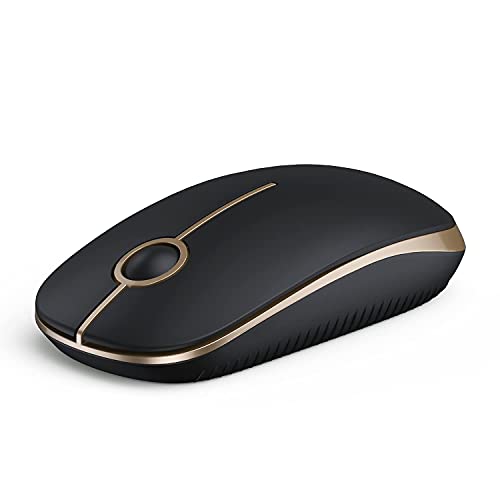 Best Computer Mice 2026: Wired, Wireless & VerticalTop pick: VssoPlor Wireless Mouse
 Best Ergonomic Keyboards for Wrist Pain (2026)Top pick: Logitech Ergo K860 Wireless Ergonomic Split Keyboard
 Logitech vs Corsair Gaming Mouse 2026Top pick: Logitech G305 LIGHTSPEED Wireless Gaming Mouse
Gift shopping? Holiday Gift Guide 2026: checked picks for everyone on your list.
Mouse Pads Buying Guide
 Photo by Matthias Haltenhof / Pexels
The right mouse pad depends on three things: how much of the desk it should cover, how the surface feels under the mouse, and how well it stays put. The Corsair MM300 Extended is our pick because it covers keyboard and mouse with a stitched cloth surface that resists fraying, the detail that usually fails first on a long pad.
Extended desk mat or standard pad
An extended pad runs under the keyboard and the mouse, so both sit on one stable surface and you never run off the edge during a wide swipe. The Corsair MM300 Extended measures 36.6 x 11.8 inches; the Logitech G840 XL (35.4 x 15.7 inches) and the SteelSeries QcK XXL (35 x 16 inches) are deeper and cover more of the desk. A standard pad such as the 14.18 x 10.84 inch Razer Gigantus V2 Medium is enough if you use a high mouse sensitivity, work at a small desk or set up a laptop. Measure the desk before buying an XL mat; the deeper ones need room in front of the monitor.
Cloth or hard surface
Cloth gives a little resistance, which makes it easier to stop the cursor exactly where you want it. Corsair lists the MM300 for both laser and optical mice, and Razer says the Gigantus V2 is optimized across all mouse sensors. Logitech describes the G840 XL as moderate friction, and Corsair builds the MM300's textile weave for low-friction tracking. Hard pads glide faster and wipe clean, but can feel louder under the mouse. The Razer Firefly Hard V2 is the hard-surface option here, with a micro-textured coating Razer tunes for both fast and controlled play.

Thickness and the base
Thickness changes the feel more than most buyers expect. The Logitech G840 XL is 0.12 inches thin, so a keyboard on it sits nearly flat on the desk. The SteelSeries QcK XXL is 0.2 inches with an extra-thick rubber base that evens out a slightly uneven desk and gives the wrist a softer rest. Every pad here has a rubber base to stop it sliding: anti-skid on the Corsair, no-slip on the Logitech and the SteelSeries, natural-foam rubber on the Razer Firefly, and 3mm of high-density rubber foam with an anti-slip base on the Razer Gigantus V2, which Razer says keeps the mat flat over an imperfect desk.
Edges and cleaning
The edge is where cloth pads wear out, because your wrist and forearm rub the front edge all day. The Corsair MM300 has stitched edges to stop fraying and peeling; the other cloth pads' listings do not mention stitching. Cloth also picks up oils and dust over time. The usual method for cleaning a cloth pad like these is lukewarm water, a little mild soap and a soft brush, then a full air dry lying flat before use.

Matching the pad to how you use it
If you play shooters at a low mouse sensitivity, you make big arm movements and want an extended mat; any of the three long pads works, and the Corsair adds stitched edges. If you mostly work, a deep mat like the Logitech G840 XL or the SteelSeries QcK XXL doubles as a desk pad under the keyboard. If you only need a surface for the mouse on a small desk, the Razer Gigantus V2 Medium is the simple answer.
How we picked: we compared each product's own listing - what it is, what comes in the box, the specifications its maker states and the warranty - and ranked them on how well they answer this page's question. We have not tested these products in hand.
Watch Before You Buy

“Corsair's MM300 Extended: a 36.6 x 11.8 inch textile-weave cloth mat with stitched anti-fray edges and an anti-skid rubber base, sized for keyboard and mouse.”
See Today’s Price →What we like
- Extended size runs under keyboard and mouse
- Stitched edges resist fraying
- Textile weave for low-friction tracking with laser and optical mice
- Anti-skid rubber base
Watch out for
- Needs a desk wide enough for keyboard and mouse
Read Full Analysis
The Corsair MM300 Extended is the pad we would put on most desks. At 36.6 x 11.8 inches it runs under the keyboard and the mouse, so both sit on one surface and a wide swipe never runs off the edge. The textile weave is built for low-friction tracking with laser and optical sensors, and the anti-skid rubber base keeps it in place. What sets it apart from the other cloth pads here is the stitched edge all the way around: Corsair says it guards against fraying and peeling, which is where long pads usually fail first, because your forearm rests on the front edge all day. It is shallower front to back than the Logitech and SteelSeries XL mats, which suits a desk with the monitor close in front.
Skip this if: You want a deeper mat that covers more of the desk front to back
“SteelSeries' QcK XXL: a 35 x 16 inch micro-woven cloth pad on an extra-thick non-slip rubber base, the brand's biggest QcK.”
See Today’s Price →What we like
- QcK micro-woven cloth for low and high sensitivity tracking
- Extra-thick non-slip rubber base
- 35 x 16 inches, SteelSeries' biggest QcK pad
- Covers keyboard and mouse together
Watch out for
- The listing does not mention stitched edges
Read Full Analysis
The SteelSeries QcK XXL is the deepest pad here at 35 x 16 inches and 0.2 inches thick, big enough to cover most of a desk under the keyboard and mouse; SteelSeries calls it its biggest mouse pad. The surface is QcK micro-woven cloth, tuned for both low and high sensitivity tracking, and the extra-thick non-slip rubber base cushions the wrist and smooths over a slightly uneven desk. The listing does not mention stitched edges, so if your forearm rests on the front edge all day, the Corsair MM300's stitching is the safer bet for long wear. Choose the QcK XXL when you want the most coverage and a softer, thicker feel than the thin Logitech G840 XL.
Skip this if: You want a thin pad, or stitched edges
“Logitech G's G840 XL: a 35.4 x 15.7 inch cloth desk mat only 0.12 inches thin, with moderate surface friction and a no-slip rubber base.”
See Today’s Price →What we like
- Extra-large: keyboard and mouse on one surface
- Moderate surface friction for stopping fast swipes
- No-slip rubber base keeps it from bunching
- 0.12-inch thin
Watch out for
- Takes up the whole desk
Read Full Analysis
The Logitech G840 XL is the thin desk mat of the group: 35.4 x 15.7 inches but only 0.12 inches thick, so a keyboard placed on it sits almost level with the desk. Logitech tunes the cloth for moderate friction, enough resistance to stop the mouse cleanly at the end of a fast movement, and for a consistent texture so the sensor tracks the same everywhere on the mat. The no-slip rubber base keeps it from bunching during rapid, sweeping movements at a low mouse sensitivity. The listing does not mention stitched edges. Choose it over the SteelSeries QcK XXL if you prefer a thin, firm feel to a thick, cushioned one.
Skip this if: Your desk is small, or you want stitched edges
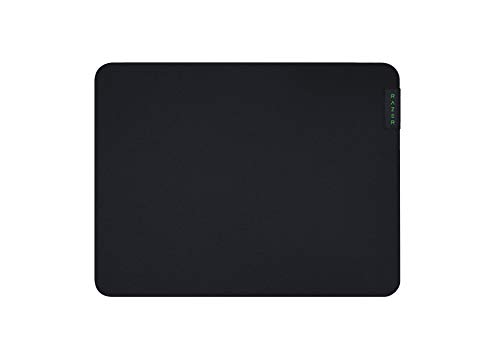
“Razer's Gigantus V2 Medium: a 14.18 x 10.84 inch micro-weave cloth pad on 3mm of high-density rubber foam with an anti-slip base, sized for the mouse alone.”
See Today’s Price →What we like
- Micro-weave cloth for fast and controlled swipes
- 3mm high-density rubber foam stays flat on an uneven desk
- Anti-slip base
- Sold in medium, large, XXL and 3XL
Watch out for
- Thicker foam is bulkier to carry than a thin pad
Read Full Analysis
The Razer Gigantus V2 Medium is the standard-size cloth pad here, for a small desk, a laptop setup or a high mouse sensitivity that does not need an extended mat. At 14.18 x 10.84 inches it sits beside the keyboard rather than under it. Its micro-weave cloth top is built for quick, fluid swipes with both fast and controlled playstyles, and Razer says it is optimized across all mouse sensors. Underneath is 3mm of high-density rubber foam, which Razer says keeps the mat uniformly flat even over an imperfect desk, on an anti-slip base. Its listing does not mention stitched edges. Razer sells the Gigantus V2 in medium, large, XXL and 3XL, so the same surface comes in desk-mat sizes. Choose it over the Razer Firefly Hard V2 if you want a cloth surface; choose the SteelSeries QcK XXL if you want one pad under keyboard and mouse.
Skip this if: You want one pad under keyboard and mouse - this is the medium size

“Razer's Firefly Hard V2: a 13.99 x 10.84 inch hard mouse pad with a micro-textured surface, Chroma RGB lighting and a built-in cable manager.”
See Today’s Price →What we like
- Micro-textured hard surface for fast and controlled play
- Razer Chroma RGB lighting
- Built-in cable manager for a wired mouse
- Natural-foam rubber base
Watch out for
- Mouse-only size, not a desk mat
Read Full Analysis
The Razer Firefly Hard V2 is the one hard pad here, for players who want the faster glide of a coated surface instead of cloth. Razer gives it a micro-textured coating tuned for both fast and controlled play and calibrated for all mouse sensors, and a natural-foam rubber base keeps it in place. Razer Chroma RGB lighting (16.8 million colors) syncs with Razer hardware and supported games, and a built-in cable manager holds a wired mouse's cable like a bungee. At 13.99 x 10.84 inches it is a mouse-only pad, not a desk mat. A hard surface wipes clean easily but can feel louder under the mouse than cloth. Choose it if you want a hard surface and lighting; choose a cloth pad for quiet, precise stops.
Skip this if: You want a quiet cloth surface or an extended desk mat
Frequently Asked Questions
Is an extended desk mat worth it over a standard mouse pad?
What is the difference between a cloth and hard mouse pad?
How do I clean a cloth mouse pad?
Does a mouse pad actually matter for gaming?
How often should I replace a mouse pad?
How We Chose These Products
We compared mouse pads on what their listings state: surface (cloth weave or hard coating), size, edge finish (stitched or plain), base material and thickness.
We compare each product’s Amazon listing, the manufacturer’s published specifications and Amazon customer ratings, shown with their review counts as Amazon’s data, and rank the products on how well they answer this page’s question. We do not test products in hand and we do not run our own analysis of review text. A publication or expert is named only where we cite its published findings about that product. No manufacturer paid for placement on this page.
A price appears only when Amazon’s API supplied it at a recent daily refresh, with the date and time beside it, and is withdrawn at 4 AM Central on the day after it turns 24 hours old; otherwise use “Check price on Amazon” for the live price. Read our full methodology →
How We Score These Products
Each dimension score comes from evidence about the exact model listed — a published specification, a measurement by a named independent reviewer, or that product’s own buyer reviews, as described for each dimension below — not from a similar product in the same range. We do not test products ourselves, and we do not score a dimension we could not evidence. A dash means no evidence was found for that product, not that it performed badly.
Control: From evidence about this exact model (specification, named reviewer or its own reviews).
Glide Speed: From evidence about this exact model (specification, named reviewer or its own reviews).
Surface Size: From evidence about this exact model (specification, named reviewer or its own reviews).
The overall score is the mean of the dimensions we could evidence for that product, on a 10-point scale. Price is shown separately and is never folded into a score. Amazon star ratings are shown separately and are never part of any score.