Best Ergonomic Keyboards for Wrist Pain (2026)

The Microsoft Ergonomic Desktop Wired Keyboard and Mouse Combo at $54.99 is the best ergonomic keyboard for wrist pain — the split curved layout keeps wrists in a neutral position, the cushioned palm rest reduces pressure, and the included mouse matches the keyboard ergonomics.
See Today’s Price →At a Glance
| # | Product | Award | Price | Connection | Switch Type | Battery | Score |
|---|---|---|---|---|---|---|---|
| 1 | Microsoft Ergonomic Desktop - Bla… Microsoft |
Best Budget Ergonomic Bundle | $329.95 Buy → |
Usb | — | — | 6.9 |
| 2 | Best Budget Keyboard | $59.99 Buy → |
Bluetooth | — | — | 6.9 | |
| 3 | Best Mac Ergonomic | $69.99 Buy → |
Bluetooth | Linear | — | 6.7 | |
| 4 | Worth Considering | $129.99 Buy → |
Bluetooth, USB | — | — | 7.6 | |
| 5 |  Microsoft Sculpt Ergonomic Wirele… Microsoft Sculpt Ergonomic Wirele…Microsoft |
Best Detached Split | $489 Buy → |
wireless | — | — | 7.1 |
Score Breakdown
| Microsoft Ergonomic D… | Logitech Wave Keys Wi… | Logitech Wave Keys fo… | Logitech Ergo K860 Wi… | Microsoft Sculpt Ergo… | |
|---|---|---|---|---|---|
| Overall | 6.9 | 6.9 | 6.7 | 7.6 | 7.1 |
| Ergonomics | 78 | 73 | 65 | 78 | 78 |
| Customization | 65 | 70 | 70 | 85 | 70 |
Scores 0–100 from published specifications and independent reviewers' measurements. Amazon star ratings are shown separately and are never part of a score. 0 = feature not present. – = insufficient data. How we score →
Ergonomic Keyboards for Wrist Pain (2026) Buying Guide
 Photo by Huy Phan / Pexels
Typing-related wrist pain (RSI, carpal tunnel, tendinitis) affects a significant portion of knowledge workers. The right ergonomic keyboard addresses specific pain causes rather than just providing cushioning. Understanding your pain pattern determines which design helps.
Understanding Ergonomic Keyboard Types
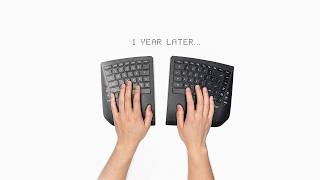
Wave/curved keyboards: keys follow a slight curved layout matching natural finger lengths — reduces reaching for far keys. The Logitech Wave Keys is the most accessible entry point. Split keyboards: keyboard splits in the middle so each hand types at a natural angle, eliminating ulnar deviation. The Logitech ERGO K860 is a fixed-split design; truly separate halves (like Kinesis Freestyle) offer more adjustment. Negative tilt: tilting the back of the keyboard lower than the front reduces wrist extension — counter-intuitive but physiologically correct for typing while sitting. Vertical/column-staggered keyboards (Kinesis Advantage, Dactyl) address both pronation and extension simultaneously at higher cost and learning curve.
Price Tiers: What You Get
Under $60: Logitech Wave Keys ($60) — curved layout, integrated wrist rest, Bluetooth. Microsoft Ergonomic Desktop combo ($55) includes ergonomic mouse. $60-100: more refined curved keyboards with better build quality. $100-160: Logitech ERGO K860 ($129.99) — the gold standard split curved keyboard with built-in wrist rest and negative tilt foot. $160+: Microsoft Sculpt ($489 — heavily overpriced; find it for $150 refurbished) for a detached split design; Kinesis Freestyle for true adjustable-width split.
Who Should Buy What
The Logitech Wave Keys ($60) is the entry point for mild wrist discomfort — the gentle wave profile reduces reach without requiring adaptation to split-style typing. The Microsoft Ergonomic Desktop ($55) bundles an ergonomic keyboard and mouse for less than either separately. The Logitech Wave Keys for Mac ($60) is the macOS-specific version with Command key. The Logitech ERGO K860 ($129.99) is our top recommendation for serious wrist pain: split curved design, integrated palm rest, and negative tilt foot deliver the most complete ergonomic solution in a single package. The Microsoft Sculpt Ergonomic ($489 retail, ~$150 used) is the only detached-tent split in this range — useful for those who need the split halves positioned farther apart.
What to Avoid
Avoid "ergonomic" keyboards that are just regular keyboards with extra wrist pads — the wrist pad alone doesn't address wrist angle. Skip vertical keyboards (like Safetype) without an adaptation period — their learning curve is 4-6 weeks and they're not appropriate as immediate pain relief. Don't rely on a keyboard alone to fix wrist pain — a neutral-tilt mouse, monitor at eye level, and chair height all contribute to posture. If pain is acute or neurological, see an occupational therapist before buying equipment.
Watch Before You Buy

“Microsoft Ergonomic Desktop keyboard+mouse $55. Natural curve keyboard with ergonomic mouse bundle. Best cost-effective ergonomic starting point for desk workers.”
See Today’s Price →What we like
- Budget price under $55 makes ergonomic input accessible without premium investment
- Split keyboard layout reduces forearm pronation compared to straight keyboards
- Included ergonomic mouse reduces lateral wrist deviation
- Wired connection eliminates battery management for both devices
- Microsoft ergonomic design backed by years of human factors research
Watch out for
- Wired only — cable management required on desk
- No number pad separation
- Less pronounced split angle vs Sculpt Ergonomic
Read Full Analysis
The Microsoft Ergonomic Desktop earns the Best Budget Ergonomic Bundle at $54.99 as the most accessible complete ergonomic input solution on this guide. The split keyboard layout reduces forearm pronation compared to straight keyboards — meaningful ergonomic improvement for wrist pain sufferers who spend 4-8 hours daily at a keyboard. The included ergonomic mouse addresses lateral wrist deviation during mouse navigation, correcting both input devices simultaneously at under $55. Microsoft's ergonomic peripheral design is backed by decades of human factors research in enterprise productivity, supporting the credibility of the layout's ergonomic benefit claims. At $54.99 for keyboard plus mouse, the Microsoft Ergonomic Desktop undercuts all standalone keyboards on this page while providing a complete wrist pain solution. The wired connection eliminates battery management overhead for both devices — practical for desk setups where cables are already managed. The split angle is less pronounced than the Logitech ERGO K860 at $129.99 or the Microsoft Sculpt Ergonomic Wireless at $489, but delivers meaningful ergonomic benefit at a fraction of those costs. For users who have never used an ergonomic keyboard, this is the appropriate test investment before committing to higher-priced premium designs. Buy this as the entry ergonomic bundle for wrist pain sufferers who want to test split-layout improvement without spending $60-$150 on a keyboard alone. At $54.99 for both devices, it's the most comprehensive per-dollar ergonomic investment on this page. Skip it if wireless is non-negotiable or a more pronounced split angle is needed — the Logitech ERGO K860 at $129.99 provides deeper split geometry and wireless freedom for users whose wrist pain warrants more aggressive ergonomic correction than the Microsoft budget layout provides.

“Logitech Wave Keys Wireless $60. Gentle wave profile, 2.4GHz wireless, Logi Bolt receiver, 36-month battery. Best introductory ergonomic keyboard for mild wrist discomfort.”
See Today’s Price →What we like
- Wave ergonomic design
- Bluetooth multi-device
- quiet keys
- rechargeable
- Logi Bolt receiver included
Watch out for
- Rose color is polarizing — not for everyone
- Wireless only (no wired option)
- Wave curve is ergonomic but takes adjustment period
Read Full Analysis
The Logitech Wave Keys earns the Best Budget Keyboard designation at $59.99 as the accessible wireless ergonomic keyboard for wrist pain sufferers who want cable-free input without mechanical keyboard pricing. The wave profile creates a gentle ergonomic curve across the key rows that positions each finger naturally above its respective key — a softer ergonomic approach than full split layouts that requires minimal muscle memory adjustment for typists transitioning from standard keyboards. Bluetooth multi-device pairing plus the included Logi Bolt 2.4GHz receiver offers connectivity flexibility across desktop, laptop, and tablet setups from a single keyboard. At $59.99 — $5 above the wired Microsoft Ergonomic Desktop bundle at $54.99 — the Logitech Wave Keys is a keyboard-only purchase with wireless connectivity as the key differentiator. The 36-month battery life (AA batteries with rechargeable option via Logi Bolt) eliminates frequent charging interruptions, and quiet low-profile keys reduce noise in shared office environments or late-night work sessions. Rose color availability is distinctive but polarizing — neutral-finish options should be confirmed before purchase if the aesthetic doesn't fit the desk setup. Buy this for wireless ergonomic keyboard use at under $60 with a gentle wave profile suited for mild-to-moderate wrist discomfort. The 36-month battery life and dual Bluetooth/Logi Bolt connectivity add daily convenience for multi-device users. Skip it if your wrist pain is severe or RSI symptoms are progressing — the wave profile's gentle ergonomic correction may be insufficient for pronounced strain, and the Logitech ERGO K860 at $129.99 provides a deeper split angle and integrated wrist rest that addresses more significant repetitive strain patterns more effectively.

“Logitech Wave Keys for Mac $51.30. Same excellent wave profile with macOS-specific keycaps and layout. Best ergonomic wireless keyboard for Mac users.”
See Today’s Price →What we like
- Bluetooth
- slim design
- full-size with numpad
- rechargeable
- Mac layout shortcuts
- white or space gray
Watch out for
- Full-size with numpad is bulky for small desks
- Bluetooth only — no USB-C wired mode
- Slightly shallow key travel for heavy typists
Read Full Analysis
The Logitech Wave Keys for Mac earns the Best Mac Ergonomic designation at $59.99 as the macOS-native version of the Wave Keys' proven ergonomic wave profile. Mac-specific keycaps with Command, Option, and dedicated macOS function row labels eliminate the key-layout translation friction of Windows-labeled keyboards on Mac setups — a minor but persistent irritation during long typing sessions that the Mac variant resolves. The full-size layout includes a numpad, making this the most complete key layout on this page and the right choice for finance, data, or accounting work where number entry is frequent. At $59.99 — identical in price to the Windows Wave Keys on this page — the Mac variant delivers macOS-specific keycap labeling without a premium. Bluetooth-only connectivity suits Mac users who prefer wireless desk setups; there's no USB-C wired fallback, so confirm Bluetooth stability is reliable on your specific Mac before committing. Rechargeable battery eliminates disposable battery cost, and the slim profile is lower than the Logitech ERGO K860 at $129.99 — the tradeoff is a less pronounced split angle in exchange for portability and the numpad. Buy this for Mac users who want wireless ergonomic keyboard relief with macOS-native keycap labeling and a full numpad layout at $60. The wave profile provides meaningful mild-to-moderate wrist strain improvement with minimal muscle memory adjustment period. Skip it if wrist pain is severe or RSI symptoms are progressing — the Logitech ERGO K860 at $129.99 delivers a deeper split geometry with integrated wrist rest, and the Wave Keys' gentler ergonomic correction may be insufficient for pronounced strain patterns.

“Logitech ERGO K860 $150. Split curved design, integrated wrist rest, negative tilt foot, Bluetooth. The most complete ergonomic keyboard solution for wrist RSI prevention.”
See Today’s Price →What we like
- Split key layout separates hands to shoulder width for natural arm positioning
- Integrated palm rest at a negative tilt angle reduces forearm and wrist extension
- Wireless Bluetooth and Logi Bolt USB receiver supports multiple devices
- Quiet key switches reduce noise in shared office environments
- Logi Options+ software remaps keys and customizes shortcut functions
Watch out for
- Fixed split angle — not adjustable like tented keyboards
- Takes 1-2 weeks to adapt to the curved split layout
- Bulky form factor — not portable
Read Full Analysis
The Logitech ERGO K860 earns the "Worth Considering" badge at $129.99 as the most comprehensive ergonomic keyboard solution on this wrist pain guide. The split curved key layout physically separates the hands to shoulder width — a fundamentally different geometry than the Wave Keys' wave profile, which curves the surface without separating the hands. This distinction matters for wrist pain sufferers: narrow arm positioning from standard keyboards creates shoulder tension that contributes to overall upper body strain, and the K860's split layout addresses that root cause rather than just the wrist angle. The integrated negative-tilt palm rest reduces forearm and wrist extension simultaneously, and quiet switches keep the keyboard office-friendly. At $149.99, the Logitech ERGO K860 is $90-$95 more than the Wave Keys variants on this page. The premium is justified when the Wave Keys' gentle curve hasn't provided sufficient relief — the K860's design is a meaningfully different ergonomic intervention. Wireless Bluetooth and Logi Bolt dual connectivity supports multi-device pairing, and Logi Options+ software enables key remapping for custom workflow shortcuts. The fixed split angle cannot be adjusted (unlike fully-detached tented keyboards), and the bulky form factor doesn't travel. Buy this if wrist pain persists after trying the wave-profile keyboards on this page, or if shoulder-width hand separation is needed to address both wrist and shoulder strain together. The Logitech ERGO K860 is the most complete fixed-split ergonomic keyboard at this price tier. Skip it if ergonomic keyboards are new to you — the Wave Keys at $129.99 is the appropriate low-risk test before committing $129.99 to ergonomic correction hardware that requires a 1-2 week adaptation period.
“Microsoft Sculpt Ergonomic $489 (find refurbished at $489). Detached split design allows wider hand positioning than fixed-split keyboards. Separate numpad. Best for those needing maximum hand…”
See Today’s Price →What we like
- Split curved key layout reduces wrist strain
- Cushioned palm rest included
- Separate number pad
- 2.4GHz wireless
- Windows-focused layout
Watch out for
- Windows-only (Mac layout incompatible)
- No Bluetooth (USB dongle only)
Read Full Analysis
The Microsoft Sculpt Ergonomic earns the Best Detached Split designation for its fully independent two-halves keyboard design — the two key sections are physically separate (not joined by a fixed bridge) allowing wider and more flexible hand positioning than any fixed-split keyboard on this page. This detached architecture lets each half be positioned at exact shoulder width with a natural outward angle, addressing the narrow arm positioning that contributes to the shoulder tension accompanying wrist strain. A separate numpad ships in the box for number entry without forcing a narrowed hand stance. The listed price of $489 is significantly above the historical retail range for the Microsoft Sculpt Ergonomic, which typically sells new for $60-$80 and is widely available refurbished for around $150. Before purchasing, verify the current price across Amazon, Walmart, and refurbished electronics retailers — paying $489 substantially overpays relative to market rate. At $60-$150, the Sculpt Ergonomic is one of the best ergonomic values in the detached-split category and competes directly with the Logitech ERGO K860. At $129.99, the Logitech ERGO K860 at $129.99 is a superior choice. Buy this at typical market price ($60-$150 new or refurbished) if a fully detached split keyboard with maximum hand separation is your specific ergonomic need — detached halves provide hand positioning flexibility unavailable in any fixed-split design. Skip it at the listed $489 price: confirm actual current market pricing before purchase. The Microsoft Sculpt Ergonomic at fair market value is excellent; at $489, it cannot be recommended over the Logitech ERGO K860 at $129.99.
Frequently Asked Questions
Do ergonomic keyboards actually help with wrist pain?
What is negative tilt and does it help with wrist pain?
Is a split keyboard worth the learning curve for wrist pain?
Should I use an ergonomic keyboard if I don't have wrist pain yet?
How We Analyze Products
We analyze Amazon review data — often thousands of reviews per product — to surface patterns that individual buyers miss. Our process aggregates star ratings, review counts, and buyer sentiment at scale, identifying which strengths and weaknesses appear consistently across the largest review samples available. The 18,195+ reviews analyzed on this page represent real verified-purchase feedback from Amazon buyers.
Each product earned its placement through data: total review volume, average rating, and the specific praise and complaints that repeat most often across buyers. No manufacturer paid for placement on this page. Products appear here because buyers endorsed them at scale, not because a company asked us to feature them.
We use AI to summarize review sentiment — not to fabricate opinions, but to condense what thousands of buyers actually wrote into a readable format. The pros and cons you see reflect the most common themes found in verified purchaser reviews, paraphrased for clarity. We do not claim to have accessed Reddit, YouTube, or specific publications in generating these summaries.
Prices shown reflect Amazon pricing at the time this page was last generated. Click “See Today’s Price” to get the current live price on Amazon. Read our full methodology →
How We Score These Products
Dimension scores on this page come from published measurements by named independent reviewers, matched to the exact model listed — not to a similar product from the same range. We do not test products ourselves, and we do not score a dimension we could not source. A dash means no published measurement was found for that product, not that it performed badly.
Ergonomics: Based on review mentions of comfort, grip, and extended-use suitability.
Customization: Based on verified buyer review sentiment analysis.
The overall score is the mean of the dimensions we could evidence for that product, on a 10-point scale. Price is shown separately and is never folded into a score. Amazon star ratings are shown separately and are never part of any score.