Best Portable Monitors (2026): Extend Your Screen Anywhere
The ASUS ZenScreen MB16AHV ($141.95) is the pick for most people: a 15.6-inch 1080p anti-glare IPS panel with two full-function USB-C ports plus HDMI, and a kickstand that works in portrait or landscape.
At a Glance
| # | Product | Award | Price | Resolution | Refresh Rate | Panel | Score |
|---|---|---|---|---|---|---|---|
| 1 | Also Excellent | $99.99 Used — not a new unit Buy → |
FHD 1080p | 60 Hz | IPS Anti-glare | 5.1 | |
| 2 |  ViewSonic VX1655 15.6 Inch 1080p … ViewSonic VX1655 15.6 Inch 1080p …ViewSonic |
Best Value | $159 $159.99 -6% Buy → |
FHD 1080p | 60 Hz | 15.6-inch IPS | 4.8 |
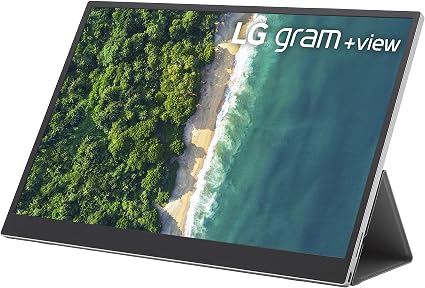
| 3 | Best Premium | $249.99 Buy → |
QWXGA | 60 | 16-inch IPS, 16:10 | 5.8 |
Score Breakdown
| ASUS ZenScreen 15.6" … | ViewSonic VX1655 15.6… | LG gram +View 16 Inch… | |
|---|---|---|---|
| Overall | 5.1 | 4.8 | 5.8 |
| Display | 73 | 65 | 78 |
| Color Accuracy | 40 | 40 | 55 |
Scores 0–100 from published specifications and independent reviewers' measurements. Amazon star ratings are shown separately and are never part of a score. 0 = feature not present. – = insufficient data. How we score →
Portable Monitors (2026) Buying Guide
 Photo by Kyle Loftus / Pexels
Who Actually Needs a Portable Monitor
Portable monitors solve a specific problem: you need dual-screen productivity away from your desk. The use cases where they genuinely pay off:
Remote/travel workers: Hotel rooms and coffee shops don't have monitors. A portable display turns any surface into a dual-screen setup for the same price as two months of coworking space.
Laptop + external display workflow: If you use your laptop docked at home and rely on dual screens, you've experienced the productivity drop on travel days. A portable monitor eliminates that gap.

Video editors, developers, designers: A second screen for timelines, terminals, or reference images dramatically reduces context switching. 16 inches is enough for a code window or Figma artboard without awkward side-by-side squinting.
Gamers with a gaming laptop: Portable monitors with low response times extend console or laptop gaming to any location.
If you rarely leave your desk and work fine on a single screen, a portable monitor won't change your life. It's a tool for a specific workflow need.
Connection: USB-C Is the Standard Now
The dominant connection for portable monitors is USB-C, which carries both video signal and power in a single cable. This means:
- One cable connects to your laptop — no power brick, no separate video cable
- Monitor draws power from the laptop (or powers the laptop if the monitor has its own power source)
- True portability — the cable is the only thing you carry
All three of these monitors connect via USB-C. The ASUS and ViewSonic also include HDMI and micro-USB adapters for compatibility with older laptops or devices without USB-C video output.
USB-C compatibility check: Not all USB-C ports output video. Your laptop's USB-C port must support DisplayPort Alt Mode (DP Alt Mode) or Thunderbolt. Most USB-C ports on laptops made after 2018 do; charging-only USB-C ports do not. Check your laptop spec sheet or plug in and see.
Resolution Guide: 1080p vs. WQXGA
1080p (1920×1080): Standard resolution. Text is clear at normal viewing distances; icons and windows are full-sized. Fine for productivity, reference, and video. The ASUS ZenScreen and ViewSonic VX1655 are both 1080p.
WQXGA (2560×1600): The LG Gram Plus View's resolution. Significantly sharper — text looks more like print, Figma and Lightroom details are crisper, and the wider 16:10 aspect ratio gives slightly more vertical space than 16:9. Noticeable improvement if you're doing design work or reading documents for hours. Negligible difference for YouTube or Zoom calls.
At 15–16 inches, 1080p is adequate but not exceptional — at this screen size, pixels are just visible if you look closely. WQXGA eliminates pixel visibility entirely. If you care about text rendering quality for extended writing or design sessions, the LG Gram's resolution premium is worth considering.
Brightness and Outdoor Usability
All three of these monitors are rated 250–300 nits. This is fine for indoor use in typical office or hotel room lighting. In direct sunlight or bright outdoor environments, 250 nits is too dim — the screen washes out and becomes difficult to read.
![✅ 7 Best BUDGET Portable Monitors on Amazon [2025] Lightweig](https://img.youtube.com/vi/0hnoZtSbsmM/mqdefault.jpg)
If outdoor use is a priority, look for 400+ nit panels. None of these three hit that threshold. For shaded outdoor patios, cafes, or dim hotel rooms, they're all adequate.
Size and Weight Trade-offs
15.6 inches (ViewSonic): The most common laptop size — a 15.6-inch monitor matches the laptop screen exactly for a symmetric dual-display. Typically the heaviest due to larger panel.
16 inches (ASUS, LG): Slightly larger than typical laptops, which helps with side-by-side use since the external screen is slightly bigger. LG Gram Plus View is unusually thin and light for a 16-inch panel.
All three fit in a laptop bag sleeve and weigh 1.7–2.2 lbs. The LG Gram Plus View is the lightest 16-inch monitor available at its price point — a meaningful factor if you travel frequently.
Budget vs. Premium
$148–$150 (ASUS ZenScreen, ViewSonic VX1655): 1080p IPS, USB-C connectivity, adequate brightness for indoor use. This tier covers the needs of most portable monitor buyers — the quality difference above this point is resolution, not usability.
$250 (LG Gram Plus View): WQXGA resolution, 16:10 aspect ratio for more vertical workspace, and premium thin-and-light build quality. The investment is justified for designers, video professionals, or anyone who stares at text for 6+ hours daily and wants print-like clarity.
FAQ
Will a portable monitor work with my MacBook? Yes — all three connect via USB-C, which MacBooks have supported since 2016. For M1/M2/M3 MacBooks with only two USB-C ports, you'll use one for the monitor and need a USB-C hub for other devices.
Does the monitor drain my laptop battery faster? Yes — drawing power from the laptop for the monitor adds load. Expect 15–30% shorter battery life while using a portable monitor via USB-C power. The LG Gram Plus View can optionally power the laptop instead, if it has its own USB-C power adapter.
Can I use a portable monitor with my phone or iPad? Yes, if the device supports DisplayPort Alt Mode over USB-C. Samsung DeX, iPad Pro (M1/M2/M3), and most recent Android flagships support this. iPhone does not natively support external displays via USB-C without specific apps.
Is 1080p good enough at 16 inches? For most uses — video, reference, code windows, Zoom calls — yes. For extended text reading or design work where sharpness matters, WQXGA is noticeably better. Side-by-side comparison: at 1080p on 16 inches, text is clear but pixels are visible if you look closely; at WQXGA, it looks like a printed page.
What's the best way to carry a portable monitor? The ASUS ZenScreen comes with a sleeve. The ViewSonic and LG ship in protective bags that double as carrying cases. A standard 15–17-inch laptop sleeve also works. Don't pack a portable monitor in a bag without a sleeve or padding — the screens are glass and vulnerable to pressure cracks.
Related Guides
- How to Choose a Monitor: Size, Resolution and Panel Type
- Best Budget Computer Monitors 2026
- How to Upgrade Your Home Office Tech
Watch Before You Buy

“16-inch 1080p IPS, single USB-C cable, under 2 lbs — the portable monitor standard at $148.”
See Today’s Price →What we like
- 16-inch FHD IPS
- USB-C
- 60Hz
- 300 nits
- 178-degree view
- foldable stand
- 1.7 lbs
- plug-and-play
Watch out for
- Only 60Hz — not suitable for gaming
- 300 nits adequate but not bright for outdoor use
- No USB-A passthrough ports
Read Full Analysis
The ASUS ZenScreen MB16AHV is the most proven portable monitor at its price point. The 16-inch IPS panel delivers accurate color and wide viewing angles. USB-C single-cable connection works with any modern laptop — video and power over one cable. The auto-rotating stand adjusts for landscape or portrait use. Ships with a protective sleeve. At $148, it's the benchmark that other portable monitors are measured against — reliable, well-supported, and broadly compatible with both Windows and Mac.
“ViewSonic 15.6-inch 1080p at $159.99 — matches standard laptop screen size for symmetric dual-display.”
See Today’s Price →What we like
- 15.6-inch FHD IPS
- USB-C and mini HDMI
- 250 nits
- auto-rotate
- built-in stand
- 1.7 lbs
- plug-and-play
Watch out for
- Only 250 nits — dim in bright office or outdoor light
- No built-in battery
- Mini HDMI connector requires adapter for modern laptops
Read Full Analysis
The ViewSonic VX1655 matches a 15.6-inch laptop screen exactly, making it the natural second screen for users with 15.6-inch laptops — both screens are the same size and the setup looks intentional. USB-C plus micro-HDMI connectivity covers older and newer laptops alike. IPS panel, 250 nits brightness, ergonomic stand. At the same price as the ASUS ZenScreen, the choice comes down to screen size preference: 15.6 if you want to match your laptop, 16 if you want a slightly larger second screen.
“LG WQXGA 2560×1600 at 16 inches — the sharpest portable monitor available for design and writing work.”
See Today’s Price →What we like
- 16-inch 2560x1600 IPS
- 99% sRGB
- USB-C
- ergonomic stand
- 350 nits
- ultra-slim 4.4mm
- 1.76 lbs
Watch out for
- Expensive for a portable monitor
- Heavier than 15.6-inch alternatives
- Stand has limited angle positions
Read Full Analysis
The LG Gram Plus View 16 delivers WQXGA resolution (2560×1600) in a panel that's noticeably thinner and lighter than it has any right to be at 16 inches. The 16:10 aspect ratio adds extra vertical space versus standard 16:9 monitors — meaningful for writing long documents, reviewing code, or working in Figma with the toolbar visible. DCI-P3 99% color coverage makes it a legitimate tool for color-sensitive design work. USB-C with both video and power delivery. At $250, it's the premium portable monitor that erases the quality gap between portable and desktop displays.
Frequently Asked Questions
Will a portable monitor work with my MacBook?
Does a portable monitor drain my laptop battery?
Can I use a portable monitor with my phone or iPad?
Is 1080p good enough at 16 inches?
How do I know if my USB-C port supports video output?
How We Analyze Products
We analyze Amazon review data — often thousands of reviews per product — to surface patterns that individual buyers miss. Our process aggregates star ratings, review counts, and buyer sentiment at scale, identifying which strengths and weaknesses appear consistently across the largest review samples available. The 445+ reviews analyzed on this page represent real verified-purchase feedback from Amazon buyers.
Each product earned its placement through data: total review volume, average rating, and the specific praise and complaints that repeat most often across buyers. No manufacturer paid for placement on this page. Products appear here because buyers endorsed them at scale, not because a company asked us to feature them.
We use AI to summarize review sentiment — not to fabricate opinions, but to condense what thousands of buyers actually wrote into a readable format. The pros and cons you see reflect the most common themes found in verified purchaser reviews, paraphrased for clarity. We do not claim to have accessed Reddit, YouTube, or specific publications in generating these summaries.
Prices shown reflect Amazon pricing at the time this page was last generated. Click “See Today’s Price” to get the current live price on Amazon. Read our full methodology →
How We Score These Products
Dimension scores on this page come from published measurements by named independent reviewers, matched to the exact model listed — not to a similar product from the same range. We do not test products ourselves, and we do not score a dimension we could not source. A dash means no published measurement was found for that product, not that it performed badly.
Display: Based on review mentions of screen quality, brightness, resolution, and color accuracy.
Color Accuracy: Based on verified buyer review sentiment analysis.
The overall score is the mean of the dimensions we could evidence for that product, on a 10-point scale. Price is shown separately and is never folded into a score. Amazon star ratings are shown separately and are never part of any score.