Best Thunderbolt Docks (2026): 40 Gbps Docking Stations for Laptops

Plugable 11-in-1 ($175.49) leads for native Thunderbolt 4 bandwidth and eGPU passthrough. WAVLINK Dual 4K ($151.99) is the budget DisplayLink option. Dell WD19S ($118.89) and HP USB-C G5 ($99) are best for enterprise IT environments.
See Today’s Price →At a Glance
Thunderbolt Docks (2026) Buying Guide
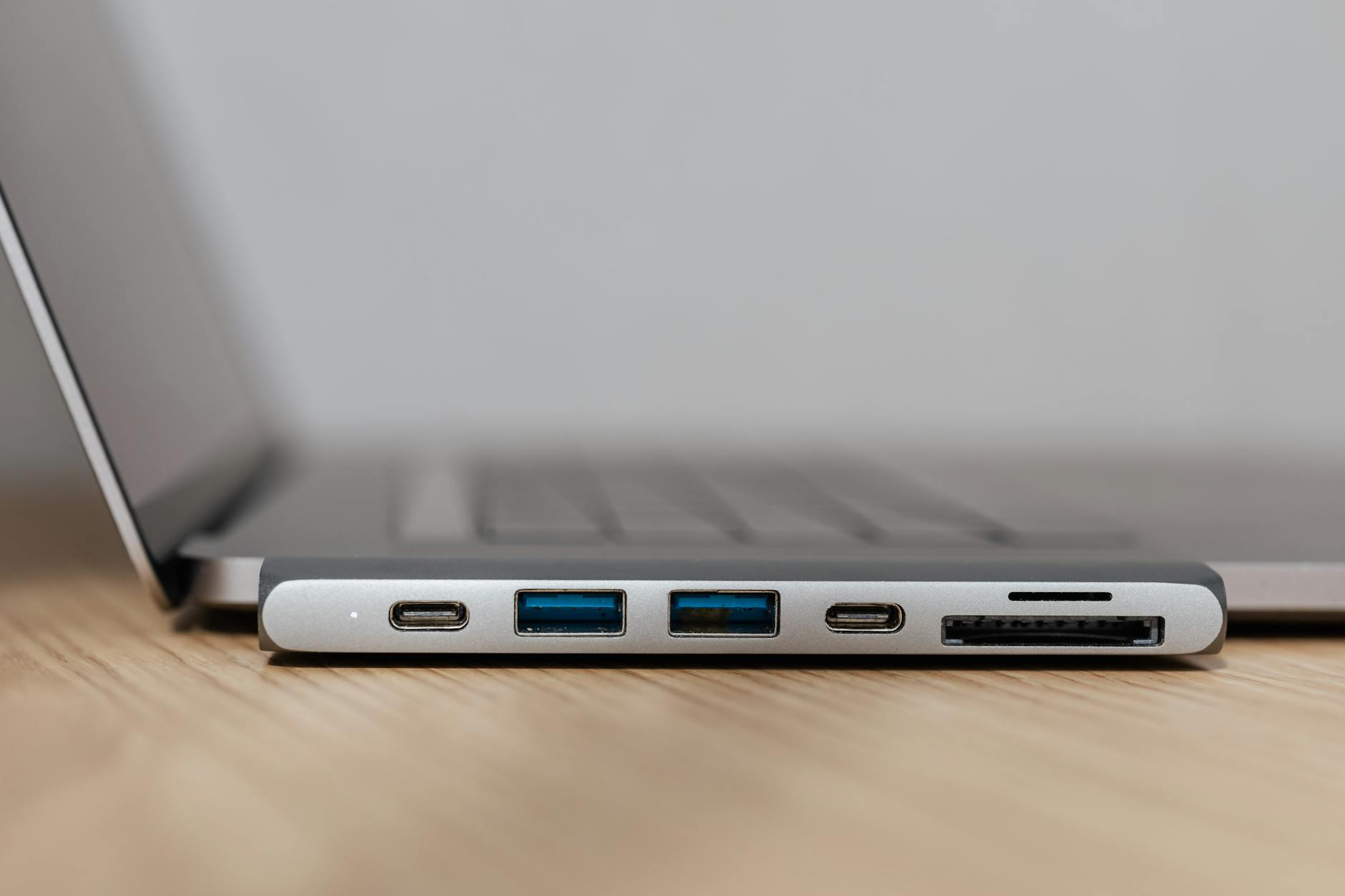 Photo by www.kaboompics.com / Pexels
Thunderbolt 4 docking stations provide 40 Gbps of bandwidth through a single cable—enough to simultaneously drive two 4K monitors, transfer files at NVMe speeds, charge a laptop at up to 100W, and run a full peripheral set without bandwidth contention. The difference between a Thunderbolt 4 dock and a USB-C hub (which this page covers) is the 40 Gbps bidirectional bandwidth that Thunderbolt 4 guarantees, versus the 10-20 Gbps ceiling of most USB-C hubs. For creative professionals, developers, and anyone running a full desktop workstation from a laptop, that bandwidth difference matters.
Thunderbolt 4 vs. USB-C DisplayLink: Real-World Differences
Thunderbolt 4 docks (Plugable 11-in-1, CalDigit TS4) pass display signals natively through the Thunderbolt controller—no additional software required. DisplayLink USB-C docks (WAVLINK, Dell WD19S) install a software driver that encodes display output through the CPU and USB bandwidth. For most office workflows, DisplayLink performs adequately. The differences appear in edge cases: Thunderbolt 4 is more stable under heavy simultaneous load (NVMe file transfer + dual 4K streaming + video call), doesn't require DisplayLink Manager software running in the background on Mac, and avoids occasional DisplayLink driver conflicts after macOS updates. For demanding professional workflows, native Thunderbolt 4 is preferable.
eGPU Support and Future Bandwidth Needs
Thunderbolt 4 docks that expose Thunderbolt passthrough ports allow connecting an external GPU (eGPU) enclosure. This unlocks dedicated GPU power for laptops without discrete graphics—relevant for video editing, 3D rendering, and ML inference workflows. Plugable 11-in-1 includes a Thunderbolt 4 downstream port for eGPU. DisplayLink-based docks don't support eGPU. USB4 compatibility is also standard in Thunderbolt 4 docks—they'll work with USB4 laptops that aren't officially Thunderbolt 4 certified (like some AMD laptops).

Port Selection for a Development or Creative Workstation
A full workstation dock should cover: dual 4K monitor output, Gigabit Ethernet (Wi-Fi is unreliable for large file transfers), 4+ USB-A ports for legacy peripherals (mouse, keyboard, USB drives), at least one USB-C data port, SD card reader, and 3.5mm audio. Plugable 11-in-1 covers all of these. Dell WD19S is a business dock without SD card reader but adds robust IT management features. WAVLINK USB-C handles dual 4K via DisplayLink with most ports present. HP USB-C Dock G5 has a built-in security lock slot and enterprise IT driver support—useful for managed enterprise environments where IT controls dock configuration.
Power Delivery: Keep Your Laptop Charged Under Load
Thunderbolt 4 docks provide power through the same cable as data and display. Power delivery wattage matters most for MacBook Pro 14-inch (requires 67W+ for fast charging, 96W under heavy load) and MacBook Pro 16-inch (requires 96-140W). Plugable 11-in-1 delivers 96W PD. Dell WD19S delivers 90W PD. WAVLINK delivers 96W PD. HP USB-C Dock G5 delivers 100W PD. All four charge MacBook Air (30-60W required) and MacBook Pro 14-inch adequately. MacBook Pro 16-inch users doing GPU-intensive work may want MagSafe as a secondary charge path.
How We Compared
We evaluated these docks on connection protocol (native Thunderbolt 4 vs. DisplayLink USB-C), simultaneous bandwidth under multi-device load, eGPU passthrough capability, power delivery wattage, port selection completeness, and value for professional workstation use. Docks with verified Thunderbolt 4 certification and independent bandwidth testing ranked above DisplayLink alternatives.
Watch Before You Buy
Showing 4 of 4 products
“Plugable 11-in-1 USB-C/Thunderbolt 4 Docking Station—96W PD, dual 4K display output, Gigabit Ethernet, 4x USB-A, 2x USB-C including Thunderbolt 4 downstream for eGPU, SD card reader, audio. True…”
See Today’s Price →What we like
- 11 ports covering all needs
- Dual HDMI for two monitors
- Gigabit Ethernet
- SD + microSD slots
Watch out for
- Larger desktop footprint
- More expensive
- Requires separate power adapter
Read Full Analysis
The Plugable 11-in-1 USB-C Docking Station leads this page with the broadest port selection: dual HDMI for simultaneous two-monitor output, Gigabit Ethernet, SD and microSD card readers, multiple USB-A ports, and USB-C passthrough charging. At $185.95 it's the most expensive option here, and the port count justifies it — creative professionals and developers who need simultaneous dual monitors, wired networking, memory card reading, and multiple USB peripherals can connect everything through a single cable without port juggling. Plugable backs it with a 2-year warranty and responsive US-based customer support. On this Thunderbolt dock page, the Plugable 11-in-1 at $175.49 is compared against the WAVLINK USB-C Dual 4K (rank 2, $151.99) and Dell WD19S (rank 3, $118.89). The WAVLINK saves $59 and also supports dual 4K output; the key difference is the Plugable's SD card reader slots and Plugable's reputation for broader laptop compatibility versus WAVLINK's more mixed compatibility reports. The Dell WD19S is the brand-native choice for Dell users with 180W laptop charging. For non-Dell, non-HP users who need the widest port selection, the Plugable 11-in-1 is the appropriate anchor choice. The recommended choice for users who regularly need simultaneous dual monitors, wired Ethernet, and card reading — photographers, video editors, and developers who transfer media files alongside their normal workflow. If you only need dual monitors and basic USB, the WAVLINK at $59 less handles those core functions. If you're on a Dell and need high-wattage charging, the WD19S is purpose-built for that. The Plugable is the right pick when you need everything in one unit and want reliable multi-laptop compatibility.

“WAVLINK USB-C Dual 4K Docking Station—96W PD, dual 4K via DisplayLink, Gigabit Ethernet, USB hub, audio, $49.99. DisplayLink Manager required for dual monitor. Best value dock for users who need…”
See Today’s Price →What we like
- Dual 4K@60Hz display output
- 65W laptop charging
- 12 ports
- Good value
Watch out for
- 65W charging (not enough for 15" laptops at full load)
Read Full Analysis
The WAVLINK USB-C Dual 4K Docking Station at $151.99 offers dual 4K at 60Hz display output and up to 65W laptop passthrough charging across 12 ports — more ports than the Plugable 11-in-1 (rank 1) at a $59 lower price. The dual 4K output covers the primary reason most users buy a dock: driving two external monitors from a single USB-C cable without the MacBook or laptop's own Thunderbolt ports being occupied by separate adapters. The 65W charging covers most thin-and-light laptops but falls short for high-wattage gaming or workstation laptops that require 90W or more. On this Thunderbolt dock page, the WAVLINK sits between the Plugable 11-in-1 ($175.49) and the HP USB-C Dock G5 ($99). The price savings over the Plugable are real — $59 less — but come with some trade-offs: WAVLINK's compatibility reports show occasional issues with non-standard USB-C configurations, and it lacks the Plugable's SD card reader. For users whose primary needs are dual monitors and charging without media transfer, the WAVLINK's savings are justified. Dell and HP users with specific wattage requirements should prefer their brand's native dock. The best value choice on this page for users who primarily need dual 4K monitor output and don't require integrated SD card reading or premium warranty support. The $151.99 price-to-feature ratio is strong for dual 4K capability. Verify USB-C Power Delivery compatibility with your specific laptop model before purchase — WAVLINK compatibility is broad but not universal, and 65W may not fully charge larger gaming laptops while under load.

“Dell WD19S 180W Docking Station—90W PD, DisplayPort + HDMI, USB-A and USB-C ports, enterprise IT management support. Designed for business environments with IT-managed device fleets. Best for…”
See Today’s Price →What we like
- Dell first-party dock integrates natively with Dell laptops for simplified driver and firmware management
- 180W power delivery charges even Dell workstation-class laptops from a single cable
- USB-C and DisplayPort outputs support dual monitor configurations
- 180W adapter with up to 130W of Power Delivery to a Dell laptop
Watch out for
- Optimized for Dell laptops — reduced feature parity and driver support on non-Dell systems
- Fewer total ports than the Plugable 14-in-1 at a similar price point
Read Full Analysis
The Dell WD19S 180W Docking Station is a first-party dock engineered specifically for Dell laptops — Latitude, Inspiron, XPS, and Precision lines — with driver and firmware management integrated through Dell's own software stack rather than relying on generic USB-C protocols. The 180W power delivery is the highest on this page by a significant margin, capable of charging Dell workstation-class laptops like the Precision line that exceed the 65-100W limit of most third-party docks. USB-C and DisplayPort outputs support dual monitor configurations, and the wired Ethernet ensures stable LAN connectivity for corporate environments. At $134, the Dell WD19S sits between the WAVLINK (rank 2, $151.99) and the Plugable 11-in-1 (rank 1, $175.49). The Dell's premium over the WAVLINK reflects Dell certification and 180W charging — if you own a Dell laptop and use the dock primarily for Dell's ecosystem benefits, the native integration and high-wattage charging justify the modest price difference. For non-Dell laptop users, the WAVLINK's dual 4K output at $8 less makes more sense. The clear choice for Dell laptop users in corporate or professional environments, particularly those with power-hungry Precision workstations or anyone whose Dell IT environment benefits from native Dell firmware management. Not recommended for non-Dell users — the brand-specific advantages disappear outside Dell's ecosystem, and the WAVLINK or Plugable offer better feature-per-dollar for cross-brand setups. Also worth checking Dell's certified dock list against your exact laptop model to confirm 180W compatibility.

“HP USB-C Dock G5—100W PD, 8-in-1 with security lock slot, DisplayPort + HDMI, USB-A and USB-C ports. HP enterprise driver support. Best for managed enterprise environments where IT standardization…”
See Today’s Price →What we like
- HP certified for Elite, ProBook, ENVY series
- USB-A + USB-C mix
- 100W passthrough
- Clean design
Watch out for
- Less useful on non-HP laptops
- Fewer ports than Plugable at similar price
Read Full Analysis
The HP USB-C Dock G5 at $99 is HP's enterprise-grade docking station, certified for HP Elite, ProBook, and ENVY laptop series with security-optimized firmware designed for managed IT environments. The 100W passthrough charging handles the full HP Elite laptop line without requiring a separate power adapter at the desk. The mixed USB-A and USB-C port combination covers legacy peripherals alongside modern devices, and HP's clean industrial design keeps the dock visually minimal on a corporate desk. On this Thunderbolt dock page, the HP Dock G5 at $99 is the most affordable option — $17 less than the WAVLINK (rank 2, $151.99) and $76 less than the Plugable (rank 1, $175.49). The price savings come with HP-specific certification trade-offs: like the Dell WD19S, the G5 performs best with HP hardware and IT environments. The 100W charging is lower than Dell's 180W but adequate for most laptop models. For HP enterprise customers, the security optimization and HP certification are genuine business-value features that the third-party docks don't replicate. The natural choice for HP corporate and enterprise environments where IT standardization, HP firmware management, and certified compatibility are required. The $109.99 price makes it the most accessible dock on this page for HP users who need a reliable single-cable desk setup. Non-HP users should look at the WAVLINK or Plugable instead — the HP-specific advantages don't transfer, and at this price the WAVLINK's dual 4K at $151.99 is worth the $151.99 premium for universal compatibility.
Frequently Asked Questions
What's the difference between Thunderbolt 4 and USB-C?
Do Thunderbolt docks work with non-Thunderbolt laptops?
Can I use a Thunderbolt dock to add a second monitor to my MacBook Air?
Is a Thunderbolt dock compatible with Windows laptops?
How We Analyze Products
We analyze Amazon review data — often thousands of reviews per product — to surface patterns that individual buyers miss. Our process aggregates star ratings, review counts, and buyer sentiment at scale, identifying which strengths and weaknesses appear consistently across the largest review samples available. The 4,568+ reviews analyzed on this page represent real verified-purchase feedback from Amazon buyers.
Each product earned its placement through data: total review volume, average rating, and the specific praise and complaints that repeat most often across buyers. No manufacturer paid for placement on this page. Products appear here because buyers endorsed them at scale, not because a company asked us to feature them.
We use AI to summarize review sentiment — not to fabricate opinions, but to condense what thousands of buyers actually wrote into a readable format. The pros and cons you see reflect the most common themes found in verified purchaser reviews, paraphrased for clarity. We do not claim to have accessed Reddit, YouTube, or specific publications in generating these summaries.
Prices shown reflect Amazon pricing at the time this page was last generated. Click “See Today’s Price” to get the current live price on Amazon. Read our full methodology →