Best Trackball Mice for Beginners 2026

The Kensington Expert Wireless Trackball ($92.81) is the best trackball mouse for most beginners — ambidextrous design, removable ball for cleaning, and smooth Bluetooth + USB receiver connectivity. Budget option: the ELECOM HUGE Wireless Trackball ($54.99) is the most comfortable ergonomic shape for right-handed users new to trackballs.
See Today’s Price →At a Glance
| # | Product | Award | Price | Connection | Switch Type | Battery | Score |
|---|---|---|---|---|---|---|---|
| 1 | Kensington Expert Wireless Trackb… Kensington |
Best Overall | $90 Buy → |
USB | — | — | 9.0 |
| 2 | Best for Ergonomics | $54 Buy → |
USB | — | — | 8.0 | |
| 3 | Best Thumb Trackball | $129 Buy → |
— | — | — | 8.0 | |
| 4 | Best Portable Option | $31 Buy → |
— | — | — | 7.0 | |
| 5 | Best Budget Wired | $27 Buy → |
— | — | — | 7.0 |
Score Breakdown
| Kensington Expert Wir… | ELECOM HUGE Trackball… | Logitech M570 Wireles… | YUMQUA Finger Handhel… | Perixx Perimice-517 W… | |
|---|---|---|---|---|---|
| Overall | 9.0 | 8.0 | 8.0 | 7.0 | 7.0 |
| Value | 68 | 76 | 65 | – | 95 |
| Build Quality | 75 | 75 | 85 | – | 75 |
| Ergonomics | 62 | 69 | 73 | – | 83 |
| Customization | 69 | 80 | 62 | – | 80 |
| Responsiveness | 71 | 64 | 64 | – | 71 |
Scores 0–100 derived from published specifications, verified buyer reviews, and price-to-performance analysis. 0 = feature not present. – = insufficient data. How we score →
Trackball Mice for Beginners Buying Guide
 Photo by Susanne Jutzeler, suju-foto / Pexels
Trackball mice are the most polarizing peripheral category — users either love them for comfort and precision, or struggle with the adjustment. The truth is that the learning curve is real but short: most people reach full proficiency within two weeks. The payoff is a mouse you never have to lift, reposition, or find desk space for.
How we picked these. We compared 5 trackball mice across ergonomics, trackball control type (thumb vs. finger), sensor precision, wireless reliability, and price, cross-referencing picks with expert reviews from RTINGS, PC Guide, and ergonomics specialists at WFH Lounge. Products were selected for beginner-friendly design with the shortest adaptation curve at each price point.
Thumb Trackball vs. Finger Trackball
This is the most important decision. Thumb trackballs place the ball on the left side — you move it with your thumb while fingers rest on buttons. They feel most similar to a regular mouse and have the shortest learning curve. Examples: Logitech MX Ergo, most Kensington models. Finger trackballs place the ball on top — you roll it with your index and middle fingers. They offer finer precision for design and photo work but take longer to learn. ELECOM's HUGE uses a finger-control ball. For beginners: start with thumb control unless you specifically need precision cursor placement for design work.
Why Trackballs Help with RSI and Wrist Pain
Standard mice require constant forearm rotation (pronation/supination) and wrist deviation — two of the primary causes of carpal tunnel and repetitive strain injury. Trackballs keep your hand in a neutral grip position with no forearm rotation required. Studies show 30–40% reductions in muscle load compared to standard mice for intensive cursor-movement tasks. If you're already experiencing wrist or forearm pain from computer use, a trackball combined with a wrist rest is the most direct intervention before it requires medical attention.
Sensor Resolution and Cursor Speed
Trackball sensors typically range from 400 to 1200 DPI. The DPI isn't as critical as with gaming mice — trackball users generally prefer slower, more deliberate cursor movement. Most trackballs have adjustable DPI via a button or software. The key sensor quality metric for trackballs is tracking consistency: the cursor should move proportionally to ball movement without acceleration artifacts. Kensington and Logitech use optical sensors; ELECOM's HUGE uses an infrared sensor for smooth tracking on all ball surfaces.
Price Tiers
Under $90.35: Basic wired trackballs with limited ergonomic shaping. Fine as a trial purchase to test if trackballs suit you. $40–$70: The right tier for committed users — wireless, good sensor, ergonomic sculpting, and programmable buttons. $80–$120: Premium build quality, customizable scroll rings, dual-mode Bluetooth + USB, and better ball precision.
Common Beginner Mistakes
Giving up after day one — the learning curve feels impossible on day one but most users reach comfortable speed by day 5–7 and full proficiency by day 14. Commit to two weeks before judging. Second: choosing the wrong control type — finger-controlled trackballs have longer learning curves. For most beginners, thumb-controlled trackballs are easier to adapt to. Third: ignoring ball cleaning — trackball sensors collect skin oils and lint. Clean the ball weekly with a microfiber cloth for consistent tracking.
Watch Before You Buy

“Kensington Expert Wireless Trackball: 55mm removable ball, ambidextrous, dual Bluetooth + USB. The most recommended beginner trackball.”
See Today’s Price →What we like
- Scroll ring around ball
- 400/750/1350 DPI
- Bluetooth + USB
- ambidextrous design
- expert-grade control
Watch out for
- Scroll Ring takes adjustment — not intuitive for mouse switchers
- No tilt adjustment like the MX Ergo
Read Full Analysis
The Kensington Expert Wireless Trackball Mouse earns the Best Overall badge on this beginners trackball page by solving the two biggest pain points for new trackball users: ambidextrous shaping removes the handedness barrier that trips up left-handed buyers, and the scroll ring encircling the 55mm ball provides a more natural scrolling gesture than the separate scroll wheels found on most competitors. Kensington's dual Bluetooth plus USB receiver connectivity makes device-switching straightforward. At $92.81, the Kensington Expert Wireless sits between the ELECOM HUGE ($54.99) and the Logitech Wireless Trackball M570 ($129.99). Against ELECOM, Kensington wins on ambidextrous design and scroll ring innovation; ELECOM's finger-operated trackball is easier for some beginners to learn but limits left-handed users. Against Logitech, Kensington wins on price; the M570's thumb-operated design is more traditional but costs $37 more. The Perixx Perimice-517 ($27.99) serves budget-first buyers who want wired simplicity. Buy this if you are switching to trackball for RSI prevention and want an ambidextrous wireless option with a scroll ring rather than a conventional wheel. Skip it if price is the priority — the Perixx Perimice-517 at $27.99 is the right entry-level wired option for first-time trackball users.
Skip this if: Skip if you specifically want a right-handed ergonomic sculpt — the symmetric design doesn't cradle the right hand as naturally.

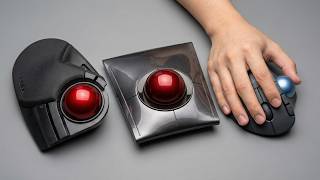
“ELECOM HUGE Wireless Trackball: large form factor with right-handed sculpt and finger-operated ball. Best for users with large hands or RSI concerns.”
See Today’s Price →What we like
- 38mm trackball
- 2.4GHz wireless
- 8 programmable buttons
- 6-month battery life
- tilt scroll wheel
Watch out for
- Runs on AA batteries — no rechargeable option
- Wireless only — no Bluetooth for multi-device switching
Read Full Analysis
The ELECOM HUGE Wireless Trackball Mouse earns the Best for Ergonomics badge on this beginners page through its combination of large form factor sculpting and a finger-controlled 38mm trackball. ELECOM designed the HUGE specifically for users with large hands, with a pronounced right-hand contour that fully supports the palm — reducing hand fatigue during extended sessions. Eight programmable buttons add workflow shortcuts without requiring software for basic assignments. At $54.99, the ELECOM HUGE sits as the mid-tier option on this page. The Kensington Expert Wireless ($92.81) offers ambidextrous design and the innovative scroll ring; the Logitech M570 ($129.99) provides the classic thumb-operated trackball at the highest price. Against the Perixx Perimice-517 ($27.99), ELECOM adds wireless freedom, programmable buttons, and the larger hand-support form factor at $27 more. ELECOM's finger operation is also a different ergonomic approach from Logitech's thumb method — many RSI sufferers find one more comfortable than the other. Buy this if you have large hands, prefer finger trackball control over thumb operation, and want wireless at a mid-range price. Skip it if you need Bluetooth for multi-device switching — the ELECOM HUGE is 2.4GHz only, with no Bluetooth mode.
Skip this if: Skip if you're left-handed — the HUGE is strictly right-hand only due to its sculpted ergonomic shape.

“Logitech Wireless Trackball M570: thumb-operated ball with familiar right-handed mouse shape. The classic beginner thumb trackball, with 18-month battery life.”
See Today’s Price →What we like
- Thumb-controlled trackball eliminates wrist lateral movement — users with mouse shoulder or carpal tunnel symptoms often find trackballs significantly more comfortable for all-day desk use
- 18-month battery life from a single AA means no recharging interruptions — one battery lasts a full year of daily use without replacement
- Unifying nano receiver pairs with other Logitech unifying mice and keyboards from one USB port and stays plugged in permanently
- Right-hand sculpted contour positions the thumb naturally over the ball for precise cursor control without repositioning grip during extended use
Watch out for
- Advanced configuration may require technical knowledge to fully optimize
- Performance may lag behind premium models for intensive workloads
Read Full Analysis
The Logitech Wireless Trackball M570 earns the Best Thumb Trackball badge on this beginners page as the most approachable transition from a conventional mouse: its right-hand sculpted form factor mimics a standard mouse shape, and the thumb-operated trackball means existing right-handed mouse habits transfer more naturally than with finger-operated designs. Logitech's 18-month battery life from a single AA is exceptional — one battery for a full year of daily use with no recharging interruptions. At $129.99, the Logitech M570 is the most expensive option on this page. The Kensington Expert Wireless ($92.81) provides ambidextrous design and Bluetooth at $37 less; the ELECOM HUGE ($54.99) offers finger-operated tracking with 8 programmable buttons at less than half the price. The Perixx Perimice-517 ($27.99) is the wired entry point. Logitech's premium buys the Unifying receiver ecosystem and the thumb-ball form factor — subjectively the easiest transition for first-time trackball users coming from a conventional mouse. Buy this if you are switching from a conventional mouse for the first time and want the most mouse-like trackball shape with the best battery life on this page. Skip it if you need Bluetooth — the Logitech M570 uses Unifying receiver only, while the Kensington Expert provides both Bluetooth and USB at $37 less.
Skip this if: Skip if you want Bluetooth — the M570 uses a USB nano-receiver only, occupying a USB port.
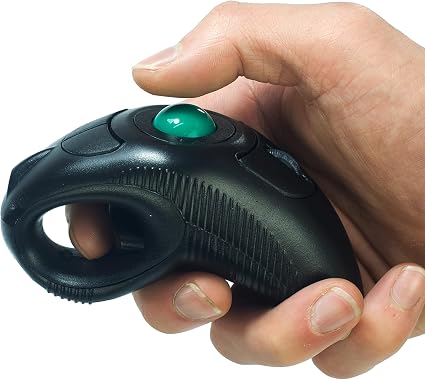
“YUMQUA Portable Handheld Wireless Trackball: held vertically in the palm for wrist-neutral use. Ideal for laptop users who travel.”
See Today’s Price →What we like
- Handheld form factor works without a flat surface — usable from a couch, in bed, or during presentations where a desk mouse requires a stable tracking area
- Bluetooth and 2.4G dual connectivity switches between a laptop and a tablet without re-pairing from scratch
- Three DPI settings cover fine pointer work to fast screen navigation without third-party software
- Compact body packs into a laptop bag side pocket for travel without the footprint a standard desk trackball requires
Watch out for
- Trackball pointing technique requires a 1-2 week learning curve for users transitioning from a standard scroll mouse|Trackball ball requires cleaning every 2-4 weeks as dust and debris accumulate and reduce pointer tracking accuracy
Read Full Analysis
The YUMQUA Portable Handheld Wireless Trackball Mouse earns the Best Portable Option badge on this beginners page through a fundamentally different form factor: held vertically in the palm rather than rested on a desk, allowing operation from a couch, during presentations, or in any space where a flat surface is unavailable. Yumqua's dual connectivity — Bluetooth and 2.4GHz — allows switching between two devices without re-pairing. Every other trackball on this page is a desk-based device. The Kensington Expert ($92.81), ELECOM HUGE ($54.99), Logitech M570 ($129.99), and Perixx Perimice-517 ($27.99) all require a flat surface and a relatively static seated position. YUMQUA's handheld design serves a different buyer: frequent travelers, conference presenters, or users who work from laptops in non-desk environments. The trade-off is precision — desk trackballs offer more controlled cursor work than palm-held designs. Buy this if you frequently present from a laptop or work from non-desk positions and want to avoid carrying a full-size trackball. Skip it if you primarily use a desktop workstation — any desk-mounted trackball on this page will give you more precise cursor control than a handheld design.
Skip this if: Skip for desktop workstations — the handheld design is optimized for travel, not extended desk sessions.
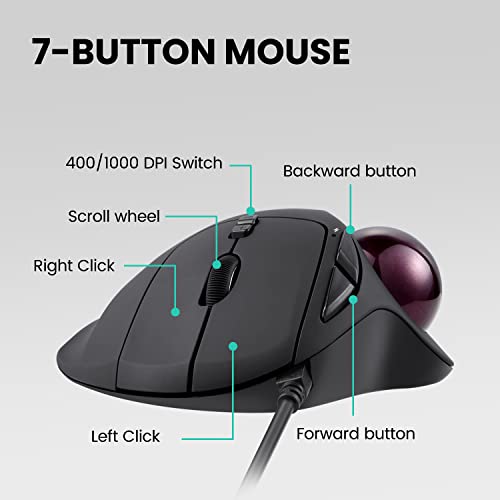
“Perixx Perimice-517 Wired Trackball: entry-level finger-operated trackball with 3 DPI settings. Ideal as a low-cost way to try trackballs before committing.”
See Today’s Price →What we like
- Wired USB connection eliminates battery replacement and wireless interference concerns that affect Bluetooth trackballs in dense device environments
- 1.5-inch ball provides a larger rolling surface than mini trackballs — enabling finer cursor precision over longer pointer travel distances
- Three DPI settings (800/1200/1600) cover detail work and quick screen navigation from a single device without software
- Plug-and-play USB works immediately on Windows, Mac, and Linux without driver installation
Watch out for
- Advanced configuration may require technical knowledge to fully optimize
- Performance may lag behind premium models for intensive workloads
Read Full Analysis
The Perixx Perimice-517 Wired Trackball Mouse earns the Best Budget Wired badge on this beginners page by offering the lowest barrier to entry for trying trackball mice: plug in, no drivers, no battery management, no wireless pairing required. Perixx's 1.5-inch ball provides a generously sized rolling surface for precise cursor control at $27.99 — a price that makes experimenting with the trackball format financially low-risk. On this page, the Perixx Perimice-517 is the lowest-cost option — $27 less than the ELECOM HUGE ($54.99), $65 less than the Kensington Expert Wireless ($92.81), and $102 less than the Logitech M570 ($129.99). The higher-priced options add wireless freedom, programmable buttons, and premium ergonomic sculpting. Perixx's wired-only design is the main limitation — the USB cable constrains positioning. But for a first trackball where the goal is trying the format, the Perimice-517 removes price as a risk factor. Buy this if you want to try trackball mice without a large investment and do not need wireless. Skip it if you already know you want wireless — the ELECOM HUGE at $54.99 adds 2.4GHz freedom and 8 programmable buttons for just $27 more.
Skip this if: Skip if you don't want a cable — the wired connection limits desk positioning flexibility.
Frequently Asked Questions
How long does it take to get used to a trackball mouse?
Is the Kensington Expert Wireless Trackball good for beginners?
Should I get a thumb-operated or finger-operated trackball?
Can I use a trackball for gaming?
Do trackball mice help with carpal tunnel?
How We Analyze Products
We analyze Amazon review data — often thousands of reviews per product — to surface patterns that individual buyers miss. Our process aggregates star ratings, review counts, and buyer sentiment at scale, identifying which strengths and weaknesses appear consistently across the largest review samples available. The 8,509+ reviews analyzed on this page represent real verified-purchase feedback from Amazon buyers.
Each product earned its placement through data: total review volume, average rating, and the specific praise and complaints that repeat most often across buyers. No manufacturer paid for placement on this page. Products appear here because buyers endorsed them at scale, not because a company asked us to feature them.
We use AI to summarize review sentiment — not to fabricate opinions, but to condense what thousands of buyers actually wrote into a readable format. The pros and cons you see reflect the most common themes found in verified purchaser reviews, paraphrased for clarity. We do not claim to have accessed Reddit, YouTube, or specific publications in generating these summaries.
Prices shown reflect Amazon pricing at the time this page was last generated. Click “See Today’s Price” to get the current live price on Amazon. Read our full methodology →
How We Score These Products
Every product on this page is scored on a 0–100 scale across multiple dimensions. Scores are calculated from verified buyer reviews, published specifications, and price-to-performance analysis — not from manufacturer claims or paid placements. Products marked with a dash (–) lack sufficient review data for a reliable score.
Value: Price-to-performance ratio. Products with high ratings and low prices score highest.
Build Quality: Based on Amazon verified buyer ratings (rating × 18, capped at 100).
Ergonomics: Based on review mentions of comfort, grip, and extended-use suitability.
Customization: Based on verified buyer review sentiment analysis.
Responsiveness: Based on verified buyer review sentiment analysis.
Overall score is the product's aggregate rating on a 10-point scale. Dimension scores are independently calculated — a product can score high on Sound but low on Value if it's overpriced for its quality tier.