Best Trackball Mice for Wrist Pain (2026): Stationary Precision

The ELECOM HUGE Wireless Trackball Mouse at $54.99 is the best trackball mouse for wrist pain — the oversized ball allows precise finger control without moving the mouse body, eliminating the forearm rotation that aggravates repetitive strain injuries over time.
See Today’s Price →At a Glance
| # | Product | Award | Price | Connection | Switch Type | Battery | Score |
|---|---|---|---|---|---|---|---|
| 1 | Best Budget Finger Trackball | $54.99 Buy → |
USB | — | — | 7.1 | |
| 2 | Best Thumb Trackball | Check current price on Amazon Buy → |
Bluetooth | — | 4 months | 7.0 | |
| 3 |  Kensington Expert Wireless Trackb… Kensington Expert Wireless Trackb…Kensington |
Best Finger Trackball | $90.35 Used — not a new unit Buy → |
USB | — | — | 6.8 |
Score Breakdown
| ELECOM HUGE Trackball… | Logitech MX Ergo Wire… | Kensington Expert Wir… | |
|---|---|---|---|
| Overall | 7.1 | 7.0 | 6.8 |
| Ergonomics | 70 | 70 | 65 |
| Customization | 78 | 70 | 70 |
| Responsiveness | 65 | 70 | 70 |
Scores 0–100 from published specifications and independent reviewers' measurements. Amazon star ratings are shown separately and are never part of a score. 0 = feature not present. – = insufficient data. How we score →
Trackball Mice for Wrist Pain (2026) Buying Guide
 Photo by Dany Kurniawan / Pexels
Trackball mice are the most underrated tool for wrist pain. Unlike ergonomic mice that still require forearm rotation and lateral movement, a trackball keeps your hand completely stationary. The learning curve (1-2 weeks to regain cursor precision) is real but the wrist relief for RSI sufferers is often dramatic.
Thumb Trackball vs Finger Trackball
Thumb trackballs (MX Ergo, M570): thumb controls the ball, other fingers rest on buttons. Right-handed design only. Most intuitive transition from traditional mice — hand position feels similar. Finger trackballs (Kensington Expert, ELECOM HUGE): index and middle finger control a large central ball. Ambidextrous design. Better for fine precision work (design, photo editing) because finger muscles have more fine motor control than thumb. Slower cursor speed by default but more accurate at slow speeds. Choose thumb trackball if coming from a standard right-hand mouse; choose finger trackball if precision matters over transition speed.
Price Tiers: What You Get
Under $60: No strong trackball options exist — trackballs require quality ball bearings and sensor precision that cost more to engineer. $60-100: ELECOM HUGE ($55), Kensington Expert Wireless ($90.35), Logitech MX Ergo ($83) — all three are the core of the trackball market. $100+: Specialty products and CST trackballs for professional CAD/GIS use.
Who Should Buy What
The ELECOM HUGE ($55) is the most affordable large-ball finger trackball — a huge 52mm ball, ambidextrous, and suitable for right or left hand. The Logitech MX Ergo ($83) is the best thumb trackball: wireless, adjustable tilt angle, and precision mode button. The single best feature is the 0°/20° angle adjustment — you can find your neutral wrist angle. The Kensington Expert Wireless ($90.35) is the finger trackball alternative: 55mm ball, 4 programmable buttons, scroll ring around the ball. Best for designers and anyone doing precision CAD or photo editing work. The ELECOM HUGE Wireless ($55) provides Bluetooth connectivity at lower cost than the Kensington.
What to Avoid
Avoid trackballs without adjustable DPI — cursor speed needs calibration when you first switch from a traditional mouse. Skip Logitech M570 (the older non-wireless trackball) — the MX Ergo has rendered it obsolete with wireless and the tilt feature. Don't expect instant productivity on a trackball — budget 1-2 weeks of adjustment where cursor control feels imprecise before muscle memory develops. This is normal and not a sign the trackball doesn't work.
Watch Before You Buy

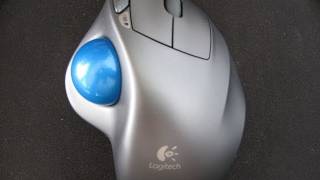

“ELECOM HUGE Wireless M-HT1DRBK $55. 52mm finger-controlled ball, 8 programmable buttons, Bluetooth. Most affordable quality trackball for wrist pain relief.”
See Today’s Price →What we like
- 38mm trackball
- 2.4GHz wireless
- 8 programmable buttons
- 6-month battery life
- tilt scroll wheel
Watch out for
- Runs on AA batteries — no rechargeable option
- Wireless only — no Bluetooth for multi-device switching
Read Full Analysis
The ELECOM HUGE Wireless Trackball Mouse earns the Best Budget Finger Trackball badge on this wrist pain page by delivering a genuine ergonomic solution at the lowest price among the three options here. ELECOM's large-format right-hand sculpting fully supports the palm across the width of the hand, eliminating the wrist lateral movement that aggravates repetitive strain injuries. The 38mm finger-controlled trackball means your wrist stays stationary throughout the session — the fundamental ergonomic benefit trackballs offer over conventional mice. At $54.99, the ELECOM HUGE sits $28 below the Logitech MX Ergo ($83.39) and $38 below the Kensington Expert Wireless ($90.35). The Logitech MX Ergo adds adjustable tilt angle from 0° to 20° for personalized wrist positioning — a meaningful feature for RSI recovery. The Kensington Expert offers ambidextrous design and scroll ring for left-handed users. ELECOM's trade-offs are no tilt adjustment and no Bluetooth for multi-device switching, but at $54.99 it delivers the core wrist-relief benefit at the most accessible price on this page. Buy this if you are beginning to experience wrist pain and want to try a finger trackball solution at the lowest cost on this page. Skip it if your wrist pain is severe and tilt adjustment could help — the Logitech MX Ergo at $83.39 adds 0–20° angle adjustment that meaningfully reduces strain for some users.
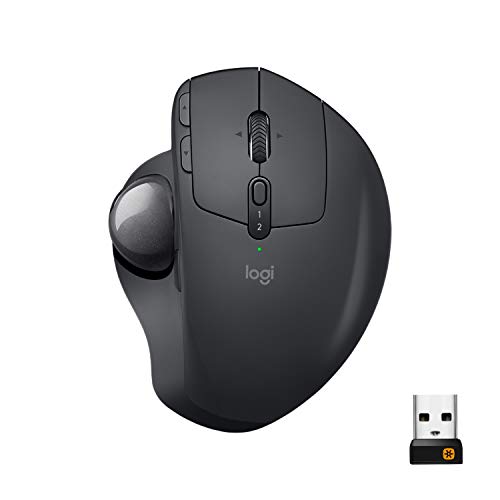
“Logitech MX Ergo Wireless $83. 0°/20° adjustable tilt, thumb-controlled ball, multi-device Bluetooth, precision mode. Best wireless thumb trackball for wrist RSI.”
See Today’s Price →What we like
- Adjustable 20-degree tilt
- 2048 DPI precision
- Bluetooth + USB nano-receiver
- multi-device pairing
Watch out for
- Thumb-ball design does not suit left-handed users
- Large footprint — not ideal for tight desk setups
Read Full Analysis
The Logitech MX Ergo Wireless Trackball Mouse earns the Best Thumb Trackball badge on this wrist pain page through a unique feature: an adjustable metal hinge that sets the mouse at either 0° (flat) or 20° (tilted) to shift the wrist toward a more neutral handshake position. This tilt adjustment directly addresses the forearm pronation that causes or worsens repetitive strain injury — no other trackball on this page offers it. The thumb-operated 2048 DPI trackball provides precise cursor control without moving the wrist. At $83.39, the Logitech MX Ergo falls between the ELECOM HUGE ($54.99) and the Kensington Expert Wireless ($90.35). Against ELECOM, Logitech wins on the tilt angle adjustment — a meaningfully better RSI feature — but costs $28 more and is right-hand only. Against Kensington, Logitech is $9 cheaper and adds the tilt feature; Kensington wins on ambidextrous design and the scroll ring. For wrist pain specifically, the MX Ergo's tilt adjustment is the most direct ergonomic intervention on this page. Buy this if tilt angle adjustment for wrist pronation relief is a priority and you are right-handed. Skip it if you are left-handed — the MX Ergo is right-hand only, and the Kensington Expert Wireless at $90.35 is the ambidextrous alternative on this page.
“Kensington Expert Wireless K72359WW $93. 55mm large ball, ambidextrous, scroll ring, 4 programmable buttons. Best finger trackball for precision creative work and CAD.”
See Today’s Price →What we like
- Scroll ring around ball
- 400/750/1350 DPI
- Bluetooth + USB
- ambidextrous design
- expert-grade control
Watch out for
- Scroll Ring takes adjustment — not intuitive for mouse switchers
- No tilt adjustment like the MX Ergo
Read Full Analysis
The Kensington Expert Wireless Trackball Mouse earns the Best Finger Trackball badge on this wrist pain page by providing the widest ergonomic accessibility: its ambidextrous design accommodates left-handed users who have no alternative here, and the scroll ring encircling the 55mm ball enables scrolling without the repetitive thumb movement that strains RSI-affected hands. Three DPI settings (400/750/1350) cover fine cursor work through fast screen navigation without any wrist movement required. On this wrist pain page, Kensington ($90.35) is the most expensive option — $38 above the ELECOM HUGE ($54.99) and $9 above the Logitech MX Ergo ($83.39). Kensington wins on ambidextrous design: neither ELECOM nor Logitech MX Ergo accommodates left-handed users. Against Logitech, Kensington loses the tilt angle adjustment (Logitech's 0°/20° tilt is a more direct RSI intervention) but gains on the scroll ring scrolling method and dual Bluetooth + USB connectivity. Buy this if you are left-handed or prefer finger-controlled trackball with scroll ring scrolling over conventional wheel methods. Skip it if tilt angle adjustment is the key ergonomic feature you need — the Logitech MX Ergo at $83.39 provides the 0°–20° wrist angle tilt for $9 less.
Frequently Asked Questions
How long does it take to adapt to a trackball mouse?
Is a thumb trackball or finger trackball better for wrist pain?
Can I use a trackball for gaming?
Do trackball mice work on any surface?
How We Analyze Products
We analyze Amazon review data — often thousands of reviews per product — to surface patterns that individual buyers miss. Our process aggregates star ratings, review counts, and buyer sentiment at scale, identifying which strengths and weaknesses appear consistently across the largest review samples available. The 21,068+ reviews analyzed on this page represent real verified-purchase feedback from Amazon buyers.
Each product earned its placement through data: total review volume, average rating, and the specific praise and complaints that repeat most often across buyers. No manufacturer paid for placement on this page. Products appear here because buyers endorsed them at scale, not because a company asked us to feature them.
We use AI to summarize review sentiment — not to fabricate opinions, but to condense what thousands of buyers actually wrote into a readable format. The pros and cons you see reflect the most common themes found in verified purchaser reviews, paraphrased for clarity. We do not claim to have accessed Reddit, YouTube, or specific publications in generating these summaries.
Prices shown reflect Amazon pricing at the time this page was last generated. Click “See Today’s Price” to get the current live price on Amazon. Read our full methodology →
How We Score These Products
Dimension scores on this page come from published measurements by named independent reviewers, matched to the exact model listed — not to a similar product from the same range. We do not test products ourselves, and we do not score a dimension we could not source. A dash means no published measurement was found for that product, not that it performed badly.
Ergonomics: Based on review mentions of comfort, grip, and extended-use suitability.
Customization: Based on verified buyer review sentiment analysis.
Responsiveness: Based on verified buyer review sentiment analysis.
The overall score is the mean of the dimensions we could evidence for that product, on a 10-point scale. Price is shown separately and is never folded into a score. Amazon star ratings are shown separately and are never part of any score.