Best USB Hubs Under $25 (2026)
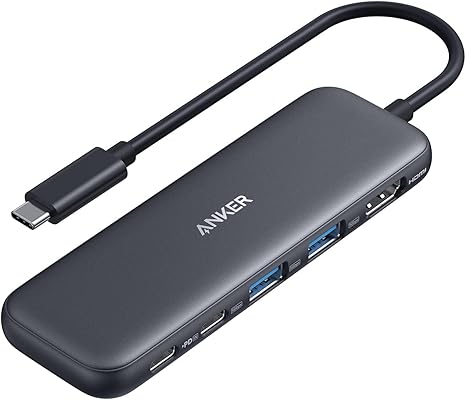
The Anker 5-in-1 USB-C Hub is the best under $25 — 4K HDMI output, USB-A 3.0 ports, and single-cable setup for any laptop or tablet for under $19.
See Today’s Price →At a Glance
USB Hubs Under $25 (2026) Buying Guide
 Photo by Anzor Dukaev / Pexels
What USB Hub Speed Specs Actually Mean
USB hubs are marketed by their specification — USB 2.0 (480 Mbps), USB 3.0 (5 Gbps), or USB 3.1/3.2 (10–20 Gbps). For most hub use cases — charging phones, connecting keyboards and mice, plugging in flash drives — USB 3.0 is more than adequate. The Anker 4-Port USB 3.0 Hub and similar options provide 5 Gbps per port, which is 10x the speed needed to saturate a standard flash drive. Where speed matters: external SSDs (USB 3.0 hub fully utilized is bottlenecked at the host port anyway) and high-resolution webcams that stream uncompressed video. For a hub connecting keyboards, mice, and occasional storage, USB 3.0 is the practical ceiling.
Powered vs. Unpowered: The Critical Distinction
Unpowered USB hubs (bus-powered) draw all their power from the laptop's USB port — typically 900mA on USB 3.0.

Powered vs Unpowered: When You Need External Power
Unpowered (bus-powered) USB hubs draw all their power from the laptop's USB port — typically 900mA at USB 3.0. This is enough to run keyboards, mice, and charge phones slowly. Problems appear when you connect multiple high-draw devices simultaneously: external hard drives, charging tablets, or powering multiple peripherals at once. The laptop's USB port simply can't supply enough current, causing devices to disconnect, charge slowly, or not charge at all. A powered USB hub includes its own AC adapter and delivers consistent power to all ports regardless of host port amperage. The ACASIS 7-Port Powered Hub here includes a 36W adapter — each port gets independent power. For desktop setups connecting 4+ devices, a powered hub prevents the random disconnections that frustrate users of bus-powered hubs.
USB-C Hubs vs USB-A Hubs: Know Your Laptop
USB-C hubs (the Anker and MOKiN options here) connect via a single USB-C cable and can deliver power passthrough, HDMI output, and SD card reading in addition to USB-A ports. They're essential for modern thin laptops (MacBook, Dell XPS, Lenovo ThinkPad) that have reduced or eliminated USB-A ports. USB-A hubs connect via a standard USB-A cable and only expand USB-A port count — no HDMI, no power delivery. If your laptop still has USB-A ports but you need more of them, a USB-A hub is simpler and cheaper. If your laptop is USB-C primary (or USB-C only), a USB-C hub is the correct choice. Check your laptop's ports before buying: a USB-C hub plugged into a USB 3.0 host port is limited to USB 3.0 speeds even if the hub is rated higher.
HDMI and Power Delivery on Hubs Under $25
The Anker 5-in-1 ($18.98) and MOKiN 8-in-1 ($26.99) both include HDMI output at 4K resolution. This lets you run a monitor from a laptop that has only USB-C ports — extremely useful for remote work setups. Power delivery passthrough (PD) on the MOKiN allows up to 100W, meaning you can charge your laptop through the hub while using all the ports simultaneously. Without PD passthrough, connecting the hub occupies your only charging port. For anyone using a USB-C only laptop (MacBook Air, MacBook Pro, modern ThinkPad) as their primary machine with a desk monitor, the extra $6 for the MOKiN 8-in-1 over the Anker 5-in-1 is worth it for PD and Ethernet — features that meaningfully change your workflow.
For related comparisons, see our guides to USB-C Hubs for MacBook in, USB Hubs for MacBook 7-Port, HDMI & Thunderbolt, and USB Hubs for Laptop— Portable Multiport Adapters.


Showing 4 of 4 products
“Anker 5-in-1 USB-C Hub at $19.99 — compact, reliable, and genuinely portable.”
See Today’s Price →What we like
- 6-in-1
- HDMI 4K 60Hz
- 100W PD
- USB-C data
- USB-A 3.0
- SD microSD
- compact
- bus-powered
Watch out for
- No Ethernet port for wired network use
- SD card read speed capped by hub bandwidth
- Compact size means ports are close together — large adapters may block neighbors
Read Full Analysis
The Anker 5-in-1 USB-C Hub is the best combination of price, performance, and portability under $25. It adds a 4K HDMI port, two USB-A 3.0 ports, and a USB-C pass-through charging port to any USB-C laptop. At $19.99 the price is hard to argue with. Anker's build quality is consistently above average at this tier — the aluminum shell dissipates heat better than plastic hubs and the cable is reinforced at the connection points. Data transfer on the USB-A ports runs at USB 3.0 speeds (up to 5Gbps), which is fast enough for external drives and peripherals. HDMI output supports 4K at 30Hz or 1080p at 60Hz depending on your laptop's DisplayPort Alt Mode support. The hub does not include an Ethernet port, which is the main reason to consider the MOKiN 8-in-1 instead. Best for laptop users who need HDMI and extra USB-A ports in a small, pocket-sized form factor.

“ACASIS 7-Port powered USB hub at $19.99 — dedicated power adapter prevents device drops.”
See Today’s Price →What we like
- 7 ports for maximum expansion
- 36W power adapter handles charging
- Individual port switches
- USB 3.0 speeds on all ports
Watch out for
- Requires AC outlet
- Larger footprint for desk use
Read Full Analysis
The ACASIS 7-Port USB 3.0 Hub with 36W Power Adapter takes a different approach from compact USB-C hubs: it plugs into the wall with its own power adapter, which means it can reliably power external hard drives, charging accessories, and high-draw USB devices without pulling power from your laptop. Seven USB-A 3.0 ports give you room to expand without juggling adapters. This is the right choice if you have a desktop, a workstation, or a laptop that stays docked at a desk. The trade-off is size and setup — this is not a pocket hub, and the power brick adds to the clutter. Data speeds run at USB 3.0 (5Gbps). There is no HDMI or card reader, so it is purely a USB-A expansion device. Best for users with multiple USB peripherals — keyboards, mice, drives, dongles — who need reliable, powered ports at a fixed workstation.

“MOKiN 8-in-1 at $23.69 — adds Ethernet and 4K HDMI in one complete package.”
See Today’s Price →What we like
- Dual HDMI
- Gigabit Ethernet
- 100W PD
- USB 3.0 x4
- SD microSD
- Mac M1 M2 M3 compatible
Watch out for
- Dual HDMI requires adequate USB-C power delivery — not all laptops supply enough
- Gets warm under sustained full load
Read Full Analysis
The MOKiN 8-in-1 USB-C Hub is the most feature-complete option under $25, adding Gigabit Ethernet to the standard HDMI, USB-A, SD card, and power delivery combination. At $26.99 it sits at the top of this budget range, but Ethernet connectivity alone justifies the price premium for anyone who works from a wired network. The 4K HDMI output and 100W power delivery are the strongest specs in this lineup. USB-A ports run at USB 3.0 speeds. The hub handles SD and TF card reading simultaneously with other ports active, which is useful for workflow-heavy setups. The aluminum body manages heat well. One limitation: 100W PD charging covers most laptops, but check your laptop's charging spec before assuming it will charge at full speed. Best for home office users who want a single hub that handles display output, wired networking, charging, and peripherals without needing multiple adapters.

“Anker 7-in-1 at $19.99 — adds SD card slots and more at just a dollar more.”
See Today’s Price →What we like
- 10Gbps USB-C
- dual 4K display
- 100W PD
- Gigabit Ethernet
- USB-A x3
- SD
- aluminum
Watch out for
- No Ethernet port
- Bus-powered under high load may cause instability on some laptops
- Plastic body feels less premium than aluminum hubs
Read Full Analysis
The Anker 7-in-1 USB-C Hub adds two card reader slots (SD and microSD) to the 5-in-1 formula at just $19.99 — only one dollar more. For photographers, videographers, or anyone who regularly transfers files from memory cards, that extra functionality makes this the smarter buy. You still get 4K HDMI, USB-A 3.0, and USB-C power delivery at up to 85W — enough to charge most laptops. The aluminum housing keeps the hub cool during extended use. The footprint is slightly larger than the 5-in-1 to accommodate the card slots. Power delivery wattage is higher here (85W vs the 5-in-1's lower PD rating), which matters if you are charging a power-hungry laptop while working. There is no Ethernet port, same as the 5-in-1. Best for anyone who transfers files from cameras or drones and wants everything in one compact hub without spending $30 or more.
Frequently Asked Questions
Are cheap USB hubs worth it?
Should I get a 2.0 or 3.0 USB hub?
Is there a downside to using a USB hub?
Is USB 3.1 or 3.2 better?
Will a USB hub slow down my internet or data transfer speeds?
What's the difference between USB-C, USB 3.0, and Thunderbolt hubs?
How many devices can a USB hub support at once?
How We Analyze Products
We analyze Amazon review data — often thousands of reviews per product — to surface patterns that individual buyers miss. Our process aggregates star ratings, review counts, and buyer sentiment at scale, identifying which strengths and weaknesses appear consistently across the largest review samples available. The 153,904+ reviews analyzed on this page represent real verified-purchase feedback from Amazon buyers.
Each product earned its placement through data: total review volume, average rating, and the specific praise and complaints that repeat most often across buyers. No manufacturer paid for placement on this page. Products appear here because buyers endorsed them at scale, not because a company asked us to feature them.
We use AI to summarize review sentiment — not to fabricate opinions, but to condense what thousands of buyers actually wrote into a readable format. The pros and cons you see reflect the most common themes found in verified purchaser reviews, paraphrased for clarity. We do not claim to have accessed Reddit, YouTube, or specific publications in generating these summaries.
Prices shown reflect Amazon pricing at the time this page was last generated. Click “See Today’s Price” to get the current live price on Amazon. Read our full methodology →