Best USB Hubs Under $30 (2026)

TP-Link's UH720 powered USB hub is our pick under 30 dollars: its own 12V/4A adapter runs seven USB 3.0 data ports at up to 5Gbps plus two 2.4A smart charging ports for a phone and a tablet. Choose the Anker 7-in-1 USB-C hub if your laptop has only USB-C ports: it adds 4K 60Hz HDMI, SD and microSD slots and up to 85W pass-through charging.
See Today’s Price →At a Glance
| # | Product | Award | Price |
|---|---|---|---|
| 1 | Our Top Pick | $26.99 as of Nov 16, 7:53 PM CT details Buy → |
|
| 2 | Best for USB-C Laptops | $21.99 as of Nov 16, 7:53 PM CT details Buy → |
|
| 3 | Best Slim Four-Port Hub | $14.99 as of Nov 16, 7:53 PM CT details Buy → |
|
| 4 | Best Per-Port Power Switches | $14.95 as of Nov 16, 7:53 PM CT details Buy → |
|
| 5 | Best Seven-Port Hub with Switches | $25.99 as of Nov 16, 7:53 PM CT details Buy → |
USB Hubs Under $30 (2026) Buying Guide
 Photo by Anzor Dukaev / Pexels
A USB hub under $30 can add seven ports and charging to a desk, four slim ports to a laptop bag, or a monitor output and card slots to a USB-C laptop. This page leads with TP-Link's UH720 and compares it with Anker's 7-in-1 USB-C hub, Anker's slim 4-port hub, Sabrent's HB-UM43 and LYFNLOVE's 7-port hub.
Powered or bus-powered
TP-Link's UH720 comes with a 12V/4A power adapter and a power on/off button, and adds two 5V/2.4A smart charging ports beside its seven USB 3.0 data ports. LYFNLOVE's 7-port hub comes with a 5V/4A adapter and has one dedicated smart charging port. Anker's slim 4-port hub comes with no power adapter, and Anker says it is not designed to charge devices. Sabrent's HB-UM43 lists no power adapter either, and Sabrent notes it is not for charging. If you plan to charge a phone from the hub or run several devices at once, pick one with its own adapter; for a mouse, keyboard and flash drives, a hub that runs from the port is enough.
USB-A or USB-C
Check your laptop's ports first. If it has only USB-C, the hub to buy here is Anker's 7-in-1, which plugs into USB-C and adds an HDMI port at up to 4K 60Hz, two USB-A 3.0 ports and a USB-C data port at 5Gbps, and SD and microSD slots. Plug your own charger into its USB-C Power Delivery port and it passes up to 85W to the laptop; only its HDMI port carries video. Anker's slim 4-port hub plugs into a USB-A port, so a USB-C-only laptop needs an adapter to use it.
Switches, cables and size
Sabrent's HB-UM43 puts an on/off switch and an LED beside each of its four ports and sits on a 2 ft cable, so you can disconnect a device without pulling its plug. LYFNLOVE's hub has a switch and a blue LED for each of its seven ports, each switch remembers its setting, and its cable is 100 cm long. TP-Link's UH720 has one power button for the whole hub and no per-port switches. Anker's 4-port hub hangs off a 2 ft USB-A cable. Anker's 7-in-1 measures 5.17 by 1.46 by 0.47 inches.
Speed and what to plug in
Every USB 3.0 port on these hubs is listed at up to 5Gbps, fast enough for a flash drive or an external drive. The hubs connect to your computer through one cable, so two drives copying at the same time share that link. For a mouse, keyboard, printer and flash drives, any of them is enough; for phones and tablets, use the charging ports on a powered hub: TP-Link's two 2.4A ports on the UH720.

What spending more buys
Spending more than $30 mostly buys USB-C docks with more of everything: a second display output, wired Ethernet, faster 10Gbps ports or more charging power for the laptop. If you only need more USB-A ports, or one HDMI output and card slots, the hubs here already cover four to seven ports, so pay more only for those extras.
How we picked: we compared each product's own listing - what it is, what comes in the box, the specifications its maker states and the warranty - and ranked them on how well they answer this page's question. We have not tested these products in hand.
Watch Before You Buy
Showing 5 of 5 products
“TP-Link's UH720 runs seven USB 3.0 data ports and two 2.4A smart charging ports from its own 12V/4A power adapter, with a built-in surge protector.”
See Today’s Price →What we like
- Seven USB 3.0 data ports at up to 5Gbps
- Two 5V/2.4A smart charging ports for phones and tablets
- 12V/4A power adapter and a power on/off button
- Built-in surge protector plus overheat, overload, overvoltage and short-circuit protection
- 2-year warranty
Watch out for
- Its listing names one power button and no per-port switches
- A desk hub: its adapter needs a wall outlet
Read Full Analysis
TP-Link's UH720 is the hub for a desk that has run out of ports. It turns one USB 3.0 port on your computer into seven USB 3.0 data ports at up to 5Gbps, for a keyboard, mouse, printer, hard drives and other USB devices, and adds two separate 5V/2.4A smart charging ports for a phone and a tablet. A 12V/4A power adapter comes with it, and a power on/off button switches the whole hub. TP-Link lists overheat, overload, overvoltage and short-circuit protection plus a built-in surge protector, hot-swap ports, no drivers on Windows, macOS and Linux, and a 2-year warranty. It has no per-port switches, and its adapter needs a wall outlet, so it belongs on a desk rather than in a laptop bag.
Skip this if: You want a hub for a laptop bag - it runs from a wall adapter

“Anker's 7-in-1 USB-C hub adds 4K 60Hz HDMI, two USB-A ports and a USB-C data port at 5Gbps, SD and microSD slots, and up to 85W pass-through charging.”
See Today’s Price →What we like
- HDMI output at up to 4K 60Hz
- Two USB-A 3.0 ports and a USB-C data port, each at 5Gbps
- SD and microSD (TF) card slots
- USB-C Power Delivery input passes up to 85W to the laptop
- 18-month warranty
Watch out for
- Its USB-C port carries data only, not video
- Pass-through charging needs your own charger; none is included
Read Full Analysis
Anker's 7-in-1 hub is the one to buy if your laptop has only USB-C ports. From one USB-C plug it gives you an HDMI port at up to 4K 60Hz, two USB-A 3.0 ports and a USB-C data port, each at 5Gbps, and SD and microSD card slots. Plug your own charger into its USB-C Power Delivery port and it passes up to 85W through to the laptop; no charger is included. Two limits from its listing: only the HDMI port carries video, and the USB-C port is for data, not a second screen. It measures 5.17 by 1.46 by 0.47 inches and comes with an 18-month warranty. If your computer has USB-A ports and you only need more of them, a plain USB-A hub is the simpler choice.
Skip this if: Your computer has only USB-A ports - it plugs into USB-C

“Anker's slim 4-port hub turns one USB-A port into four USB 3.0 ports at up to 5Gbps, on a 2 ft cable, with no power adapter to carry.”
See Today’s Price →What we like
- Turns one USB-A port into four
- Data transfer at up to 5Gbps
- Slim and light, on a 2 ft USB-A cable
- No power adapter in the box: it runs from the computer's USB port
- 18-month warranty
Watch out for
- Not designed to charge devices
- USB-A plug only: a USB-C-only computer needs an adapter
Read Full Analysis
Anker's 4-port hub is the simple answer for a laptop or desktop that needs a few more USB-A ports for a mouse, keyboard and flash drives. It turns one USB port into four USB 3.0 ports at up to 5Gbps and hangs off a 2 ft USB-A cable; the box holds the hub, a welcome guide and an 18-month warranty, with no power adapter to pack. Anker states plainly that it is not designed to charge devices, so phones and tablets need a powered hub with charging ports. Its plug is USB-A, so a USB-C-only laptop needs an adapter to use it.
Skip this if: You want to charge phones from the hub - Anker says it is not designed to charge devices

“Sabrent's 4-port USB 3.0 hub gives every port its own on/off switch and LED, on a 2 ft cable, with no driver to install.”
See Today’s Price →What we like
- Four USB 3.0 ports at up to 5Gbps, backward compatible with USB 2.0 and 1.1
- An on/off switch and a power LED for every port
- 2 ft cable puts the hub within reach of hard-to-reach ports
- No driver needed: plug and play and hot-swappable
Watch out for
- Sabrent says it is not for charging devices
- Four ports: a desk full of devices needs a bigger powered hub
Read Full Analysis
Sabrent's HB-UM43 adds four USB 3.0 ports to a computer and puts a power switch and an LED beside each one, so you can disconnect a device without pulling its plug. The ports run at up to 5Gbps and also work with USB 2.0 and USB 1.1 devices. A 2 ft cable lets the hub sit on the desk while it plugs into a port at the back of a computer, and Sabrent lists it for PCs, MacBooks, iMacs, the Mac mini and XPS laptops. There is no driver to install: it is plug and play and hot swappable. Sabrent notes it is not for charging, so it suits data devices such as flash drives rather than phones.
Skip this if: You need to charge a phone or tablet from the hub - Sabrent says it is not for charging
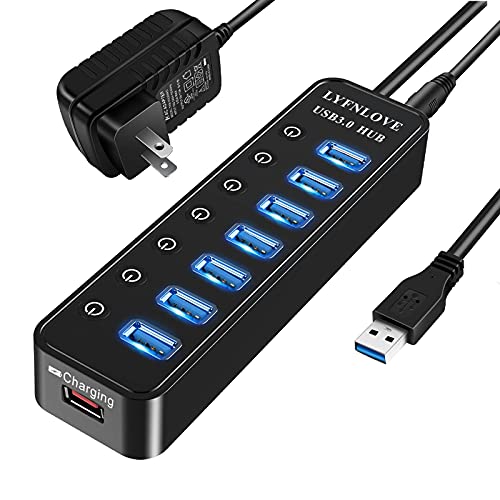
“LYFNLOVE's powered hub adds seven USB 3.0 ports, each with its own on/off switch and LED, plus a dedicated smart charging port and a 5V/4A adapter.”
See Today’s Price →What we like
- Seven USB 3.0 ports at up to 5Gbps, backward compatible with USB 2.0 and 1.1
- An on/off switch and a blue LED for every port; each switch remembers its setting
- A dedicated smart charging port, with a 5V/4A power adapter in the box
- A 100 cm cable to reach ports at the back of a computer
Watch out for
- One dedicated charging port, and its listing gives no output figure for it
Read Full Analysis
LYFNLOVE's 7-port hub pairs a power adapter with a switch on every port. Its seven USB 3.0 ports run at up to 5Gbps and work with USB 2.0 and 1.1 devices; each port has its own on/off switch with a blue LED, and each switch remembers whether you left it on or off. A dedicated smart charging port detects what you plug in and delivers the charging current it needs, and a 5V/4A power adapter comes in the box. The 100 cm cable reaches ports at the back of a desktop. LYFNLOVE lists Windows XP through Windows 10, macOS and Linux, and built-in protection. There is one dedicated charging port, so it charges one phone or tablet at a time.
Skip this if: You want to charge several phones at once - it has one dedicated charging port
Frequently Asked Questions
Do I need a powered USB hub?
Which USB hub works with a USB-C-only laptop?
Can I switch off individual USB ports?
How fast are these USB hubs?
Do these USB hubs need drivers?
How We Chose These Products
We compare each product’s Amazon listing, the manufacturer’s published specifications and Amazon customer ratings, shown with their review counts as Amazon’s data, and rank the products on how well they answer this page’s question. We do not test products in hand and we do not run our own analysis of review text. A publication or expert is named only where we cite its published findings about that product. No manufacturer paid for placement on this page.
A price appears only when Amazon’s API supplied it at a recent daily refresh, with the date and time beside it, and is withdrawn at 4 AM Central on the day after it turns 24 hours old; otherwise use “Check price on Amazon” for the live price. Read our full methodology →