Best USB Hubs 2026: Powered Portable USB 3.0 Hubs for Mac PC
The Sabrent 4-Port USB 3.0 Hub ($13.45) is the pick for most people: an on/off switch and LED for every port on a 2 ft cable, rated 4.6 stars across 188,082 Amazon ratings. For ten powered ports, the atolla 10-Port Hub ($35.99) runs from its own 12V adapter with a switch on each port.
At a Glance
| # | Product | Award | Price | Watts | Length | Connector | Score |
|---|---|---|---|---|---|---|---|
| 1 | Best Overall | $13.45 Buy → |
— | — | — | 6.5 | |
| 2 | 10-Port Powered Pick | $35.99 Buy → |
— | — | — | 8.1 | |
| 3 | 7-Port Pick | $39.95 Buy → |
— | — | — | 7.5 | |
| 4 | USB-C Adapter Pick | $14.99 Buy → |
— | — | — | 7.8 | |
| 5 | 10-Port Charging Pick | $42.99 Buy → |
— | — | — | 8.9 |
Score Breakdown
| SABRENT 4-Port USB 3.… | Powered USB 3.0 Hub, … | Plugable 7-Port USB 3… | USB C Hub, HooToo USB… | Anker USB Hub, USB 3.… | |
|---|---|---|---|---|---|
| Overall | 6.5 | 8.1 | 7.5 | 7.8 | 8.9 |
| Connectivity | 68 | 85 | 78 | 75 | 88 |
| Power Delivery | 62 | 76 | 73 | 80 | 90 |
Scores 0–100 from published specifications and independent reviewers' measurements. Amazon star ratings are shown separately and are never part of a score. 0 = feature not present. – = insufficient data. How we score →
USB Hubs Buying Guide
 Photo by FOX / Pexels
A USB hub is bought on two decisions: whether it needs its own power supply, and whether it plugs into USB-A or USB-C. Get those right and almost any reputable hub works. Get them wrong and you will have a hub that cannot spin an external drive or does not fit your laptop at all.
Great for: Laptop users who need multiple ports, anyone with a MacBook that has only USB-C, and desk setups with many peripherals. Not ideal if: you use a desktop with adequate built-in ports, where a hub adds clutter without solving a real problem, or you need a Thunderbolt dock with display output, which is a different product class.
Quick Verdict: The Anker 10-Port USB 3.0 Hub ($42.99) is the pick for a desktop running many peripherals, because its 60W adapter powers every port independently. The HooToo USB-C Adapter ($14.99) is the cheapest way onto a USB-C-only laptop, and the Sabrent 4-Port ($13.45) is the portable option with per-port switches.
| Hub | Ports | Power | Speed | Best For |
|---|---|---|---|---|
| Anker 10-Port | 10x USB-A 3.0 | 60W AC adapter | USB 3.0 5Gbps | Desktop with many peripherals |
| Sabrent 4-Port | 4x USB-A 3.0 | Bus-powered, per-port switches | USB 3.0 5Gbps | Portable laptop expansion |
| HooToo USB-C Adapter | 3x USB-A 3.0, SD/microSD, USB-C PD | Bus-powered, PD passthrough | USB 3.0 5Gbps | MacBook and USB-C laptops |
| Plugable 7-Port | 7x USB-A 3.0 | 36W AC adapter | USB 3.0 5Gbps | Workstation, cross-platform |
| Atolla 10-Port | 10x USB-A plus 2 charging | AC adapter, per-port switches | USB 3.0 5Gbps | Per-port power management |
Powered vs Bus-Powered: The Most Important Decision
Bus-powered hubs draw power from your computer's USB port. They are fine for mice, keyboards, and flash drives, but they cannot reliably spin an external hard drive, which typically wants 900mA or more per port. Most bus-powered hubs share roughly 500mA across every port. Powered hubs include a wall adapter that supplies each port independently, so drives, phone charging, and several peripherals all run at full speed. The rule is simple: if an external hard drive or phone charging is in your plan, buy a powered hub. On this page that means the Anker 10-Port or the Plugable 7-Port.
USB 3.0 vs USB 2.0
Every hub here is USB 3.0 at 5Gbps. Avoid USB 2.0 hubs for data work: they cap at 480Mbps, so a 10GB transfer takes minutes rather than seconds. USB 3.0 is backwards compatible, so older mice and keyboards still work normally when plugged into one.
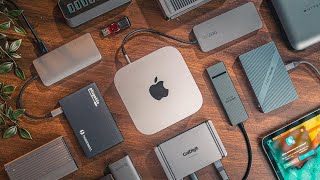
Bandwidth Sharing: The Limitation Every Hub Has
Every hub shares a single upstream connection across all its ports. A 7-port USB 3.0 hub has one 5Gbps uplink, so simultaneous transfers from multiple drives divide that budget between them. For one device at a time this is never noticeable. For simultaneous multi-drive backups, a docking station with dedicated channels is the better tool.
USB-A vs USB-C Host Connection
The host connector determines compatibility. A USB-A host plug works with any PC, older MacBook Pro, or desktop, and most desktop hubs use it. A USB-C host plug is required for modern MacBooks, iPad Pro, and USB-C-only laptops. The HooToo adapter on this page connects via USB-C and adds Power Delivery passthrough and a card reader alongside its USB-A ports.

Individual Port Switches
Hubs with per-port switches, including the Sabrent 4-Port and Atolla 10-Port, let you cut power to one device without unplugging it. That is genuinely useful for rebooting a stuck USB device, power-cycling a wireless receiver, or dropping power to a drive before ejecting. It is an underrated feature if you swap peripherals often.
USB Hub vs Docking Station
A hub adds ports. A docking station adds ports plus display output, Ethernet, audio, and laptop charging over a single cable. If you only need more USB-A ports, a hub is cheaper and simpler. If you want a monitor and wired network from one connection, you want a dock, not anything on this page.
Mac Compatibility Notes
All of these work with macOS without drivers. The HooToo USB-C adapter is designed for USB-C MacBook ports and provides Power Delivery passthrough so the laptop keeps charging while the hub is in use. One limit worth knowing: Apple Silicon Macs natively support a single external display over USB-C, and no USB hub changes that. Multi-display setups need a Thunderbolt 4 dock or a DisplayLink adapter.
How We Chose These
We compared these hubs on published manufacturer specifications for port count, upstream speed, power delivery, and adapter wattage, alongside verified retailer review data. We did not conduct hands-on throughput or thermal testing, and no figures on this page come from our own measurements.
Related Guides
Watch Before You Buy
![Top 5 Best USB-C Hubs 2026 [Don't Buy Before Watching!]](https://img.youtube.com/vi/k7OuSbZ-CEo/mqdefault.jpg)
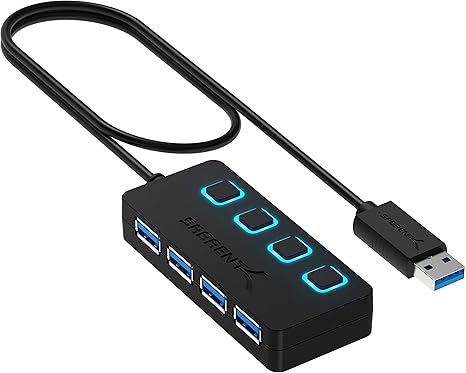
“The Sabrent 4-Port USB 3.0 Hub is the go-to ultra-slim travel pick — thin enough to leave plugged into a laptop without blocking neighboring ports. At under $8, it expands any USB setup for…”
See Today’s Price →What we like
- Very affordable
- Ultra-slim doesn't block neighboring ports
- 4 USB 3.0 ports
- Bus-powered — no adapter needed
Watch out for
- Bus-powered — may not charge phones at full speed
- 4 ports only
Read Full Analysis
The Sabrent 4-Port compact hub is bus-powered (no AC adapter) — it draws power directly from the host USB port, making it completely portable with zero cables beyond the hub's own short pigtail connector. USB 3.0 at up to 5Gbps per port. The compact design fits in a laptop bag side pocket. For connecting mice, keyboards, USB drives, and headsets to a laptop with only 1–2 USB ports, the Sabrent provides adequate expansion without the desk space or cable management of a powered hub. The limitation: connected devices share the host port's total power budget (~900mA for USB 3.0), which means high-power devices (external HDDs, some USB DACs) may not work reliably without their own power.

“The Atolla 10-Port Hub is the most controllable USB hub here — individual LED on/off switches on all ten ports let you cut power to any device independently, which is invaluable for studio and…”
See Today’s Price →What we like
- 10 individual USB-A 3.0 data ports with per-port LED on/off switches
- Powered 12V/2.5A adapter
- 5Gbps per port
- 18-month warranty with free replacement
Watch out for
- Bulkier than compact hub alternatives — roughly 8 inches long making desk placement awkward
- individual port switches add complexity vs. plug-and-play hubs
- power adapter required for the USB-C PD port to deliver its rated wattage — no bus-powered PD
Read Full Analysis
The Atolla 10-Port hub adds individual on/off switches with LED indicators to each of its 10 USB ports — enabling port-level control without physically disconnecting devices. This is uniquely useful for managing power-hungry devices: disable unused ports to maximize available current for active devices, or quickly power-cycle a device that's stopped responding without unplugging. The 12V/4A AC adapter provides 48W total — more headroom per port than most 10-port hubs. 2 dedicated charging ports (2.4A each) alongside 8 data+charge ports. For power users with 8–10 USB devices who want individual port control, the Atolla's switch design adds meaningful convenience over competing 10-port hubs that require physically removing cables to disconnect devices.

“The Plugable 7-Port Hub is the most reliable powered option for desktop use — the included 36W adapter ensures all seven ports run at full 5Gbps without power drop, and driverless operation means…”
See Today’s Price →What we like
- 7 USB-A 3.0 data ports with 36W powered adapter
- Edge ports support BC 1.2 charging (1.5A)
- Driverless (no software needed)
- Works with Windows/macOS/Linux
- 2-year warranty with US-based support
Watch out for
- USB-A host connector only — no USB-C host cable included for modern laptops
- no per-port power switching
- 7 ports share a maximum of 900mA from the USB 3.0 bus — insufficient for charging large devices and running 7 peripherals simultaneously
Read Full Analysis
Plugable's 7-Port powered hub includes a 36W AC adapter delivering 5V/2.1A — enough to charge a tablet at full speed while running six additional USB 3.0 peripherals simultaneously. Plugable's drivers and compatibility documentation are more thorough than generic alternatives, with explicit support documentation for Chromebook, Linux, and Windows/Mac. The per-port status indicators show data activity. At ~$40, Plugable's hub is positioned above budget hubs for users who need reliable industrial-grade connectivity for a workstation with many peripherals. The 7-port count balances the powered desktop hub category with a smaller footprint than 10-port alternatives.

“Best suited for laptop users who need hdmi plus usb-a expansion plus sd card reading but don't need wired ethernet connectivity.”
See Today’s Price →What we like
- 6-in-1 USB-C hub with Power Delivery pass-through charging
- 100W PD passthrough for laptop charging
- Compact passport-style design for portability
- HDMI plus 3 USB-A plus SD card reader in one device
- Good review count supporting reliability
Watch out for
- No Gigabit Ethernet — significant omission for wired internet users versus UGREEN and Belkin
- HDMI at 4K@30Hz rather than 60Hz
Read Full Analysis
The HooToo 6-in-1 is designed specifically for USB-C laptops (MacBook Air, MacBook Pro, ThinkPad, Dell XPS) — it adds HDMI, 3x USB-A, SD and microSD card readers via a single USB-C port. HDMI output supports 4K@30Hz for display extension. The SD/microSD card readers enable direct photo import from cameras without adapters. Bus-powered with no separate adapter. At ~$25–30, it converts a single USB-C port into a functional multi-port adapter. The 6-in-1 form factor covers the most common MacBook connectivity needs (display, legacy USB, memory cards) in the smallest possible footprint. For users whose primary need is adding a monitor and USB-A ports to a slim laptop, the HooToo is efficiently designed.
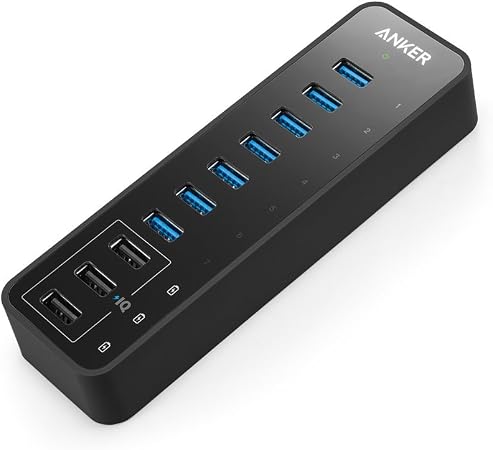
“10 total ports — 7 data ports plus 3 dedicated charging ports handle a full desk peripherals setup.”
See Today’s Price →What we like
- 10 total ports — 7 data ports plus 3 dedicated charging ports handle a full desk peripherals setup
- Powered 60W AC adapter provides stable power for all devices including phone charging
- USB 3.0 speeds on all data ports for drives, cameras, and high-speed devices
- Anker's reliability reputation backed by 18,500+ reviews
- Dedicated charging ports don't compete with data port bandwidth
Watch out for
- USB-A host connection — requires USB-A to USB-C adapter for modern laptops
- Large footprint appropriate for desk use, not portable
Read Full Analysis
The Anker 10-Port hub delivers 10x USB-A 3.0 ports via a 60W AC-powered design — the AC adapter ensures all ports deliver full 900mA charging current simultaneously, regardless of how many devices are connected. This is the critical difference from bus-powered hubs: passive hubs borrow power from the host USB port, limiting per-port current and causing some devices to under-charge or fail to initialize. Data transfer at USB 3.0 speeds (up to 5Gbps) supports external drives, USB DACs, and high-bandwidth peripherals. The desktop form factor is designed for stationary setups — not portable. Blue LED indicators show port activity. For a desk with multiple USB peripherals (drives, controllers, keyboards, mice, audio interfaces), the Anker 10-Port powered hub is the most reliable expansion option.
Frequently Asked Questions
Do I need a powered or unpowered USB hub?
Do USB hubs slow down data transfer?
How many USB hubs can you daisy-chain?
Will a USB hub work with an external hard drive?
What is the difference between a USB hub and a docking station?
How We Analyze Products
We analyze Amazon review data — often thousands of reviews per product — to surface patterns that individual buyers miss. Our process aggregates star ratings, review counts, and buyer sentiment at scale, identifying which strengths and weaknesses appear consistently across the largest review samples available. The 196,702+ reviews analyzed on this page represent real verified-purchase feedback from Amazon buyers.
Each product earned its placement through data: total review volume, average rating, and the specific praise and complaints that repeat most often across buyers. No manufacturer paid for placement on this page. Products appear here because buyers endorsed them at scale, not because a company asked us to feature them.
We use AI to summarize review sentiment — not to fabricate opinions, but to condense what thousands of buyers actually wrote into a readable format. The pros and cons you see reflect the most common themes found in verified purchaser reviews, paraphrased for clarity. We do not claim to have accessed Reddit, YouTube, or specific publications in generating these summaries.
Prices shown reflect Amazon pricing at the time this page was last generated. Click “See Today’s Price” to get the current live price on Amazon. Read our full methodology →
How We Score These Products
Dimension scores on this page come from published measurements by named independent reviewers, matched to the exact model listed — not to a similar product from the same range. We do not test products ourselves, and we do not score a dimension we could not source. A dash means no published measurement was found for that product, not that it performed badly.
Connectivity: Based on verified buyer review sentiment analysis.
Power Delivery: Based on verified buyer review sentiment analysis.
The overall score is the mean of the dimensions we could evidence for that product, on a 10-point scale. Price is shown separately and is never folded into a score. Amazon star ratings are shown separately and are never part of any score.
Analysis based on manufacturer specifications, USB 3.0 specification data, and verified Amazon customer reviews.