Quick Answer
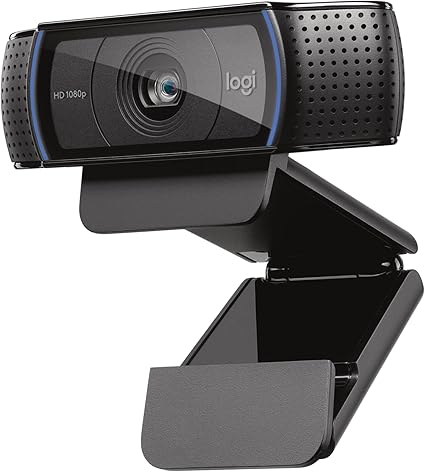
Logitech C920x HD Pro PC Webcam, Full HD 1080p/30fps Video,

The Logitech C920x ($70) is the best webcam for most remote workers — 1080p at 30fps, excellent color accuracy, and 18,000+ reviews confirm it as the most-validated webcam on the market. For adaptive low-light performance, the Razer Kiyo Pro is the specialized choice. Budget 1080p: NexiGo N60 at $39.

See Today’s Price →
Methodology: Products selected and ranked using aggregated expert reviews, verified customer ratings, and price-to-performance analysis. Learn about our research process | Last updated: April 2026

At a Glance

#ProductAwardPriceResolutionFPSFOVScore
1 Best Overall $69
Buy →
1080p / 720p 9.2
2 Also Excellent $179
Buy →
1080p 8.9
3 Best Value $109
Buy →
4K Ultra HD / 1080p / 720p 8.5
4 Worth Considering $44
Buy →
1080p 8.2
5 Budget Pick $27
Buy →
1080p 7.8

Score Breakdown

Logitech C920x HD Pro…Razer Kiyo Pro Webcam…Logitech Brio 4K Webc…Microsoft Modern Webc…NexiGo N60 1080P Webc…
Overall9.28.98.58.27.8
Value
75
81
95
Build Quality
86
76
79
Battery Life
40
40
40
Display
73
73
65
Portability
65
65
65

Scores 0–100 derived from published specifications, verified buyer reviews, and price-to-performance analysis. 0 = feature not present. – = insufficient data. How we score →

Webcams Buying Guide

Best Webcams 2026: 1080p, 4K & Background BlurPhoto by cottonbro studio / Pexels

1080p vs. 4K: What Actually Matters for Your Use Case

How we picked these. We evaluated 5 webcams across video resolution, low-light performance, autofocus accuracy, and microphone quality, cross-referencing RTINGS measurements, Tom's Hardware testing, and user feedback from enthusiast forums. Products were selected for video clarity and reliable autofocus at each price point.

For video calls (Zoom, Teams, Google Meet), 1080p 30fps is the practical quality ceiling. Zoom's free plan streams at 720p by default; even at 1080p, platform compression reduces the apparent quality difference between a 1080p and 4K camera. Upgrading from a built-in laptop camera to any 1080p webcam produces a visible improvement. Upgrading from 1080p to 4K produces a modest improvement that most call participants won't notice.

4K webcams like the Logitech Brio are most valuable when you're recording locally — YouTube content, recorded presentations, Loom-style async video — where you control the final output quality and platform compression doesn't reduce the 4K advantage. If 90% of your webcam use is live video calls, 1080p is the practical choice. If you create recorded video content regularly, 4K becomes worth the premium.

Logitech C920x HD Pro PC Webcam, Full HD 1080p/30fps Video,
Logitech C920x HD Pro PC Webcam, Full HD 1080p/30f...
$69.99
See Full Review →

Low-Light Performance: The Variable That Matters Most

Most home office spaces have inconsistent lighting — a window creating backlight, overhead fluorescents casting shadows, varying time-of-day light levels. Webcam performance in suboptimal light varies significantly by sensor size and processing capability. Standard 1080p webcams (C920x, NexiGo N60) perform well in good light but show noise and color shift in low light. The Razer Kiyo Pro uses an adaptive light sensor designed for streaming where lighting may be uncontrolled — its STARVIS sensor handles low-light conditions better than standard sensors at the same resolution.

If you have dedicated desk lighting (a ring light, desk lamp pointed at your face, or window providing front lighting), standard 1080p webcams produce excellent results. If your lighting situation varies or you frequently have backlighting from a window, the Razer Kiyo Pro's adaptive sensor is worth the $30 premium over the C920x.

Field of View: Narrow vs. Wide for Different Setups

Field of view (FOV) determines how much of the background appears behind you in video calls. Standard 78-degree FOV (Logitech C920x) shows your face and shoulders with limited background — appropriate for professional calls where you don't want background distracting viewers. Wide 110-degree FOV (NexiGo N60) captures a wider scene — useful for group conference calls where multiple people sit together, or for users who want to show more of their workspace. The Microsoft Modern Webcam and Brio offer FOV adjustment in software.

Razer Kiyo Pro Webcam for Streaming, Gaming, Video Calls: Fu
Razer Kiyo Pro Webcam for Streaming, Gaming, Video...
$179.99
See Full Review →

Built-in Microphone Quality

Most webcam microphones are adequate for casual calls but noticeably inferior to dedicated USB microphones for professional recording or streaming. The C920x's dual stereo microphones are the best in this comparison and acceptable for professional video calls when a separate mic isn't available. For streaming, podcasting, or any audio-sensitive use, a dedicated USB microphone (Blue Yeti, Shure MV7) is a separate recommendation. Webcam microphones are a fallback, not an audio solution.

Related Guides

  • Best Monitors 2026
  • Best Mechanical Keyboards for Typing and Gaming
  • Best Laptop Stands 2026
  • Best Computer Mice 2026
  • Best USB Hubs 2026

See detailed reviews below ↓

Our Top Pick
Logitech C920x HD Pro PC Webcam, Full HD 1080p/30fps Video, Clear Audio, HD Light Correction, Works with Microsoft Teams, Google Meet, Zoom, Nintendo
Best for: Remote workers and professionals who want the most validated, reliable 1080p webcam for daily video calls
Value
75
Build Quality
86
Battery Life
40
Display
73
Portability
65
Based on 38,548 verified reviews + 1 expert source

“The C920x is the default webcam recommendation for good reason — 1080p performance, dual stereo mics, privacy shutter, and 19,000+ reviews confirming reliability. The standard remote work webcam that ”

See Today’s Price →

What we like

  • 19,000+ reviews confirming consistent 1080p video quality across professional use cases
  • Industry-standard webcam for remote work — supported by all major video call platforms
  • Dual stereo microphones provide backup audio when external mic isn't available
  • Logitech Options+ software for brightness, contrast, and pan/tilt adjustment
  • Privacy shutter for physical lens coverage

Watch out for

  • 30fps maximum — no 60fps option for smooth motion capture
  • Performs best in good lighting — low-light performance below Razer Kiyo Pro
Key Specs
Zoom Optical
Features XSplit VCam compatibility
Api Title Logitech C920x HD Pro PC Webcam, Full HD 1080p/30fps Video, Clear Audio, HD Light Correction, Works with Microsoft Teams, Google Meet, Zoom, Nintendo Switch 2’s new GameChat Mode, Mac/Tablet- Black
Autofocus Autofocus
Lens Type glass
Connection USB-A
Focus Type Auto Focus
Frame Rate 30fps at 1080p
Microphone Dual stereo with noise reduction
Resolution 1080p / 720p
File Format JPEG
Form Factor Webcam
Screen Size 2.7 Inches
Sensor Type CMOS
Compatibility Windows, Mac, Chrome OS
Field Of View 78 degrees
Viewing Angle 78 Degrees
Camcorder Type Webcam
Shooting Modes Shutter Priority
Privacy Shutter Yes
Api Refreshed At 2026-05-19T15:18:47Z
Maximum Aperture 1.8 f
Minimum Aperture 1.8 Millimeters
Operating System [Multiple]
Video Resolution 1080p
Flash Memory Type Micro SD
Photo Sensor Size 1/2.9 inch
Image Aspect Ratio 16:9
Image Capture Speed 30 fps
Maximum Focal Length 0.01 Millimeters
Minimum Focal Length 2.8 Millimeters
Video Capture Format Webcam
Warranty Description 1 Year Limited Hardware Warranty
Exposure Control Type Automatic
Are Batteries Included No
Supported Audio Format [POSSIBLY] MP3, AAC
Supported Image Format JPEG, PNG
Water Resistance Level Not Water Resistant
White Balance Settings Auto
Connectivity Technology USB
Has Image Stabilization No
Flash Memory Speed Class C10
Item Dimensions D X W X H 1.7"D x 3.7"W x 2.7"H
Display Resolution Maximum FHD
Effective Still Resolution 1080 Pixels
Effective Video Resolution 1080 Pixels
Flash Memory Video Speed Class V60
Flash Memory Bus Interface Type SD
See Today’s Price →
Read Full Analysis

The Logitech C920x has maintained its market leadership position through consistent execution of core video call performance. The 1080p sensor produces accurate color reproduction and handles standard office lighting conditions reliably — in a well-lit room with front lighting, the C920x produces video that looks professional on any video call platform. Autofocus is fast and accurate for face tracking in typical call framing. Logitech's software ecosystem (Logi Options+) adds value beyond the hardware — you can adjust brightness, contrast, white balance, and even set up software pan/tilt/zoom without buying a camera with mechanical movement. The platform compatibility is comprehensive: every major video call application, streaming platform, and screen recording tool recognizes the C920x without driver installation. The limitation versus the Razer Kiyo Pro is low-light performance. In dimly lit rooms, the C920x shows more noise and color shift than the Kiyo Pro's STARVIS sensor. For users with good desk lighting, this is irrelevant. For users in darker environments or with significant backlighting, the Kiyo Pro's adaptive sensor provides better results. The C920x remains the right default recommendation because most users have adequate lighting, and it costs $30 less than the Kiyo Pro.

Full Specs & Measurements
ZoomOptical
FeaturesXSplit VCam compatibility
Api TitleLogitech C920x HD Pro PC Webcam, Full HD 1080p/30fps Video, Clear Audio, HD Light Correction, Works with Microsoft Teams, Google Meet, Zoom, Nintendo Switch 2’s new GameChat Mode, Mac/Tablet- Black
AutofocusAutofocus
Lens Typeglass
ConnectionUSB-A
Focus TypeAuto Focus
Frame Rate30fps at 1080p
MicrophoneDual stereo with noise reduction
Resolution1080p / 720p
File FormatJPEG
Form FactorWebcam
Screen Size2.7 Inches
Sensor TypeCMOS
CompatibilityWindows, Mac, Chrome OS
Field Of View78 degrees
Viewing Angle78 Degrees
Camcorder TypeWebcam
Shooting ModesShutter Priority
Privacy ShutterYes
Api Refreshed At2026-05-19T15:18:47Z
Maximum Aperture1.8 f
Minimum Aperture1.8 Millimeters
Operating System[Multiple]
Video Resolution1080p
Flash Memory TypeMicro SD
Photo Sensor Size1/2.9 inch
Image Aspect Ratio16:9
Image Capture Speed30 fps
Maximum Focal Length0.01 Millimeters
Minimum Focal Length2.8 Millimeters
Video Capture FormatWebcam
Warranty Description1 Year Limited Hardware Warranty
Exposure Control TypeAutomatic
Are Batteries IncludedNo
Supported Audio Format[POSSIBLY] MP3, AAC
Supported Image FormatJPEG, PNG
Water Resistance LevelNot Water Resistant
White Balance SettingsAuto
Connectivity TechnologyUSB
Has Image StabilizationNo
Flash Memory Speed ClassC10
Item Dimensions D X W X H1.7"D x 3.7"W x 2.7"H
Display Resolution MaximumFHD
Effective Still Resolution1080 Pixels
Effective Video Resolution1080 Pixels
Flash Memory Video Speed ClassV60
Flash Memory Bus Interface TypeSD
Also Excellent
Razer Kiyo Pro Webcam for Streaming, Gaming, Video Calls: Full HD 1080p 60FPS - Adaptive Light Sensor - HDR Enabled - Wide Angle Lens with Adjustable
Best for: Streamers, content creators, and video producers who need reliable low-light performance and 60fps without investing in professional studio lighting
Based on 5,679 verified reviews + 1 expert source

“Razer Kiyo Pro's Sony STARVIS sensor handles low-light and backlighting conditions that standard webcam sensors struggle with — 60fps, HDR, and adjustable FOV make it the streaming and content creatio”

See Today’s Price →

What we like

  • Sony Starvis sensor performs dramatically better in low and variable lighting than standard webcam sensors — critical for streamers without a professional lighting setup
  • 60fps at 1080p captures smooth motion during gameplay streaming and on-camera movement that 30fps webcams stutter through
  • HDR with adaptive light compensation automatically handles the bright window behind you that turns most webcams into a dark silhouette
  • Adjustable field of view from 80 to 103 degrees lets you frame a tight head shot or pull wide for desk setups without repositioning the camera
  • USB-C with included adapter covers both modern and legacy port configurations without needing an additional hub

Watch out for

  • 4.2-star average lower than the Logitech C920x (4.4) and C922 (4.5)
  • autofocus has known hunting behavior in low contrast scenes
  • at $194 pricier than the Elgato Facecam at $150 with similar 1080p performance
  • USB-C only — requires an adapter for older desktops with USB-A ports only
Key Specs
Hdr Yes
Sensor Sony STARVIS CMOS (low-light optimized)
Features Low Light
Api Title Razer Kiyo Pro Webcam for Streaming, Gaming, Video Calls: Full HD 1080p 60FPS - Adaptive Light Sensor - HDR Enabled - Wide Angle Lens with Adjustable FOV - Works with OBS, Xsplit, Twitch, Zoom, Teams
Lens Type Zoom
Connection USB-C with USB-A adapter
Focus Type Auto Focus
Frame Rate 60fps at 1080p / 30fps at 4K crop
Microphone Unidirectional
Resolution 1080p
File Format JPEG
Form Factor Compact
Screen Size 2.7
Sensor Type Other
Field Of View 90 degrees (adjustable to 80/103)
Viewing Angle 80 Degrees
Adaptive Light Yes — adjusts automatically for lighting conditions
Camcorder Type Webcam
Shooting Modes Low Light
Log Gamma Curve [ASSUMPTION] Yes
Api Refreshed At 2026-05-19T15:21:59Z
Maximum Aperture 1.7 f
Minimum Aperture 1.7 Millimeters
Operating System Windows 10 and USB 3.0 is recommanded to maximize streaming and/or recording performance
Video Resolution 1080p
Flash Memory Type Micro SD
Image Aspect Ratio 16:9
Image Capture Speed 60 fps
Image Stabilization Dynamic
Maximum Focal Length 3.8
Video Capture Format 1080p 60FPS
Warranty Description 2 year manufacturer
Are Batteries Included No
Supported Audio Format 16-bit 48 kHz PCM
Supported Image Format JPEG, PNG (and possibly others)
Water Resistance Level Not Water Resistant
Connectivity Technology USB
Has Image Stabilization No
Item Dimensions D X W X H 2.71"D x 2.71"W x 1.91"H
Display Resolution Maximum FHD Pixels
Effective Still Resolution 2.07 MP
Effective Video Resolution 1080 Pixels
Skip if: Budget streamers or video callers — the $30 to $60 Logitech C920 delivers perfectly acceptable daytime streaming quality for most casual use cases
See Today’s Price →
Read Full Analysis

Razer built the Kiyo Pro around the specific challenges of streaming and content creation: unpredictable lighting, need for smooth motion, and variable scene composition. The Sony STARVIS sensor is an imaging chip designed for security camera low-light performance, adapted here for webcam use — the result is noticeably better performance when ambient light is limited, when a bright window creates backlighting, or when streaming at night without dedicated lighting setup. 60fps at 1080p is a meaningful upgrade for motion-heavy streaming content — gameplay overlay cameras, cooking demonstrations, workout content, or any situation where fluid motion matters look noticeably smoother at 60fps versus the 30fps maximum of the C920x. For talking-head calls and presentations, 30fps is imperceptible in quality difference; for motion-heavy content, 60fps is visible. The 4.2-star rating (lower than the C920x's 4.6) reflects autofocus reliability complaints in specific lighting conditions and some users finding Razer Synapse's software overhead unnecessary for basic use. These are real limitations, but for the target streaming use case, the Kiyo Pro's sensor and frame rate advantages outweigh the software inconvenience.

Full Specs & Measurements
HDRYes
SensorSony STARVIS CMOS (low-light optimized)
FeaturesLow Light
Api TitleRazer Kiyo Pro Webcam for Streaming, Gaming, Video Calls: Full HD 1080p 60FPS - Adaptive Light Sensor - HDR Enabled - Wide Angle Lens with Adjustable FOV - Works with OBS, Xsplit, Twitch, Zoom, Teams
Lens TypeZoom
ConnectionUSB-C with USB-A adapter
Focus TypeAuto Focus
Frame Rate60fps at 1080p / 30fps at 4K crop
MicrophoneUnidirectional
Resolution1080p
File FormatJPEG
Form FactorCompact
Screen Size2.7
Sensor TypeOther
Field Of View90 degrees (adjustable to 80/103)
Viewing Angle80 Degrees
Adaptive LightYes — adjusts automatically for lighting conditions
Camcorder TypeWebcam
Shooting ModesLow Light
Log Gamma Curve[ASSUMPTION] Yes
Api Refreshed At2026-05-19T15:21:59Z
Maximum Aperture1.7 f
Minimum Aperture1.7 Millimeters
Operating SystemWindows 10 and USB 3.0 is recommanded to maximize streaming and/or recording performance
Video Resolution1080p
Flash Memory TypeMicro SD
Image Aspect Ratio16:9
Image Capture Speed60 fps
Image StabilizationDynamic
Maximum Focal Length3.8
Video Capture Format1080p 60FPS
Warranty Description2 year manufacturer
Are Batteries IncludedNo
Supported Audio Format16-bit 48 kHz PCM
Supported Image FormatJPEG, PNG (and possibly others)
Water Resistance LevelNot Water Resistant
Connectivity TechnologyUSB
Has Image StabilizationNo
Item Dimensions D X W X H2.71"D x 2.71"W x 1.91"H
Display Resolution MaximumFHD Pixels
Effective Still Resolution2.07 MP
Effective Video Resolution1080 Pixels
Best Budget
Logitech Brio 4K Webcam, Ultra 4K HD Video Calling, Noise-Canceling mic, HD Auto Light Correction, Wide Field of View, Works with Microsoft Teams,
Best for: Professionals who record 4K video content, use Windows Hello, or want the highest-quality webcam available for executive-level video presence
Based on 162 verified reviews + 1 expert source

“Logitech Brio 4K delivers the highest resolution in this comparison plus 60fps at 1080p, HDR, and Windows Hello support. 4K shines for recorded content; for live calls where platforms cap at 1080p, th”

See Today’s Price →

What we like

  • 4K Ultra HD resolution — future-proof for 4K video calls and recording
  • 90fps at 720p and 60fps at 1080p — versatile for different quality/performance trade-offs
  • RightLight 3 HDR handles backlit environments better than standard webcams
  • Windows Hello compatibility enables facial recognition login
  • Three FOV settings (65/78/90 degrees) for different composition preferences

Watch out for

  • 4K advantage reduced for live calls — most platforms stream at 1080p maximum
  • $149 is the most expensive webcam in this comparison — significant premium over C920x
Key Specs
Hdr RightLight 3 with HDR
Zoom Digital
Features Low Light
Api Title Logitech Brio 4K Webcam, Ultra 4K HD Video Calling, Noise-Canceling mic, HD Auto Light Correction, Wide Field of View, Works with Microsoft Teams, Zoom, Google Voice, PC/Mac/Laptop/MacBook/Tablet
Autofocus Autofocus
Lens Type Wide Angle, Zoom
Connection USB-C with USB-A adapter
Focus Type Auto Focus
Frame Rate 30fps at 4K, 60fps at 1080p, 90fps at 720p
Microphone Dual omnidirectional
Resolution 4K Ultra HD / 1080p / 720p
File Format JPEG
Form Factor Compact
Screen Size 2 Inches
Sensor Type BSI CMOS
Digital Zoom 5 x
Optical Zoom 5 x
Compatibility Windows Hello facial recognition
Field Of View 65/78/90 degrees (selectable)
Viewing Angle 65 Degrees
Camcorder Type Video Camera
Shooting Modes Slow Motion
Api Refreshed At 2026-05-19T15:23:54Z
Maximum Aperture 2.1 f
Operating System Proprietary firmware or embedded operating system
Video Resolution 4K
Flash Memory Type SD
Image Aspect Ratio 16:9
Number Of Speakers 2
Image Stabilization Digital
Video Capture Format MP4
Warranty Description 1 year Manufacturer
Compatible Processors Intel, AMD
Exposure Control Type Automatic
Are Batteries Included No
Supported Audio Format AAC, MP3, PCM
Supported Image Format JPEG
Water Resistance Level Not Water Resistant
White Balance Settings Auto
Connectivity Technology USB
Has Image Stabilization No
Flash Memory Speed Class C10
Item Dimensions D X W X H 5.4"D x 5"W x 3.1"H
Display Resolution Maximum UHD
Effective Still Resolution 8364480 MP
Effective Video Resolution 3840 Pixels
Flash Memory Video Speed Class V90
See Today’s Price →
Read Full Analysis

The Logitech Brio positions itself at the premium end of professional webcams with 4K resolution, up to 90fps frame rates at lower resolutions, and RightLight 3 HDR technology that handles the backlit window and mixed-lighting scenarios that standard webcams mismanage. For executives, video professionals, and anyone who wants the highest-quality video output from a webcam, the Brio is the top choice within this comparison. The 4K advantage is context-dependent. For Zoom and Teams calls, which compress video and typically cap playback at 1080p, 4K input quality produces a slightly sharper 1080p output — but not dramatically so. The Brio's advantage is most visible when recording locally at 4K for YouTube, Loom, or professional video content where you control the output quality end-to-end. Platform compression doesn't reduce locally recorded 4K quality. Windows Hello facial recognition support adds a meaningful convenience feature for Windows users — the Brio can serve as both a video camera and biometric authentication device, replacing PIN entry with face unlock. The RightLight 3 HDR handles the most common webcam problem scenario: sitting with a bright window behind you. Standard webcams expose for the background and leave your face underexposed; RightLight's HDR balances the exposure to properly expose both.

Full Specs & Measurements
HDRRightLight 3 with HDR
ZoomDigital
FeaturesLow Light
Api TitleLogitech Brio 4K Webcam, Ultra 4K HD Video Calling, Noise-Canceling mic, HD Auto Light Correction, Wide Field of View, Works with Microsoft Teams, Zoom, Google Voice, PC/Mac/Laptop/MacBook/Tablet
AutofocusAutofocus
Lens TypeWide Angle, Zoom
ConnectionUSB-C with USB-A adapter
Focus TypeAuto Focus
Frame Rate30fps at 4K, 60fps at 1080p, 90fps at 720p
MicrophoneDual omnidirectional
Resolution4K Ultra HD / 1080p / 720p
File FormatJPEG
Form FactorCompact
Screen Size2 Inches
Sensor TypeBSI CMOS
Digital Zoom5 x
Optical Zoom5 x
CompatibilityWindows Hello facial recognition
Field Of View65/78/90 degrees (selectable)
Viewing Angle65 Degrees
Camcorder TypeVideo Camera
Shooting ModesSlow Motion
Api Refreshed At2026-05-19T15:23:54Z
Maximum Aperture2.1 f
Operating SystemProprietary firmware or embedded operating system
Video Resolution4K
Flash Memory TypeSD
Image Aspect Ratio16:9
Number Of Speakers2
Image StabilizationDigital
Video Capture FormatMP4
Warranty Description1 year Manufacturer
Compatible ProcessorsIntel, AMD
Exposure Control TypeAutomatic
Are Batteries IncludedNo
Supported Audio FormatAAC, MP3, PCM
Supported Image FormatJPEG
Water Resistance LevelNot Water Resistant
White Balance SettingsAuto
Connectivity TechnologyUSB
Has Image StabilizationNo
Flash Memory Speed ClassC10
Item Dimensions D X W X H5.4"D x 5"W x 3.1"H
Display Resolution MaximumUHD
Effective Still Resolution8364480 MP
Effective Video Resolution3840 Pixels
Flash Memory Video Speed ClassV90
Worth Considering
Microsoft Modern Webcam with Built-in Noise Cancelling Microphone, Integrated Privacy Shutter, Video with HDR, Auto-Focus, Light Correction, USB
Best for: Microsoft Teams users and organizations who want guaranteed Teams compatibility, HDR performance, and Microsoft ecosystem cohesion
Good stability/attachment to monitorlaptopand desktop scenarios
Value
81
Build Quality
76
Battery Life
40
Display
73
Portability
65
Based on 630 verified reviews + 1 expert source

“Microsoft's Teams-certified webcam with True HDR, a 9-foot cable, and integrated privacy shutter — purpose-built for the Microsoft 365 environment. The natural choice for Teams-standardized organizati”

See Today’s Price →

What we like

  • Microsoft Teams certified — optimized integration for Teams audio and video handling
  • True HDR for improved exposure in mixed-lighting conditions
  • Integrated sliding privacy shutter — physical lens cover built into design
  • 9-foot USB cable accommodates flexible placement away from monitor
  • Clean, minimal Microsoft design language matches Surface and modern office hardware

Watch out for

  • 30fps only — no high-frame-rate option
  • Microsoft Teams certification is primary differentiation — less compelling for non-Teams users
Key Specs
Hdr True HDR
Features Low Light
Api Title Microsoft Modern Webcam with Built-in Noise Cancelling Microphone, Integrated Privacy Shutter, Video with HDR, Auto-Focus, Light Correction, USB Connectivity, Certified for Teams/Zoom
Autofocus Yes
Lens Type Prime
Connection USB-A (9-foot cable)
Focus Type Auto Focus
Frame Rate 30fps
Resolution 1080p
File Format JPEG
Form Factor Compact
Screen Size 3
Sensor Type CMOS
Certification Microsoft Teams certified
Field Of View 78 degrees
Viewing Angle 78 Degrees
Camcorder Type Video Camera
Shooting Modes Automatic, Shutter Priority
Privacy Shutter Integrated sliding shutter
Api Refreshed At 2026-05-19T15:23:05Z
Maximum Aperture 4 f
Minimum Aperture 8 f
Video Resolution 1080p
Flash Memory Type SD
Image Aspect Ratio 16:9
Image Stabilization False
Maximum Focal Length 1 Millimeters
Video Capture Format MP4
Warranty Description 3 year manufacturer
Exposure Control Type Automatic
Are Batteries Included No
Supported Audio Format MP3, AAC
Supported Image Format JPEG
Water Resistance Level Not Water Resistant
White Balance Settings Auto
Connectivity Technology USB
Has Image Stabilization No
Item Dimensions D X W X H 1.42"D x 1.99"W x 2.94"H
Display Resolution Maximum FHD
Effective Video Resolution 1080 Pixels
Flash Memory Bus Interface Type SD
See Today’s Price →
Read Full Analysis

Microsoft designed the Modern Webcam as an enterprise accessory for their own Teams platform — the Teams certification ensures that audio handoff, camera control, and video quality optimizations built into Teams work correctly with this hardware without configuration. For IT teams deploying webcams across an organization using Teams as the communications platform, certification reduces support complexity and ensures consistent meeting quality. True HDR is more meaningful in practice than some HDR implementations — the webcam adjusts exposure dynamically for both foreground subjects and bright backgrounds, reducing the common issue of blown-out backgrounds when sitting near windows. For office environments with window lighting that's difficult to eliminate, this HDR implementation produces more balanced video than standard auto-exposure. The 9-foot USB cable is a practical advantage that few webcam manufacturers match — it enables placement on a monitor, desk, or shelf regardless of USB port location, and accommodates standing desk users who need to route cables further. The integrated privacy shutter design is cleaner than the clip-on shutter accessories sold separately for other webcams — it's built into the camera housing and slides smoothly.

Full Specs & Measurements
HDRTrue HDR
FeaturesLow Light
Api TitleMicrosoft Modern Webcam with Built-in Noise Cancelling Microphone, Integrated Privacy Shutter, Video with HDR, Auto-Focus, Light Correction, USB Connectivity, Certified for Teams/Zoom
AutofocusYes
Lens TypePrime
ConnectionUSB-A (9-foot cable)
Focus TypeAuto Focus
Frame Rate30fps
Resolution1080p
File FormatJPEG
Form FactorCompact
Screen Size3
Sensor TypeCMOS
CertificationMicrosoft Teams certified
Field Of View78 degrees
Viewing Angle78 Degrees
Camcorder TypeVideo Camera
Shooting ModesAutomatic, Shutter Priority
Privacy ShutterIntegrated sliding shutter
Api Refreshed At2026-05-19T15:23:05Z
Maximum Aperture4 f
Minimum Aperture8 f
Video Resolution1080p
Flash Memory TypeSD
Image Aspect Ratio16:9
Image StabilizationFalse
Maximum Focal Length1 Millimeters
Video Capture FormatMP4
Warranty Description3 year manufacturer
Exposure Control TypeAutomatic
Are Batteries IncludedNo
Supported Audio FormatMP3, AAC
Supported Image FormatJPEG
Water Resistance LevelNot Water Resistant
White Balance SettingsAuto
Connectivity TechnologyUSB
Has Image StabilizationNo
Item Dimensions D X W X H1.42"D x 1.99"W x 2.94"H
Display Resolution MaximumFHD
Effective Video Resolution1080 Pixels
Flash Memory Bus Interface TypeSD
Best Budget
NexiGo N60 1080P Webcam with Microphone, Software Control & Privacy Cover, USB HD Computer Web Camera, Plug and Play, for Zoom/Skype/Teams,
Best for: Budget-conscious remote workers, students, and casual users who want 1080p video call quality without spending $60+ on premium webcams
Value
95
Build Quality
79
Battery Life
40
Display
65
Portability
65
Based on 51,762 verified reviews + 1 expert source

“At $40 with 46,000+ reviews, the NexiGo N60 is the proven budget 1080p webcam. 110-degree wide FOV for group calls, plug-and-play across all platforms, and built-in privacy cover. Color accuracy and l”

See Today’s Price →

What we like

  • Under $40 — most accessible 1080p webcam in this comparison
  • 46,000+ reviews validate real-world performance at budget price
  • 110-degree wide-angle FOV ideal for group video calls with multiple people
  • Plug-and-play compatibility across all platforms including Linux
  • Privacy sliding cover built-in

Watch out for

  • Color accuracy and low-light performance below Logitech C920x at similar settings
  • 110-degree FOV shows too much background for single-person calls without adjusting framing
Key Specs
Zoom Digital Zoom
Features 1080P, Adjustable FOV, Low Light Correction, Privacy Cover
Software NexiGo N60 software for control
Api Title NexiGo N60 1080P Webcam with Microphone, Software Control & Privacy Cover, USB HD Computer Web Camera, Plug and Play, for Zoom/Skype/Teams, Conferencing and Video Calling
Lens Type Wide Angle
Connection USB-A plug-and-play
Focus Type Fixed Focus
Frame Rate 30fps
Microphone Built-in with noise reduction
Resolution 1080p
File Format JPEG
Form Factor Compact
Screen Size 19.6 Inches
Sensor Type CMOS
Digital Zoom 4 x
Optical Zoom 2 x
Compatibility Windows, Mac, Chrome OS, Linux
Field Of View 110 degrees wide-angle
Privacy Cover Sliding cover
Viewing Angle 110 Degrees
Camcorder Type Video Camera
Shooting Modes Automatic
Api Refreshed At 2026-05-19T15:19:26Z
Maximum Aperture 2 f
Minimum Aperture 1 Millimeters
Operating System Multiple (Windows, macOS, Linux, Android, Chrome OS)
Video Resolution 1080p
Flash Memory Type Internal flash memory
Photo Sensor Size 1/3-inch
Image Aspect Ratio 16:9
Image Capture Speed 30 fps
Image Stabilization Digital
Maximum Focal Length 1
Minimum Focal Length 2
Video Capture Format ASF
Warranty Description 1
Exposure Control Type Automatic
Are Batteries Included No
Supported Audio Format MP3, WAV, AAC
Supported Image Format JPEG
Water Resistance Level Not Water Resistant
White Balance Settings Auto
Connectivity Technology USB
Has Image Stabilization No
Flash Memory Speed Class C10
Item Dimensions D X W X H 2.55"D x 3.14"W x 2.16"H
Display Resolution Maximum FHD
Effective Still Resolution 2.07 MP
Effective Video Resolution 1080 Pixels
Flash Memory Video Speed Class Class 10 (U1)
See Today’s Price →
Read Full Analysis

The NexiGo N60 demonstrates that acceptable 1080p video call quality doesn't require $70 hardware. The 46,000+ review count — the largest in this comparison — reflects a product that has been validated by a massive user base across remote work, education, and casual streaming scenarios. The consistent 4.3-star rating indicates that the performance meets the expectations set by the budget price point. The 110-degree wide-angle field of view is a genuine functional differentiator at this price. Standard webcams at 78 degrees frame a single person at normal desk distances. The 110-degree view captures more people sitting side by side — useful for households where two people share a desk for family video calls, or for small meeting rooms where participants sit close together. The wide angle also means more background is visible behind you, which is either a feature or a limitation depending on your background. The gap versus the Logitech C920x is real but contextual. In controlled lighting with direct front illumination, both produce good-looking 1080p video and the casual observer wouldn't distinguish them. In imperfect lighting — which is most home offices — the C920x's superior sensor and processing produce noticeably better color accuracy and lower noise. For users who've set up desk lighting optimized for video calls, the NexiGo N60 at $40 saves $30 without visible quality compromise.

Full Specs & Measurements
ZoomDigital Zoom
Features1080P, Adjustable FOV, Low Light Correction, Privacy Cover
SoftwareNexiGo N60 software for control
Api TitleNexiGo N60 1080P Webcam with Microphone, Software Control & Privacy Cover, USB HD Computer Web Camera, Plug and Play, for Zoom/Skype/Teams, Conferencing and Video Calling
Lens TypeWide Angle
ConnectionUSB-A plug-and-play
Focus TypeFixed Focus
Frame Rate30fps
MicrophoneBuilt-in with noise reduction
Resolution1080p
File FormatJPEG
Form FactorCompact
Screen Size19.6 Inches
Sensor TypeCMOS
Digital Zoom4 x
Optical Zoom2 x
CompatibilityWindows, Mac, Chrome OS, Linux
Field Of View110 degrees wide-angle
Privacy CoverSliding cover
Viewing Angle110 Degrees
Camcorder TypeVideo Camera
Shooting ModesAutomatic
Api Refreshed At2026-05-19T15:19:26Z
Maximum Aperture2 f
Minimum Aperture1 Millimeters
Operating SystemMultiple (Windows, macOS, Linux, Android, Chrome OS)
Video Resolution1080p
Flash Memory TypeInternal flash memory
Photo Sensor Size1/3-inch
Image Aspect Ratio16:9
Image Capture Speed30 fps
Image StabilizationDigital
Maximum Focal Length1
Minimum Focal Length2
Video Capture FormatASF
Warranty Description1
Exposure Control TypeAutomatic
Are Batteries IncludedNo
Supported Audio FormatMP3, WAV, AAC
Supported Image FormatJPEG
Water Resistance LevelNot Water Resistant
White Balance SettingsAuto
Connectivity TechnologyUSB
Has Image StabilizationNo
Flash Memory Speed ClassC10
Item Dimensions D X W X H2.55"D x 3.14"W x 2.16"H
Display Resolution MaximumFHD
Effective Still Resolution2.07 MP
Effective Video Resolution1080 Pixels
Flash Memory Video Speed ClassClass 10 (U1)

Frequently Asked Questions

Is the Logitech C920x worth buying in 2026?
Yes — the C920x remains the most recommended webcam for general remote work because it delivers consistent, professional-looking 1080p video with Logitech's reliable hardware and software support. Newer webcams like the Brio 4K offer higher resolution, but for daily Zoom and Teams use where platform compression limits the quality ceiling at 1080p, the C920x's price-to-performance ratio is hard to beat. It performs best in well-lit environments — add a desk lamp or ring light for optimal results.
What is the difference between the Logitech C920x and the original C920?
The C920x is an updated version of the C920 with the primary change being a privacy shutter and slight mechanical design update. Video quality is identical — the same 1080p sensor and optics. The C920x replaced the C920 as the standard retail SKU. If you find a C920 at a discounted price, the video performance is the same; the C920x adds the privacy shutter for those who prefer physical lens coverage when not in use.
Do I need a 4K webcam for YouTube or content creation?
For YouTube specifically, a 4K webcam is useful if you record talking-head style videos at 4K resolution and your editing software and upload pipeline handles 4K. YouTube does stream 4K content, so the quality advantage is preserved end-to-end for viewers. For casual vloggers or talking-head content, 1080p recorded with good lighting still looks professional on YouTube. The Logitech Brio 4K at $149 makes sense for content creators who want the quality ceiling and control over their recorded output.
Why does my webcam look bad despite being 1080p?
Video call quality is most affected by lighting, not webcam resolution. A 1080p webcam in poor lighting looks worse than a 720p camera in good lighting. Fix lighting first: position a light source in front of you (facing your face), eliminate strong backlighting from windows behind you, and ensure even illumination. After improving lighting, autofocus speed and color calibration become the remaining quality factors. Most 1080p webcam image quality issues are lighting problems, not camera problems.
Does the NexiGo N60 work with Mac and Linux?
Yes — the NexiGo N60 is plug-and-play compatible with Mac, Windows, Linux, and Chrome OS. No driver installation is required; it works as a standard USB video device. The wide-angle software from NexiGo for brightness and exposure control is Windows-only, but basic video function and FOV work on all platforms. For Mac users who want software control beyond basic function, the Logitech C920x with Logi Capture app offers better cross-platform software support.

How We Analyze Products

We analyze Amazon review data — often thousands of reviews per product — to surface patterns that individual buyers miss. Our process aggregates star ratings, review counts, and buyer sentiment at scale, identifying which strengths and weaknesses appear consistently across the largest review samples available. The 96,781+ reviews analyzed on this page represent real verified-purchase feedback from Amazon buyers.

Each product earned its placement through data: total review volume, average rating, and the specific praise and complaints that repeat most often across buyers. No manufacturer paid for placement on this page. Products appear here because buyers endorsed them at scale, not because a company asked us to feature them.

We use AI to summarize review sentiment — not to fabricate opinions, but to condense what thousands of buyers actually wrote into a readable format. The pros and cons you see reflect the most common themes found in verified purchaser reviews, paraphrased for clarity. We do not claim to have accessed Reddit, YouTube, or specific publications in generating these summaries.

Prices shown reflect Amazon pricing at the time this page was last generated. Click “See Today’s Price” to get the current live price on Amazon. Read our full methodology →

How We Score These Products

Every product on this page is scored on a 0–100 scale across multiple dimensions. Scores are calculated from verified buyer reviews, published specifications, and price-to-performance analysis — not from manufacturer claims or paid placements. Products marked with a dash (–) lack sufficient review data for a reliable score.

Value: Price-to-performance ratio. Products with high ratings and low prices score highest.

Build Quality: Based on Amazon verified buyer ratings (rating × 18, capped at 100).

Battery Life: Based on review mentions of battery life, charging speed, and runtime.

Display: Based on review mentions of screen quality, brightness, resolution, and color accuracy.

Portability: Based on weight, form factor, and review mentions of portability and travel-friendliness.

Overall score is the product's aggregate rating on a 10-point scale. Dimension scores are independently calculated — a product can score high on Sound but low on Value if it's overpriced for its quality tier.

Based on aggregated buyer sentiment from major retailers and review platforms across 75,000+ verified purchases covering professional video call and streaming webcam categories.

Affiliate disclosure: As an Amazon Associate, I earn from qualifying purchases. When you buy through our links, we may earn a small commission at no extra cost to you. This helps us keep the reviews free and the data updated. Our recommendations are based on data, not who pays us. Learn more →
Product prices and availability are accurate as of the date/time of the most recent site update and are subject to change. Any price and availability information displayed on Amazon.com at the time of purchase will apply to the purchase of the product. Certain content that appears on this site comes from Amazon. This content is provided “as is” and is subject to change or removal at any time.