Mechanical vs Membrane Keyboards Explained (2026)
The Corsair K70 CORE RGB ($89.99) is the mechanical pick on this page: pre-lubed MLX Red linear switches with sound-dampening foam, so it stays quiet without giving up the positive keypress a rubber-dome membrane cannot match. The Apple Magic Keyboard with Touch ID is the scissor-switch counterpoint if you want low profile and near-silence.
At a Glance
| # | Product | Award | Price | Connection | Switch Type | Battery | Score |
|---|---|---|---|---|---|---|---|
| 1 | Best Mid-Range | $89.99 Buy → |
USB-A | Linear | — | 6.9 | |
| 2 | Best Premium Mechanical | Check current price on Amazon Buy → |
Wired | Mechanical | — | 6.8 | |
| 3 | Best Membrane/Scissor | $149 Buy → |
— | — | — | 6.9 |
Score Breakdown
| Corsair K70 CORE RGB … | Corsair K95 RGB Plati… | Apple Magic Keyboard … | |
|---|---|---|---|
| Overall | 6.9 | 6.8 | 6.9 |
| Customization | 65 | 73 | 70 |
| Responsiveness | 78 | 65 | 73 |
Scores 0–100 from published specifications and independent reviewers' measurements. Amazon star ratings are shown separately and are never part of a score. 0 = feature not present. – = insufficient data. How we score →
Mechanical vs Membrane Keyboards Explained (2026) Buying Guide

Mechanical and membrane keyboards look identical on a desk. Under your fingertips, they feel completely different. Mechanical keyboards use individual switches under each key — a physical mechanism that clicks, bumps, or silently actuates with a defined travel distance. Membrane keyboards use a rubber dome layer under the keys that requires bottoming out to register. Neither is universally better — they serve different users and use cases.
How Mechanical Switches Work
Each key on a mechanical keyboard sits above a physical switch — a self-contained mechanism with a spring, slider, and housing. When you press a key, the slider moves down, compressing the spring and triggering a registration point before the key bottoms out. Switch types determine the feel: linear switches (Cherry MX Red, Gateron Red) have smooth, consistent travel with no tactile bump — preferred for gaming where fast repeated presses matter. Tactile switches (Cherry MX Brown, Holy Pandas) provide a bump at the actuation point — feedback that tells your fingers the keystroke registered without pressing all the way to the bottom. Clicky switches (Cherry MX Blue, Kailh BOX White) add an audible click to the tactile bump — satisfying for typists, distracting for everyone nearby. Key mechanical switch specs: actuation force (how hard you press, typically 40-80 grams), actuation point (how far down before registration, typically 1.5-2.5mm), and total travel (typically 4mm). These numbers determine typing feel more than any other factor.
How Membrane Keyboards Work
Membrane keyboards use three layers: a top membrane layer with circuit paths printed on it, a spacer layer with holes at each key position, and a bottom membrane layer that completes the circuit when pressed. When a key is pressed, the rubber dome under the keycap deforms and pushes the top membrane through the spacer hole to contact the bottom layer — registering the keystroke. This happens at key bottom, which is why membrane keyboards feel "mushy" — there's no defined actuation point before bottom-out. Membrane keyboards are less expensive to manufacture, which is why most OEM and budget keyboards ($15-50) use membrane technology. They're also quieter than clicky mechanical switches and more water-resistant since the membrane layer protects the circuit.
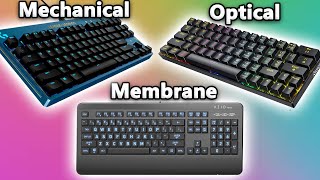
Gaming: Mechanical Wins for Most Use Cases
For gaming, mechanical keyboards generally offer advantages in two areas: actuation consistency and switch durability. Mechanical switches actuate at a defined mid-point rather than requiring bottom-out — in rapid key-press scenarios (movement in FPS games, ability rotations in MMOs), this can reduce the force and time needed per keystroke. Switch durability matters for heavy gaming use: most mechanical switches are rated 50-100 million keystrokes, while membrane keyboards typically last 5-10 million. The Corsair K70 Core RGB ($89.99) with Cherry MX Red switches is a popular gaming mechanical; the Corsair K95 RGB Platinum XT ($249.99) is the premium gaming option. For competitive gaming specifically, ultra-low actuation force linear switches (25-35 gram actuation) allow faster key repetition than any membrane keyboard.
Typing: Mechanical Is Preferred, but Membrane Is Fine
For professional typing — writing, coding, data entry — mechanical keyboards are preferred by most dedicated typists because the tactile feedback at the actuation point reduces cognitive load. Your fingers "know" the key registered without looking at the screen or pressing all the way to the bottom. Tactile switches (Brown, Clear) and clicky switches (Blue) are the typing-preferred options. However: the most satisfied work typists on membrane keyboards aren't suffering — they just prefer the feel of mechanical if given a choice. The Apple Magic Keyboard ($149) uses a scissor-switch mechanism (a variant of membrane) and is beloved by many professional writers who prefer its thin, stable low-travel feel. This is a genuine preference divide, not a performance gap.

When to Choose Membrane
Choose membrane when: office/shared workspace noise matters (clicky mechanical switches are incompatible with open offices), budget is the primary constraint ($15-40 for decent membrane vs $50-80 minimum for decent mechanical), or you prefer the lower-profile feel of scissor switches (like Apple Magic Keyboard or slim laptop keyboards). Membrane keyboards also tend to be spill-resistant without the immediate damage risk that mechanical keyboard PCBs carry.

Hotswap Mechanical Keyboards: The Best of Flexibility
Hotswap mechanical keyboards allow changing switches without soldering — you pull a switch out with a switch puller tool and press a new one in. This means you can buy a mechanical keyboard once and experiment with different switch types (linear, tactile, clicky, silent) as your preferences evolve. The Keychron Q series and Corsair K70 Core both offer hotswap variants. For anyone uncertain about switch preference, a hotswap keyboard eliminates the commitment to one switch type.
Common Mistakes to Avoid
Don't assume all mechanical keyboards are loud — silent mechanical switches (Cherry MX Silent Red, Gateron Silent switches) are quieter than most membrane keyboards. Don't buy a mechanical keyboard without checking switch type — "mechanical" covers linear, tactile, and clicky with dramatically different feels. Don't upgrade to mechanical expecting immediate speed improvement — switch preference is personal, and many typists are already maximally efficient on membrane. Don't buy based on RGB lighting quality — it affects aesthetics, not performance.
Watch Before You Buy
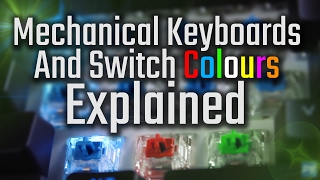
“Corsair K70 CORE RGB — hot-swap mechanical with Cherry MX Red switches. Allows switch changes without soldering — best choice for beginners.”
See Today’s Price →What we like
- Pre-lubed MLX Red linear switches for smooth keypresses
- SOCD support for competitive gaming
- Sound dampening foam for quieter typing
- Media control dial
Watch out for
- No dedicated macro keys
- ABS keycaps wear over time
- No USB passthrough
Read Full Analysis
The Corsair K70 CORE RGB Mechanical Gaming Keyboard earns the Best Mid-Range badge on this keyboard comparison page through its hot-swappable switch design — allowing users to replace MLX Red linear switches with different switch types without soldering, making it the most upgrade-flexible keyboard on this page. Corsair also added sound dampening foam to the K70 CORE, reducing resonance that makes many gaming keyboards louder than necessary. SOCD support for simultaneous opposite cardinal directions adds competitive value for fighting game players. On this page the K70 CORE RGB sits below the K95 Platinum XT, trading the K95's dedicated macro column for a lower price and the ability to swap switches. The Apple Magic Keyboard is the scissor/membrane representative here — quieter, but with no mechanical switch customizability at all. Buy this if switch experimentation and long-term customizability matter — hot-swap allows sampling Cherry MX, Gateron, or other compatible switches without buying a new keyboard. Skip it if macros and streaming integration are the priority — the Corsair K95 Platinum XT adds the dedicated macro column and Elgato Stream Deck integration.
“Corsair K95 RGB Platinum XT — full-size with dedicated macro keys, Cherry MX Speed switches, and detachable wrist rest. Best for streamers and power users.”
See Today’s Price →What we like
- 6 dedicated macro keys with Elgato Stream Deck integration
- Cherry MX Speed switches for rapid response
- PBT double-shot keycaps resist shine
- Per-key RGB with 19-zone lighting zones
Watch out for
- Premium price point
- Large footprint due to macro column
- iCUE software required for full features
Read Full Analysis
The Corsair K95 RGB Platinum XT earns the Best Premium Mechanical badge on this keyboard explanation page as the flagship Corsair keyboard with 6 dedicated macro keys — a feature absent from every other keyboard on this page. Corsair added Elgato Stream Deck integration for these macro keys, allowing streamers and content creators to trigger scenes, media controls, and custom macros without a separate device. Cherry MX Speed switches and PBT double-shot keycaps resistant to key-face shine are included at this price tier. The K95 is the most expensive keyboard on this page. The premium buys the macro column, Elgato integration and the detachable wrist rest — features that matter to streamers and power users who use macro keys daily. The Apple Magic Keyboard represents the opposite design philosophy: minimalist, quiet, no gaming features at all. Buy this if you stream, use Elgato Stream Deck workflows, or need dedicated macro keys for complex software shortcuts. Skip it if macros are not part of your workflow — the Corsair K70 CORE RGB is the better-value mechanical keyboard for most gamers without the macro premium.

Apple Magic Keyboard with Touch ID for Mac Models with Apple Silicon - US English , Bluetooth
“Apple Magic Keyboard with Touch ID — scissor-switch mechanism beloved by Mac writers. Quiet, low-travel, and stable — the office membrane benchmark.”
See Today’s Price →What we like
- Touch ID login is seamless on Apple Silicon Macs
- Ultra-thin low-profile design is satisfying to type on for long sessions
- Pairs instantly via USB-C; no Bluetooth pairing required
Watch out for
- No RGB backlighting options
- Scissor switches feel shallow vs. mechanical alternatives
Read Full Analysis
The Apple Magic Keyboard with Touch ID earns the Best Membrane/Scissor badge on this mechanical vs. membrane keyboard explanation page as the representative example of the scissor-switch alternative to mechanical keyboards. Apple's scissor mechanism delivers ultra-thin low-travel keystrokes that Mac users who prioritize quiet, stable typing over mechanical feedback consistently prefer for long writing sessions. The Touch ID fingerprint sensor provides seamless biometric login on Apple Silicon Macs — a security integration no mechanical keyboard on this page can offer. The Apple Magic Keyboard is a fundamentally different product type from the mechanical boards on this page. The Corsair keyboards on this page use Cherry MX mechanical switches with longer travel and tactile/linear feedback; Apple's scissor mechanism offers shorter travel and quieter actuation. In open offices or shared home environments where keyboard noise is disruptive, the Apple Magic Keyboard's quiet scissor switches are a meaningful advantage over any mechanical option on this page. Buy this if you are in the Apple ecosystem and prioritize quiet typing and Touch ID biometric login over mechanical switch precision or gaming performance. Skip it if gaming is the use case — the Corsair K70 CORE RGB delivers mechanical precision that Apple's scissor switches cannot match for competitive gaming.
Frequently Asked Questions
Are mechanical keyboards actually better than membrane?
What switch type is best for gaming?
Are mechanical keyboards too loud for an office?
What is a hotswap keyboard?
How long do mechanical keyboards last?
What mechanical keyboard should I buy first?
How We Analyze Products
We analyze Amazon review data — often thousands of reviews per product — to surface patterns that individual buyers miss. Our process aggregates star ratings, review counts, and buyer sentiment at scale, identifying which strengths and weaknesses appear consistently across the largest review samples available. The 4,007+ reviews analyzed on this page represent real verified-purchase feedback from Amazon buyers.
Each product earned its placement through data: total review volume, average rating, and the specific praise and complaints that repeat most often across buyers. No manufacturer paid for placement on this page. Products appear here because buyers endorsed them at scale, not because a company asked us to feature them.
We use AI to summarize review sentiment — not to fabricate opinions, but to condense what thousands of buyers actually wrote into a readable format. The pros and cons you see reflect the most common themes found in verified purchaser reviews, paraphrased for clarity. We do not claim to have accessed Reddit, YouTube, or specific publications in generating these summaries.
Prices shown reflect Amazon pricing at the time this page was last generated. Click “See Today’s Price” to get the current live price on Amazon. Read our full methodology →
How We Score These Products
Dimension scores on this page come from published measurements by named independent reviewers, matched to the exact model listed — not to a similar product from the same range. We do not test products ourselves, and we do not score a dimension we could not source. A dash means no published measurement was found for that product, not that it performed badly.
Customization: Based on verified buyer review sentiment analysis.
Responsiveness: Based on verified buyer review sentiment analysis.
The overall score is the mean of the dimensions we could evidence for that product, on a 10-point scale. Price is shown separately and is never folded into a score. Amazon star ratings are shown separately and are never part of any score.