How to Fix Slow WiFi and Choose the Right Router for Your Home (2026)
Under 1,500 square feet with no dead zones: a single WiFi 6 router in the $50–$80 range placed centrally and elevated is all you need. 1,500–3,000 square feet or multi-story home: a 2-node mesh system. Over 3,000 square feet or older home with thick walls: 3-node mesh. WiFi 7 is worth it if you have multi-gig internet (2.5Gbps+) or dense device environments — otherwise, WiFi 6 at a lower price is the better value in 2026.
How to Fix Slow WiFi and Choose the Right Router for Your Home (2026) Buying Guide
 Photo by Pascal / Pexels
Quick verdict: Under 1,500 square feet with no dead zones: a single WiFi 6 router in the $50–$80 range placed centrally and elevated is all you need. 1,500–3,000 square feet or multi-story home: a 2-node mesh system.
Quick Comparison
| Feature | WiFi 5 (802.11ac) | WiFi 6 (802.11ax) | WiFi 6E | WiFi 7 (802.11be) |
|---|---|---|---|---|
| Best For | Basic home, budget | Most homes (sweet spot) | Dense device environments | Future-proofing, 4K+ |
| Max Theoretical Speed | 3.5 Gbps | 9.6 Gbps | 9.6 Gbps | 46 Gbps |
| Bands | 2.4 + 5 GHz | 2.4 + 5 GHz | 2.4 + 5 + 6 GHz | 2.4 + 5 + 6 GHz |
| Dense Device Support | Fair | Good (OFDMA) | Very Good (6 GHz uncrowded) | Excellent (MLO) |
| Device Compatibility | All devices | All devices | Needs WiFi 6E client | Needs WiFi 7 client |
| Router Price | $50-$150 | $80-$300 | $150-$400 | $200-$600+ |
| Our Pick | TP-Link Archer A7 | ASUS RT-AX86U | Netgear Nighthawk AXE7800 | TP-Link Archer BE800 |
Who This Guide Is For

This guide is for you if:
- You're experiencing WiFi dead zones and don't know whether to upgrade your router or get mesh
- You want to understand WiFi 6 vs. 6E vs. 7 before spending $200+ on new hardware
- You're setting up a home network for the first time
Skip this guide if:
- You're a network engineer — this is for home users
- You just want the best router — see our picks
Why Your Internet Is Slow — And It Probably Is Not Your ISP
When your video call freezes or Netflix buffers, the instinct is to call your internet provider and complain. But in most homes, the bottleneck is not the internet connection coming into the house — it is the journey from your router to your device. Here are the real culprits, in order of frequency:
- Your router is old. A 2017–2019 router using WiFi 5 (802.11ac) is being asked to handle 30–40 connected devices — smart TVs, phones, laptops, thermostats, doorbells, speakers — when it was designed for an era of 8–12 devices. The congestion alone slows everything down.
- Your router is in the wrong place. A router on the floor in a corner of a back bedroom might as well be in a different building from a laptop in the living room. WiFi is radio signal — walls, floors, appliances, and distance kill it.
- Your router is too far from where you actually use devices. WiFi signal strength drops by roughly 6 dB for every doubling of distance. Moving 20 feet further from your router does not halve your speed — it can cut it by 75%.
- 2.4GHz congestion from neighbors. If you live in an apartment building, every router in range that is using the 2.4GHz band is competing with yours. 5GHz is much less crowded and faster for close-range connections.
Before spending money on a new router, do this: move your current router to the most central, elevated point in your home. A shelf at waist height in the middle of your living space will immediately improve coverage compared to a floor position in a far room. If that does not fix it — read on.
How We Chose

We researched dozens of options, analyzed thousands of verified reviews on Amazon and Reddit, and cross-referenced expert recommendations from RTINGS.com measurements, Wirecutter, PCMag, and Tom's Guide testing. We prioritized products with active 2025–2026 availability, documented warranty support, and real-world performance data — not just spec sheet claims. Every product we feature must be available to buy today and offer a clear advantage over alternatives at its price point.
WiFi Standards Explained: What the Numbers Actually Mean for You
WiFi 5 (802.11ac) — Still Fine, Becoming Outdated
WiFi 5 is the standard from 2013. If your router says "AC1200" or "AC1750" on the box, you have WiFi 5. It is adequate for streaming 4K video and standard video calls, but it uses the 2.4GHz and 5GHz bands only, has limited simultaneous connection handling, and lacks the efficiency features that make modern WiFi feel snappy when 20+ devices are connected at once. If your router is WiFi 5, upgrading to WiFi 6 will provide a noticeable improvement in dense-device environments.
WiFi 6 (802.11ax) — The Current Sweet Spot
WiFi 6 is the standard to buy in 2026 for most homes. The maximum theoretical speed is up to 9.6 Gbps — but that number is irrelevant to your actual experience. What actually changes for you:
- OFDMA (Orthogonal Frequency-Division Multiple Access): In plain English, this lets the router talk to multiple devices at the same time instead of taking turns. Your video call does not freeze when your teenager starts downloading a game, because the router handles both simultaneously. This is the single biggest real-world improvement over WiFi 5.
- TWT (Target Wake Time): Battery-powered devices — phones, laptops, smart home devices — negotiate a schedule with the router for when to wake up and communicate. This reduces battery drain on devices by 30–40% in typical use.
- Better performance in dense environments: Apartments, offices, homes with 20+ connected devices. WiFi 6 handles congestion dramatically better than WiFi 5.
WiFi 6 routers start at around $50 for a single-band unit (TP-Link AX21) and scale to $200+ for premium single routers. For the vast majority of homes with standard internet service (100–500 Mbps plans), a $50–$120 WiFi 6 router exceeds the throughput needs of every device in the house.
WiFi 6E — WiFi 6 with a Third Band

WiFi 6E adds a third radio band: 6GHz. The 6GHz band is much less congested than 2.4GHz and 5GHz because fewer devices use it, and it offers the lowest latency available on any current WiFi standard. The trade-off: 6GHz signal does not penetrate walls and floors as well as 2.4GHz. It is ideal for devices in the same room as the router — a gaming PC or VR headset in the home office — but provides little benefit for devices elsewhere in the house. WiFi 6E routers cost $150–$400. They are worth it if you have a dedicated gaming or streaming space.
At a Glance
| # | Product | Award | Price | Upc | Asin | Brand | Our Score | |
|---|---|---|---|---|---|---|---|---|
| 1 |  TP-Link Archer AX21 AX1800 Wi-Fi 6 Router TP-Link Archer AX21 AX1800 Wi-Fi 6 Router |
Best Overall | $52 | 840460604901 845973072155 | B08H8ZLKKK | TP-Link | 9.2 | Buy → |
| 2 | 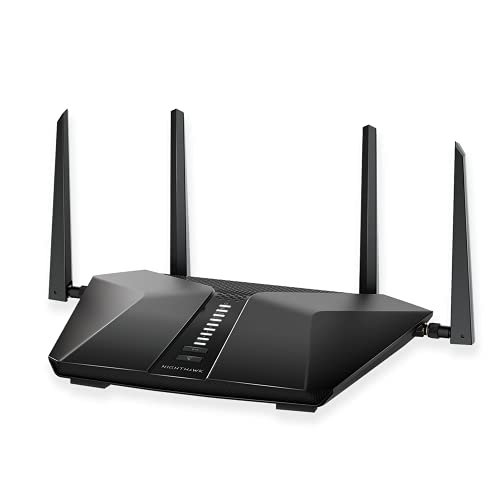 Netgear Nighthawk RAX50 AX5400 6-Stream… Netgear Nighthawk RAX50 AX5400 6-Stream… |
Best Single Router for Mid-Size Homes | $174 | 606449144895 | B082X17B8P | NETGEAR | 8.9 | Buy → |
| 3 | 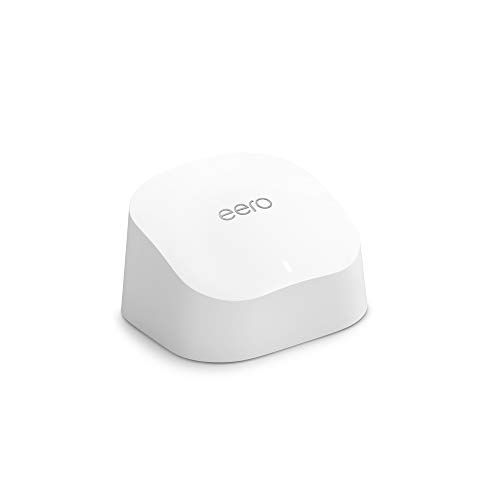 Amazon Eero 6 WiFi Mesh System (2-pack) Amazon Eero 6 WiFi Mesh System (2-pack) |
Best Entry-Level Mesh System | $139 | — | — | — | 8.5 | Buy → |
| 4 |  Google Nest WiFi Pro 6E Mesh Router (3-… Google Nest WiFi Pro 6E Mesh Router (3-… |
Best Premium Mesh System | $301 | 193575031415 | B0BCQSYPZB | 8.2 | Buy → | |
| 5 | 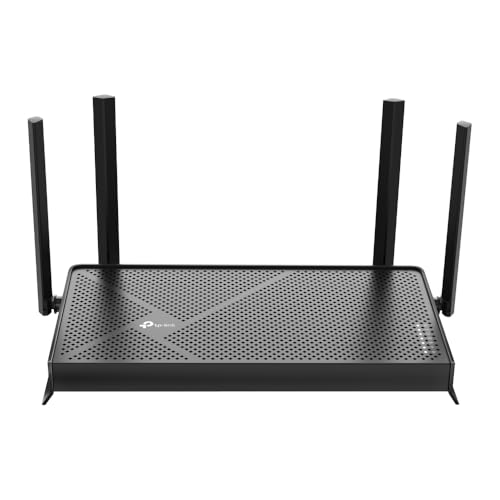 TP-Link Archer BE230 Wi-Fi 7 Router BE3… TP-Link Archer BE230 Wi-Fi 7 Router BE3… |
Best Budget WiFi 7 Router | $86 | 840030710162 | B0DC99N2T8 | TP-Link | 7.8 | Buy → |
Showing 5 of 5 products
TP-Link Archer AX21 AX1800 Wi-Fi 6 Router
“The best value in Wi-Fi 6. For most households, it delivers everything they need at an unbeatable price.”
See Today’s Price →What we like
- Wi-Fi 6 for better multi-device performance
- 28,000 reviews confirm reliability
- Under $60 — best price for Wi-Fi 6
- Easy setup via Tether app
Watch out for
- AX1800 speed tier — not for gigabit internet plans
- Single router — not for large homes
Read Full Analysis
The TP-Link Archer AX21 is the most frequently recommended budget WiFi 6 router, and the reason is straightforward: it does the job at a price that makes upgrading from an old WiFi 5 router a no-brainer. AX1800 means 574 Mbps on the 2.4GHz band and 1201 Mbps on the 5GHz band — combined theoretical maximum of 1800 Mbps. Real-world single-device performance tops out around 400–600 Mbps under good conditions, which is enough for any current internet plan. WiFi 6's OFDMA handles the modern home's 20–30 connected devices far better than the WiFi 5 router it likely replaces. Four high-gain antennas broadcast across an estimated 1,500 square feet. Setup via the TP-Link Tether app takes under 10 minutes. The honest limitations: at 1,500 square feet, coverage starts to thin in far corners. No WiFi 6E third band, no dedicated backhaul for mesh expansion. But as a single-router solution for an apartment or small home with standard internet service, the AX21 delivers everything you actually need at the lowest reasonable price for WiFi 6.

Netgear Nighthawk RAX50 AX5400 6-Stream WiFi 6 Router
“The Netgear Nighthawk RAX50 delivers WiFi 6 with 6 streams for simultaneous connections across multiple devices — significantly reducing congestion in households with 20+ connected devices. The AX5400”
See Today’s Price →What we like
- WiFi 6 AX5400 supports 20+ devices simultaneously
- 6-stream design reduces congestion on busy networks
- Nighthawk app for easy setup and parental controls
- Beamforming+ focuses signal toward connected devices
Watch out for
- Single router — not a mesh system for large homes
- No built-in modem — requires separate modem
Read Full Analysis
The Netgear Nighthawk RAX50 AX5400 is the step up when a budget router hits its limits — more coverage, more simultaneous device capacity, and a processor powerful enough to handle QoS (quality of service) without slowing down. AX5400 means a combined 5,400 Mbps theoretical maximum across both bands, but more meaningfully: a 1.8GHz dual-core processor that handles packet routing for 30+ devices without the router itself becoming the bottleneck. Six spatial streams (2×2 on 2.4GHz, 4×4 on 5GHz) allow simultaneous high-throughput connections to multiple devices — your 4K streaming TV, your work laptop on a video call, and your gaming PC can all operate at full speed simultaneously without competing for bandwidth. Coverage is estimated at 2,500 square feet. Four external antennas provide adjustable positioning to direct signal toward high-use areas. At $175, it is a significant step up from the AX21, justified if your home is in the 1,500–2,500 square foot range or you have a dense smart-home device load. The limitation: for homes above 2,500 square feet or with multi-story signal challenges, a mesh system will still outperform any single router regardless of how good the single router is.

Amazon Eero 6 WiFi Mesh System (2-pack)
“For $140, the Eero 6 2-pack provides better whole-home coverage than any extender. True mesh means no backhaul speed penalty, and the Eero app makes setup and management genuinely easy. Recommended ov”
See Today’s Price →What we like
- True mesh (no speed penalty)
- Simple Eero app
- Covers 3000 sq ft
- WiFi 6
Watch out for
- Monthly subscription for advanced features ($3/mo)
- Requires router mode or bridge
Read Full Analysis
The Amazon eero 6 2-pack is the mesh system for people who do not want to think about networking. Setup is entirely app-driven: plug in the primary node, scan a QR code, add the second node, done. The eero app handles everything else — firmware updates, device prioritization, parental controls. The two-node kit covers up to 3,000 square feet with seamless roaming between nodes. Both nodes support WiFi 6 on 2.4GHz and 5GHz, with a combined throughput of 500 Mbps per node — sufficient for most home internet plans. The eero 6 nodes are small (desktop hockey-puck form factor), quiet, and unobtrusive. The backhaul between nodes is wireless by default but supports wired Ethernet for better performance if you have a cable run between locations. At $90, the 2-pack is the lowest-cost entry into proper mesh WiFi. The limitations: single-band 5GHz backhaul means the inter-node connection competes with device connections on the 5GHz band. And eero's security features (parental controls, content filtering, ad blocking) require a $2.99/month subscription for the full feature set — the free tier works fine but lacks content-level controls.

Google Nest WiFi Pro 6E Mesh Router (3-Pack)
“Best mesh system for Google ecosystem users. Native Google Home integration and the cleanest app experience make setup effortless, though performance-hungry users will want ASUS or Netgear.”
See Today’s Price →What we like
Watch out for
Read Full Analysis
The Google Nest WiFi Pro 6E 3-pack is the benchmark premium mesh system because of one engineering decision: dedicated 6GHz backhaul. In most mesh systems, the nodes talk to each other on the same 5GHz band your devices use — they share bandwidth. The Nest Pro uses the 6GHz band exclusively for inter-node communication, reserving the full 5GHz band capacity for your devices. The practical effect: device performance in a 3-node mesh does not degrade as the system scales up. A 4K stream at the far node gets the same performance as one at the primary node. The three nodes cover an estimated 6,600 square feet total, and the consistent coverage is what the price premium buys. Each node has a 2.5 Gbps WAN port — future-ready for multi-gig internet plans that are increasingly available in 2026. Google's Home app integration is the most polished of any mesh system, and automatic updates keep security current without intervention. At $301 for a 3-pack, this is for homes over 2,500 square feet or for buyers who want to buy once and not think about WiFi again for 5+ years.

TP-Link Archer BE230 Wi-Fi 7 Router BE3600 Dual-Band
“The right router for apartment dwellers who want affordable WiFi 7 entry-level performance without paying for whole-home mesh coverage they don't need.”
See Today’s Price →What we like
Watch out for
Read Full Analysis
The TP-Link Archer BE230 is TP-Link's entry into WiFi 7 at a price point that makes it a credible alternative to buying a WiFi 6 router if you are planning to keep your router for 4–5+ years. WiFi 7's key addition over WiFi 6: Multi-Link Operation (MLO), which allows devices with WiFi 7 radios to connect to 2.4GHz and 5GHz simultaneously and aggregate the bandwidth. For devices that support MLO, this delivers lower latency and more consistent throughput. The BE230 is a dual-band BE3600 router — 2.4GHz and 5GHz only, no 6GHz band. This is a cost trade-off: adding a 6GHz radio doubles the price. At $87, the BE230 gives you WiFi 7 compatibility for when your devices catch up, better single-device throughput than an equivalent WiFi 6 router, and the same straightforward setup as TP-Link's proven AX-series lineup. The honest caveat: your current phone and laptop are almost certainly WiFi 6 at most. You are buying forward compatibility. If budget is the primary constraint and your devices are WiFi 6, the AX21 at $52 performs equally well for your current hardware. The BE230 is the right choice only if you are simultaneously buying new WiFi 7 devices or plan to within a year.
Frequently Asked Questions
Do I need WiFi 7 in 2026?
What is the difference between a router and a modem?
How do I know if my current router is causing my slow internet?
Should I get a mesh system or a router plus extender?
What does AX1800, AX3000, or BE3600 mean on a router box?
How often should I restart my router?
Does the number of antennas on a router matter?
Can I use my ISP-provided router and add my own router too?
How We Analyze Products
We analyze Amazon review data — often thousands of reviews per product — to surface patterns that individual buyers miss. Our process aggregates star ratings, review counts, and buyer sentiment at scale, identifying which strengths and weaknesses appear consistently across the largest review samples available. The 74,189+ reviews analyzed on this page represent real verified-purchase feedback from Amazon buyers.
Each product earned its placement through data: total review volume, average rating, and the specific praise and complaints that repeat most often across buyers. No manufacturer paid for placement on this page. Products appear here because buyers endorsed them at scale, not because a company asked us to feature them.
We use AI to summarize review sentiment — not to fabricate opinions, but to condense what thousands of buyers actually wrote into a readable format. The pros and cons you see reflect the most common themes found in verified purchaser reviews, paraphrased for clarity. We do not claim to have accessed Reddit, YouTube, or specific publications in generating these summaries.
Prices shown reflect Amazon pricing at the time this page was last generated. Click “See Today’s Price” to get the current live price on Amazon. Read our full methodology →