Best Coding Toys for Kids 2026: Robots, Apps & STEM Kits

Osmo Genius Starter Kit is our top pick for ages 5–10 — the physical game pieces combined with iPad camera recognition make abstract concepts tangible. Wonder Workshop Dash Robot is the best physical coding robot for ages 6+, with years of curriculum support.
See Today’s Price →What You Need to Know
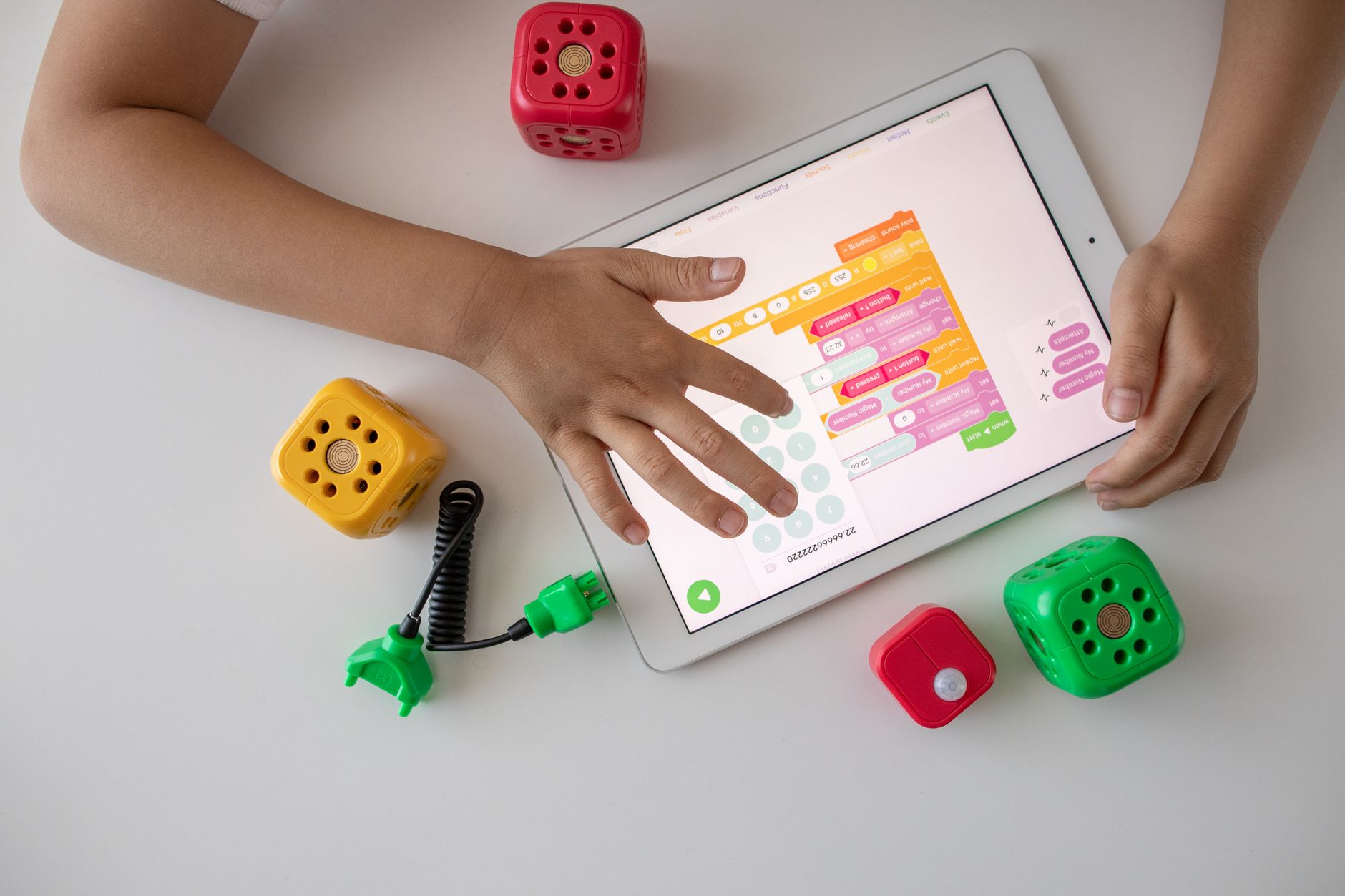 Photo by Robo Wunderkind / Pexels
How we picked these. We compared 6 coding toys for kids across age range (5–14), programming interface (visual block, app, physical), challenge progression, and screen-free vs. app-paired design, cross-referencing STEM education editorial picks and verified consumer child engagement reviews.
Coding toys split into two main types: screen-based tools that use a tablet as the primary interface, and robot-based tools where a physical robot responds to code the child writes. Both approaches work — the choice depends on your child's age and whether they prefer digital or physical play.
Age-Appropriate Coding Concepts
Ages 4-6: Directional coding (forward, turn, stop). Look for toys with simple button-sequence programming, not app-required coding. Botley 2.0 works without a screen at this level. Ages 6-8: Visual block coding with drag-and-drop commands. Dash Robot, Botley, and LEGO Boost all use block-based apps that teach sequencing and loops without text syntax. Ages 9-12: Event-driven coding and variables. Sphero BOLT introduces physics simulations and conditional logic. For advanced kids ready for real programming, kits that bridge into Python or JavaScript provide the longest runway.
Growth Potential
The best coding toys have curriculum progression built in. Wonder Workshop Dash pairs with free Wonder and Blockly apps, ranging from beginner (dragging blocks) to intermediate (JavaScript-adjacent logic) — a 6-year-old can start and the same toy challenges them at 10. Sphero scales similarly through increasingly complex programming modes. One-level toys that max out quickly frustrate kids within a year. Before buying, check whether the companion app has multiple difficulty tiers and ongoing content updates.
Screen Time vs Physical Interaction
Robot-based toys (Dash, Sphero, Botley) use a tablet for programming but deliver results in the physical world — the robot moves, lights up, or makes sounds based on the code. This physical feedback loop is more engaging for kinesthetic learners than purely app-based coding games. Osmo bridges both worlds with physical game pieces that the iPad camera reads. If your goal is minimizing screen time, Botley 2.0 is the strongest option — it can be programmed entirely through buttons on the robot itself.
Durability and Battery Life
Coding robots get dropped, kicked, and crashed into furniture. Sphero BOLT's polycarbonate shell is nearly indestructible. Dash has soft rubber bumpers that absorb impact. LEGO Boost is the most fragile since LEGO constructions can break apart on hard impacts. Battery life ranges from 1 hour (Sphero on active drive mode) to 5+ hours (Botley on standby with intermittent coding). Rechargeable batteries are preferable to disposable — coding toys get heavy daily use during the initial excitement period.

Buying as a Gift
If buying for someone else's child, check tablet compatibility first. Osmo requires an iPad. Dash works with both iPad and Android tablets but needs Bluetooth. Botley 2.0 and LEGO Boost work without any tablet at their basic levels. Also consider whether the recipient already has a compatible device — a $372.99 coding robot that requires a $372.99 iPad the family doesn't own creates frustration instead of excitement.
Coding toys teach different computational thinking skills depending on the child's age. See Best Friendship Gifts for Kids if you are buying as a gift rather than for your own child, and How to Choose a Gift for Coworkers for ideas on gifting a coding kit to a colleague with children.
Watch Before You Buy
“Best robot: Dash drives, lights up, and responds to kid-written code.”
See Today’s Price →What we like
- Physical robot provides immediate, visible results
- Works with multiple coding apps at different skill levels
- Durable and rechargeable
- Schools and libraries use it
Watch out for
- Premium price for a single toy
- Requires tablet or phone
- May need adult help for initial setup
Read Full Analysis
Dash is a physical programmable robot that responds to code written through Wonder Workshop companion apps (Blockly, Wonder, Wonder Junior) — children see immediate results in the real world rather than on a screen, which is the core engagement advantage over app-only coding tools like Osmo on this page. At $189.99, it is the second-highest priced option here after LEGO Boost at $372.99, and significantly above Sphero BOLT ($50) and Botley 2.0 ($50). The premium is justified by the multi-app progression ecosystem: as a child moves from drag-and-drop Blockly commands toward JavaScript-level coding, Dash scales with them — a depth range Sphero and Botley do not match. Age range is 6 and up. The rechargeable battery eliminates ongoing costs common with battery-powered robot toys. Requires a tablet or smartphone to operate, which is a dependency Botley 2.0 avoids entirely. Durable enough for school and library use, which signals build quality at a price where that distinction matters.
“Best building kit: LEGO bricks plus motors plus drag-and-drop coding.”
See Today’s Price →What we like
- LEGO compatibility — works with existing brick collections
- 5 buildable models keep it fresh
- Drag-and-drop coding is genuinely fun
- Strong brand trust
Watch out for
- App requires constant tablet connection
- Brick sorting is time-intensive
- Best for kids who already like LEGO
Read Full Analysis
LEGO Boost combines physical LEGO building with motorized robotics and block-based coding through the Boost companion app — children construct one of five buildable models (Vernie the robot, a caterpillar machine, a guitar, a building kit, and an automated cat) and then program them to move, react, and interact. At $302.49, it is the most expensive option on this page by a significant margin — more than double the Dash Robot at $149.99 and six times the price of Sphero BOLT. The premium is partly justified and partly a format premium: LEGO Boost is the only option here that combines brick building with programming, which means children who already own and love LEGO sets will find a natural transition. For children with no LEGO foundation, the brick-sorting and assembly time before a single line of code runs is a real friction that Dash and Sphero BOLT eliminate. The drag-and-drop coding interface is genuinely age-appropriate for ages 7 to 12 — it maps closely to Scratch-style blocks without requiring an active internet connection for base app functionality. App-tablet dependency is ongoing; the models do not retain programming without the app connection, which matters for younger children who lose focus when technology friction appears. Brick compatibility with existing LEGO collections is the strongest long-term argument for the price: the motors and hub become components in future custom builds, extending value well past the five included models.

“Best screen-free: Botley programs without any tablet or phone.”
See Today’s Price →What we like
- Gift set bundle
- Obstacle pieces
- Screen-free coding
- Ages 5 plus
Watch out for
- Coding concepts require adult guidance for youngest users
- Battery required
- Programming interface simpler than Scratch or physical coding toys for older kids
Read Full Analysis
Botley 2.0 is the screen-free option on this page — children program it by pressing buttons on the remote to create sequences of forward, backward, turn, and loop commands without opening an app or connecting a tablet. This makes it the lowest-friction entry point for children ages 5 to 7 who are not yet comfortable with touchscreen interfaces. At $58.56, the gift set version includes obstacle course pieces and accessories that add setup variety over solo box versions. Against Dash Robot ($149.99) and LEGO Boost ($372.99), the coding ceiling is lower: Botley does not grow into JavaScript or complex sensor interactions the way those options do. Against Sphero BOLT ($50), the appeal is tangible physical button-programming over app dependency. Best suited as a first coding toy before graduating to a screen-based robot, or for households that prefer minimizing screen time during play.

“Best for advanced kids: Scratch blocks to JavaScript in one durable ball.”
See Today’s Price →What we like
- Supports both Scratch blocks and JavaScript for older learners
- LED matrix displays programmable patterns
- Durable waterproof design
- Used in school STEM programs
Watch out for
- Pricier than simpler options
- App-dependent
- May be frustrating for younger kids without adult guidance
Read Full Analysis
Sphero BOLT is the progression toy on this page — it accepts Scratch block coding from beginners and scales to JavaScript for advanced learners, making it the only option here with a genuine multi-year coding curriculum ceiling. The transparent shell houses an LED matrix that programmers configure visually, adding a design dimension to coding projects. At $50, it is the lowest-priced app-dependent robot on the page, below Botley 2.0 ($58.56) and well below Dash ($149.99). The waterproof and durable casing is a practical advantage — Sphero BOLTs appear in school STEM programs specifically because they survive repeated drops and rough handling. App dependency is the main constraint for younger or less patient users; the experience weakens without reliable tablet access. Best suited for children 10 and up who have outgrown simpler button-programming robots and are ready to engage with actual coding syntax in a motivating physical format.
Frequently Asked Questions
What age should kids start learning to code?
Do kids need to know math to learn coding?
Screen-based vs screen-free coding toys — which is better for young kids?
How long does it take a child to learn coding?
Are coding toys worth the price?
How We Analyze Products
We analyze Amazon review data — often thousands of reviews per product — to surface patterns that individual buyers miss. Our process aggregates star ratings, review counts, and buyer sentiment at scale, identifying which strengths and weaknesses appear consistently across the largest review samples available. The 11,487+ reviews analyzed on this page represent real verified-purchase feedback from Amazon buyers.
Each product earned its placement through data: total review volume, average rating, and the specific praise and complaints that repeat most often across buyers. No manufacturer paid for placement on this page. Products appear here because buyers endorsed them at scale, not because a company asked us to feature them.
We use AI to summarize review sentiment — not to fabricate opinions, but to condense what thousands of buyers actually wrote into a readable format. The pros and cons you see reflect the most common themes found in verified purchaser reviews, paraphrased for clarity. We do not claim to have accessed Reddit, YouTube, or specific publications in generating these summaries.
Prices shown reflect Amazon pricing at the time this page was last generated. Click “See Today’s Price” to get the current live price on Amazon. Read our full methodology →