Best 4K Gaming Monitor (2026)

For 4K gaming in 2026, the ASUS ROG Swift OLED PG27UCDM is the clear winner — QD-OLED contrast at 240Hz in a 27-inch package. Console gamers should look at the Alienware AW3225QF instead: 31.6 inches curved, HDMI 2.1, and the same OLED quality at slightly lower cost.
See Today’s Price →At a Glance
| # | Product | Award | Price | Resolution | Refresh Rate | Panel | |
|---|---|---|---|---|---|---|---|
| 1 | 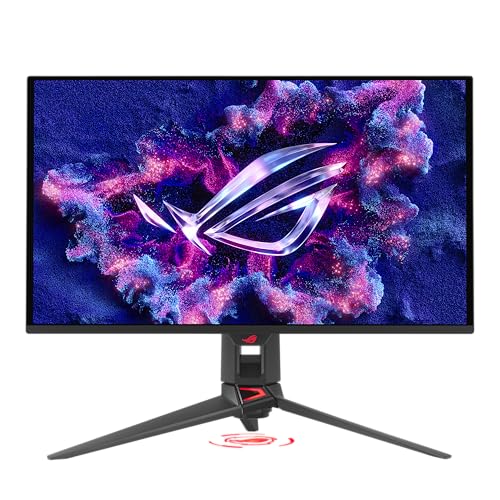 ASUS ROG Swift OLED PG27UCDM 27" 4K QD-… ASUS ROG Swift OLED PG27UCDM 27" 4K QD-… |
Best Overall | $1099 | 4K UHD 2160p | 240 Hz | QD-OLED | Buy → |
| 2 |  Alienware AW3225QF 31.6" 4K QD-OLED Cur… Alienware AW3225QF 31.6" 4K QD-OLED Cur… |
Best 4K Console Gaming | $544 | 4K UHD 2160p | 240 Hz | QD-OLED Curved | Buy → |
| 3 | 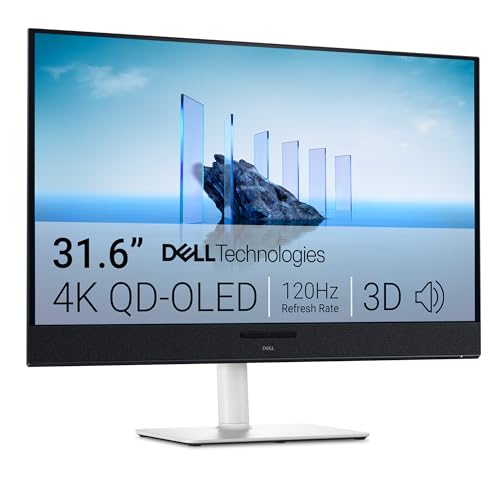 Dell S3225QC 31.6" 4K QD-OLED Monitor Dell S3225QC 31.6" 4K QD-OLED Monitor |
Best OLED 4K | $499 | 4K UHD 2160p | 120 Hz | QD-OLED | Buy → |
| 4 | 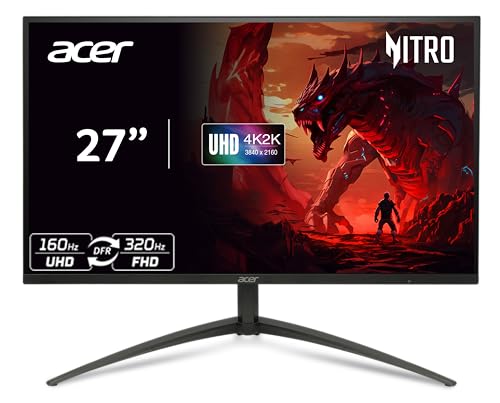 Acer Nitro XV275K P5biipruzx 27" 4K Min… Acer Nitro XV275K P5biipruzx 27" 4K Min… |
Best Mid-Range 4K | $424 | 4K UHD 2160p | 160 Hz | Mini LED IPS | Buy → |
| 5 | 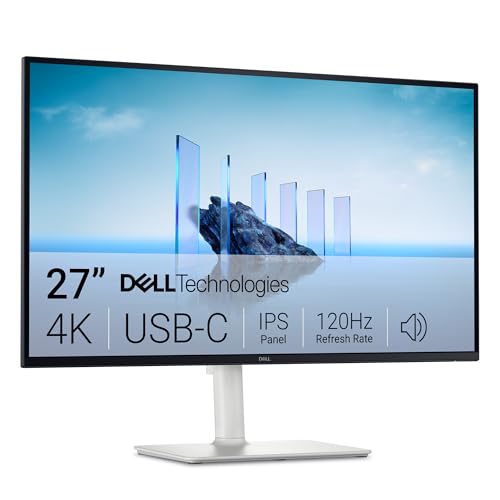 Dell S2725QC 27" 4K USB-C Monitor Dell S2725QC 27" 4K USB-C Monitor |
Best Value 4K | $299 | 4K | 120 Hz | IPS | Buy → |
Showing 5 of 5 products
ASUS ROG Swift OLED PG27UCDM 27" 4K QD-OLED Gaming Monitor
“The PG27UCDM is the gold standard 4K gaming monitor — QD-OLED contrast meets 240Hz speed in a single 27-inch panel.”
See Today’s Price →What we like
- Industry-leading 4K QD-OLED panel with infinite contrast
- 240Hz refresh rate with 0.03ms response time
- 99% DCI-P3 color coverage
- DisplayPort 2.1a for full 4K@240Hz bandwidth
- 3-year warranty with OLED burn-in coverage
Watch out for
- Premium $1,199 price tag
- Cooling fan audible in quiet rooms
- OLED requires periodic pixel refresh routine
Read Full Analysis
The ASUS ROG Swift OLED PG27UCDM sets the performance ceiling for 4K gaming monitors. Its 27-inch QD-OLED panel delivers 3840x2160 at 240Hz with a 0.03ms response time — a specification combination that no 4K IPS or Mini LED panel can match at any price. When competitive gamers move from 1080p or 1440p to 4K, they typically accept lower refresh rates; the PG27UCDM eliminates that compromise entirely. DisplayHDR True Black 400 certification means genuine per-pixel illumination without a backlight. In games with pronounced light-to-dark contrast — dark caves, night environments, space scenes — OLED renders actual black rather than the elevated black floor that IPS panels show regardless of local dimming quality. The QD-OLED panel's DCI-P3 color coverage also benefits creative workflows when the monitor doubles as a workstation display. The primary trade-off is burn-in susceptibility. Static game UI elements — health bars, minimaps, ability cooldown indicators — that render in fixed screen positions for thousands of hours can create permanent image retention. ASUS includes burn-in countermeasures, but this risk makes the PG27UCDM better suited for varied game genres than a single title played exclusively. At $1,199, it is the most expensive monitor on this page. Best for: PC gamers who play visually demanding titles at 4K and refuse to compromise on refresh rate or response time to achieve it.

Alienware AW3225QF 31.6" 4K QD-OLED Curved Gaming Monitor
“The AW3225QF is the best large-format 4K gaming screen — OLED contrast at 32 inches with 240Hz transforms both competitive PC gaming and console play.”
See Today’s Price →What we like
- 31.6-inch 4K QD-OLED Curved — immersive for gaming and entertainment
- 240Hz with 0.03ms — RTINGS top pick for 4K console gaming
- Infinite contrast with DisplayHDR True Black 400
- HDMI 2.1 supports 4K@120Hz on PS5 and Xbox Series X
Watch out for
- $1,125 premium price
- 1800R curve not ideal for productivity
- Large OLED needs routine pixel refresh
Read Full Analysis
The Alienware AW3225QF offers a different take on flagship 4K gaming: a 31.6-inch curved QD-OLED panel that prioritizes immersive screen area over pixel density. At 3840x2160 across 31.6 inches, the pixel pitch is slightly lower than the 27-inch PG27UCDM, but the added screen size creates a visual environment that fills your peripheral vision at typical desk distances. The 240Hz refresh rate and 0.03ms response time match the ASUS spec-for-spec on performance. DisplayHDR True Black 400 certification delivers the same per-pixel OLED contrast as the PG27UCDM — genuine black levels in dark scenes, no backlight bleed, no halo around bright objects on dark backgrounds. The 1000R curved panel wraps around your field of view in a way that flat 27-inch displays do not, particularly in racing games and immersive open-world titles. The honest limitations are size and burn-in. At 31.6 inches, the AW3225QF demands more desk depth than 27-inch panels to avoid uncomfortably close viewing distances. OLED burn-in risk from static game UI elements applies equally here. At $1,125 it costs $74 less than the ASUS while offering more screen area at the same panel technology. Best for: gamers who want the maximum immersive screen area in a curved OLED format and have the desk space to accommodate a 32-inch panel.

Dell S3225QC 31.6" 4K QD-OLED Monitor
“The Dell S3225QC makes 4K QD-OLED accessible — stunning picture quality, real speakers, and Dolby Vision in one panel that serves as both monitor and display.”
See Today’s Price →What we like
- 31.6-inch 4K QD-OLED at $669 — exceptional value for OLED screen size
- AI-enhanced 3D spatial audio with five 5W speakers
- Dolby Vision and 99% DCI-P3
- USB-C 90W power delivery
- 0.03ms OLED response time
Watch out for
- 120Hz only — not suited for competitive gaming
- Glossy OLED panel picks up reflections
- Speaker depth adds to desk footprint
Read Full Analysis
The Dell S3225QC is the most compelling value argument in 4K gaming monitors: 31.6-inch QD-OLED at $669 versus $1,125 for the Alienware AW3225QF with the same panel technology. The 3840x2160 QD-OLED panel delivers 0.03ms response time and DisplayHDR True Black 400 certification — the same per-pixel contrast performance as the premium Alienware and ASUS options. The refresh rate drops to 120Hz versus 240Hz, but for 4K gaming in single-player and story-driven titles, 120Hz is technically indistinguishable from higher refresh rates for most players. At 31.6 inches, the S3225QC delivers the same immersive field of view as the AW3225QF. OLED's per-pixel illumination means dark environments in demanding PC titles like Cyberpunk 2077 or Alan Wake 2 render with genuine black depth that the IPS panels on this page cannot replicate at any price. The limitations are build quality and refresh rate. The S3225QC's stand adjustment range is more limited than the Alienware, and the port selection is less comprehensive. For competitive 4K gaming at 120Hz+, the 120Hz ceiling is adequate but the Alienware and ASUS offer more headroom. At $456 less than the AW3225QF, the S3225QC is the rational choice for gamers who want 4K QD-OLED without the premium monitor pricing. Best for: gamers who prioritize image quality over maximum refresh rate and want QD-OLED at the lowest possible price.
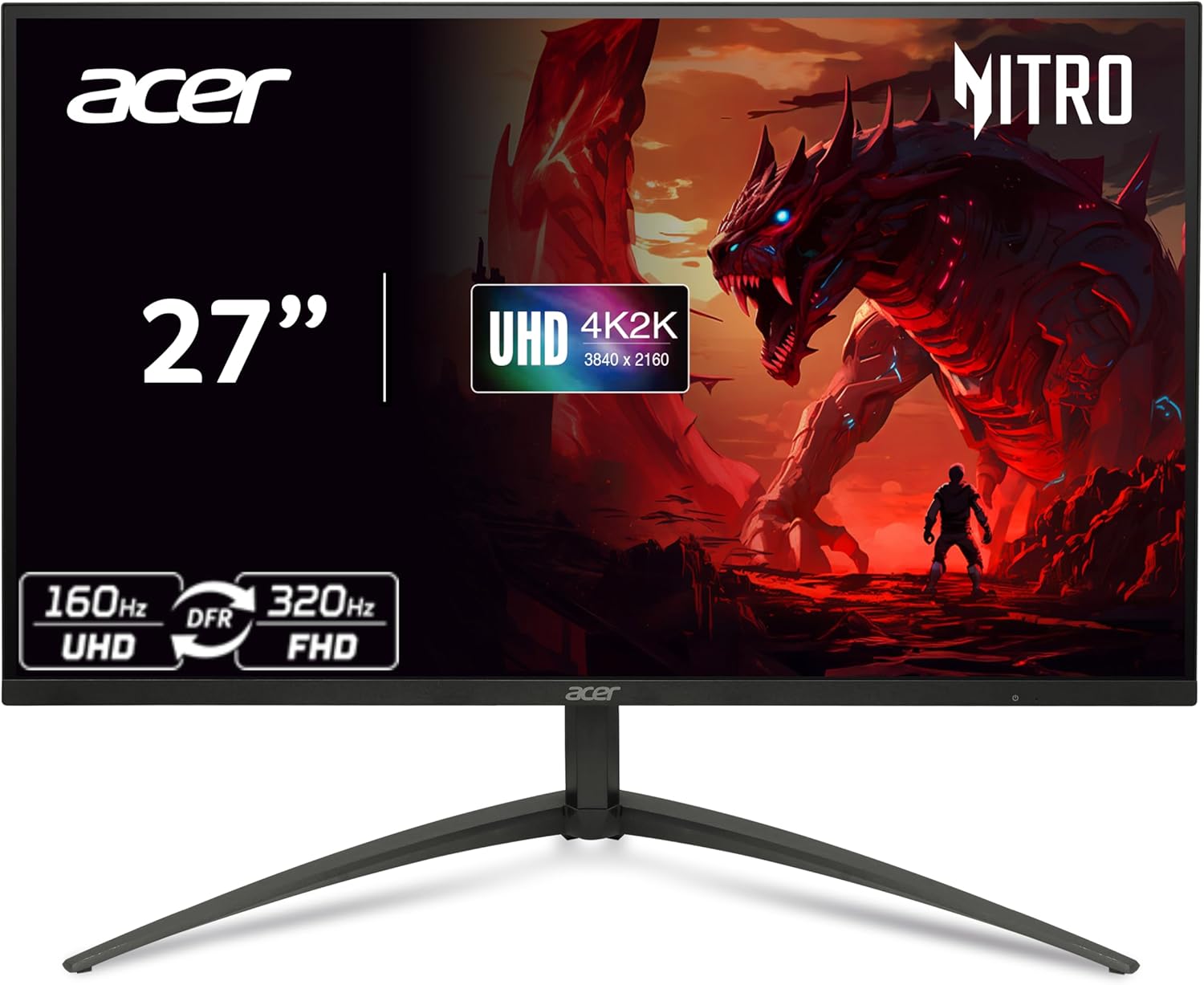
Acer Nitro XV275K P5biipruzx 27" 4K Mini LED Gaming Monitor
“The Acer Nitro XV275K delivers 4K gaming at 160Hz with genuine Mini LED HDR — the sweet spot between budget IPS and expensive OLED.”
See Today’s Price →What we like
- 1,152-zone Mini LED with VESA DisplayHDR 1000
- 160Hz at native 4K for smooth high-res gaming
- Dynamic Frequency Response: up to 320Hz at FHD
- 90W USB-C power delivery
Watch out for
- IPS panel lacks OLED contrast depth
- Plastic stand feels budget for the price
- HDR blooming visible on fine highlights
Read Full Analysis
The Acer Nitro XV275K takes a different approach to 4K gaming performance: Mini LED backlighting with 1ms GTG response time at $585. Its Mini LED IPS panel achieves DisplayHDR 1000 certification with local dimming — a meaningful jump over the Dell S2725QC's DisplayHDR 400 — while maintaining the wide viewing angles and color accuracy that IPS panels are known for. The 160Hz refresh rate at 3840x2160 is substantially higher than the 120Hz offerings at this price. Mini LED's local dimming zones create contrast performance that standard IPS cannot achieve, without the burn-in risk of OLED. For gamers who switch between a single competitive title with a static HUD for many hours daily, Mini LED mitigates the permanent image retention concern that OLED carries. The 160Hz refresh with 1ms GTG response time also positions this monitor well for titles where high frame rates are achievable at 4K on high-end GPUs. The trade-off is that Mini LED local dimming, even with hundreds of zones, cannot match OLED's per-pixel precision — halos around bright objects on dark backgrounds remain perceptible. IPS contrast ratios cap below what OLED achieves. At $585, the XV275K sits between the budget Dell S2725QC and the OLED options, offering a middle ground that prioritizes HDR brightness over OLED contrast depth. Best for: 4K gamers who want Mini LED HDR performance without OLED burn-in risk and need 160Hz for high-frame-rate competitive play.

Dell S2725QC 27" 4K USB-C Monitor
“The Dell S2725QC punches above its price with 4K resolution and USB-C laptop charging — the smart choice for a clean, capable work desk.”
See Today’s Price →What we like
- Sharp 4K IPS panel at an accessible price
- USB-C with 65W power delivery — one cable for your laptop
- 120Hz for smooth scrolling and productivity
- 99% sRGB factory-calibrated color
Watch out for
- 120Hz cap — not suited for fast gaming
- 4ms response time
- No Thunderbolt 4
Read Full Analysis
The Dell S2725QC earns its place on this list by making 4K IPS accessible at $331 with a feature set that punches above its price. USB-C with power delivery means a single cable connects a laptop for display, data, and charging simultaneously — a workflow convenience that none of the more expensive monitors on this page offer as cleanly. The 27-inch IPS panel at 3840x2160 runs at 120Hz with 4ms GtG response time, practical specs for 4K gaming and productivity. The IPS panel delivers accurate color reproduction with consistent wide viewing angles, making the S2725QC equally capable as a work monitor and a gaming display. DisplayHDR 400 certification provides functional HDR performance for content that supports it, though it falls below the HDR 1000 of the Acer XV275K. The honest limitations are contrast depth and HDR performance. At DisplayHDR 400, the S2725QC's HDR content appears enhanced rather than transformed. Black levels are standard IPS — elevated compared to OLED or even good VA panels. For buyers whose workload splits between productivity and gaming rather than dedicated gaming use, the S2725QC's USB-C hub functionality and $331 price represent genuine value. Best for: work-from-home professionals and light gamers who want 4K IPS with USB-C connectivity at the most accessible price on this page.
4K Gaming Monitor (2026) Buying Guide
 Photo by Ron Lach / Pexels
GPU performance has finally caught up with 4K display technology. The RTX 4080 Super and RX 7900 XTX can sustain 120+ fps at 4K in most titles. Monitors now offer 4K at refresh rates that were 1440p-only two years ago. 4K at 27 inches gives you 163 PPI — noticeably sharper than 1440p (109 PPI) at the same size.
At the 4K tier, the choice has narrowed: most recommended monitors are OLED or Mini LED.
QD-OLED (top pick): The ASUS PG27UCDM and Alienware AW3225QF use QD-OLED — Samsung's quantum dot layer adds ~140% wider color gamut versus standard OLED. Infinite contrast, 0.03ms response, 99%+ DCI-P3.
Mini LED IPS: The Acer XV275K uses 1,152 dimming zones with DisplayHDR 1000. Better than OLED for prolonged static use (no burn-in), worse for pure contrast in dark scenes.
4K QD-OLED at $669: The Dell S3225QC makes 4K OLED accessible — 31.6 inches, 120Hz (not for competitive gaming), built-in Dolby Vision and speakers. Ideal for media and casual gaming.
- 120Hz: Sufficient for console gaming (PS5/Xbox max), media, casual PC gaming
- 160Hz: Balance of resolution and speed. Acer XV275K — best for mid-range GPUs
- 240Hz: High-end — requires RTX 4080+ to sustain at 4K. ASUS PG27UCDM and AW3225QF
-
HDMI 2.1 is required for 4K@120Hz. Every pick on this page includes it.
-
Variable Refresh Rate (VRR): All picks support it. On PS5, this eliminates screen tearing.
-
Screen size: 31-32 inches (AW3225QF, Dell S3225QC) fills more of your FOV from sofa distance.
-
RTX 4070 Ti / RX 7800 XT: 4K at 60-80fps in demanding titles; 4K at 120+ in esports
-
RTX 4080 / RX 7900 XTX: 4K at 100-140fps in AAA titles
-
RTX 4090: Sustained 4K at 120-200fps; unlocks full 240Hz in lighter titles
- Best Gaming Monitor for PS5
- Best Wireless Earbuds
- Best AndaSeat Gaming Chairs
- Best Laptop Stands
- Best Webcams
- ASUS ROG Swift OLED PG27UCDM 27" 4K QD-OLED Gaming Monitor ($1100) — Enthusiast gamers and content creators who want the best 4K gaming experience money can buy Key advantage: Industry-leading 4K QD-OLED panel with infinite contrast
- Alienware AW3225QF 31.6" 4K QD-OLED Curved Gaming Monitor ($545) — Console gamers and PC enthusiasts who want a large 4K OLED for immersive gaming and cinematic content Key advantage: 31.6-inch 4K QD-OLED Curved — immersive for gaming and entertainment
- Dell S3225QC 31.6" 4K QD-OLED Monitor ($500) — Content consumers and creative professionals who want OLED picture quality at a mainstream monitor price Key advantage: 31.6-inch 4K QD-OLED at $669 — exceptional value for OLED screen size
- Acer Nitro XV275K P5biipruzx 27" 4K Mini LED Gaming Monitor ($425) — Gamers who want 4K at high refresh rates with real HDR without the OLED premium Key advantage: 1,152-zone Mini LED with VESA DisplayHDR 1000
- Dell S2725QC 27" 4K USB-C Monitor ($300) — Remote workers and productivity users who want 4K and USB-C in one affordable package Key advantage: Sharp 4K IPS panel at an accessible price
Key Features to Compare When Spending Over $100
Premium tech products justify higher prices through build quality, longevity, and ecosystem integration. Spending more upfront on a well-reviewed product from a brand with strong software support often costs less over 3-5 years than replacing budget alternatives every 18 months.
-
Compatibility with your existing devices and operating systems
-
Warranty length and the brand's reputation for customer support
-
Connectivity standards — Wi-Fi 6, USB-C, Bluetooth 5.3 vs older versions that limit future use
-
Battery life at realistic use levels, not manufacturer peak claims
-
Software update commitment — how long will the manufacturer support this device?

-
Ignoring total cost of ownership — accessories, cables, subscriptions add up fast
-
Buying last year's flagship at full price when a current mid-range matches its performance
-
Overlooking return window and restocking fees before purchasing from third-party sellers
Frequently Asked Questions
What is the best 4K gaming monitor in 2026?
Is 4K gaming worth it in 2026?
Can a PS5 use a 4K gaming monitor?
Is the Dell S3225QC good for gaming?
What GPU do I need for 4K gaming at 240Hz?
How We Analyze Products
We analyze Amazon review data — often thousands of reviews per product — to surface patterns that individual buyers miss. Our process aggregates star ratings, review counts, and buyer sentiment at scale, identifying which strengths and weaknesses appear consistently across the largest review samples available.
Each product earned its placement through data: total review volume, average rating, and the specific praise and complaints that repeat most often across buyers. No manufacturer paid for placement on this page. Products appear here because buyers endorsed them at scale, not because a company asked us to feature them.
We use AI to summarize review sentiment — not to fabricate opinions, but to condense what thousands of buyers actually wrote into a readable format. The pros and cons you see reflect the most common themes found in verified purchaser reviews, paraphrased for clarity. We do not claim to have accessed Reddit, YouTube, or specific publications in generating these summaries.
Prices shown reflect Amazon pricing at the time this page was last generated. Click “See Today’s Price” to get the current live price on Amazon. Read our full methodology →