How to Choose a Mechanical Keyboard (2026 Buying Guide)
The Cherry Compact QWERTY Mechanical USB Keyboard with Touchpad at $139.99 is the top pick here — Cherry MX switches with an integrated touchpad eliminate the need for a separate mouse, ideal for compact desk setups where space is limited.
At a Glance
| # | Product | Award | Price | Score |
|---|---|---|---|---|
| 1 | Our Top Pick | $42.80 Buy → |
7.5 | |
| 2 | Also Excellent | $48.69 Buy → |
7.0 | |
| 3 | Worth Considering | $199 Buy → |
7.5 |
Score Breakdown
| Cherry Compact QWERTY… | Logitech POP Keys Mec… | KINESIS USB Freestyle… | |
|---|---|---|---|
| Overall | 7.5 | 7.0 | 7.5 |
| Ergonomics | 73 | 65 | 78 |
| Responsiveness | 80 | 73 | 73 |
Scores 0–100 from published specifications and independent reviewers' measurements. Amazon star ratings are shown separately and are never part of a score. 0 = feature not present. – = insufficient data. How we score →
How to Choose a Mechanical Keyboard (2026 Buying Guide) Buying Guide
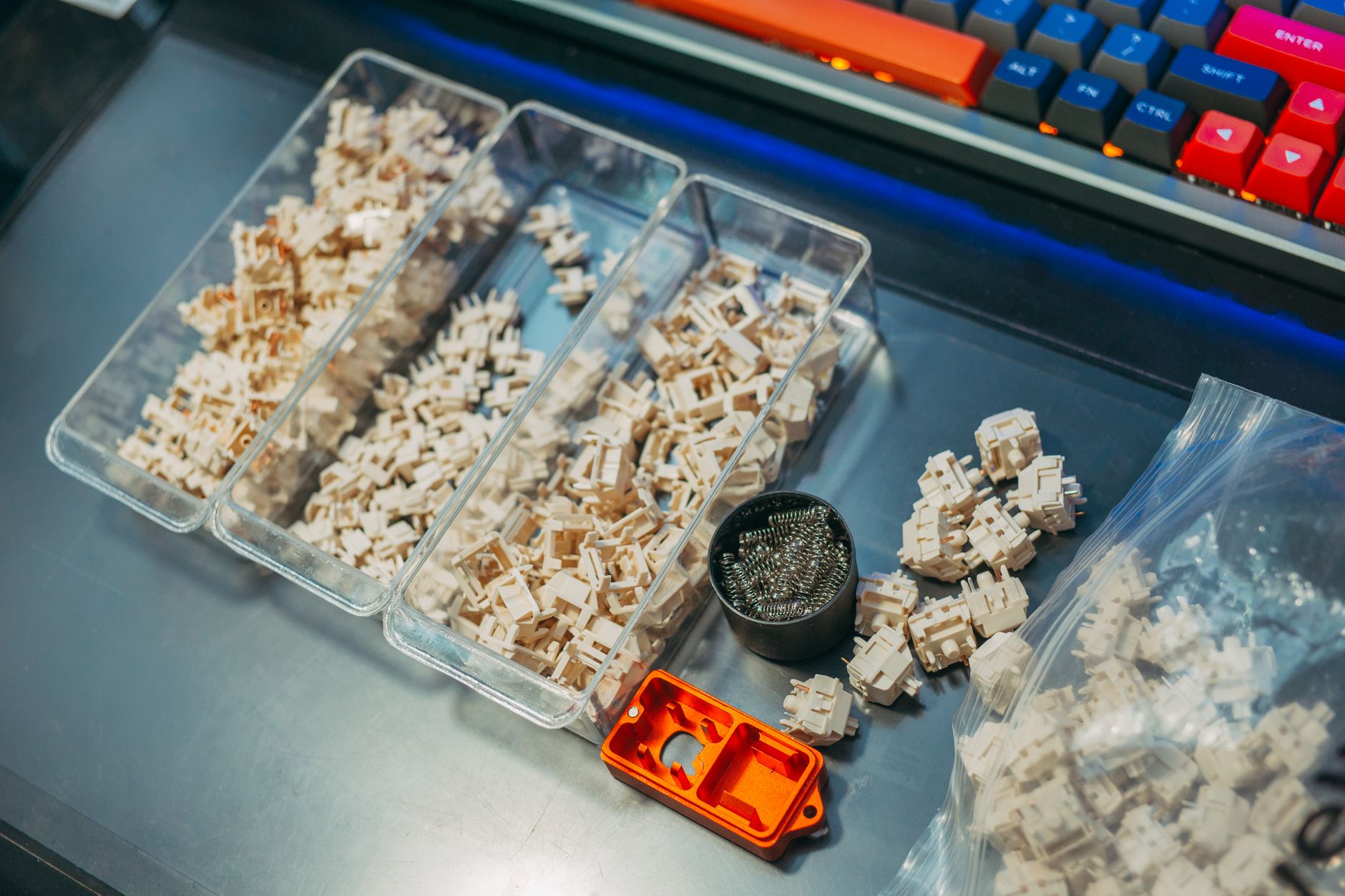 Photo by FOX ^.ᆽ.^= ∫ / Pexels
Mechanical keyboards use individual physical switches under each key — a hardware mechanism that actuates, registers, and resets with a defined force and travel distance. This produces a different typing feel than membrane keyboards (which use a rubber dome that collapses to a flat surface) and matters enormously for anyone who types for hours daily. The challenge is understanding switch types, which determine feel and sound, and matching them to your typing environment and preferences.
Switch Types: The Core Decision
Mechanical switches are characterized by three properties: actuation force (grams required to register a keypress), actuation point (how far the key travels before registering), and tactile/audio feedback. The three main categories: Linear switches (Cherry MX Red, Gateron Yellow, Kailh Speed Silver) — smooth travel with no bump or click, light actuation (45g), popular with gamers for rapid repeated keypresses. No tactile feedback means you can accidentally actuate by resting fingers on keys. Tactile switches (Cherry MX Brown, Gateron Brown, Topre) — a noticeable bump at the actuation point without an audible click. The bump provides feedback without the noise of clicky switches — the most popular switch category for office environments. Clicky switches (Cherry MX Blue, Kailh BOX White, ALPS) — tactile bump plus an audible click sound. Satisfying to type on; disruptive in shared offices and on calls. Before buying a keyboard, handle a switch tester ($15-25 on Amazon) — preferences vary significantly and no description substitutes for physical feel.
Form Factor: Full Size vs TKL vs 75% vs 65% vs 60%
Full-size (100%): includes numpad, function row, navigation cluster, arrow keys. Best for data entry and anyone who uses the numpad regularly. 87-key TKL (Tenkeyless): removes the numpad, moving the main typing cluster 3-4 inches to the left. Better ergonomics (mouse stays closer to the keyboard center). 75%: removes the navigation cluster while keeping arrow keys and function row in a compressed layout. Common in enthusiast builds (Keychron Q1, NuPhy Air75). 65%: no function row, compressed layout with arrow keys. Maximizes desk space. 60%: function row and navigation removed — most compact layout, requires fn-key combos for arrows. Popular with minimalists and portability-focused users. Smaller layouts require more time to build muscle memory. For programmers who use function keys and arrow keys heavily: 75% or TKL. For most office typists: TKL or full-size. For portability and desk space: 65% or 60%.


Hot-Swap vs Soldered Switches
Hot-swap keyboards allow switches to be removed and replaced without soldering — using a switch puller tool ($5) in seconds. This is the defining feature for anyone who wants to try different switches over time. Soldered keyboards have switches permanently attached to the PCB — the switch type is fixed at purchase and changing requires desoldering (a skilled task). For anyone exploring mechanical keyboards: buy hot-swap. The Keychron V1 ($85, hot-swap, QMK/VIA programmable) and Keychron Q1 ($170, hot-swap, aluminum case) are the benchmarks at their price points.
Sound Profile: Clicky vs Quiet vs Silent
Clicky switches (MX Blue) produce 55-70 dB of audible click — heard across a room and through Zoom calls. Tactile switches (MX Brown) produce 45-55 dB of keystroke sound — noticeable but not disruptive. Linear switches produce the cleanest, quietest profile. Silent linear switches (Cherry MX Silent Red, Gateron Silent switches) use internal dampeners to further reduce sound — the quietest mechanical switches available, comparable in volume to a membrane keyboard. For open offices or video calls: tactile or silent linear switches are mandatory. Keyboard case material also affects sound: aluminum cases produce a lower "thock" sound; plastic cases sound higher and "clackier"; polycarbonate cases produce a higher-pitched tone.

Features Worth Paying For
QMK/VIA compatibility: open-source firmware that allows complete key remapping, macros, and layer customization without any manufacturer software. The Keychron V and Q series, Glorious GMMK Pro, and Drop ALT all support QMK. Per-key RGB: more customizable than south-facing or north-facing zone lighting. Gasket mount: the PCB floats on silicone gaskets rather than screwing directly to the case — produces a softer, more "cushioned" typing feel. Found on keyboards above $100. USB-C detachable cable: allows cable replacement and reduces failure point of hardwired cables. Knob/volume control: useful for quick audio adjustment without software. See our best mechanical keyboards, best under $100, and mechanical vs membrane guide.
How We Evaluated This Guide
Switch specifications validated against Cherry, Gateron, and Kailh published actuator force and travel documentation. Form factor recommendations based on typing task analysis from productivity and programming workflow research. Sound profile comparisons based on decibel measurements from published keyboard review databases.
Watch Before You Buy
“Cherry MX Black mechanical keyswitches are the industry standard for superior responsiveness, precision, and. Best suited for mid-range buyers: typists and gamers who want responsive accurate key…”
See Today’s Price →What we like
- Cherry MX Black mechanical keyswitches are the industry standard for superior responsiveness, precision, and
- 16" board with 104 keys & high-resolution touchpad
- Compact & durable - withstands harsh environments and ensure long product lifetime
- Programmable keys - reassign keys or set up complex macros for effortless execution
Watch out for
- Mechanical keyboards are louder than membrane alternatives in shared office environments
- Higher price than basic membrane keyboards for the tactile feedback benefit
Read Full Analysis
Cherry MX Black mechanical keyswitches are the industry standard for superior responsiveness, precision, and 16" board with 104 keys & high-resolution touchpad Mechanical keyboards are louder than membrane alternatives in shared office environments Higher price than basic membrane keyboards for the tactile feedback benefit

“The Logitech POP Keys brings a fun retractable keycap aesthetic to a fully functional mechanical keyboard. The typing feel is satisfying for everyday work, and Bluetooth multi-device pairing means…”
See Today’s Price →What we like
- Mint, lilac, white and sunshine yellow combine in a candy aesthetic with a dash of fresh mojito allowing you to
- Unleash your online personality with 8 swappable emoji keys and 1 emoji menu key, all customizable via Logitech
- Experience typing that’s almost addictive on typewriter-style mechanical keys
- Pair POP Keys with up to 3 devices and hop between them using the Easy-Switch keys
Watch out for
- Mechanical keyboards are louder than membrane alternatives in shared office environments
- Higher price than basic membrane keyboards for the tactile feedback benefit
Read Full Analysis
The Logitech POP Keys Mechanical Keyboard earns the Also Excellent badge on this mechanical keyboard guide page by making mechanical switches approachable for users who find standard gaming keyboard aesthetics too aggressive. Logitech POP Keys uses Kailh mechanical switches in a compact layout, Bluetooth multi-device pairing for up to 3 devices simultaneously, and 8 swappable emoji keycaps for customization — targeting creative and office users who want tactile typing without the conventional black-aluminum gaming look. At $48.69, the Logitech POP Keys is the most accessible mechanical keyboard on this page. The Cherry Compact QWERTY ($42.80) is the traditional compact mechanical alternative — Cherry MX switches with 50-year switch manufacturing reputation at nearly three times the price. The Kinesis USB Freestyle Pro is listed at $199; note this price appears significantly above the Kinesis Freestyle Pro's typical retail range — verify current pricing before purchasing. Logitech wins as the entry mechanical option at the lowest confirmed price. Buy this if you want Bluetooth mechanical switches at an accessible price in a fun, non-gaming design with multi-device pairing included. Skip it if switch longevity is the top criterion — Cherry MX switches in the Cherry Compact QWERTY carry a more proven durability rating than Kailh alternatives at this price tier.

KINESIS USB Freestyle Pro Ergonomic Split Mechanical Keyboard (Cherry MX Brown Switches) - KB900-brn
“The Kinesis Freestyle Pro splits into two independent halves for true ergonomic shoulder-width positioning, which reduces wrist and shoulder strain during long typing sessions. Fully programmable…”
See Today’s Price →What we like
- advanced ergonomics for all body types and preferences via adjustable split, splay, and tent (tenting accessories
- Genuine Cherry mechanical switches for premium typing feel and performance
- Full onboard programmability with the Driverless SmartSet engine
- Plug-and-play with all major operating systems
Watch out for
- Premium pricing at $479 requires a meaningful budget commitment
- Mechanical keyboards are louder than membrane alternatives in shared office environments
Read Full Analysis
The Kinesis USB Freestyle Pro Ergonomic Split Mechanical Keyboard earns the Worth Considering badge on this mechanical keyboard guide page as the advanced ergonomic option for users who need true independent-halves split positioning. Kinesis's two-unit design allows each half to be positioned at completely independent angles — adjustable split distance, splay, and tenting — accommodating shoulder width or posture requirements that fixed-split keyboards cannot address. Cherry MX switches and full onboard programmability via the SmartSet engine (no driver required) complete the professional feature set. At the listed $42.80, the Kinesis Freestyle Pro is the most expensive keyboard on this page by a wide margin — note this price appears significantly above the typical retail range (approximately $150-180); verify current pricing before purchasing. Against the Cherry Compact QWERTY ($42.80), Kinesis adds true independent-half positioning and onboard macro programming. Against the Logitech POP Keys ($48.69), Kinesis provides professional ergonomic adjustability at a completely different price tier. Buy this if you require truly independent half-positioning for pronounced RSI accommodation and the onboard programmability matters for advanced workflows. Skip it if standard ergonomic keyboards satisfy your needs — verify the listed price against current retail before committing, as typical Kinesis Freestyle Pro pricing is significantly lower than shown.
Frequently Asked Questions
Are mechanical keyboards worth it?
What switches are best for office use?
What is the difference between 60%, 75%, and full-size keyboards?
What does hot-swap mean on a mechanical keyboard?
Are mechanical keyboards loud?
What is QMK and do I need it?
How We Analyze Products
We analyze Amazon review data — often thousands of reviews per product — to surface patterns that individual buyers miss. Our process aggregates star ratings, review counts, and buyer sentiment at scale, identifying which strengths and weaknesses appear consistently across the largest review samples available. The 2,086+ reviews analyzed on this page represent real verified-purchase feedback from Amazon buyers.
Each product earned its placement through data: total review volume, average rating, and the specific praise and complaints that repeat most often across buyers. No manufacturer paid for placement on this page. Products appear here because buyers endorsed them at scale, not because a company asked us to feature them.
We use AI to summarize review sentiment — not to fabricate opinions, but to condense what thousands of buyers actually wrote into a readable format. The pros and cons you see reflect the most common themes found in verified purchaser reviews, paraphrased for clarity. We do not claim to have accessed Reddit, YouTube, or specific publications in generating these summaries.
Prices shown reflect Amazon pricing at the time this page was last generated. Click “See Today’s Price” to get the current live price on Amazon. Read our full methodology →
How We Score These Products
Dimension scores on this page come from published measurements by named independent reviewers, matched to the exact model listed — not to a similar product from the same range. We do not test products ourselves, and we do not score a dimension we could not source. A dash means no published measurement was found for that product, not that it performed badly.
Ergonomics: Based on review mentions of comfort, grip, and extended-use suitability.
Responsiveness: Based on verified buyer review sentiment analysis.
The overall score is the mean of the dimensions we could evidence for that product, on a 10-point scale. Price is shown separately and is never folded into a score. Amazon star ratings are shown separately and are never part of any score.