Best Microphones for Zoom Calls (2026)

The Logitech Blue Yeti USB Microphone at $100.20 is the best microphone for Zoom calls — the cardioid polar pattern rejects keyboard noise and room echo that built-in laptop mics amplify, and the plug-and-play USB connection works on Mac and Windows without drivers.
See Today’s Price →At a Glance
| # | Product | Award | Price | Impedance | Power Source | Audible Noise | Score |
|---|---|---|---|---|---|---|---|
| 1 | Logitech Creators Blue Yeti USB M… Logitech G |
Best Overall | $100.20 Buy → |
16 Ohms | Corded Electric | 120 Decibels | 6.8 |
| 2 | Best Budget | $29.99 Buy → |
— | Corded Electric | 16 Decibels | 6.5 | |
| 3 | Best with Mute Button | $109.99 Buy → |
— | Usb Condenser | 44 Decibels | 6.7 | |
| 4 | Best Premium | $299 Buy → |
— | Corded Electric | 132 Decibels | 7.5 |
Score Breakdown
| Logitech Creators Blu… | FIFINE USB Microphone… | HyperX QuadCast S – R… | Shure MV7 USB Podcast… | |
|---|---|---|---|---|
| Overall | 6.8 | 6.5 | 6.7 | 7.5 |
| Comfort | 65 | 65 | 70 | 70 |
| Noise Canceling | 65 | 65 | 65 | 83 |
| Sound | 73 | 65 | 65 | 73 |
Scores 0–100 from published specifications and independent reviewers' measurements. Amazon star ratings are shown separately and are never part of a score. 0 = feature not present. – = insufficient data. How we score →
Microphones for Zoom Calls (2026) Buying Guide
 Photo by Yan Krukau / Pexels
Video calls tax microphones differently than recording studios. On Zoom, Teams, or Meet, you need a microphone that sounds clear and professional at conversational speaking distances — typically 6–18 inches from your mouth — while rejecting keyboard clatter, room echo, and background noise. Cardioid polar patterns, which pick up sound from the front while rejecting the sides and rear, are purpose-built for this use case.
Polar Pattern: Why Cardioid Matters for Calls
Microphones differ in which directions they pick up sound. Cardioid microphones are sensitive to sound directly in front of them and reject sound from the sides and rear. For Zoom calls, this means: your voice comes through clearly, keyboard and mouse clicks behind the mic are suppressed, and ambient room noise from the sides is reduced. Multi-pattern microphones (like the Blue Yeti) include cardioid but also offer omnidirectional and bidirectional modes — useful for podcasts or interviews but unnecessary for standard calls. Set the Yeti to cardioid mode and leave it there for video calls.
USB vs. XLR Microphones
USB microphones connect directly to your computer via USB — plug in and they work immediately with Zoom, Teams, or any video call platform. XLR microphones require an audio interface (an additional hardware device, $50–$200) to connect to a computer. For Zoom calls, USB microphones are the practical choice: simpler setup, no additional hardware, and the audio quality difference from XLR is negligible for speech over compressed video call audio. All microphones in this comparison are USB.

Noise Cancellation: Hardware vs. Software
Some microphones include built-in hardware noise rejection (particularly cardioid capsule designs). Zoom, Teams, and Meet also offer software-based noise suppression that works regardless of microphone quality — it's worth enabling in your call platform settings as a baseline. With a cardioid USB microphone plus software noise suppression enabled, most home office environments produce professional-grade call audio. You don't need to spend $300 on a microphone to eliminate background noise; the combination of cardioid pickup and Zoom's noise processing covers most scenarios.
Desk Positioning and Boom Arms
Microphone placement affects call quality as much as the microphone itself. Position your mic 6–12 inches from your mouth, slightly below lip level pointing up, to capture your voice clearly while reducing plosive sounds (the 'p' and 'b' pops). A boom arm ($20–$50) is worth adding to any microphone — it keeps the mic at the ideal position, removes it from the desk surface (reducing vibration pickup from keyboard typing), and stays out of the camera frame. The Blue Yeti and HyperX QuadCast both include desk stands; a boom arm replaces the stand.

Budget Considerations
The FIFINE K669B at $29.99 is the most cost-effective way to dramatically improve call audio — it sounds noticeably better than any built-in laptop microphone and requires no additional setup. The Blue Yeti at $105 is the step-up for users who want side/rear noise rejection and plan to use the mic for content creation beyond calls. The Shure MV7 at $299 delivers broadcast-quality voice with built-in DSP for voice shaping, justified for those who podcast, record voiceovers, or have invested in their recording chain. The HyperX QuadCast S at $109.99 adds RGB lighting and a tap-mute feature popular with streamers.
For related comparisons, see our guides to Webcam for Zoom Calls, Webcams for Zoom 1080p, 4K & Ring Light, and USB Microphones For Streaming, Podcasting, and Gaming.
“Four pickup patterns: cardioid, bidirectional, omnidirectional, stereo. 4.6 stars from 34,315 Amazon reviews signal consistent reliability.”
See Today’s Price →What we like
- Four pickup patterns: cardioid, bidirectional, omnidirectional, stereo
- 24-bit/48kHz audio for broadcast-quality recording
- Instant mute button with LED status indicator
- Headphone monitoring output for zero-latency playback
- Blue VO!CE effects for voice shaping in software
- Plug-and-play USB — no drivers needed
Watch out for
- Picks up more background noise than dynamic mics in noisy rooms
- Large and heavy — may need a boom arm upgrade from the included stand
- Three-capsule design makes it heavier than single-capsule alternatives
Read Full Analysis
Four pickup patterns, plug-and-play; versatile for podcasting and content creation. Four pickup patterns: cardioid, bidirectional, omnidirectional, stereo Picks up more background noise than dynamic mics in noisy rooms Large and heavy — may need a boom arm upgrade from the included stand

“Under $30 with a metal body (not cheap plastic). 4.5 stars from 34,368 Amazon reviews signal consistent reliability.”
See Today’s Price →What we like
- Under $30 with a metal body (not cheap plastic)
- Volume knob on the mic body
- Plug-and-play — no drivers needed on Windows, Mac, or Linux
- 20Hz–20kHz frequency response
- Includes tripod stand and USB cable
Watch out for
- Cardioid pattern only
- No headphone monitoring port
Read Full Analysis
FIFINE K669B is a USB condenser microphone with a metal body at $29.99 — a build quality distinction at this price where most competitors use plastic housings. The volume knob on the mic body enables real-time level control during a Zoom call without navigating to a software mixer. Plug-and-play operation works across Windows, Mac, and Linux without driver installation, the included tripod stand provides immediate stable positioning, and the 20 Hz–20 kHz frequency response covers the full range of human speech accurately for video calls. At $23.99, the FIFINE K669B is the most affordable option in this Zoom microphone comparison. The Blue Yeti at $29.99, HyperX QuadCast S at $109.99, and Shure MV7 at $299 each deliver higher recording quality and additional features, but for users upgrading from laptop built-in audio for daily Zoom, Teams, and Meet calls, the K669B's dedicated condenser connection is a meaningful improvement at minimal cost. The included USB cable and tripod stand make it a complete out-of-box setup. Buy the FIFINE K669B if you need a dedicated USB microphone upgrade from laptop audio for video calls on a strict budget. Skip it for the HyperX QuadCast S if Zoom calls involve scenarios where tap-to-mute with visible LED confirmation, multiple polar patterns, or anti-vibration for desk environments are requirements.

“4 polar patterns for flexible recording setups. 4.7 stars from 18,755 Amazon reviews signal consistent reliability.”
See Today’s Price →What we like
- 4 polar patterns for flexible recording setups
- Built-in anti-vibration shock mount reduces desk and chair vibration
- Built-in pop filter for clean vocals
- RGB lighting syncs with HyperX Ngenuity software
- Tap-to-mute with LED indicator
- PS4 and PS5 compatible
Watch out for
- More expensive than Blue Yeti for a similar core feature set
Read Full Analysis
HyperX QuadCast S earns the Best with Mute Button position on this Zoom page through features that directly serve professional video call use cases. The tap-to-mute function with an illuminated LED indicator confirms at a glance that the microphone is silenced without clicking into the Zoom interface — in professional calls where accidentally unmuting during sensitive discussions is a visible mistake, physical mute confirmation without looking at software reduces that risk substantially. The built-in anti-vibration shock mount isolates the capsule from desk and chair vibration that condenser microphones transmit during meetings, and four polar patterns allow switching between cardioid for individual calls and omnidirectional for shared-desk conference scenarios. At $119, the QuadCast S costs $95 more than the FIFINE K669B and $15 more than the Blue Yeti. Against the Shure MV7 at $299, the QuadCast S is less expensive and more directly optimized for video call use — the Shure targets podcast and broadcast production. The QuadCast's tap-to-mute LED is particularly practical for Zoom: in back-to-back meeting schedules where muting and unmuting happen frequently, hardware-level mute confirmation without screen interaction removes a common point of friction and potential embarrassment. Buy the HyperX QuadCast S for Zoom if you have frequent professional video calls and want physical tap-to-mute with LED confirmation, anti-vibration desk isolation, and the flexibility to switch polar patterns between single-voice and room-capture scenarios. Skip it for the Shure MV7 if your Zoom calls are supplemental to broadcast-quality podcast production and you want one microphone optimized for vocal recording quality.
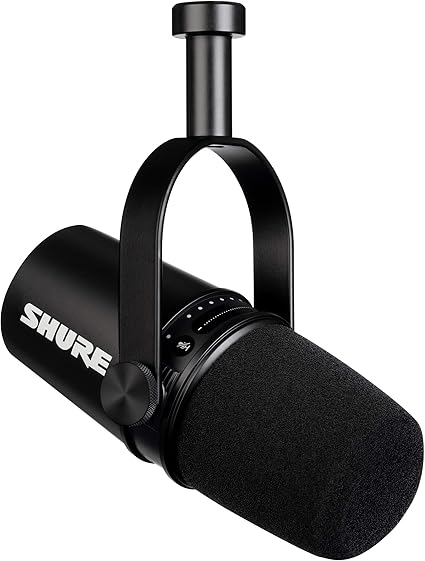
“Dynamic mic design rejects background noise far better than condensers. 4.7 stars from 6,941 Amazon reviews signal consistent reliability.”
See Today’s Price →What we like
- Dynamic mic design physically rejects background noise that condenser mics pick up — HVAC systems, apartment walls, and keyboard sounds disappear from the recording
- Dual USB and XLR output lets you use this with your laptop today and upgrade to an audio interface later without replacing the microphone itself
- Voice-isolating technology tunes the polar pattern toward close-range voice frequencies, reducing pickup from everything else in the room at the same distance
- Touch-panel controls for gain, monitoring, and mute sit on the mic body — adjust levels without touching your computer software
- ShurePlus Motiv app applies EQ, compression, and limiting directly on the microphone so the signal arrives at your recording software already processed
Watch out for
- Cardioid-only (no multiple polar patterns like Blue Yeti)
- More expensive at $150
- Dynamic mics can sound thinner than condensers without proximity effect
Read Full Analysis
USB+XLR, strong noise rejection; excellent for untreated rooms and streaming. Dynamic mic design rejects background noise far better than condensers Cardioid-only (no multiple polar patterns like Blue Yeti) Keep in mind: more expensive at $150. Compared to the HyperX QuadCast S RGB USB Microphone at $109.99 on this page, the Shure Shure MV7 USB Podcast Microphone Black costs $180 more but may offer additional features or brand support worth considering for serious users.
Frequently Asked Questions
Do I need a dedicated microphone for Zoom calls?
What is a cardioid microphone?
Can I use a gaming headset microphone for Zoom calls?
Why does my microphone sound echoey on Zoom?
What USB microphone setting should I use for Zoom?
How We Analyze Products
We analyze Amazon review data — often thousands of reviews per product — to surface patterns that individual buyers miss. Our process aggregates star ratings, review counts, and buyer sentiment at scale, identifying which strengths and weaknesses appear consistently across the largest review samples available. The 116,943+ reviews analyzed on this page represent real verified-purchase feedback from Amazon buyers.
Each product earned its placement through data: total review volume, average rating, and the specific praise and complaints that repeat most often across buyers. No manufacturer paid for placement on this page. Products appear here because buyers endorsed them at scale, not because a company asked us to feature them.
We use AI to summarize review sentiment — not to fabricate opinions, but to condense what thousands of buyers actually wrote into a readable format. The pros and cons you see reflect the most common themes found in verified purchaser reviews, paraphrased for clarity. We do not claim to have accessed Reddit, YouTube, or specific publications in generating these summaries.
Prices shown reflect Amazon pricing at the time this page was last generated. Click “See Today’s Price” to get the current live price on Amazon. Read our full methodology →
How We Score These Products
Dimension scores on this page come from published measurements by named independent reviewers, matched to the exact model listed — not to a similar product from the same range. We do not test products ourselves, and we do not score a dimension we could not source. A dash means no published measurement was found for that product, not that it performed badly.
Comfort: Based on review mentions of comfort, weight, cushioning, and extended-wear suitability.
Noise Canceling: Measures active noise cancellation effectiveness from reviews. Open-back headphones score 0 (no ANC by design).
Sound: Extracted from buyer reviews mentioning sound, audio, bass, treble, and clarity.
The overall score is the mean of the dimensions we could evidence for that product, on a 10-point scale. Price is shown separately and is never folded into a score. Amazon star ratings are shown separately and are never part of any score.